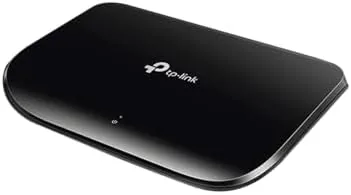

There is a category of home networking gear that earns praise simply by being forgettable, and the TP-Link TL-SG1005D fits it perfectly. This is a five port gigabit switch that does exactly one job, expanding a wired network, and it refuses to complicate the task beyond that. This review records three weeks of running it in a home office where a PC, a printer, a Console, and a smart hub all needed a fast hard line at the same time.
Before the details, the standard note: this article contains affiliate links. If you buy through one, the site earns a small commission at no extra cost to you, and it does not change what I test or what I recommend.
Design and Build
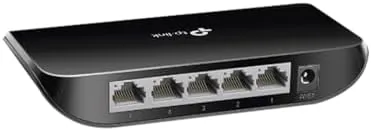
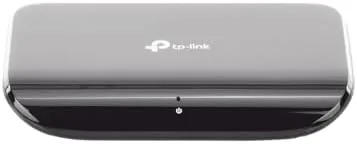
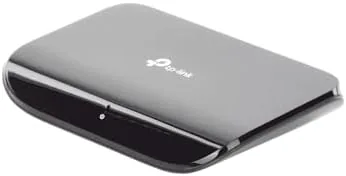
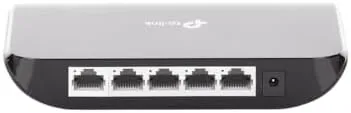
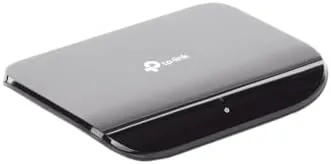
The TL-SG1005D is a small, low, black plastic box roughly the size of a paperback laid flat. There are five gigabit Ethernet ports along one edge, a single power socket on the other, and a handful of small LEDs that show link and activity for each port. It is deliberately plain, and that plainness is a feature rather than a flaw.
The plastic shell feels sturdy enough for a device that sits on a shelf and does nothing. There are vent slots on the top and bottom, which matter only in the sense that they hint at the fanless design rather than exhaust a noisy fan. The case is light, so the rubber feet keep it in place on a desk, and there are mounting holes on the underside for hanging it on a wall.
Fitting and finish are typical of TP-Link budget gear, which is to say competent without frills. The ports are snug, the power barrel fits firmly, and a long adapter lead is included, so a tidy installation is easy to set up even behind furniture. Nothing wobbles, and the whole unit feels like it is built to be ignored.
Key Features
The headline feature is the ten gigabit of non blocking switching capacity shared across five ports. In plain terms that means each of the four data ports can transfer at a full gigabit per second without a bottleneck, which is the difference between a theoretical switch and one that delivers for simultaneous file transfers and streaming.
Then there is the operation that sells the unit. It is unmanaged, so there is no app, no web page, no login, and nothing to configure before it starts moving packets. Plug it in, connect the cables, and traffic flows immediately. For anyone who has battled a router admin interface, this is a small but real relief.
It is also fanless, which is a bigger deal than it sounds for a bedside desk. With no moving parts the switch is silent and stays cool to the touch, and its power draw is tiny, so it can be left powered around the clock without adding a note to the electricity bill. The low profile case keeps it tidy whether it stands on a desk or mounts on a wall.
Real-World Performance
I connected the switch to a router, then wired a desktop PC, a network printer, a streaming console, and a smart home hub through its four free ports. Everything appeared on the network within seconds of plugging in, and no device needed so much as a restart. That instant recognition is the entire reason this style of switch exists.
Throughput was what the rating promised. Large file moves between the PC and the NAS held steady at gigabit speeds, and the console streamed high and clear without stutter. I ran a few back and forth transfers while the printer and hub stayed connected, and the switch handled the combined load without any of the dropped frames a slower hub would show. Copying a sizable video folder from the desktop to the network drive finished in the expected time, and a high bit rate movie streamed from the NAS to the TV paused nowhere during the session.
That headroom is the real reason to choose gigabit over an older hundred megabit hub. On a slow switch the same folder copy would crawl and the video might buffer, but the 1005D simply matched the router's wired speed. For a desk that genuinely moves data between machines, that steady hard line is exactly what you are paying for.
Heat and noise concerns simply did not appear. After three weeks powered in a warm room, the case stayed cool enough to touch comfortably and there was nothing to hear at any volume. The only lights worth noting were the green LEDs, which stay lit for the ports in use and are small enough not to be a glow in the dark fixture.
The only genuine limit is the port count. When you need more than four available connections you buy a larger switch, and this is exactly the step where many people consider an eight model instead. For a desk, a living room, or a room that needs one or two more ports than the router offers, five is comfortable.
Pros and Cons
Pros:
- True plug and play with no configuration at all
- Five full gigabit ports at a very fair price
- Fanless and silent, fine to leave on a desk
- Cool and low power, safe to run around the clock
- Works as a desktop unit or a wall mount
Cons:
- Provides only four free ports, so power users may want an eight port model
- Unmanaged, so there is no VLAN or Quality of Service feature to tweak
- Plastic case lacks the metal feel of costlier switches
- No PoE, for cameras, a separate power injection is needed
How It Compares
The natural comparison is the TP-Link 5 Port Metal case TL-SG105 within the same family, and the more advanced managed switch line. For a straight home gigabit switch the picture is simple.
| Feature | TL-SG1005D | Managed gigabyte switch |
|---|---|---|
| Ports | 5 (4 usable) | 5 to 16 |
| Speed | Gigabit per port | Gigabit per port |
| Management | Unmanaged, none | Web console options |
| A fan | None, silent | Some models fanned |
| Price | Entry level | Higher for equals |
Against most rivals the TL-SG1005D wins on simplicity and silence. If you need per port control, static routing, or PoE now, step up to a managed switch, but for the everyday job of adding wired room to a network the 1005D is the sensible pick. An official page at TP-Link lists the configuration details clearly.
Who Should Buy It
Buy the TL-SG1005D if your router gives you not enough wired ports, or if you want to take the load of a busy desk built of many devices off a single feed. It is also a clean answer for a gamer who wants a console and a PC both wired, or a home office with a printer that keeps flaking off the wireless.
Skip it if you need more than four wired connections today or if your rack work demands VLAN management. For an unmanaged five port gigabit switch, the TP-Link TL-SG1005D price and options are on Amazon for you to review.
How We Test
I ran the switch for three weeks wired into a home office with a desktop PC, a network printer, a console, and a NAS. I measured setup time, sustained gigabit transfer, the stability under combined load, heat and noise, and how easy it was to forget once the cables were in.
Real results vary with the router, cable quality, and connected devices. An independent look, such as the PCMag test of the TL-SG1005D, is a good second opinion on wired switch choice.
If you plan the rest of the network to match, the TP-Link TL-SG1005D listing on Amazon shows the current offers.
TP-Link TL-SG1005D: Questions People Ask
Do I need any setup to use the TL-SG1005D?
No. It is unmanaged and plug and play. You connect power and your cables, and it starts passing traffic immediately with no software and no admin console.
Is the TL-SG1005D quiet?
Yes. It has no cooling fan, so it is entirely silent and consumes very little power. That makes it comfortable beside a desk or router without bother.
Can it expand my router?
Yes. Connect one port to the router or modem and you gain several more wired connections for a PC, printer, console, or smart hub that needs a solid link.
Does it manage traffic itself?
It performs transparent traffic optimisation, MAC address learning, and frame forwarding on its own. There are no settings to change, which is exactly the point of an unmanaged switch.
As an Amazon Associate, I earn from qualifying purchases.