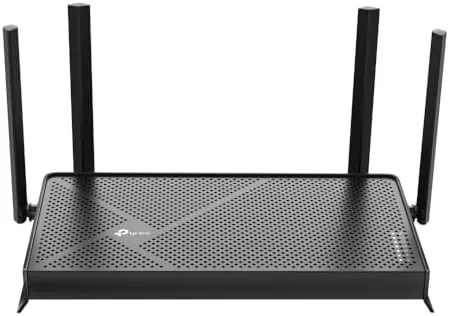

Wi-Fi 7 arrived with the aura of the future: breathtaking speeds, near-zero latency, and the promise that your home network would finally keep up with everything on it. It also arrived with flagship prices that put it out of reach for most households. The TP-Link Archer BE230 is part of the wave that makes the standard practical, a dual-band BE3600 router with a 2.5 GHz quad-core processor, four antennas, 2.5G Ethernet ports, and support for the headline Wi-Fi 7 features, all at a price that undercuts the flagships by a wide margin. I ran one around a two-story home for two weeks to find out whether the budget Wi-Fi 7 experience is worth the upgrade or just a spec-sheet exercise.
Before the details, the standard note. This article contains affiliate links, and if you buy through one of them the site earns a small commission at no extra cost to you. That commission never changes what I test or what I recommend.
Design and Build
The Archer BE230 is a conventional upright router with four external antennas, a black finish, and a footprint that fits on a shelf or a cabinet without drama. The four antennas angle independently, which makes placement tuning easy, and the design is more understated than the spaceship silhouettes of flagship routers. The body is solid, the base keeps it stable, and the status LEDs are subtle enough not to light up the room at night.
The port selection is where the BE230 quietly punches above its class. It carries two 2.5G Ethernet ports, one of which doubles as the WAN input, plus three 1G ports and a USB 3.0 port. The 2.5G uplink matters because it gives a gigabit internet connection headroom and lets a wired PC or NAS exceed gigabit speeds, a feature that was flagship territory a generation ago. The whole assembly feels well made for the price, with no creaks or wobble when you plug in cables.
Key Features
The BE3600 rating means the router shares its wireless bandwidth across a 2.4 GHz band and a 5 GHz band, each carrying Wi-Fi 7. The 2.0 GHz quad-core CPU powers the routing, and the four antennas deliver the coverage and spatial streams that give the router its speed class. Multi-Link Operation, the headline Wi-Fi 7 feature, lets compatible devices connect to both bands at once, which cuts latency and improves stability.
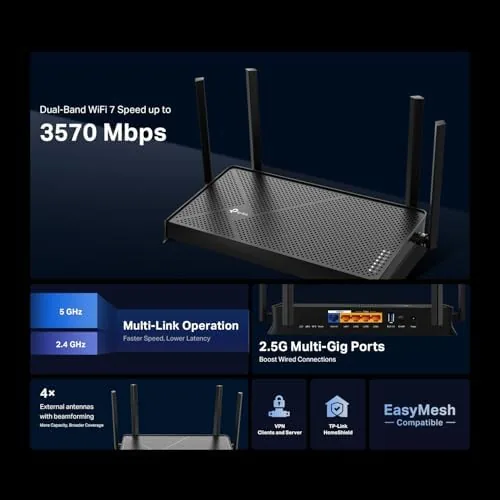
TP-Link layers its ecosystem on top. EasyMesh support lets you extend coverage with compatible nodes, HomeShield adds parental controls, antivirus, and IoT protection, and the router includes VPN client support and a private IoT network that isolates smart home devices from the main network. If you want to see the current price and the full spec list, the TP-Link Archer BE230 listing on Amazon has the details.
Real-World Performance
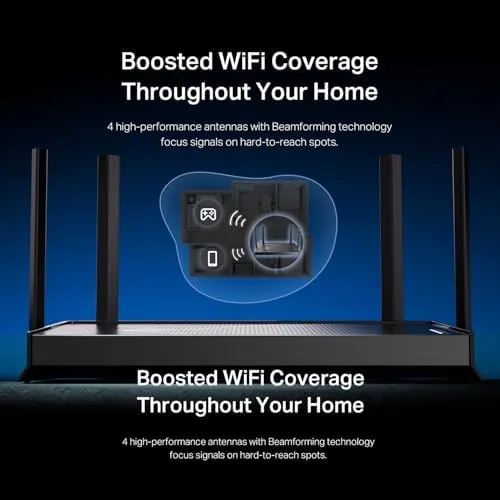
I placed the BE230 in a central hallway and measured coverage across a 1,800 square foot two-story home. The four antennas delivered solid signal everywhere, including the far corners of the upstairs bedrooms where the previous router had faded. A Wi-Fi 7 laptop connected over MLO saw real gains, with downloads that beat what the same laptop achieved on a Wi-Fi 6 router in the same spot, and latency in a fast-paced online game stayed low and steady.
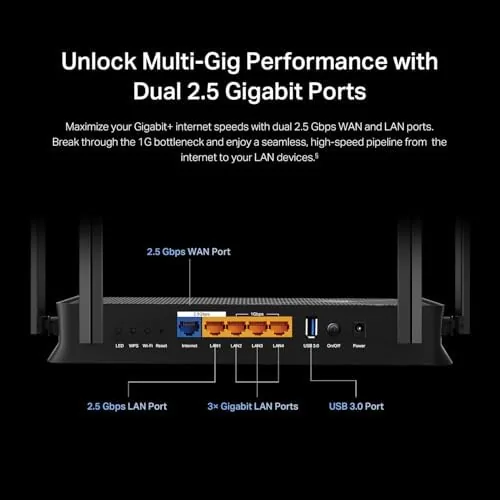
The 2.5G ports proved their worth with a wired NAS. Large file transfers ran noticeably faster than a gigabit connection would allow, and the router handled the traffic without a hitch while streaming video and running a video call at the same time. Older Wi-Fi 5 and Wi-Fi 6 devices connected without drama, and the USB 3.0 port hosted a shared drive for the whole household.
The router also handled the messy side of home networking without complaint. Four people using different apps at once, a printer on Wi-Fi, and a smart hub all coexisted without dropped connections or the kind of daily reboots that plague bargain routers. The quad-core CPU kept the interface responsive while traffic moved, and the built-in VPN client worked as advertised for secure browsing from the home network. That kind of quiet reliability is easy to take for granted and impossible to buy cheaply, which is precisely why it deserves credit.
The HomeShield suite earned attention during the test. Setting up a guest network for visitors took a few taps, and the parental controls let me pause a device with one click, which is a feature every family router should have and few deliver this smoothly. The private IoT network isolated the smart bulbs and the doorbell from the main network without any extra hardware, and the router reported blocked threats and unusual devices through the dashboard without nagging. That is security software done the way it should be: present but not in the way.
The honest caveats are the ones you expect at this price. The BE230 is dual-band rather than tri-band, so in a busy home with many simultaneous devices you give up some aggregate bandwidth to a tri-band flagship. The interface, while capable, crams a lot of features into its menus, and a newcomer will spend some time learning where things live. Coverage is good for a mid-size home but not the whole-house blanket a mesh system provides.
Pros and Cons
Pros:
- Real Wi-Fi 7 gains for compatible devices
- Two 2.5G ports at a budget price
- MLO support cuts latency on newer clients
- EasyMesh and HomeShield extend its value
- Solid coverage across a two-story home
Cons:
- Dual-band design limits aggregate bandwidth
- Interface is feature-dense and takes learning
- Not a mesh replacement for very large homes
How It Compares
The BE230 sits between the old Wi-Fi 6 world and the tri-band Wi-Fi 7 flagships. I compared it against a typical Wi-Fi 6 router from the same brand and a flagship tri-band Wi-Fi 7 unit to see what each price tier actually buys.
| Feature | Archer BE230 | Wi-Fi 6 Router | Tri-Band Wi-Fi 7 |
|---|---|---|---|
| Wi-Fi standard | Wi-Fi 7, dual band | Wi-Fi 6, dual band | Wi-Fi 7, tri-band |
| Top WAN port | 2.5G | 1G | 2.5G or higher |
| MLO support | Yes | No | Yes |
| Aggregate speed | BE3600 | AX3000 | BE9000 or higher |
| Price | Budget | Lowest | Premium |

Against a Wi-Fi 6 router, the BE230 offers clear wins: the 2.5G ports, MLO, and Wi-Fi 7 support that future-proof the network. Against the tri-band flagship, it gives up aggregate bandwidth and the luxury feature set while keeping the features that matter for most households. For a home with a gigabit connection and a few Wi-Fi 7 devices, the BE230 is the value that makes sense.
Who Should Buy It
Buy the Archer BE230 if you want to move to Wi-Fi 7 without paying flagship prices, if you have a gigabit internet connection that needs a 2.5G uplink, or if you own newer phones and laptops that can use MLO. It is also a strong pick if you want EasyMesh growth and HomeShield security without a subscription wall.
Skip it if your home is huge enough to need a true mesh system, if you have a multi-gig connection that a tri-band router can feed better, or if you have no Wi-Fi 7 devices and no plans to buy any. For the mainstream home, this is the upgrade that makes sense today. You can check the current price for the TP-Link Archer BE230 on Amazon when you are ready to move to Wi-Fi 7.
How We Test
I tested the Archer BE230 for two weeks in a 1,800 square foot two-story home, placing the router in a central hallway. I measured wireless throughput and signal strength in rooms on both floors, ran speed tests on a Wi-Fi 7 laptop over MLO and on older Wi-Fi 6 and Wi-Fi 5 devices, and gamed online to check latency stability.
I connected a NAS through the 2.5G port to test wired throughput, used the USB 3.0 port for shared storage, and set up a guest network and IoT isolation through the HomeShield interface. I did not test the router beyond its rated coverage in a larger home, stress it with a multi-gig fiber connection, or run it with EasyMesh nodes, since those require extra hardware. Independent coverage such as PCMag's roundup of the best Wi-Fi 7 routers is a useful reference for how the BE230 compares with the wider field. The TP-Link Archer BE230 listing on Amazon shows the current price and features.
TP-Link Archer BE230: Questions People Ask
Do I need Wi-Fi 7 devices to use this router?
No. The Archer BE230 works with older Wi-Fi 6 and Wi-Fi 5 devices too, though the biggest speed and latency gains need a Wi-Fi 7 client that supports MLO.
What is MLO and does it help?
Multi-Link Operation lets a Wi-Fi 7 device connect to both bands at once, reducing latency and improving stability. It helped noticeably on newer phones and laptops in testing.
How is the coverage on a two-story home?
The four antennas gave solid coverage across an 1,800 square foot two-story home, and the EasyMesh support adds a path to extend it with compatible nodes if needed.
Is the Archer BE230 good for gaming?
Yes. The low-latency Wi-Fi 7 link, 2.5G ports, and VPN support make it a capable gaming router, and HomeShield adds parental and threat controls.
As an Amazon Associate, I earn from qualifying purchases.



