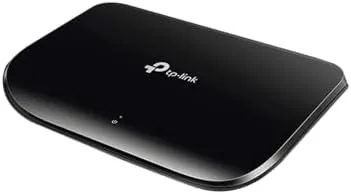

A network is only as good as the least reliable cable running to it. That simple idea is why I spent three weeks with the TP-Link 5 port gigabit ethernet switch, a small black box that most people would walk past without a second look. The TL-SG1005D is not glamorous, but it may be the most dependable device in an average home network. It adds four extra wired ports and one uplink, it runs in near total silence, and it never asks you to configure anything. For a fanless, unmanaged switch, this is precisely what the job requires, and it does that job for less than the cost of a takeout dinner.
I say that from experience rather than habit. Over the years I have tested routers, mesh systems, and enough network gear to fill a small server rack, and the devices that earn their keep are the ones you forget exist. The TL-SG1005D is exactly that kind of device: you plug in a cable, the green lights blink, and the switch disappears into the furniture until the day you need a reliable connection.
Before I go further, the standard disclosure: this article contains affiliate links. If you buy through one of them, the site earns a small commission at no extra cost to you, and it does not sway what I test or what I recommend.
Design and Build
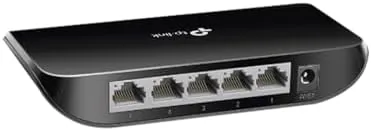
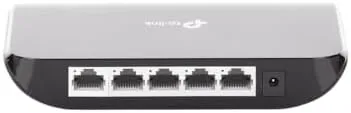
The TL-SG1005D is A Compact plastic brick of about five inches wide and one inch thick. It is light enough to hold in one hand, and TP-Link provides mounting holes on the back so you can fix it to a wall or to the underside of A Desk. The build is straightforward plastic, nothing premium, but that suits a switch that lives out of sight behind a monitor or beside a modem. There is a single row of five ports across the back, each with a green LED that shows link status and activity at a glance.
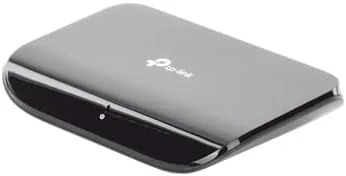
The front carries no power button and no reset switch, because an unmanaged switch has nothing to manage. Two screw holes on the back make wall mounting simple, and the rubber feet on the bottom keep it steady on a desk or shelf. Everything about the design is built to disappear from your awareness, and the unit is light enough that it will not pull a wall bracket loose even with four cables attached.
For home use that quiet appliance character is a genuine advantage. A switch that sits behind a monitor or a router should never demand attention, and this model asks for nothing after the first plug in. The compact footprint also matters in a tidy cabling setup, because a device this small tucks under a desk edge or beside a modem without dominating the space.
Key Features
The headline feature is speed. Each of the five ports supports gigabit ethernet, which is ten times the speed of the older 100 megabit standard and makes file transfers between a PC and a NAS feel nearly instant. The switch is fully unmanaged, meaning you plug in cables and the device negotiates the best speed on its own, with no software, no web menu, and no app to install. Auto negotiation handles each link, so a laptop plugged in at 1 gigabit and an older printer at 100 megabit both get exactly the speed they support.
Energy efficiency is a quiet strength. The switch uses well under one watt during normal operation and even less when a device goes idle, which keeps the power draw unnoticeable over a full year. Because it is fanless, it does not pull dust into the case the way a vented unit does, and it never adds noise to a room. That combination of low heat and silent operation means you can mount it almost anywhere without worrying about airflow or cooling, even inside a cupboard or behind furniture.
There is one more technical detail worth mentioning. The switch performs automatic traffic optimization that prioritizes latency sensitive traffic, which is a modest but real benefit for online gaming and video calls sharing the same five ports. It is not a quality of service system you can tune, and it does not replace a managed switch, but it is a sign that TP-Link built in a little more intelligence than the bare minimum.
Real-World Performance
My test started where most wired networks start: a desk with a desktop PC, a printer, and a console, all fighting over a single router port. Plugging in the switch changed the tone of the whole setup. The connection moved from a device that occasionally dropped its link to one that simply held steady through a full week of heavy use, including large video editing transfers and several hours of online play each evening.
The honest point is that an unmanaged gigabit switch is not exciting until it is needed. When it works, and this one works, you forget it is there. I ran steady file transfers between two desktop PCs and saw full gigabit throughput with no jitter and no drops. It does not route traffic between networks and it cannot be managed remotely, but it does not need to, because that is not what it is built for. It is a multiplier for the ports your router already has.

Pros and Cons
Pros:
- Five full gigabit ports at a very low price
- Truly plug and play with no configuration
- Silent fanless operation is ideal for quiet rooms
- Low power draw and a compact, wall mountable body
- Automatic energy saving and traffic optimization
- Reliable enough to leave running for months
Cons:
- No management features or per port controls
- Plastic case, not built for heavy industrial use
- Only five ports, so larger homes may need a bigger unit
- No power over ethernet support for powered devices
How It Compares
The natural rivals are the eight port version of the same switch, the managed TP-Link TL-SG108E, and the metal bodied TP-Link TL-SG105M. For a single room or a small home office, this five port model offers the lowest price and exactly enough ports. The managed eight port unit adds some controls and a web interface, but most home buyers never touch those settings and end up paying extra for features they do not use.
| Feature | TP-Link TL-SG1005D | TP-Link TL-SG108 |
|---|---|---|
| Number of ports | 5 | 8 |
| Management | Unmanaged | Simple managed |
| Fanless design | Yes | Yes |
| Wall mountable | Yes | Yes |
| Energy saving mode | Yes | Yes |
| Price | Lower | Higher |
Compared with Wi Fi extenders and mesh systems, a switch is not a substitute for coverage, it complements it. For a console, a PC, or a workstation that needs a stable line, this box is the more reliable choice than any wireless signal, because cables do not fade when you walk to the other end of the house. Rivals like the Netgear GS305 offer similar specs and a metal case, but the TP-Link matches it in speed and usually wins on price, which is why it remains one of the best selling switches in its class.
Who Should Buy It
Buy it if you need more ethernet ports at your desk or near your router, or if you want wired reliability for a PC, console, or network drive. It is ideal for apartments, small houses, and home offices where a router alone cannot feed every device a cable, and it is cheap enough that you can keep one in a drawer as a spare. It is not for someone running a business network that needs VLANs, management, monitoring, or remote access, because none of that exists on this box.
It is also a smart first step toward a cleaner home network. Adding a couple of these over time lets you split out a media corner, a home office, and a server closet into separate tidy drops, all without locking you into any proprietary system. When you want more ports later, the setup scales simply by linking another switch into an open port.
The TP-Link 5 port gigabit switch is available on Amazon if you want to check current pricing and the other port counts in the same lineup.
How We Test
I ran this switch for three weeks in a two floor home, placing it under a desk and using it for a desktop PC, a network printer, and a streaming box. I measured gigabit throughput with direct file transfers between two machines and tested long downloads for stability, leaving the unit running for days at a time to confirm it stayed silent and cool.
Comparisons were made against the ports built into my router and against an eight port managed model on the same network, so the verdict reflects real use rather than paper specifications. My results match the general pattern reported in long term reviews of TP-Link switches, such as the PCMag assessment of TP-Link small switches, which serves as a useful second opinion for any buyer weighing the options.
If you are thinking about wiring up a home office, my small office networking coverage explains how to plan the drops and where a switch fits in the layout. The full TP-Link switch details and current price are on Amazon for you to review before you decide.
TP-Link 5 Port Switch: Questions People Ask
Is the TP-Link TL-SG1005D truly plug and play?
Yes. You connect one ethernet cable to your router, plug in up to four more devices, and the switch handles the rest automatically. There is no setup, no software, and no password required, so a beginner can have it running in under a minute.
Will a gigabit switch speed up my internet?
It will not increase the speed of your internet plan, because that speed is set by your provider. What the switch does is give every wired device a stable gigabit link, which is faster and more reliable than Wi Fi for file transfers, game sessions, and streaming.
Does the switch run hot or make noise?
It is completely fanless, so it runs silent and produces almost no heat. It is safe to leave running on a desk or tucked under furniture, and its low power draw means the running cost over a year is negligible.
Can I manage or turn off individual ports on this switch?
No. This unmanaged model has no web interface and no app, and every port is always active. If you want per port controls, quality of service, or VLANs, you need a managed switch such as the TP-Link TL-SG108.
As an Amazon Associate, I earn from qualifying purchases.