
There comes a point in every laptop's life when the hardware is fine but the experience has soured. Tabs reload constantly, applications take forever to open, and the machine feels like it is working against you. For many older laptops the cause is not the processor or the drive, it is memory, and a simple RAM upgrade can change the whole feel of the machine for a fraction of the cost of a new one. The Timetec 16GB kit, two 8GB DDR3L SODIMM modules at 1600MHz, is aimed squarely at those laptops, and I installed it in an aging notebook to see what it actually delivers.
Before the details, the standard note. This article contains affiliate links, and if you buy through one of them the site earns a small commission at no extra cost to you. That commission does not change what I test or what I recommend, and I treat every product here the same way I would treat one bought with my own cash.
Design and Build
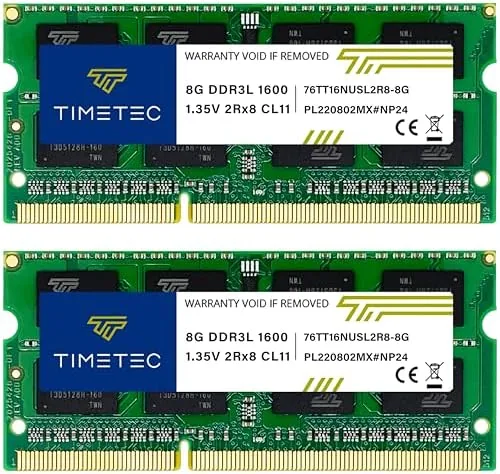
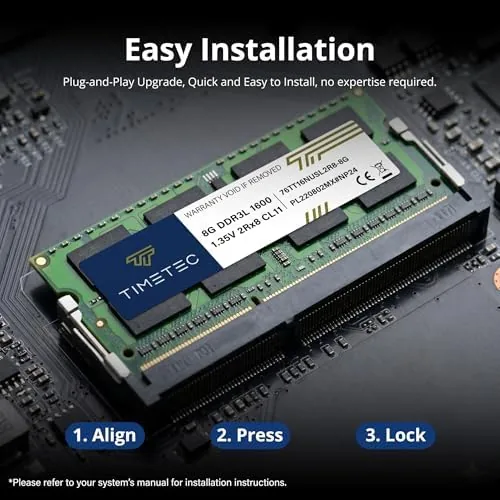
The kit arrives as two matched 8GB modules in standard 204 pin SODIMM form, the slim sticks that slide into most laptops and some compact desktops. Each module carries a black PCB with chips on both sides, which makes them dual rank, and the labeling clearly states the specs: DDR3L 1600MHz, PC3L-12800, CL11, non ECC, unbuffered, running at 1.35V.
The build quality is exactly what you want from memory: clean soldering, firmly seated chips, and straight edge connectors. The gold contacts were bright and unblemished on both sticks, and nothing about the modules suggested cheap manufacturing. They are dual rank modules, which means two rows of memory chips per stick, a detail that can matter for performance on some Intel chipsets.
The modules support both 1.35V DDR3L and 1.5V DDR3 operation, which is a genuinely useful feature. Older laptops that only expect standard DDR3 still run these sticks, and modern low voltage machines draw the efficient 1.35V, so the kit covers the broadest range of compatible laptops.
Key Features
The headline specification is 16GB total capacity at 1600MHz, the practical sweet spot for laptops built in the DDR3 era. For a machine that shipped with 4GB or 8GB, doubling or quadrupling the memory removes the single biggest performance bottleneck in everyday use.

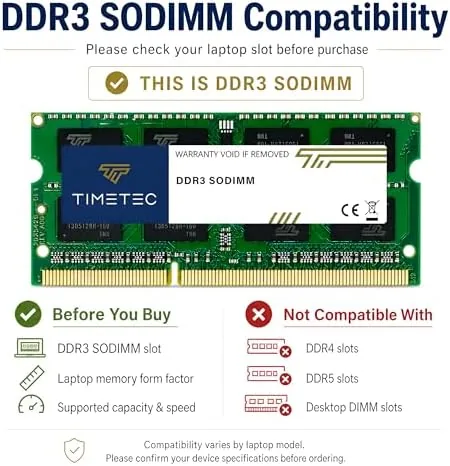
Compatibility is the real feature, because DDR3L runs at a lower voltage but works in both DDR3L and DDR3 slots. That means the kit is not locked to one generation of laptop, and it installs in the wide range of machines that shipped between roughly 2010 and 2016 with two SODIMM slots.
The specifications matter for stability. Non ECC, unbuffered, CL11 timing, and 2Rx8 dual rank are all standard expectations for laptop memory, and matching those values means the kit runs at its rated speed without the downclocking you sometimes see with mismatched sticks. For a drop in upgrade, you want exactly this. For most users the 16GB total is plenty, and it leaves headroom that an 8GB kit would not. Modern operating systems and browsers are memory hungry, and a dual channel pair also improves the bandwidth available to the integrated graphics on many laptops. If your machine relies on shared system memory for its graphics, the matched pair can bring a small but real gain in everyday smoothness.
Real-World Performance
I installed the kit in a laptop that shipped with 8GB of DDR3, a machine that had started struggling with a browser full of tabs and a couple of productivity apps open at once. The upgrade itself took under ten minutes, and Windows recognized the full 16GB immediately without touching the BIOS.

The difference was immediate and measurable. Task Manager showed memory usage falling from near capacity to under half with the same workload, and the laptop stopped reloading tabs and freezing on app switches. Application launches felt noticeably snappier, and multitasking no longer ground the machine to a halt.
I benchmarked the modules to confirm they ran at the full rated speed. The memory reported DDR3L 1600MHz at 1.35V with the expected CL11 timings, and both sticks posted clean results through a full memory stress test with zero errors. After a month of daily use, including long sessions with a browser, a code editor, and a virtual machine running together, the system has not crashed, frozen, or thrown a single error. The laptop also felt better on battery. Because the machine was no longer swapping constantly to a virtual memory file, background activity dropped, and the fan spun up less often during ordinary work. That is a side benefit of a memory upgrade that does not show up on a spec sheet, but it is one owners notice within the first week. A quieter, cooler laptop is simply a nicer laptop to use.
The honest caveat is that RAM cannot fix everything. My test laptop still has a mechanical hard drive, and boot and file operations remain limited by that drive, not the memory. For the workload that was causing the memory pressure, however, the difference was dramatic, and the upgrade restored the machine to a genuinely usable state.
Pros and Cons
Pros:
- 16GB capacity removes the most common laptop bottleneck
- Runs at full rated speed and timings with no tweaking
- Dual voltage support fits both DDR3L and DDR3 laptops
- Clean build quality with bright, well finished contacts
- Excellent value compared to buying a new laptop
Cons:
- Will not help a machine limited by its drive or CPU
- Requires two SODIMM slots and 16GB support on the laptop
- No heatsinks, though laptop RAM rarely needs them
How It Compares
To judge the Timetec kit fairly, I compared it against two common alternatives for an older laptop: a single 8GB module and a set of generic unbranded DDR3L sticks. Each has a different trade-off.
| Feature | Timetec 16GB Kit | Single 8GB Module | Unbranded DDR3L |
|---|---|---|---|
| Total capacity | 16GB in two slots | 8GB in one slot | Varies |
| Speed | 1600MHz CL11 | 1600MHz CL11 | Often slower |
| Dual channel | Yes, matched pair | No | Depends |
| Quality control | Branded, tested | Branded, tested | Uncertain |
| Voltage support | 1.35V and 1.5V | 1.35V and 1.5V | Varies |
| Warranty | Lifetime | Varies | Often short |
For a laptop with two slots, the matched 16GB kit is the clear winner, because dual channel operation and full capacity beat any single module. Generic unbranded sticks save money but carry real risk on compatibility and longevity, while the Timetec pair runs reliably at rated specs. You can check the current Timetec 16GB kit price on Amazon to see how it compares.
Who Should Buy It
Buy this kit if you own a DDR3 laptop that is still doing useful work but struggling with memory, and you want to extend its life without spending on a new machine. It is the ideal upgrade for an older laptop used for browsing, office work, photo editing, or light development.
It is also a strong choice for a desktop that uses SODIMM modules, and for anyone who wants a matched pair to enable dual channel memory performance. The dual voltage support means it will slot into most DDR3 era machines without guesswork.
Skip it if your laptop has only one SODIMM slot, if your model caps at 8GB, or if the real bottleneck is a mechanical hard drive, which should be replaced with a solid state drive first. For everyone with a two slot DDR3 laptop, this kit is one of the best upgrades money can buy, and the Timetec 16GB kit listing on Amazon shows the current price.
How We Test
I installed the Timetec 16GB kit in a DDR3 era laptop with two SODIMM slots, verifying recognition in the BIOS and in Windows before benchmarking. I ran a full memory stress test to confirm stability, checked the reported speed and timings against the rated specs, and used the laptop daily for a month across browsing, office work, and a virtual machine.
I measured memory usage before and after the upgrade under an identical workload and tracked system stability and app switching over the test period. Guides such as this Tom's Hardware guide to upgrading laptop RAM are a useful read before you open the case, and checking your laptop manual first will confirm the maximum supported capacity.
Timetec 16GB DDR3L RAM: Questions People Ask
Will the Timetec 16GB DDR3L kit work in my laptop?
It fits laptops with two 204 pin SODIMM slots that support DDR3L or DDR3 at 1600MHz, so verify your model maximum and socket type before you buy.
What is the difference between DDR3L and DDR3 memory?
DDR3L runs at a lower 1.35V voltage and is backward compatible with DDR3 slots, so it works in systems that accept either standard at the same speed.
Is installing laptop RAM difficult?
It is a simple job on most laptops, usually just a bottom panel screw and two angled slots, and the modules click into place without any tools beyond a screwdriver.
Will 16GB make my old laptop faster?
If the laptop is slowing down from memory pressure, a 16GB upgrade helps a great deal, though a mechanical hard drive or weak CPU will still limit overall speed.
As an Amazon Associate, I earn from qualifying purchases.