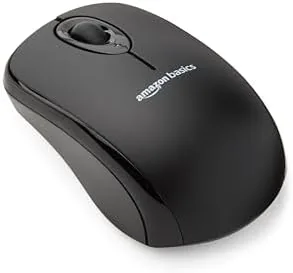

There is something quietly satisfying about moving a pointer across a screen with no cable in the way, and the Amazon Basics 2.4 GHz Wireless Optical Computer Mouse captures that feeling without asking for much money. It is not a flashy accessory. There is no high polling rate aimed at gamers, no battery that charges on a pad, and no companion app. It simply offers a familiar mouse, freed from the wire, at a price that makes it easy to justify for anyone who works at a computer. This review records a full week of cord free daily use.
Before the points, the standard note: this article contains affiliate links. If you buy through one of them, this site earns a small commission at no extra cost to you, and it does not affect what I test or what I recommend in this Amazon Basics wireless mouse review.
Design and Build
The Mouse wears the same plain matte black look as the wired Amazon Basics model, but the body is a little more, with a gentle curve and a slightly lower hump over the hand. It is compact, so it feels at home on a desk and perhaps more at home tucked into a laptop bag for a trip. The surface is smooth with a soft texture that gives the fingers something to hold without being sticky.
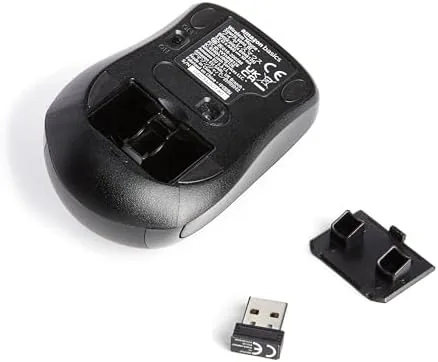
Inside the rear of the mouse there is a small opening in which the USB nano receiver waits when it is not in use. This is a fine detail for travel, because it keeps the receiver from vanishing into a bag, which is the single most common loss in life with a wireless mouse. Packing the mouse means keeping that receiver with the pointer, and that is exactly how it should work.
There is a slot for a single battery beneath the mouse, and the unit powers on and off with a small switch. The whole construction is light, and the buttons press with a clear response. It is plainly built for value, but the assembly feels solid enough for daily transport and repeated pushes.
Key Features
The headline is the 2.4 GHz wireless connection through a USB nano receiver. The receiver is so small that it stays in the port of a laptop without reaching far beyond it, which makes the mouse effectively a stationary cord free device. Because it uses the licensed 2.4 GHz band, it delivers a responsive, low latency link to the cursor that is ideal for everyday work.
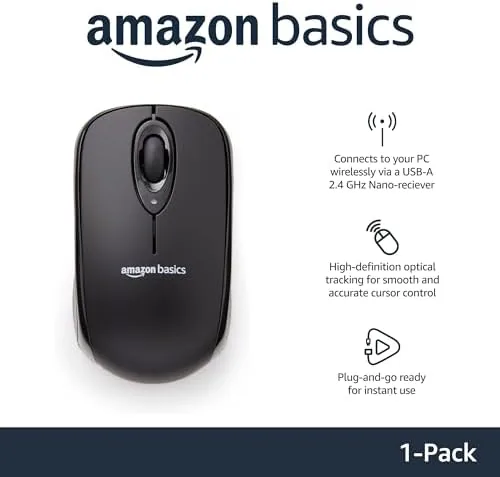
Multi device and multi system compatibility is another selling point. The mouse works with Windows and Mac machines, and because it relies on a universal receiver rather than Bluetooth pairing, it can be moved between computers simply by shifting the tiny receiver from one port to the next. That is a quieter but useful advantage for a worker who switches between a desktop and a laptop.
Power efficiency is a strong feature. The mouse runs for a long stretch on a single battery, and the power slide lets you cut the link when the receiver unplugged, so the battery is not drained accidentally. Between the long life and the on switch, the mouse rarely asks for attention, which is just how a daily device should behave.
Real-World Performance
In daily use, the wireless nature disappeared into the work. I moved between spreadsheets, a long document, and web tabs, and the cursor followed the hand with no visible lag and no dropouts. The 2.4 GHz link handles the pace of normal desk tasks without hesitation, and the response felt just as true as a wired pointer for the work I asked of it.

The freedom from the cable was the most obvious, and it mattered in a real way. Moving the mouse across a cluttered desk required no cord management at all, and switching from desk to lap on a sofa for an afternoon meant no tangled lead to finish. For those small and frequent moments, the wireless advantage is genuine, not theoretical.
The battery performance deserves a moment. Over the week I never once worried about power, and the battery life on this scale runs for many browsing sessions before it needs attention. The on and off switch also means I could pull the receiver and rest the mouse without draining the battery overnight, which a wired mouse cannot claim.
The nano receiver is worth a closer look, because it drives the whole portable argument. It protrudes so little from a USB port that a laptop slips back into a bag without the receiver catching on anything, and when the trip is done the receiver tucks away into its slot under the mouse. That tiny part is easy to lose, so the storage built into the mouse is a thoughtful detail, and moving between two machines took nothing more than unplugging the receiver and seating it into the other computer.
As with any wireless pointer, there is no hard wire to rescue you if the battery runs low, so the honest advice is to keep it in mind on a long trip. Within the normal daily rhythm, though, it performed precisely as advertised, and I finished the week with no complaint about how it tracked.
Pros and Cons
Pros:
- Cord free freedom with a tiny USB nano receiver
- Long battery life on a single battery
- Compact, travel friendly design with switchable power
- Works across Windows and Mac machines
- Portable setting on power for a quick and easy disconnect
Cons:
- The nano receiver can still be misplaced if left outside the mouse
- Battery must be replaced rather than charged
- No Bluetooth, so the receiver must travel with the device
- Comfort is basic rather than ergonomic at length
How It Compares
Measured next to the wired Amazon Basics mouse, the wireless model gives up the permanent tether in exchange for a free and a receiver that can be set aside. The wired model still has the edge for anyone who never wants to think of a battery, while the wireless wins for the person who moves, carries a laptop, or dislikes a cord running over the desk.
| Feature | Wireless Nano | Wired USB |
|---|---|---|
| Connection | 2.4 GHz near receiver | USB cable |
| Power | Single battery | No battery |
| Movement range | Untethered | Limited to cable |
| Portability | High | Low |
| Cost | Higher | Lower |
Against a Bluetooth mouse, the Amazon pick is simpler and generally cheaper, though it asks that you keep the receiver with you. For a desk worker who stays put, either Amazon model is a fair answer, and the wireless one simply rewards anyone who wants the cord out of the way.
Who Should Buy the Amazon Basics Wireless Mouse
Buy it if you work from a laptop, shift between a desktop and a bed, or simply dislike the visual clutter of a cable across your desk. If you want a Comfortable, dependable, and genuinely cord free pointer that costs little, this one is easy to recommend.

You can check the latest price and the color options of this model directly at Amazon Basics wireless mouse on Amazon. Skip it only if you want a recharging mouse with no receiver at all to keep track of.
How We Test
I used the wireless mouse as my daily pointer for a full week, splitting the time between a desktop desk and a laptop for travel. I measured setup ease, how steady the connection stayed, battery behavior, and whether the small receiver caused any find or drop.
Independent coverage writ, such as the budget office gear roundups at TechRadar, give a useful data point on wireless mice in this price class, while my daily test grounds the numbers in honest use.
If you are comparing against a wired pointer or a Bluetooth model, my earlier wired mouse review is the natural follow, and the live Amazon Basics wireless mouse listing holds the current season of price and options.

Amazon Basics 2.4 GHz Wireless Mouse: Questions People Ask
How long does the battery last?
Amazon rates the mouse for a very long run on a single battery. In normal use a single cell lasts many months, especially with the power switch set to off when the receiver is removed.
Do I need to install software?
No. The nano receiver is plug and play, so the mouse works with Windows, Mac, and compatible systems as soon as you insert the receiver. Nothing to install.
Can I use it with a laptop?
Yes. The compact size and the tiny USB receiver make it ideal for a laptop and for travel, since it takes up almost no space and connects in seconds.
As an Amazon Associate, I earn from qualifying purchases.



