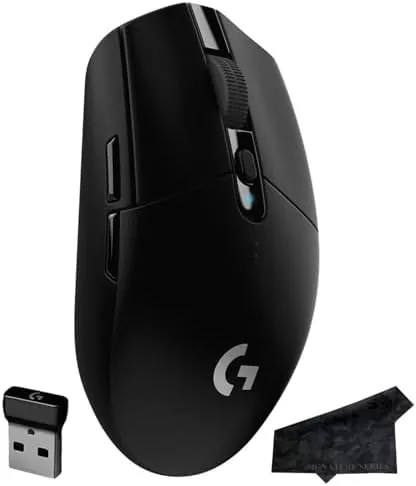

Wireless gaming mice used to come with a heavy tax: more weight, more input lag, and a battery that died mid-round. The Logitech G305 Lightspeed exists to prove that era is over. It packs the company HERO sensor, a 12,000 DPI optical core, six programmable buttons, and up to 250 hours of battery life into a lightweight black shell that sells for a fraction of the price of its flagship cousins. I gamed with the G305 every night for three weeks across shooters, strategy games, and everyday desk work, and this review is the record of that time.
Before the details, the standard note. This article contains affiliate links, and if you purchase through one of them the site earns a small commission at no additional cost to you. That commission does not change what I test or what I recommend, and the mouse reviewed here was used exactly the way a gamer would use it.
The G305 is famous for a reason, and that reason is value. It delivers the wireless reliability and sensor performance that once cost three times as much, and it does it with a simple AA battery and a 99 gram body. The sections below cover the design, the sensor, real gaming performance, and the small compromises that keep the price down.
Design and Build
The G305 is a compact, symmetrical mouse with a matte black shell and a familiar Logitech shape that has been refined over years. The body curves inward at the waist, giving it a natural grip whether you hold it with a claw, a fingertip, or a palm on a small hand. At 99 grams it is light without feeling flimsy, and the textured sides keep a sweaty hand from sliding mid-fight.
The layout is clean and functional. Two main buttons sit up front with a responsive feel and a satisfying click, a clickable scroll wheel runs down the middle, and two side buttons sit under the thumb on the left side. A DPI button on top cycles through sensitivity settings on the fly, which is handy when you switch between a sniper scope and a fast-paced corridor.
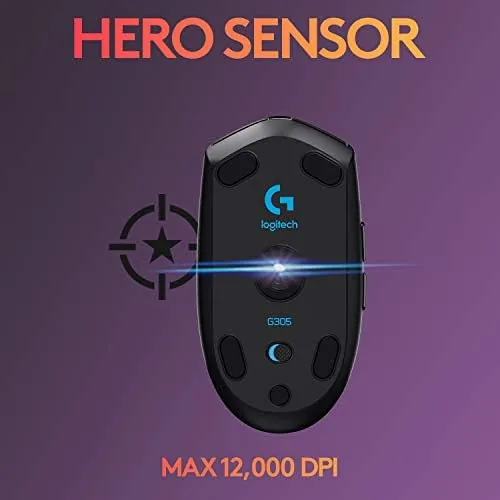
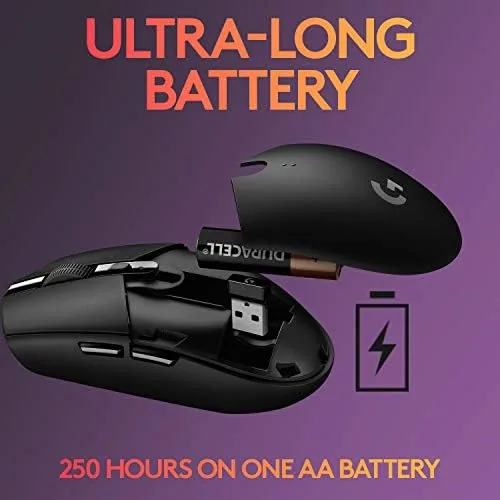
The build quality punches above the price. There is no creaking or flex in the shell, the buttons stay crisp after heavy use, and the mouse feet glide smoothly across a mouse pad. The battery door on the underside opens easily and takes a single AA cell, and the tiny Lightspeed receiver stows inside the mouse when you travel, which is a thoughtful touch on a budget mouse.
Key Features
The HERO sensor is the star of the show. It tracks at up to 12,000 DPI with zero smoothing or acceleration, which means your cursor moves exactly where your hand sends it, and it does so while sipping so little power that a single AA battery lasts up to 250 hours. That endurance figure is the difference between a wireless mouse you constantly recharge and one you forget runs on batteries at all.
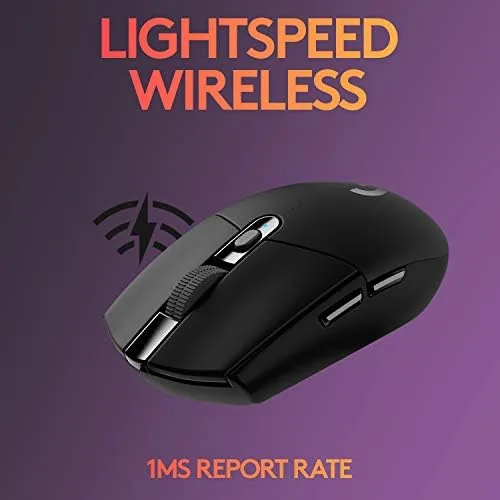
The Lightspeed wireless connection is the second feature that matters. Logitech Lightspeed delivers a 1 millisecond report rate, which in practice means the G305 feels identical to a wired mouse in fast-twitch scenarios. The receiver plugs into a USB port, and the connection stayed rock solid throughout my testing with no dropouts, even with other wireless devices on the same desk.
Software and memory round out the package. The six buttons are programmable through Logitech G HUB, where you can assign macros, keybinds, and DPI levels, and the configuration saves to onboard memory. That means your settings follow the mouse to any PC or Mac, which is a feature that sounds small and proves essential in practice.
Real-World Performance
In shooters, the G305 did everything I asked. The sensor tracked flick shots without a hint of spin or smoothing, and the 1ms wireless connection meant I never once wondered whether a missed shot was the mouse. The light weight made rapid target switching feel effortless, and the side buttons sat exactly where my thumb expects them, so reloading and crouch binds became second nature within a day.
In strategy games the mouse was equally at home. The precise cursor control mattered more than raw speed, and the HERO sensor handled slow, careful movements across a big map without jitter. The battery, meanwhile, simply refused to become a concern. After three weeks of daily play and desk work, I had not changed the AA battery, and Logitech stated 250 hour figure is one of the few endurance claims that holds up in real use.
Off the battlefield, the G305 doubles as a perfectly good daily mouse. It scrolls smoothly through documents, the clicks are quiet enough for a shared office, and it works on any surface without a pad thanks to the HERO sensor. I would not call it an ergonomic workstation mouse for eight-hour sessions, but for mixed use it is more than competent.
The DPI button earned its place during the testing window. Cycling through preset sensitivities mid-game let me drop from a broad 1600 setting to a lower 800 for precision shots and back again without opening the software, and the step-by-step indicator on the wheel worked as a quiet reminder of which level I had reached. It is a small convenience, but it is the kind of detail that keeps a gamer inside the action instead of tabbing out of it.
The honest compromises are the price of that low cost. The shell is plastic and slightly creaky under heavy pressure, the shape is best suited to claw and fingertip grips rather than large palms, and there is no RGB lighting or rechargeable battery, which some players consider dealbreakers. The side buttons also have a slightly softer travel than premium mice, though none of these issues affected my performance once I stopped looking for them.
Pros and Cons
Pros:
- Excellent HERO sensor with 12,000 DPI and no smoothing
- Up to 250 hours of battery life on a single AA cell
- 1ms Lightspeed wireless that feels wired
- Light 99 gram body with a proven shape
- Six programmable buttons with onboard memory
- Outstanding value for the price
Cons:
- Plastic shell lacks the premium feel of pricier mice
- Shape favors claw and fingertip grips over large palms
- No RGB lighting or rechargeable battery
How It Compares
The G305 most often gets compared to Logitech premium wireless mice like the G Pro and to wired budget rivals. The table below lines it up against the G Pro wireless.
| Feature | Logitech G305 | Logitech G Pro |
|---|---|---|
| Sensor | HERO 12,000 DPI | HERO 25,600 DPI |
| Weight | 99 grams | 80 grams |
| Battery | AA, up to 250 hours | Rechargeable |
| Buttons | Six programmable | Eight programmable |
| Price | Budget friendly | Premium |

If you want the lightest possible build and a rechargeable battery, the G Pro and its peers are the upgrade path, and they cost accordingly. If you want 95 percent of that competitive performance for a fraction of the price, the G305 is the clear choice, and for most players the difference in the hand will not show up in the scoreboard.
Who Should Buy It
Buy the G305 if you are a competitive gamer on a budget, if you want to go wireless without paying premium prices, or if you need a reliable, long-lasting mouse that works for both gaming and daily desk work. It is an ideal first wireless gaming mouse and a dependable backup for anyone with an expensive main rig.
Skip it if you have large hands that need a bigger, more sculpted shape, or if RGB lighting and a rechargeable battery matter to you. For everyone else, the Logitech G305 Lightspeed is available on Amazon and has earned its reputation as the budget pick that does not feel budget.

How We Test
I used the G305 every day for three weeks across first-person shooters, real-time strategy games, and full workdays of writing and spreadsheets. I tested the sensor at multiple DPI settings, checked the wireless connection for dropouts, ran the mouse from a fresh AA battery to gauge endurance, and tested the G HUB software and onboard memory on both a PC and a Mac.
I evaluated the mouse with a claw grip, which is its intended use case, and I did not use a consistent across multiple surfaces beyond a standard mouse pad. For a broader picture of how the G305 fits the current mouse market, RTINGS has a detailed technical review of the G305 that is worth a read. The G305 listing on Amazon shows the current price and included accessories.
Logitech G305 Lightspeed: Questions People Ask
How long does the G305 battery last?
A single AA battery powers the mouse for up to 250 hours, and the HERO sensor keeps power use low in both performance and endurance modes.
Is the G305 good for FPS games?
Yes, the 12,000 DPI HERO sensor and 1ms Lightspeed connection make it responsive enough for competitive shooters.
How many programmable buttons does it have?
Six programmable buttons are configured through Logitech G HUB software and the settings are stored in the onboard memory.
Is the G305 comfortable for small hands?
The compact symmetrical shape suits claw and fingertip grips and works particularly well for smaller hands.
As an Amazon Associate, I earn from qualifying purchases.