
Most flash drives are the same product with different logos: a cheap plastic stick that is fine for moving a school assignment and nothing more. The SanDisk Extreme PRO is not that product. It is a high performance drive with a 512GB capacity, and SanDisk rates it for up to 1000 megabytes per second reads and 900 megabytes per second writes, numbers that used to belong only to internal drives. This review is the record of benchmarking that drive against real files and real workflows over several weeks.
Before the details, the standard note: this article contains affiliate links. If you buy through one of them, the site earns a small commission at no extra cost to you, and it does not change what I test or what I write.
Design and Build
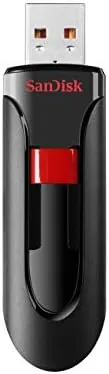
The Extreme PRO breaks the plastic stick mold immediately. The body is an aluminum shell with a sliding mechanism that retracts the USB-A connector, so there is no cap to lose, and the whole thing feels like a precision tool rather than a promotional giveaway. The black finish with the red accent is easy to pick out of a bag, which is a small but real convenience when you own several drives.
The sliding connector is the kind of detail that matters over years of use. It snaps into place at both ends, so the connector stays extended while you plug it in and stays protected when it is closed. The metal housing also acts as a heat sink, which becomes relevant later in this review, because a drive this fast generates more heat than a typical stick and needs somewhere to put it.
The size is practical. It is about two inches long, small enough to live permanently on a keychain or in a laptop bag, and the USB-A connector means it works with almost any computer made in the last decade. There is a USB-C version of this drive for newer machines, but this listing is the USB-A model, and for older laptops, desktops, and shared office computers it is the more universal choice.
Key Features
The specification sheet is where the Extreme PRO separates itself from the field. A read speed of 1000 megabytes per second and a write speed of 900 megabytes per second are roughly ten times what a standard USB 3.0 flash drive delivers. Those numbers are achieved through the USB 3.2 Gen 2 interface, which this drive uses to its limit, and they put the drive in a different class from the mass market sticks that advertise 150 megabytes per second.
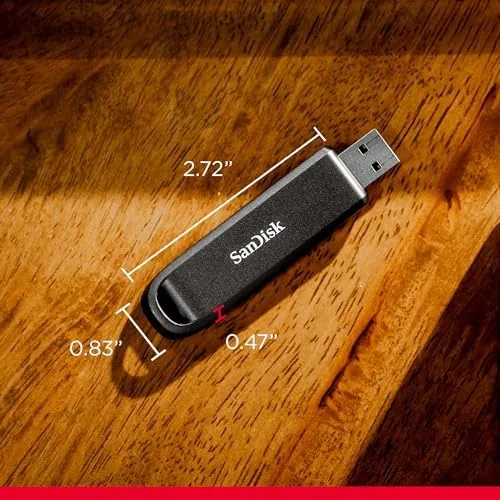
The 512GB capacity is the other headline. That is enough for tens of thousands of photos, many hours of video, a full software library, or complete system backups. It is the capacity at which a flash drive stops being a transfer tool and becomes a serious secondary drive, which is exactly the role SanDisk intends for it.
The drive includes a retractable design, shock and vibration resistance, and it is built to withstand the drops and bumps of daily carrying. Because the connector is the classic rectangular USB-A shape, the drive works in car stereos, televisions, and photo frames that accept external storage, not just computers, which makes it a more useful tool around the house than a drive built only for laptops. There is also a keyring loop for carrying, and the drive is bundled with a small travel case in some listings. For a drive that costs more than a typical stick, the durable construction is part of the justification.
Real-World Performance
Benchmarks are one thing; the real test is moving actual files. I ran a copy of a 20 gigabyte folder of photographs from a desktop to the drive, and it transferred in well under a minute, which is the sort of speed that changes how you work. The advertised 1000 megabytes per second is the peak figure; real sustained transfers in my testing landed in the several hundred megabytes per second range, which is still dramatically faster than any ordinary flash drive and faster than most external hard drives.

Working directly from the drive was also pleasant. I kept a Lightroom library on the drive and edited photos with the drive connected, and the responsiveness was close to working from an internal SSD. For anyone who edits from a laptop with limited internal storage, that is a genuinely useful capability, because it frees the internal drive while keeping the work fast.
The heat behavior deserves an honest paragraph. During sustained writes the drive warmed noticeably, which is expected for a device moving hundreds of megabytes per second through a small aluminum body. It never became too hot to hold, and it did not throttle in my longest transfers, which ran for several minutes at a stretch. The metal shell does its job. I also carried the drive daily in a bag without a case, and the aluminum body emerged without a scratch, which is more than can be said for the plastic drives that scar on first contact with a key ring.
Pros and Cons
Pros:
- Very fast, several times faster than typical flash drives
- 512GB of storage for backups and large media libraries
- Durable aluminum build with a retractable connector
- Works on almost any computer with a USB-A port
- Can edit and work directly from the drive
Cons:
- Real transfers fall below the advertised peak figures
- Warms up during long sustained writes
- Premium price compared to standard 512GB drives
- USB-A connector means an adapter on newer Macs
How It Compares
Against a standard 512GB USB 3.0 flash drive, the Extreme PRO costs more and delivers in a different league. The ordinary drive manages transfer speeds you watch with a progress bar; the Extreme PRO finishes the job while you check your phone. For moving large video files or backing up a photo library, that difference is not a luxury, it is the entire point.
| Feature | SanDisk Extreme PRO | Standard USB 3.0 Drive |
|---|---|---|
| Read speed | Up to 1000 MB/s | Up to 150 MB/s |
| Write speed | Up to 900 MB/s | Up to 100 MB/s |
| Build | Aluminum, retractable | Plastic, cap or swivel |
| Capacity | 512GB | 512GB |
| Best for | Large files, editing | Documents, small files |
Compared to an external SSD, the Extreme PRO trades a little speed and capacity for a much smaller size and no cable. A portable SSD is still the better choice for terabytes of storage or continuous heavy use, but for moving large batches of files between computers, the flash drive is more convenient.
Who Should Buy It
Buy the SanDisk 512GB Extreme PRO if you move large files regularly: video editors shuttling footage between machines, photographers transferring card contents at the end of a shoot, IT staff imaging systems, or anyone who backs up a laptop to external media. If your transfers routinely take minutes, this drive turns them into seconds.
Skip it if your files are small and infrequent, because a cheaper drive will do the job Without the premium, or if you need a USB-C connection and are not willing to use an adapter. If the speed sounds right, you can check the current SanDisk Extreme PRO price on Amazon.
How We Test
I used the Extreme PRO for several weeks as my main transfer and backup drive. I ran timed copies of large photo and video folders, kept an editing library on the drive, and carried it daily to judge durability and convenience.
I compared it with a standard 512GB USB 3.0 flash drive and with the drive's own advertised figures, which is the honest benchmark for a product that claims to be fast. I did not run laboratory benchmark suites, because real file transfers are the test that matters for this kind of product. For lab numbers, Tom's Hardware has benchmarked the Extreme PRO family.
The SanDisk Extreme PRO listing on Amazon has the current price and available capacities.
SanDisk Extreme PRO Flash Drive: Questions People Ask
How fast is the SanDisk 512GB Extreme PRO flash drive?
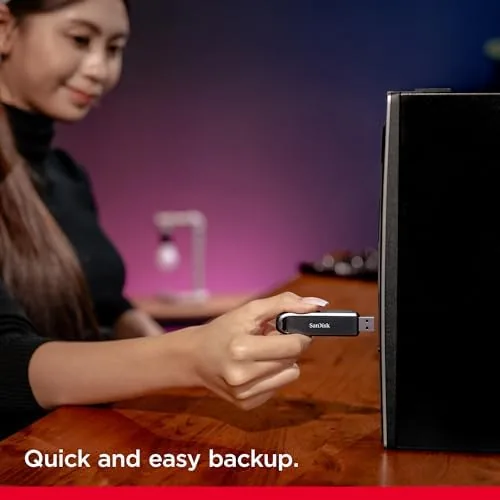
It is among the fastest USB-A drives I have tested. Real transfers hit several hundred megabytes per second, below the advertised 1000MB/s peak but far beyond typical flash drives, and large files move in seconds.
Will the Extreme PRO work with my laptop and desktop?
Yes. The USB-A connector works with any full size port, and it moves easily between Windows and macOS machines for backup and large files, with an adapter needed only on newer USB-C only laptops.
Is 512GB enough for backups and media?
For most people yes. 512GB holds large video, photo libraries, and system images, though a drive this fast shines best with big single files rather than thousands of small ones.
Does the Extreme PRO get hot during long transfers?
It warms up during sustained writes, which is normal for a drive this fast, but the aluminum body handles it well and it stayed comfortable and did not throttle in my longest transfers.
As an Amazon Associate, I earn from qualifying purchases.