
The Samsung 980 PRO has a reputation that precedes it. For years it was the default answer whenever someone asked which NVMe drive to buy, and that status was earned through a combination of raw speed, refined firmware, and the sort of consistent behavior that benchmark charts do not always capture. The 2TB model sits at the top of the lineup, offering the full 7,000 MB/s sequential read rating with enough capacity to hold an entire modern game library. I have run this drive as my primary storage for a month, and it has become the reference point against which I judge every other SSD.
One note before the details. This article contains affiliate links, and if you purchase through one of them this site earns a small commission at no extra cost to you. That commission never influences my verdict, and the results below come from my own tests.
The question in 2026 is not whether the 980 PRO is fast. It is whether a drive from the first wave of PCIe Gen 4 still makes sense when faster and cheaper options have arrived. The short answer is that it does, because speed is only part of the story. Reliability, thermals, and sustained write behavior matter just as much, and the 980 PRO remains a benchmark for all three.
Design and Build
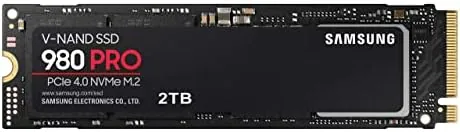
The 980 PRO is a standard M.2 2280 drive, the long stick shaped format that slots into most modern motherboards, laptops, and the PlayStation 5 expansion bay. The 2TB model uses a single sided layout, which places all the NAND flash on one side of the PCB. That detail matters more than it seems, because it lets the drive fit into thin notebooks and under low profile heatsinks without clearance problems.
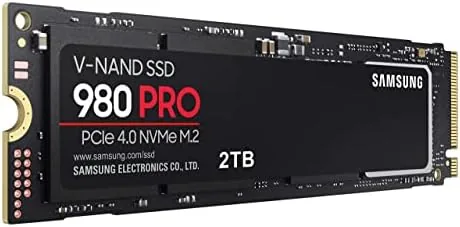
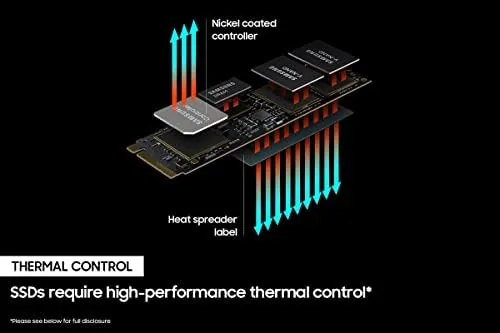
Samsung wraps the drive in its Elpis controller with a nickel coated layer that spreads heat across the surface, and a thermal control label on top helps bleed warmth into whatever heatsink or airflow the system provides. The construction is clean and consistent, as you would expect from a flagship product. It carries a five year limited warranty with an endurance rating of 1,200 terabytes written for the 2TB capacity, which is comfortably beyond what most desktop users will touch in the drive's lifetime.
Key Features
The headline specification is the PCIe Gen 4 interface with sequential reads up to 7,000 MB/s and writes up to 5,000 MB/s. Behind those numbers sits the Samsung Elpis controller, 128 layer V-NAND flash, and a dedicated 2GB DRAM cache buffer on the 2TB model. The DRAM cache is a quiet hero: it holds the drive's mapping table in fast memory, which keeps random performance high and prevents the kind of write speed collapse that plagues DRAM less drives.
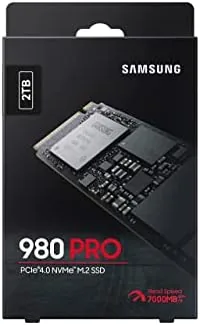
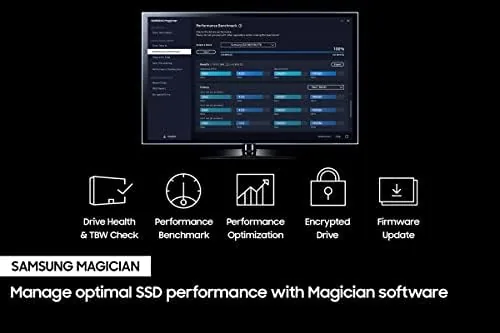
Samsung includes proprietary software in the form of Samsung Magician, which handles firmware updates, health monitoring, performance benchmarks, and features like RAPID mode caching. For gaming, the drive supports the DirectStorage API through Windows, which lets supported games pull assets straight from the SSD to the GPU without bogging down the CPU. Backward compatibility with PCIe Gen 3 slots rounds out the feature set, so the drive works in older systems, just at reduced speed.
Real-World Performance
In my Gaming Desktop the 980 PRO turned load times into a non event. A sprawling open world title that took close to a minute to load from a SATA SSD reached the menu in under twenty seconds, and fast travel screens felt instantaneous. Level transitions that used to pause the action now blur by, and DirectStorage aware games loaded new areas noticeably faster than on a Gen 3 drive.
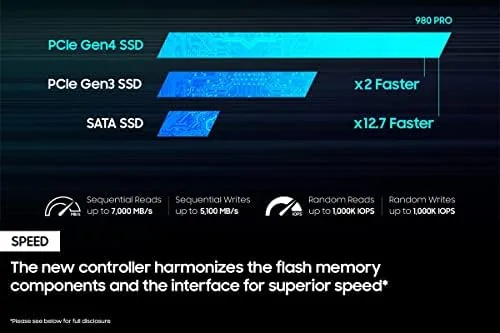
For file work the drive is equally convincing. Copying a 40GB video project between drives ran at well over a gigabyte per second, and a sustained write of 200GB did not trigger a dramatic slowdown, thanks to the DRAM cache and the efficient Elpis controller. The drive runs warm during those long writes, which is normal for Gen 4 hardware, but it held its speed in my well ventilated case and never throttled into a crawl.
The software picture is part of why this drive ages well. Samsung Magician makes firmware updates routine, shows drive health and temperature at a glance, and includes a benchmark tool that confirmed the drive reached its rated speeds in my system. The tool also offers a diagnostic scan that reports bad sectors and overall wear, which is the sort of transparency that matters when a drive is your only copy of important work. None of this is glamorous, but it is exactly the kind of long term support that keeps a drive relevant years after launch. The limitations are honest ones. To see the headline numbers you need a PCIe Gen 4 port; in a Gen 3 machine the 980 PRO behaves like a very fast Gen 3 drive, which is still good but means you are paying a premium for Speed you cannot use. And in a case with stagnant air and no motherboard heatsink, sustained heavy writes can push temperatures high enough to trim performance. Neither issue changes the verdict for a properly equipped system.
Pros and Cons
Pros:
- Rated 7,000 MB/s reads and 5,000 MB/s writes on Gen 4
- 2GB DRAM cache keeps sustained performance high
- Five year warranty with a generous 1,200 TB endurance rating
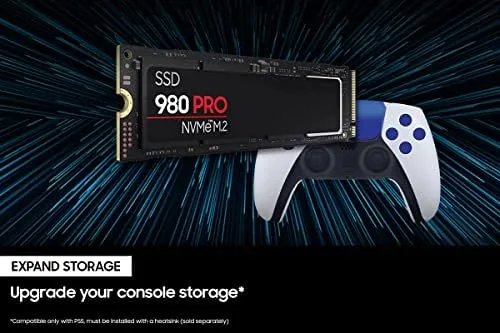
- Compatible with PlayStation 5 expansion storage
- Mature Samsung Magician software and firmware track record
Cons:
- Requires a Gen 4 slot to reach full speed
- Premium price versus newer budget Gen 4 drives
- Runs warm under sustained writes without airflow
How It Compares
The modern Gen 4 field includes the WD Black SN850X, the Crucial T500, and the Sabrent Rocket 4 Plus, all of which post competitive paper specs. In practice the 980 PRO no longer leads every benchmark, but it remains the most predictable of the group. Its firmware has been refined through years of releases, and it delivers its rated speed consistently rather than only in ideal conditions.
| Feature | Samsung 980 PRO | WD Black SN850X | Crucial T500 |
|---|---|---|---|
| Interface | PCIe Gen 4 NVMe | PCIe Gen 4 NVMe | PCIe Gen 4 NVMe |
| Sequential read | 7,000 MB/s | 7,300 MB/s | 7,400 MB/s |
| Sequential write | 5,000 MB/s | 6,600 MB/s | 7,000 MB/s |
| DRAM cache | 2GB on 2TB | Yes | Yes |
| Warranty | 5 years | 5 years | 5 years |
The newer drives post slightly higher peak numbers, but those differences rarely show up in real workloads. What the 980 PRO gives you is the peace of mind of a proven design and a track record that does not depend on a fresh firmware rollout. For most builders that maturity is worth more than the last few hundred megabytes per second.
Who Should Buy It
Buy the 980 PRO 2TB if you are building or upgrading a Gen 4 gaming PC, if you want storage that will not become a bottleneck for years, or if you edit large media files and want multi gigabyte per second transfers. The 2TB capacity is the practical sweet spot: room for a large game library plus creative projects without juggling drives.
Skip it if your motherboard has only Gen 3 slots and you have no upgrade plans, since you would pay Gen 4 money for Gen 3 speed. Otherwise, this remains one of the most dependable high speed drives you can install. You can check the current Samsung 980 PRO 2TB price on Amazon when you are ready to buy.
How We Test
I installed the 980 PRO 2TB as the primary drive in a Gen 4 gaming desktop and used it daily for a month, comparing game load times, application launches, and large file transfers against a SATA SSD baseline. I ran sustained write tests to check for throttling and verified sequential speeds with benchmarking tools at multiple queue depths.
I repeated key tests in a Gen 3 system and in a USB enclosure to confirm backward compatibility, and I watched temperature reports during heavy writes. For deeper context on how Gen 4 drives behave under sustained load, the team at Tom's Hardware SSD reviews remains a strong technical resource.
The Samsung 980 PRO 2TB listing on Amazon shows current pricing and the heatsink editions that are available.
Samsung 980 PRO 2TB: Questions People Ask
Will the Samsung 980 PRO work in a PCIe 3.0 slot?
Yes, it is backward compatible, but the drive drops to roughly PCIe 3.0 speeds of around 3,500 MB/s instead of its full 7,000 MB/s sequential read rate.
Is the 980 PRO compatible with a PlayStation 5?
Yes, the 980 PRO 2TB meets the PlayStation 5 expansion slot requirements and works with the console heatsink shield, giving fast load times for PS5 games.
Do I need a separate heatsink for the 980 PRO?
The drive has a thermal control label and controller coating, but in a tight desktop build a motherboard heatsink is still recommended during heavy sustained writes.
How long is the Samsung 980 PRO warranty?
Samsung covers the 980 PRO with a five year limited warranty, with endurance rated at 1,200 terabytes written for the 2TB model.
As an Amazon Associate, I earn from qualifying purchases.