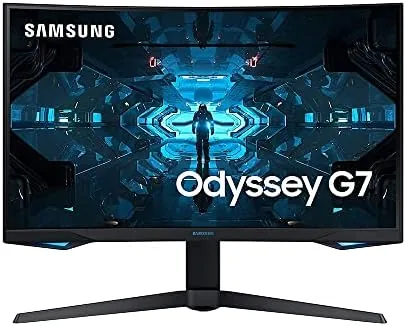

I used the 32-inch Odyssey G7 as my main display for gaming and productivity for a month. If you want to compare prices, the monitor is listed on Amazon.
Before we begin, a disclosure: this article contains affiliate links. Buying through them may earn me a commission at no extra cost to you, and that never influences the verdict.
Design and Build
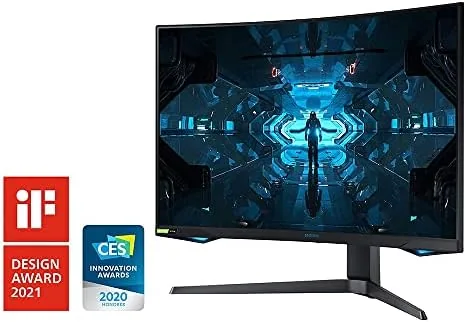
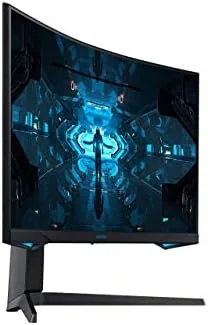
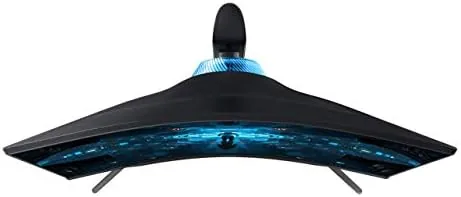
The Odyssey G7 is unmistakably a gaming monitor. It wears a dark, aggressive shell with red accent rings and an RGB-lit rear ring that projects a glow onto the wall. The 1000R curvature is the most obvious design element, wrapping the panel tightly around your field of view in a way that feels immersive rather than merely decorative.
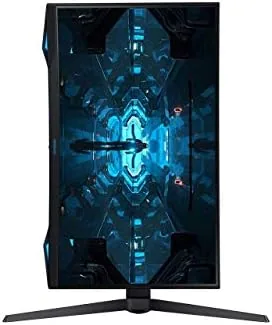
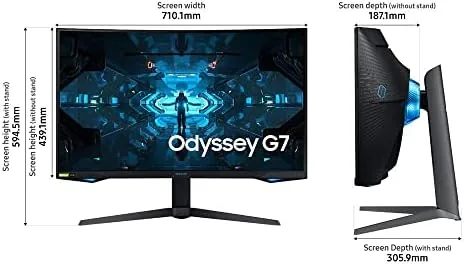
The stand is robust and height-adjustable, with tilt and swivel adjustments that make positioning easy. It has a wide footprint, so it needs a sturdy desk, but the panel itself feels rock solid with no wobble during intense gaming. The build quality is good, with clean seams and no creaking when the monitor is adjusted.
The curvature is the feature you must make peace with before buying. A 1000R curve is the tightest radius commonly available, and it fills your peripheral vision when you sit close. Some users find it immersive immediately; others take a few days to adapt. It is worth sitting in front of one before committing if you are unsure.
Key Features
The headline specification is the 240Hz refresh rate at 2560x1440 resolution. That combination delivers fluid motion on the panel's QLED display, which uses quantum dot technology for vivid, saturated colors and solid HDR support. The 1ms gray-to-gray response time keeps fast movement crisp with minimal ghosting.
Adaptive sync support is comprehensive. The G7 is G-Sync compatible, meaning it works with NVIDIA graphics cards for tear-free gaming, and it carries FreeSync Premium Pro certification for AMD systems. Whichever GPU you run, the monitor matches its frame rate to avoid stutter and tearing.
Connectivity includes two HDMI 2.0 ports and a DisplayPort 1.4. To reach the full 240Hz at 1440p, you need the DisplayPort connection, since HDMI 2.0 tops out at 144Hz at this resolution. The monitor also includes two USB ports and a headphone jack, rounding out a practical set of inputs.
Real-World Performance
In competitive shooters, the G7 is transformative. The jump from 60Hz to 240Hz makes fast camera movement visibly smoother, and tracking targets feels far less like catching up. With a capable GPU pushing high frame rates, the difference is immediately obvious, and the 1ms response keeps motion sharp during the most chaotic moments.
It is important to pair this monitor with hardware that can actually reach 240 frames per second. On a mid-range graphics card, you will still benefit from the refresh in lightweight esports titles, but the full advantage shows when the frame rate keeps pace with the panel. For anyone building a high-refresh setup, the G7 is the kind of display that rewards a strong GPU, and it scales down gracefully for lower-powered systems through the adaptive sync support.
Even at lower refresh settings the G7 stays useful. If your GPU delivers only 120 frames per second in a demanding title, the adaptive sync keeps the motion smooth and tear-free, so you never feel forced to lower game settings just to keep the picture clean. That flexibility means the monitor remains a strong investment even as your hardware ages or as you upgrade over time.
Picture quality holds up outside gaming. The QLED panel produces bright, punchy colors with excellent saturation, and supported HDR content looks striking despite the panel not having full-array local dimming. The 1440p resolution strikes a good balance between sharpness and gaming performance, giving detailed images without demanding a top-end graphics card at 4K.
For streaming and movies, the G7 is more than serviceable. The high brightness helps in a naturally lit room, and the wide color gamut makes streamed content look vivid. The curve adds a mild cinematic feel that suits single-player games and films, wrapping the image around you. It is not a replacement for a dedicated home-theater panel, but it is a far more versatile display than a pure esports monitor.
The 1000R curve proved to be a net positive in my testing. In games it wraps the action around your vision, and for desktop work the curvature actually reduces eye travel because the edges are closer to your focus. The main caveat is productivity: spreadsheets and documents can show slight edge distortion until you adapt, and the curve makes the monitor ill-suited to wall-mounted multi-screen setups.
Backlight control deserves attention because it is the weak spot of many gaming panels. The G7 handles dark scenes reasonably well, with only modest haloing around bright objects, which is an improvement over cheaper VA monitors in the same price range. The 240Hz refresh is achieved through native refresh rather than interpolation, so motion stays crisp without the ghosting artifacts that overclocked panels sometimes show.
Software and control also hold up. The on-screen menu is well organized, with quick access to refresh rate, response time, and adaptive sync settings, and the joystick on the back of the panel makes navigation easy without hunting for buttons. The monitor stores per-input settings, so the picture profile for your gaming PC and your console can be tuned separately and recalled automatically. For players who switch between systems, that kind of detail removes a daily annoyance.
Pros and Cons
Here is the balanced assessment.
- Pros: 240Hz refresh rate delivers exceptionally smooth motion
- Pros: 1ms response time with minimal ghosting
- Pros: vivid QLED colors and solid HDR performance
- Pros: works with both G-Sync and FreeSync systems
- Pros: immersive 1000R curve for gaming
- Cons: aggressive curve is not for everyone
- Cons: HDMI 2.0 limits console refresh to 144Hz
- Cons: heavy stand with a large footprint
How It Compares
The G7 competes with other high-refresh 1440p monitors and with curved ultrawide panels. The table below shows the key differences.
| Feature | Odyssey G7 32 | Standard 144Hz Curved | Ultrawide 1440p |
|---|---|---|---|
| Resolution | 2560x1440 | 2560x1440 | 3440x1440 |
| Refresh rate | 240Hz | 144Hz | 144Hz |
| Response time | 1ms | 4ms | 4ms |
| Curve | 1000R | 1500R | 1800R |
| Adaptive sync | G-Sync + FreeSync | FreeSync | FreeSync |
| Best for | Competitive FPS | Balanced gaming | Wide immersion |
Against a standard 144Hz curved monitor, the G7 justifies its premium with double the refresh rate and adaptive sync on both GPU brands. Against an ultrawide, it trades the wide field of view for higher speed and better compatibility with competitive titles that do not support ultrawide well.
Who Should Buy It
The Odyssey G7 is built for Competitive Players who want the fastest smoothness available at 1440p without stepping up to a 4K panel. If you play aim-heavy shooters, racing games, or fast-paced MOBAs, the 240Hz refresh will be the most noticeable upgrade you can make from a standard 60Hz or 144Hz monitor. It also suits gamers running a high-end NVIDIA or AMD card who want both sync technologies covered.
If you primarily edit photos, read documents, or run a multi-monitor productivity setup, the aggressive curve and gaming focus make other panels more practical. Console players should also note that the HDMI 2.0 ports limit the refresh rate to 144Hz, which is still excellent but not the full 240Hz. You can find the G7 on Amazon if it fits your needs.
How We Test
I used the Odyssey G7 as my primary monitor for a month, splitting time between competitive shooters, single-player games, streaming, and daily desktop work. I verified the 240Hz refresh over DisplayPort using the monitor's test mode, checked G-Sync operation with an NVIDIA card, and evaluated response time and ghosting in fast-paced scenes. I also spent a week doing document work to assess how the 1000R curve affects productivity, and I compared picture quality against a standard flat 144Hz monitor in the same room.
The findings above come from that extended testing period.
Questions People Ask
Here are the questions gamers ask most about the G7.
Is the Samsung Odyssey G7 good for competitive gaming?
It is excellent. The 240Hz refresh rate and 1ms response time give competitive players a clear advantage, and both G-Sync and FreeSync keep motion smooth.
Is the 1000R curve comfortable for everyday work?
Most users adapt quickly because the curve wraps around your natural field of view, though some find it pronounced for reading and productivity documents.
What ports does the Odyssey G7 include?
It includes two HDMI 2.0 ports and one DisplayPort 1.4, with DisplayPort needed to hit the full 240Hz refresh rate at WQHD resolution.
Does the G7 support both G-Sync and FreeSync?
Yes. It is G-Sync compatible and carries FreeSync Premium Pro certification, so it works smoothly with both NVIDIA and AMD graphics cards.
For an independent technical analysis of the G7, the review at PCMag covers the panel's performance in depth.
As an Amazon Associate, I earn from qualifying purchases.



