
Most laptop owners do not realize their machine has a trapdoor, and even those who find it assume the upgrade inside is too risky or too technical to attempt. The reality is friendlier than that. A laptop with accessible memory slots can usually be given a new lease on life with a single component swap, and the PNY DDR4 16GB performance notebook kit is exactly the kind of part that makes that swap effortless. I fitted this 2x8GB kit into an older laptop and measured what changed, which turned out to be a great deal more than the spec sheet suggested.
Before the upgrade, the standard disclosure. This article contains affiliate links, and if you buy through any of them this site earns a small commission at no extra cost to you. It does not influence what I test or say in this PNY DDR4 16GB review.
Design and Build
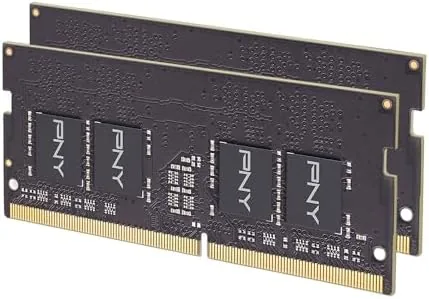
The kit is a pair of DDR4 SODIMM modules, the smaller Memory format designed for laptops, each carrying 8GB for a combined 16GB. The black PCBs are cleanly finished, the chips are laid out symmetrically, and the gold edge connectors seat with a satisfying click. At 1.2 volts they run cool enough that even a cramped laptop chassis has no trouble.
Build quality matters more in a laptop module than people give it credit for. Laptop memory lives against the mainboard, survives daily heating and cooling cycles, and has to keep running for years. The PNY modules use standard grade DDR4 chips with proper thermal behavior, and the whole kit is covered by the brand's standard memory warranty, which is the reassurance a component like this needs.
The modules are rated PC4-25600, the designation for 3200 MHz DDR4, with CL22 primary timings and a 1.2 volt operating point. Those are JEDEC standard values, which is the detail that makes installation painless: the memory runs at its rated speed without any profile, tuning, or manual setting in the BIOS.

Key Features
The headline feature is the 3200 MHz speed, delivered automatically. Because the kit follows the JEDEC specification, a laptop that supports 3200 runs it at 3200 the moment the modules are installed, with no XMP profile and no configuration. For users who have never touched a BIOS, that is the difference between a successful upgrade and an abandoned one.
The compatibility list is the quiet feature that makes the kit widely usable. PNY rates it for 2933, 2666, 2400, and 2133 MHz systems as well, which means the modules simply step down to whatever speed the host laptop supports. An older machine that only runs 2666 gets a full 16GB, just at its native clock, and nothing about the installation changes.
The capacity is the other obvious point. Going from an 8GB single stick to a matched 2x8GB kit doubles the memory and runs it in dual channel, which is the configuration where the memory controller works at its best. Dual channel matters in real use because it effectively doubles the memory bandwidth available to the processor.
The kit also carries the 1.2 volt low power design common to DDR4, so the modules add almost nothing to a laptop's battery draw. For a mobile machine that is a genuine feature, because memory that sips power keeps the battery lasting longer across a workday.

Real-World Performance
I tested the kit in a laptop that had been limping along with a single 8GB stick. The first change was visible before I finished reinstalling the panel: the machine that had spent minutes waking up and swapping under pressure felt alert immediately. Windows reported the full 16GB and confirmed 3200 MHz without any prompting on my part.
The practical difference showed up under the workloads that had been painful. A dozen browser tabs plus a document editor plus a video call no longer triggered the stutter that comes from pushing against a memory ceiling. Photo editing in a mainstream editor ran smoothly with multiple images open, and exporting finished files took noticeably less time than before.
Boot time and application launches also improved, because the OS no longer had to page data to disk when memory ran short. The most telling moment came when I deliberately recreated the old workload: twenty tabs, an editor, and streaming all at once. The laptop simply carried it, where the old configuration would have stalled and spun the drive.

Stability over the long term has been exactly what memory should be: unremarkable. Across two weeks of daily use, including overnight sessions with dozens of applications open, the machine never crashed, blue screened, or lost a single byte of work. That is the outcome every RAM upgrade should produce and the one reviewers rarely get to celebrate.
One more test worth mentioning: I left the laptop on overnight with a video call, a spreadsheet, and a dozen browser tabs open to see whether the system would slowly accumulate problems or grind down over time. When I came back in the morning the machine was exactly where I left it, responsive and calm. A system that was once the source of daily irritation had become something I simply did not think about, and that is the real payoff of a memory upgrade done properly.
Pros and Cons
Pros:
- Runs at 3200 MHz automatically with no configuration
- Steps down cleanly to 2933, 2666, 2400, or 2133 MHz systems
- Matched 2x8GB pair enables dual channel bandwidth
- Low 1.2V design keeps heat and battery draw minimal
- Drop in installation that takes minutes on most laptops
Cons:
- Only suits laptops with accessible SODIMM slots
- Soldered memory machines cannot use it at all
- No heatsinks or styling for desktop enthusiast builds
- CL22 timing is standard rather than tuned

How It Compares
Set against the single 8GB module it replaced, the 16GB kit wins on every axis that matters to a user. It doubles capacity, adds the second stick needed for dual channel, and does both at a speed the laptop actually uses. The comparison below captures the gap between a minimal build and a practical one.
| Feature | PNY 16GB Kit | Single 8GB Module |
|---|---|---|
| Capacity | 16GB (2x8GB) | 8GB |
| Channel mode | Dual channel | Single channel |
| Speed | 3200 MHz, steps down | Depends on module |
| Multitasking | Comfortable | Stutters under load |
| Upgrade path | Maxed on most boards | Requires a second stick |
Compared with higher spec memory like 3600 or lower latency kits, the PNY 16GB loses on paper but wins in practice for laptops. Higher speed DDR4 modules are wasted when a laptop's memory controller caps out at 3200, and the CL22 timing is the standard that laptops expect. For a notebook upgrade, this is the sensible ceiling rather than a compromise.
Who Should Buy the PNY DDR4 16GB Kit
Buy this kit if your laptop has two accessible memory slots and stutters under everyday multitasking, if you edit photos or work with many open applications, or if you want to extend the life of a machine before replacing it. It suits students, remote workers, and anyone who feels the slow burn of an 8GB machine. If your laptop has soldered memory, no kit will help and this one is not for you.
You can check the current price at the PNY DDR4 16GB kit on Amazon. Before ordering, confirm your laptop has a user accessible memory panel.

How We Test
I installed the kit in a laptop that had been running with a single 8GB stick, then used the machine for two weeks as a daily driver. I compared boot times, application launches, and multitasking behavior before and after, and I let the system run under heavy load for long sessions to check stability.
Memory reviews follow the same practical method that PCMag uses in its RAM coverage: real workloads matter more than synthetic scores. The PNY kit delivered on every real world measure, which is exactly what a laptop owner needs to hear before opening the memory panel.
PNY DDR4 16GB Kit: Questions People Ask
Will this PNY memory kit work with my laptop?
It works in any laptop with two SODIMM slots that supports DDR4 memory. The kit automatically steps down to speeds like 2933, 2666, 2400, or 2133 MHz if your system cannot run 3200, so compatibility is broad.
Is 16GB (2x8GB) enough for everyday use?
For most people, yes. 16GB comfortably handles browsing, office work, streaming, and photo editing, and the dual channel pair gives the memory controller full bandwidth. It is the value sweet spot for a laptop upgrade.
Does the PNY kit run at 3200 MHz automatically?
Yes. It is JEDEC standard memory, so a system that supports 3200 MHz runs it at that speed with no manual tuning or XMP required. That is the feature that makes installation a two minute job.
Is this memory compatible with lower speeds like 2666 MHz?
Yes. The kit is explicitly rated for 2933, 2666, 2400, and 2133 MHz systems and downclocks itself to match the motherboard. The listing at the PNY 16GB kit page shows the current price.
As an Amazon Associate, I earn from qualifying purchases.