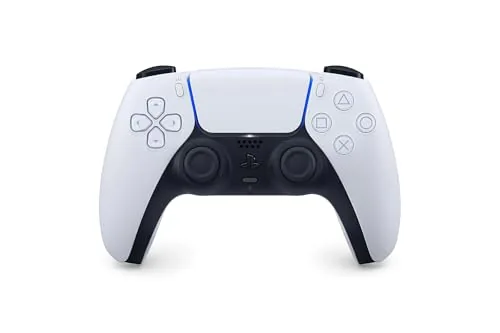

The DualSense wireless controller arrived with the PlayStation 5 and immediately changed how I thought about a gamepad. Most controllers refine the same formula: two sticks, a d-pad, four face buttons, and two bumpers arranged in a layout everyone already knows. The DualSense keeps that skeleton but adds two ideas that were genuinely new at launch, namely haptic feedback and adaptive triggers, and those two features have reshaped what a pad can communicate to your hands. After several weeks of daily use across a PS5, a Windows PC, a Mac, and an Android phone, I have a clear sense of where this controller shines and where it stumbles. This review walks through the design, the features, the real-world performance, and the honest trade-offs, so you can decide whether the DualSense belongs in your setup.
Before I go deeper, the standard note. Some links in this article are affiliate links, and if you buy through them the site earns a small commission at no extra cost to you. That does not change my verdict, which is based entirely on hands-on testing. You can check the current DualSense price on Amazon if you want to see it for yourself.
Design and Build
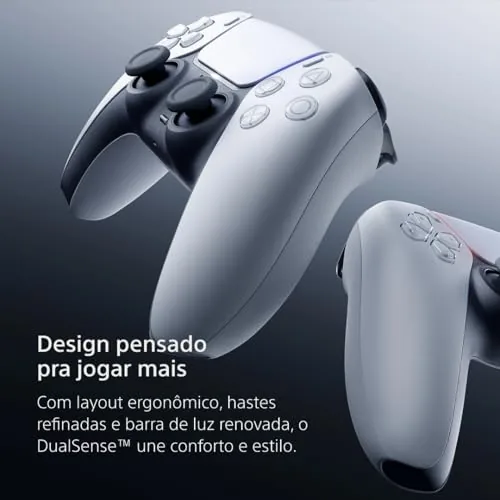
Holding the DualSense for the first time feels different from any previous PlayStation pad. The body is noticeably larger than the DualShock 4, with deeper grips that fill the palm more completely and a wider stance across the top. Sony has rounded the handles so your fingers wrap naturally around the curve, and the matte texture on the face keeps the controller from sliding during long sessions. The white and black two-tone shell is clean and modern, and the subtle PlayStation button icons keep the overall look restrained rather than busy.
The build quality is strong. The plastic feels dense rather than hollow, the face buttons have a crisp, springy throw, and the analog sticks rotate with a smooth, damped motion that inspires confidence. The central touchpad is a large, clickable surface that doubles as a button, and it is useful in games that map gestures or menus to it. Sony has also placed the light bar along the rim of the touchpad rather than on the back, which is a small change that makes the controller look intentional instead of glowing from behind. The USB-C port on top handles charging, and the 3.5 millimeter headphone jack sits below it for wired audio.
Comfort holds up over time. The increased weight, around 280 grams, actually helps the controller sit steadily in your hands, and after several hours of play I noticed no cramping or strain. The asymmetrical sticks, with the left stick slightly higher and the right stick lower, match the modern standard most players already prefer. The d-pad is a shallow dish design that feels precise for menu navigation and fighting game inputs alike.
Key Features
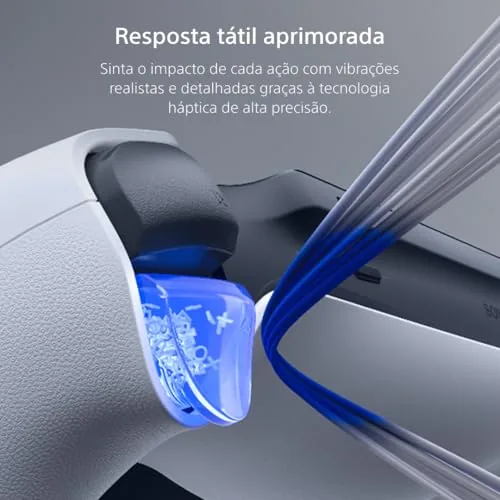
The headline feature is haptic feedback, which replaces the old spinning motor with two linear actuators that produce a far wider range of sensations. Where a traditional rumble just shakes, the DualSense can simulate textures, impacts, and subtle resistance. Walking through grass produces a soft, continuous vibration. Landing a heavy attack sends a sharp thump through the grips. Racing on gravel feels gritty under the thumbs. These details do not exist for their own sake; they genuinely pull you deeper into the game.
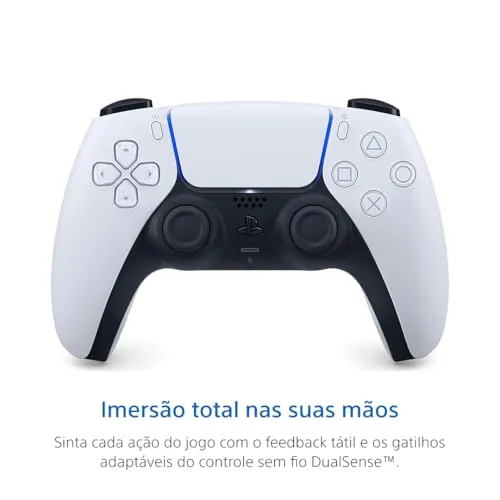
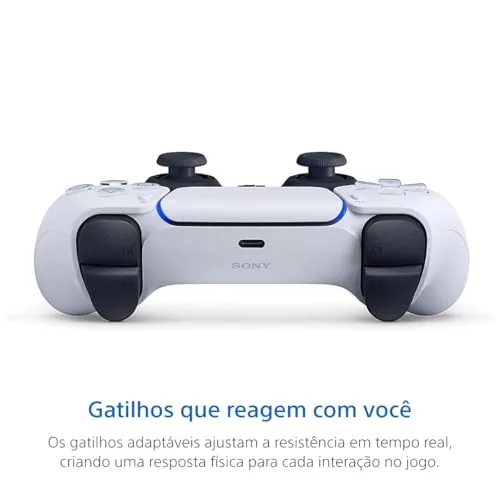
The second headline feature is the adaptive trigger, which adds programmable resistance to the L2 and R2 buttons. In a shooter, the right trigger can stiffen as you pull to mimic a real trigger break. In an archery minigame, the trigger builds tension while you draw the bow and releases the moment you fire. In a driving game, the brake pedal pushes back against your foot as you press it. These triggers work alongside the haptics to make actions feel physical rather than purely visual, and they are the main reason the DualSense still stands apart from nearly every competing pad.
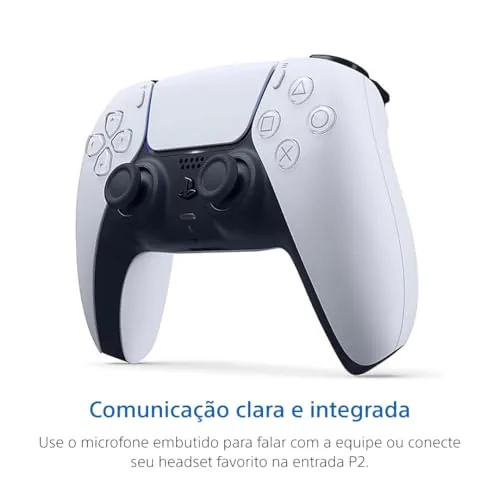
Beyond the two marquee features, the controller includes a built-in microphone and speaker, so you can chat Without a headset in a quiet room. There is a mute button for the mic, a Create button that replaces the old Share button, and motion sensing via an internal gyroscope and accelerometer. The battery is rated for a full day of light use, though demanding games shorten that, and the USB-C connection supports both charging and low-latency wired play.
Real-World Performance
I spent most of my test time on a PS5, where the DualSense is at its best because first-party games are built around its abilities. Titles like Astro\'s Playroom and Ratchet and Clank use the haptics and triggers in ways that feel essential rather than gimmicky, and even multiplatform games deliver improved feedback compared with a standard pad. In shooters the adaptive trigger on the right side makes every shot feel deliberate, and in open-world games the haptics add a constant, subtle layer of texture to running, driving, and weather.
On a Windows PC, the DualSense works well over Bluetooth and USB, and Steam includes built-in support for its input layout. Native haptic and trigger support varies by game, but the pad is fully functional as a controller in everything I tried, and the touchpad works as a mouse in desktop mode. On a Mac the situation is similar: the controller is recognized over Bluetooth, works in supported games, and pairs cleanly for emulation and streaming. On Android, the DualSense connected easily and worked with every game I launched, making it a strong choice for cloud gaming services on a phone or tablet.
Battery life is the weakest point. With haptics and adaptive triggers active, I averaged between ten and twelve hours per charge, which is shorter than most modern rivals. The positive side is that USB-C charging is fast, and the included cable is long enough to play while charging. The built-in microphone is serviceable for party chat in a quiet room, though background noise does bleed through, so a headset remains the better option for serious sessions.
Pros and Cons
Pros:
- Outstanding haptic feedback with a wide range of sensations
- Adaptive triggers add genuine depth to supported games
- Comfortable, well-built body that suits long sessions
- Works across PS5, PC, Mac, and mobile devices
- Built-in microphone, speaker, and motion sensing
- Touchpad functions as a mouse on PC and Mac
Cons:
- Battery life is short at ten to twelve hours
- Haptic and trigger support varies across PC games
- Larger size may feel bulky for smaller hands
How It Compares
The DualSense faces strong competition from the Xbox Wireless Controller, the DualSense Edge, and budget options from brands like 8BitDo. Each pad targets a different balance of features, price, and platform support, so the right choice depends on where you play and which features matter most to you.
| Feature | DualSense | Xbox Wireless Controller | DualSense Edge |
|---|---|---|---|
| Haptic feedback | Yes, advanced | Basic rumble | Yes, advanced |
| Adaptive triggers | Yes | No | Yes |
| Battery life | 10-12 hours | Uses AA batteries | 6-8 hours |
| PC and mobile support | Excellent | Excellent | Excellent |
| Rear buttons | No | No | Yes, remappable |
| Price tier | Mainstream | Mainstream | Premium |
The Xbox pad is a superb controller with rock-solid build quality and broad compatibility, but it lacks haptics and adaptive triggers entirely. The DualSense Edge adds swappable sticks, back paddles, and profile switching, yet it costs roughly double and offers worse battery life. For most players, the standard DualSense delivers the best combination of features and value, especially if you own a PS5.
Who Should Buy It
The DualSense is an easy recommendation for anyone who owns a PlayStation 5, because it is the controller the console was designed around and the only pad that unlocks the full range of haptic and trigger effects. It is also a great choice for PC gamers who want a premium controller with the best-feeling haptics on the market, and for people who play across multiple devices and want one pad that follows them everywhere.
Skip the DualSense if you rarely use controllers and only need a spare pad for occasional local multiplayer, because cheaper options cover that use case well. If battery life is your top priority, you may prefer a controller with longer endurance. For everyone else, the DualSense is the most complete gamepad you can buy, and you can find the DualSense wireless controller on Amazon to see today\'s price.
How We Test
I tested the DualSense for several weeks across four platforms to build a complete picture of its performance. On the PS5 I played first-party titles that use haptics and adaptive triggers extensively, plus shooters, racing games, and platformers to gauge general comfort and responsiveness. On the PC I tested both Bluetooth and wired connections across Steam and Epic titles, and I verified that the touchpad works as a mouse and that controller layouts are recognized correctly. On the Mac and on an Android phone I paired the pad over Bluetooth and played streaming and native titles to confirm the connection is stable and the input lag stays low.
I measured battery life over multiple full charge cycles with haptics enabled, and I tested the microphone quality with party chat in a quiet room and with music playing in the background. For independent perspective, outlets such as Tom\'s Hardware have also covered the DualSense extensively, and their long-term testing aligns with my findings on build quality and the battery trade-off.
PlayStation DualSense Wireless Controller: Questions People Ask
Does the DualSense controller work with a PC and Mac?
Yes, the controller connects over Bluetooth or USB and works with Steam and most PC games, while Mac support depends on the titles you run.
How long does the battery last on a full charge?
In my testing a full charge lasted roughly ten to twelve hours with haptics and triggers enabled, which is fine for long sessions but shorter than some rivals.
Can the adaptive triggers and haptics be turned off?
You can lower or disable haptic intensity and trigger effects in the PlayStation settings, which is useful when you want to extend battery life.
Is the built-in microphone good enough for game chat?
The built-in mic is clear enough for casual party chat in a quiet room, though a headset still sounds better when background noise is present.
As an Amazon Associate, I earn from qualifying purchases.