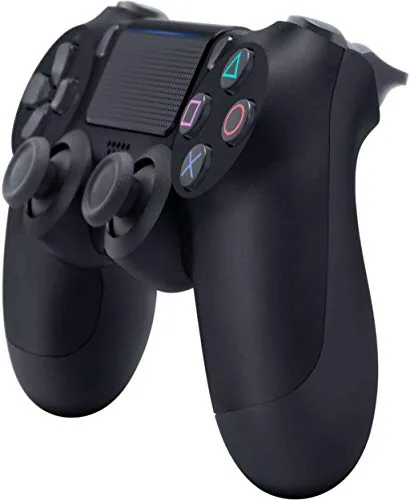

Some hardware becomes the quiet standard of its generation, so familiar that you stop noticing it until you try something worse. The DualShock 4 is exactly that controller. For millions of PlayStation 4 owners it was the object in their hands through thousands of hours of play, and even now, years later, it remains a favorite for PC gamers who want a comfortable, dependable gamepad. This review is the record of using the Jet Black DualShock 4 across a range of games on both PlayStation and PC, and whether it still deserves a place in your setup today.
Before the details, the standard note. This article contains affiliate links, and if you buy through one of them the site earns a small commission at no extra cost to you. That commission does not change what I test or what I recommend, and every product here is treated the same way I would treat one bought with my own money.
Design and Build
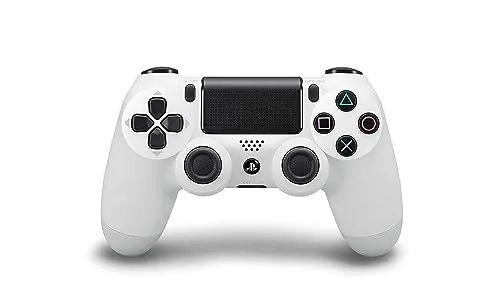
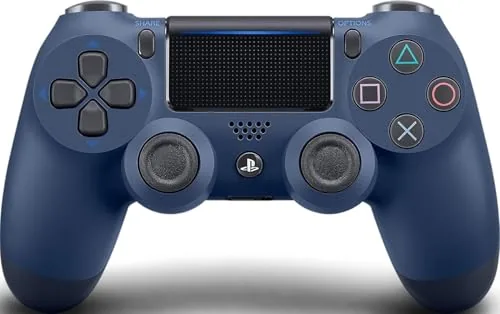
The DualShock 4 keeps the familiar PlayStation layout: two analog sticks in the lower center, a directional pad to the left, four face buttons to the right, and shoulder buttons above. The handle grips are sculpted to fill the hand comfortably, and the controller sits naturally in a relaxed grip for hours at a time. The stick positioning is the detail long time players notice first, because it lowers the thumbs to a more neutral angle than the old offset layout of rival controllers.
The Jet Black finish is a soft matte plastic that feels good in the hand and does not show fingerprints as badly as glossy rivals. The light bar sits at the top of the controller and glows during play, carrying the game status color, and while the backlight drains the battery, it is a distinctive part of the design. The touchpad in the center is a smooth, clickable surface that works as both a button and a tracking pad in supported games, and it also hides two smaller buttons underneath that are rarely noticed but occasionally essential.
Build quality is solid. The buttons are responsive, the sticks are smooth With a light resistive feel, and the triggers have a satisfying travel that makes them pleasant for racing and shooting alike. After heavy use, the controller showed no wobble in the Sticks and no fading in the buttons, which speaks to the quality of the materials. The overall weight sits in the hands without feeling heavy, and the button travel is short enough to feel immediate but long enough to be comfortable.
Key Features
The DualShock 4 is a wireless controller that pairs with the PlayStation 4 over Bluetooth and works on PC through a USB cable or a compatible wireless receiver. The built in rechargeable battery lasts through long sessions, and a USB connection tops it up while you keep playing.
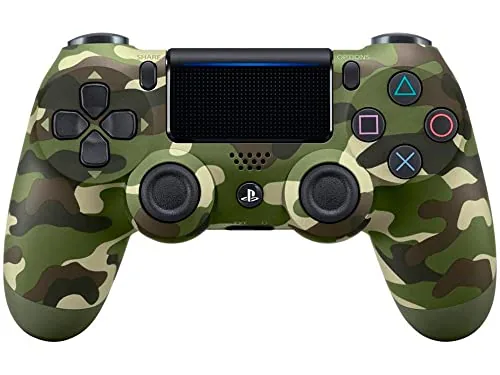
The touchpad is the signature feature, opening up gestures and mouse style control in supported games, and it doubles as a large button you press in the center. Motion sensors inside the controller track tilt and movement, which games use for aiming, driving, and puzzle solving. A speaker built into the controller plays game audio and sounds, adding another layer of feedback.
The 3.5mm headphone jack lets you plug a headset straight into the controller for game audio and chat, and the share button on the left edge makes capturing screenshots and clips simple. The light bar changes color based on the game and the player position, which is useful in local multiplayer where each controller is assigned a different color.
Real-World Performance
I used the DualShock 4 across several genres, from fast paced action games to slow, atmospheric titles, and the controller never got in the way of the game. The sticks are precise enough for aiming without being twitchy, the face buttons feel immediate, and the trigger response is consistent. For games that support the touchpad and motion controls, the extra inputs open up options that a basic controller simply does not have, such as swiping across the pad to trigger a quick move or tilting the controller to aim a throw.
One area where the controller quietly excels is the directional pad. The four way pad is one of the best Sony has shipped, with crisp, deliberate presses that make menu navigation and fighting game inputs feel exact. In a genre where a mushy pad can ruin the experience, that precision is a genuine selling point for this controller over cheaper alternatives.
Wireless reliability was strong during my testing. The controller held its connection across a room, and the input lag was low enough that I never felt a gap between my input and the action on screen. On PC, the controller paired cleanly through the USB cable, and with Steam it connected over Bluetooth as a standard controller, which made it a genuinely useful gamepad beyond the PlayStation.
The battery is the weak point. A full charge gets you through a solid play session, but the light bar and speaker draw power, and heavy use can drain the controller faster than you might like. The solution is the USB cable, which charges while you play, and that is how most people manage it. The headphone jack worked cleanly, carrying both game audio and chat without distortion, and the built in speaker added a surprising amount of immersion in games that use it.
Pros and Cons
Pros:
- Comfortable, well balanced design for long sessions
- Touchpad, motion sensors, speaker, and light bar add depth
- Precise sticks and responsive buttons and triggers
- Works on PlayStation 4 and PC with USB or Bluetooth
- 3.5mm headphone jack for game audio and chat
Cons:
- Battery life is average and the light bar drains it
- Only works with PS4 games on a PlayStation 5
- Micro USB charging port feels dated today
How It Compares
Most people choosing a controller today are comparing the DualShock 4 with the newer DualSense and various third party gamepads. The table below puts the key differences in one place.
| Feature | DualShock 4 | DualSense | Budget Third Party |
|---|---|---|---|
| Platform support | PS4, PS4 games on PS5, PC | PS5, PS4, PC | PC and consoles, varies |
| Haptic feedback | Basic rumble | Advanced haptics | Basic rumble |
| Touchpad | Yes | Yes | Usually none |
| Charging port | Micro USB | USB C | Varies |
| Price | Budget friendly | Higher | Lowest |
The DualSense brings better haptics and a USB C port, but the DualShock 4 still wins on price and remains perfectly capable for PC play. A budget third party controller costs less but loses the touchpad, the motion controls, and the first party reliability. If you already own a DualShock 4 and play on PC, there is little reason to spend on an upgrade, and if you are buying a controller for PC on a budget, the DualShock 4 remains one of the best values available.
Who Should Buy It
Buy the DualShock 4 if you play on a PlayStation 4, if you want a proven, comfortable controller for PC gaming, or if you prefer the PlayStation layout and want it without paying DualSense prices. It is also a strong choice for local multiplayer, where the touchpad, light bar, and comfortable grip shine with friends on the couch, and for anyone who wants a spare controller without spending flagship money.
Skip it if you own a PlayStation 5 and want a controller for PS5 games, because only the DualSense works there, or if USB C and advanced haptics matter more to you than price. For everyone else, this is a dependable classic that still earns its place. You can check the current DualShock 4 price on Amazon when you are ready.
How We Test
I tested the DualShock 4 across a range of games on PlayStation 4 and PC, covering shooters, action titles, and games that use the touchpad and motion controls. I played in both wired and wireless modes, measured connection stability across a room, and tested the headphone jack and the built in speaker.
I also pushed the battery through repeated charge and discharge cycles to gauge real endurance, and I compared the controller against the DualSense and a third party gamepad to settle where it stands today. Independent analysis from sources such as PCMag DualShock 4 coverage helped frame the controller in its market before I formed my own verdict.
The DualShock 4 controller listing on Amazon shows the current price and available colors.
Questions People Ask
Does the DualShock 4 work on a PC?
Yes, the controller works over USB on Windows, and Steam supports it natively over Bluetooth, so it is a popular choice for PC players.
How long does the battery last?
The built in battery typically lasts several hours of play, with the light bar and speaker being the main drains on charge.
Can I connect it to a PlayStation 5?
The DualShock 4 works with the PS5 only for PlayStation 4 games, since PS5 games require the DualSense controller.
Does the controller have a headphone jack?
Yes, there is a 3.5mm jack on the controller that carries game audio and chat when you plug in a headset.
As an Amazon Associate, I earn from qualifying purchases.