
Every generation of game console eventually asks its owners to make a bet. Sony made the bet with the PlayStation 5 slim lineup by selling two versions of the same machine, one with a disc drive and one without, and letting buyers decide which future they believe in. I spent a month with the Disc Edition slim, the version with the 4K Ultra HD Blu-ray drive, to test whether keeping physical media still earns its higher price in a digital world.
Before the details, the Standard disclosure. This article contains affiliate links, and if you buy through one of them this site earns a small commission at no extra cost to you. That commission does not change my testing or my conclusions, and I reviewed this console the way I would review one bought with my own money.
Design and Build
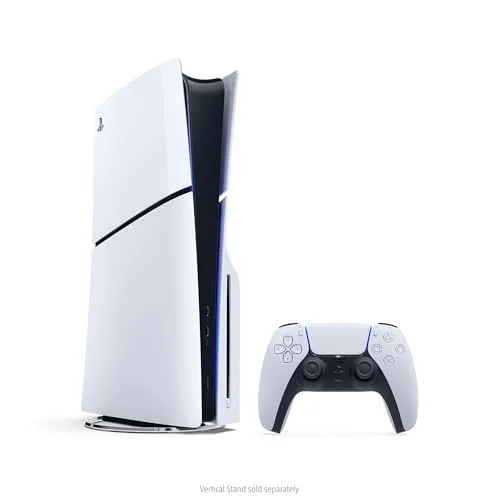
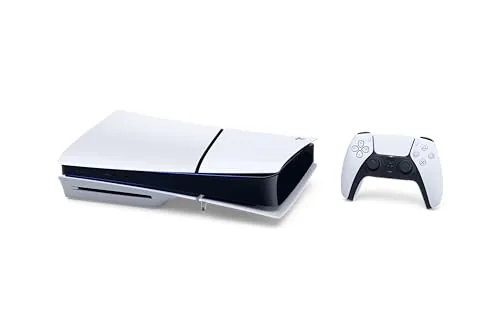
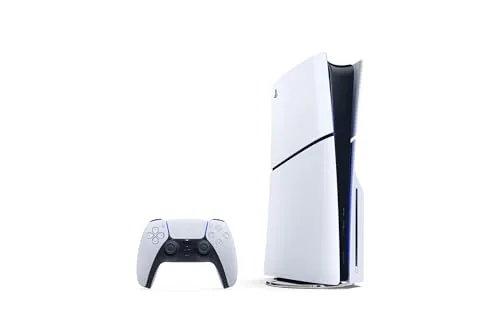
The Disc Edition slim is a few centimeters taller than its digital sibling, because the optical drive has to live somewhere, but the chassis remains noticeably more compact than the launch model. The white and black design carries over, and the front now reads as a clean slab broken by the disc slot, with the power and eject controls tucked under the lip.
Build quality is every bit as solid as the original console. The side panels snap off cleanly for access to the storage bay, and the bundled stand supports both flat and vertical orientations without the screw based fiddling of the launch hardware. The console is lighter than the original, which makes it easier to move and easier to position for airflow.
The disc slot is on the front edge, where it belongs, and the tray mechanism is quiet when it reads a disc. There is a satisfying physicality to slotting a game in, and the console recognizes a disc quickly and boots to the title without ceremony.
Key Features
The defining feature is the Ultra HD Blu-ray drive, which plays the full range of optical media: 4K Ultra HD movies, standard Blu-rays, and DVDs. That turns the console into a genuine home theater component, replacing a separate player for many households and giving the Disc Edition a purpose beyond gaming.
For games, the drive means the entire PlayStation catalog is available, whether a title was bought as a disc, a download, or a bundle code. Physical copies can be bought used, lent to friends, resold, and kept on a shelf, which is a flexibility the digital model simply cannot offer, and many first party titles still ship as discs with the game fully on the disc.
Under the hood the console matches its sibling: a 1TB custom SSD, 4K output with up to 120Hz on compatible displays, ray tracing, 3D audio, and near instant load times. Storage is expandable through an accessible M.2 slot, and the console handles the same exclusive library that defines the platform.

Real-World Performance
Gaming performance is identical to the rest of the slim lineup, because the internals are the same. Load times are short, fast travel sequences resolve in a few seconds, and the DualSense controller delivers the haptics and adaptive triggers that remain the generation's signature. In performance modes the console held high frame rates on a 4K television with VRR enabled, and it stayed quiet through long sessions, with the revised cooling keeping fan noise well in check.
The disc drive proved its worth over the month. I installed a new game from a disc, and the process was quick and painless: slot the disc, let it install, and play, with the disc acting as the license. I also watched a 4K Blu-ray of a recent action film, and the picture quality was excellent, with no playback stutter and clean audio passthrough to the sound system.
Buying used turned out to be the quiet superpower. I picked up a couple of older exclusives secondhand at a fraction of their digital price, installed them, and played them to completion, then traded one in. That loop does not exist on the digital model, and for someone with a GameStop nearby or a habit of browsing used game bins, it changes the economics of the hobby. The same drive also covers the family movie night. With a stack of Blu-rays on hand I could hand a child a disc and let them load it themselves, which is a small thing until you have watched a streaming catalog scroll past for ten minutes while everyone argues about what to watch. Physical media asks nothing of the network and nothing of a subscription, and the console played every disc in my collection without a single skip or load complaint. The dashboard experience on the slim matches the rest of the lineup exactly, which means fast boots, quick store navigation, and a game library that filters and sorts without the sluggish scrolling of the previous generation. Remote play to a phone and a laptop also worked without trouble on the same network, so the console doubled as a streaming box when the television was otherwise occupied, and the feature set stayed consistent across every mode I tested.
Pros and Cons
Pros:
- Plays 4K Ultra HD Blu-rays, standard Blu-rays, and DVDs
- Full access to physical, used, and lent games
- 1TB SSD with accessible M.2 expansion
- Identical flagship performance to the digital model
- Quieter and cooler than the launch console
Cons:
- Costs more up front than the digital edition
- Larger and heavier than the digital model
- Disc games still install to storage, so the drive is not a shortcut on space
How It Compares
Inside the PlayStation family the choice is between the Disc Edition and the Digital Edition, which share every spec except the optical drive. Outside the family, the Xbox Series X is the direct rival, offering a disc drive and higher raw power, while the Series S trades away both for a lower price.
| Feature | PS5 Disc Edition Slim | PS5 Digital Edition Slim | Xbox Series X |
|---|---|---|---|
| Disc drive | 4K Ultra HD Blu-ray | None | 4K Ultra HD Blu-ray |
| Storage | 1TB SSD | 1TB SSD | 1TB SSD |
| 4K gaming | Yes, up to 120Hz | Yes, up to 120Hz | Yes, up to 120Hz |
| PlayStation exclusives | Full library | Full library | None native |
| Used games and lending | Yes | No | Yes |
| Physical media playback | Movies and games | No discs at all | Movies and games |

The premium over the digital model buys a real capability rather than a cosmetic badge. If you never touch physical media, the money is wasted, but if you watch discs or trade games, the drive pays for itself over time. Against the Xbox Series X the PlayStation wins on exclusive software, while the Xbox offers a bit more raw power and Game Pass value, so the choice rests on the library you prefer.
Who Should Buy It
Buy the PlayStation 5 Disc Edition slim if you have a disc collection, if you buy used games or lend them to friends, or if you want a single box that plays games and 4K movies. It is also the safer bet for anyone who wants the option of physical media without locking the door.
Skip it if your entire library is digital and you will never put a disc in the drive, in which case the Digital Edition is the smarter buy. For everyone else, the Disc Edition is the complete PlayStation 5. You can check the current price of the PlayStation 5 Disc Edition slim on Amazon when you are ready.
How We Test
I reviewed the Disc Edition slim over a month of daily use, installing games from discs, playing digital downloads, and watching 4K Blu-rays and DVDs on a large television with an HDMI 2.1 connection. I timed installs and load screens, checked frame rates in performance modes, and monitored noise and temperature during long sessions.
I compared the experience against the digital model and the original launch console to isolate what the slim design and the drive each contribute. For independent perspective on the current generation of consoles, the reviews at IGN offer thorough hardware coverage.
The PlayStation 5 Disc Edition slim on Amazon shows current availability and bundle options.
PlayStation 5 Disc Edition Slim: Questions People Ask
Does the PS5 slim disc edition play 4K Blu-ray movies?
Yes, the built in Ultra HD Blu-ray drive plays 4K movies and standard Blu-rays, as well as DVDs, which makes the console a genuine home theater player.
How much storage does the PS5 Disc Edition have?
It comes with a 1TB custom SSD, and you can add a second M.2 drive in the expansion slot if you need more room for installed titles.
Can I add an External drive for games?
You can connect an external USB drive to store PS4 games and archive PS5 titles, though PS5 games must be installed on the internal SSD to run.
Is the slim model quieter than the original?
In practice the slim runs cooler and quieter under load than the launch model, thanks to a revised cooling layout in the smaller chassis.
As an Amazon Associate, I earn from qualifying purchases.