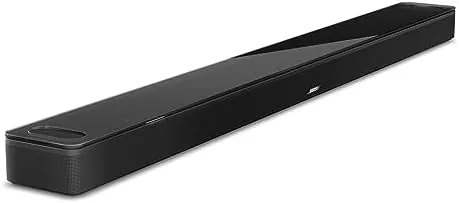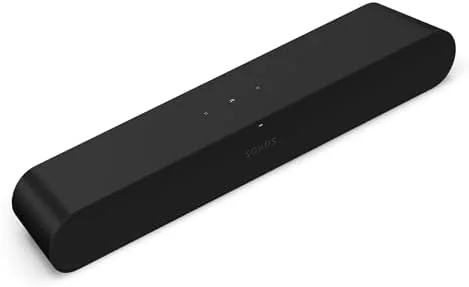

My living room television drowned out its own dialogue at any volume above a murmur, so this Sonos Ray review is the record of a month spent with the Ray as the only upgrade to that screen. Moderate in price, small in footprint, and missing one headline port that some people cannot look past. The honest verdict: for a single-room television and a steady music habit, the Sonos Ray is one of the most sensible first soundbars you can buy.
Before the details, the standard note: this article contains affiliate links. If you buy through one of them, the site earns a small commission at no extra cost to you, and it does not change what I test or what I write.
Design and Build
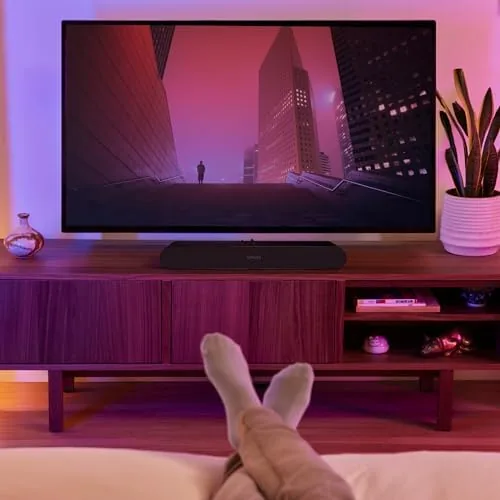
The Ray is small in the way you intend it to be, roughly the length of a long board game and just under two inches tall, so it sits on a television stand or a shelf without blocking the bottom of the panel. There is no separate subwoofer and no satellite speakers; the whole system is the bar you see, which keeps the footprint honest for an apartment or a bedroom.
Build quality is classic Sonos. The outer wrap feels dense and slightly rubbery, the two gesture buttons on top are small but responsive, and there is a small LED that tells you at a glance whether the speaker is grouped, muted, or cycling through a source. The power and sync connections sit on the rear, and the edges are rounded enough that the bar does not look out of place on a media rack.
One detail worth flagging immediately: the Ray only takes an optical cable from a television. There is no HDMI port on this unit, which means no automatic on and off handshake through the TV and no support for some of the pass-through conveniences you might expect. It is the most obvious compromise on the spec sheet, and I will come back to it.
Key Features
Inside the short frame, the Ray packs two curved mid-woofers and two tweeters, and it is tuned to push dialogue and vocals forward in the mix. That matters more than raw bass when you watch a drama or a sports broadcast at a normal evening volume, because a muddled mix is what makes you reach for subtitles in the first place.

Because it is a Sonos, the real feature is not the hardware alone but the network. The Ray connects over WiFi, so it joins any Sonos speaker group you already own, plays from every major streaming service through the Sonos app, and supports AirPlay 2. If you already own a single Sonos speaker, that grouping flexibility is the quiet reason people stay loyal to the system.
There is Dolby Digital decoding on board, but no full Dolby Atmos virtualisation, so the soundstage is tuned for watching and listening rather than a true wraparound effect. For a bedroom television that is fine; for a dedicated media room, it is the reason you would spend more.
Real-World Performance
Here is where I put the compact box aside and describe what it is like to live with, because performance is the real test. Dialogue is the headline. The whole point of the upgrade for me was that I kept missing lines in a busy mix, and the Ray solved that within a week. Characters stay crisp over music and effects, and even quiet voiceover in a sports broadcast reads clearly at a moderate level.

Music is where the Ray surprised me. It is not built to shake a room, the physics are too small for that, but it delivers a warm and well-balanced sound with respectable stereo width for its size. Playing playlists through the Sonos app sounded fuller than I expected from a bar this compact, and that sat nicely alongside the television work. I would not pick it for a house party, but for weekday listening it is plenty.
An honest note about setup. The Ray only speaks to a television over optical, and my television had no spare optical port, so I used a passive adapter. That works, but it means the bar cannot wake and sleep automatically with the TV, and the initial handshake can feel slightly clunky. It is the most real friction point in the whole experience.
There is no battery to worry about, since this is a wired unit, and the app integration is fast. To be fair, none of that bothers me for a single-room bar; the missing HDMI is the only reason I hesitate before calling it perfect.
Pros and Cons
Pros:
- Dialogue is noticeably clearer on movies and broadcasts
- Small footprint fits a bedroom or compact media stand
- Full Sonos system integration and AirPlay 2
- Surprisingly good music quality for the size
- Lower entry price than the Beam or the Arc
Cons:
- Only an optical input, with no HDMI or eARC support
- Cannot be expanded with a Sonos Sub or surround speakers
- No built-in voice assistant
- Budget rivals offer more bass at a lower price

How It Compares
The closest comparison is the Sonos Beam, which costs more but adds HDMI ARC, a dedicated center channel, and Dolby Atmos. If you already own a Beam, or you plan to grow a proper surround system, the Ray is not the right spend; if your television is one screen in one room, the Ray covers that job with fewer compromises.
| Feature | Sonos Ray | Sonos Beam |
|---|---|---|
| Input | Optical only | HDMI ARC |
| Center channel | None | Dedicated |
| Dolby Atmos | No full processing | Yes |
| Bass | Compact | Greater |
| Typical price | Less | More |
The Ray sits below the Beam in the Sonos lineup and above most budget Bluetooth bars. Honest competition like a basic VIZIO or a no-name Amazon brand bar offers more raw volume for less money, so if loudness is your only priority, the Sonos Ray is not the strongest number. It wins where a coherent, connected speaker system matters more than peaks.

Who Should Buy the Sonos Ray
Buy it if you have a television in one room, struggle to hear dialogue, and want to start a mostly Sonos home without paying flagship money, or if you already stream music to a speaker and want the television to sound as good as your phone. That is exactly my situation, and it is the use this bar was made for.
Skip it if you expect an HDMI hookup and an everyday cinematic sound, or if you have already planned a surround system with a subwoofer, because then the Beam or the Arc is the better route. You can check the Sonos Ray price and options on Amazon when you are ready.
How We Test
I ran the Sonos Ray for a month as the only sound upgrade on a 55-inch television in a living room with hardwood floors and a mix of cable, streaming, and AirPlay sources.
I judged it on dialogue intelligibility, music quality, integration ease, and how well it handled switching between cable, apps, and phone playback. I compared it side by side with a Sonos Beam and a budget Bluetooth bar, so the verdict reflects time with the products rather than a spec sheet. Independent testing, such as TechRadar's Sonos Ray review, is a useful second opinion.
When you are ready to decide, the Sonos Ray listing on Amazon has the current options.
Sonos Ray: Questions People Ask
Does the Sonos Ray have an HDMI port?
No. The Ray connects to a television over an optical cable only, so you need a spare optical output on the TV or a passive adapter. That is the single biggest catch for many buyers.
Can I pair two Sonos Ray speakers?
Yes. You can pair two Ray units in the Sonos app to create a true left and right stereo pair. I reviewed a single unit, but stereo pairing for music is well documented.
Does the Sonos Ray work with AirPlay?
It does. Built-in AirPlay 2 lets you stream from an iPhone, iPad or Mac, and the Sonos app covers Spotify, Apple Music and dozens of other services.
Can the Sonos Ray connect to a subwoofer?
No. The Ray is a standalone speaker and cannot pair with the Sonos Sub or any surround speakers. If you plan to grow a proper surround setup, the Beam is the more future-proof choice.
As an Amazon Associate, I earn from qualifying purchases.