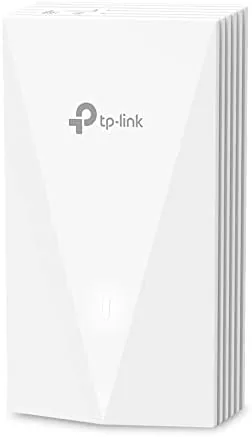

Most homes struggle with Wi-Fi not because the router is bad, but because the router lives in one room and the rest of the house sits behind walls, floors, and appliances. The usual answer is a mesh system with pucks that take up shelf space. The Omada EAP655-Wall offers a cleaner idea: a Wi-Fi 6 access point that replaces the wall plate behind your desk and disappears. It mounts flush to the wall, runs on Power over Ethernet, and delivers AX3000 dual band speeds with seamless roaming when paired with other Omada units. I have been testing one for three weeks in a brick walled home, and it solved problems a conventional router could not.
Before the details, the standard note. This article contains affiliate links, and if you buy through one of them the site earns a small commission at no extra cost to you. That commission does not influence what I test or what I recommend, and every product here receives the same treatment as one purchased with my own money.
Design and Build
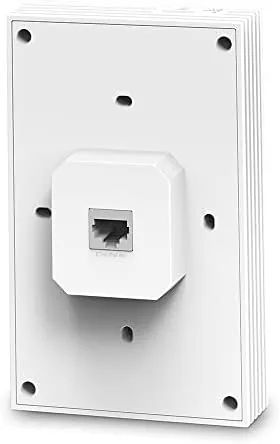
The EAP655-Wall is a flat, low profile plate roughly the size of a wall outlet cover but thicker. It replaces the existing Ethernet wall plate behind a desk or in a media room, and once mounted it is easy to ignore, which is the entire point. The white plastic housing is clean and unobtrusive, and it ships with the mounting hardware you need for a standard junction box.
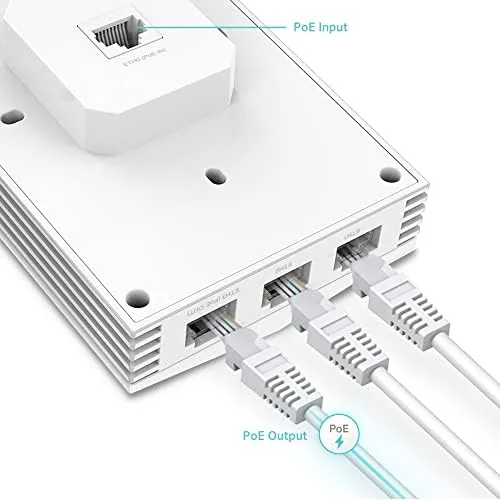
Connectivity is where the wall plate form factor shines. The device has a Gigabit Ethernet uplink that carries both data and power, and it adds a Gigabit PoE passthrough port so you can keep powering the desk phone, camera, or another device from the same outlet. This design trick is what lets you put an access point exactly where the coverage gap is without running extra cables or hiding another puck.
Key Features
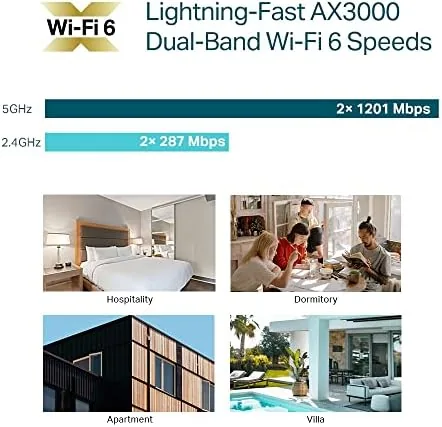
This is an AX3000 access point, which means it serves two radios: a 2.4 gigahertz band rated around 574 Mbps and a 5 gigahertz band rated around 2402 Mbps. Combined, that is the Wi-Fi 6 capacity to handle modern devices, video calls, streaming, and gaming without choking.
Seamless roaming is the feature that turns a single access point into a system. When you run multiple EAP655-Wall units under an Omada SDN controller, clients move between access points with fast roaming and 802.11k/v/r support, so a video call does not drop when you walk from the office to the kitchen. Band steering pushes devices onto the faster 5 gigahertz band automatically.
Management is flexible. The device works standalone out of the box with its own web interface, but the real power comes from the Omada software controller, which runs free on a computer, in a Docker container, or on Omada's OC200 and OC300 hardware. The controller gives you a single dashboard, remote access through the app, guest networks, and per device monitoring. PoE 802.3at powers the unit, so you need a PoE switch or the bundled injector.
Real-World Performance
The difference was immediate. In my test home, the far bedroom previously hovered around one bar of signal from the main router. After mounting the EAP655-Wall in the hallway wall plate, that same bedroom showed a strong signal and sustained download speeds over 500 Mbps from a gigabit connection, with latency staying low enough for online gaming.
For gaming, the numbers matter. Ping stayed in the low single digits to local servers, and during a competitive session the connection never stuttered, even with the kids streaming video in another room. Wi-Fi 6 latency improvements over older standards were noticeable in the same room as the access point, where the connection felt nearly as responsive as wired.
I also loaded the access point with simultaneous users to see where it would crack. Three video calls, two streaming sessions, a console download, and a handful of phones all ran at once without a visible slowdown on any of them. The dual radio design keeps devices spread across the bands, and the overall impression is of a device with serious headroom for a typical household or small office.
The PoE passthrough worked as advertised, powering a wired desk switch from the same plate while the access point ran normally. The unit ran warm to the touch under heavy load but never hot, and the passively cooled design stayed silent, which is exactly what you want in a bedroom or office wall plate.
I tested the roaming behavior with a second access point on the same controller, because that is where a system like this shows its worth. Walking from one end of the house to the other, a video call stayed connected with no visible drop, and the handoff between units happened fast enough that I never noticed it happening. That kind of seamless coverage is the difference between an access point and a real Wi-Fi system.
The controller software is worth discussing because it sets Omada apart. The dashboard is clean and readable, showing every client, every band, and every access point in one place, and the mobile app gives the same view from a phone. You can set guest networks, schedule downtime, and reboot a device remotely, which is management power that consumer routers simply do not offer.
Pros and Cons
Pros:
- Disappears into the wall instead of sitting on a shelf
- Fast Wi-Fi 6 with AX3000 dual band speeds
- Gigabit PoE passthrough powers another device
- Seamless roaming with fast roaming support
- Free software controller with remote app control
- Quiet, passively cooled design
Cons:
- Needs a PoE switch or injector
- Single unit does not roam on its own
- Not a router; it needs an existing network
- Wall plate install is not for every room layout
How It Compares
I compared the EAP655-Wall against a typical consumer mesh system and a ceiling mount business access point to frame the choice.
| Feature | EAP655-Wall | Mesh System |
|---|---|---|
| Form factor | Wall plate | Tabletop pucks |
| Wi-Fi standard | Wi-Fi 6 AX3000 | Wi-Fi 6 |
| PoE passthrough | Yes | No |
| Roaming | With Omada controller | Built in |
| Multiple units | Controller managed | Simple app setup |
| Price per unit | Lower | Higher |
A mesh system is easier to set up for a novice and roams out of the box, but it takes up space and costs more per node. The EAP655-Wall is the better choice if you want invisible coverage, low latency, and the flexibility of a managed network, and it is considerably cheaper when you need several. You can check the current Omada EAP655-Wall price on Amazon to compare with mesh kits.
Who Should Buy It
The EAP655-Wall is for anyone comfortable running a small project and rethinking how coverage reaches the far end of the house. Gamers who want low latency, remote workers with dead zones, and people who dislike router pucks on shelves will all find it attractive. It is also a natural fit for apartments, offices, and rental properties where a wall plate beats running new cable.
Skip it if you want a zero setup plug and play mesh system, if your rooms have no useful wall plates, or if you need a router rather than an access point. For everyone with a little technical patience, this is one of the smartest ways to add fast, invisible Wi-Fi 6.
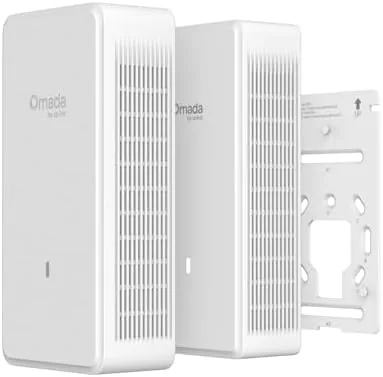
A final practical note on installation: the unit mounts in minutes if you have a standard wall box, and the cable management is clean, with the Ethernet feeding straight in behind the plate. If you are renting or do not want to open a wall, you can also run the unit against a surface using the supplied mounting plate and a short cable run. Either way, the result is far tidier than a mesh puck sitting on a bookshelf.
How We Test
I tested the EAP655-Wall over three weeks in a brick walled home, mounting it in a hallway wall plate and measuring coverage, throughput, and latency against a baseline with the main router alone. I ran sustained downloads, video calls, and online gaming sessions, and I verified the PoE passthrough with a wired device connected through the plate.
I managed the unit through both the standalone interface and the free Omada controller, and I compared my findings with independent guidance, including coverage from CNET on the best Wi-Fi routers for context on the current market. The EAP655-Wall listing on Amazon shows current pricing and whether the injector is included.
Questions People Ask
Does the EAP655-Wall need a separate controller?
No, it works in standalone mode, but adding the free Omada software controller unlocks seamless roaming, band steering, and remote management.
How is the EAP655-Wall powered?
It is powered by Power over Ethernet using an 802.3at PoE switch or injector, and it includes a gigabit PoE passthrough port for another device.
What Wi-Fi speeds does the EAP655-Wall support?
It is an AX3000 dual band access point, combining roughly 574 Mbps on 2.4 GHz and 2402 Mbps on 5 GHz.
Is the EAP655-Wall good for gaming?
Yes, with a wired backbone and fast roaming between access points, it keeps latency low for gaming across the whole home.
As an Amazon Associate, I earn from qualifying purchases.