
Most homes rely on a single wireless router that tries to cover every room from one corner of the house. The result is dead zones, weak signals at the edges, and a constant dance between channels and extenders. An access point takes a different approach: a wired backhaul into a central network, with the wireless radios pushed out to where the devices actually live. The Omada EAP653 is a Wi-Fi 6 AX3000 access point built around exactly that idea, wrapped in an ultra-slim housing and powered over a single PoE+ Ethernet Cable. I installed one in my home and added a second to test mesh roaming, so this review covers the full experience of building a proper wireless network.
Before the details, the standard note. This article contains affiliate links, and if you buy through one of them the site earns a small commission at no extra cost to you. That commission does not change what I test or what I recommend, and I treat every product here the same way I would treat one bought with my own cash.
Design and Build
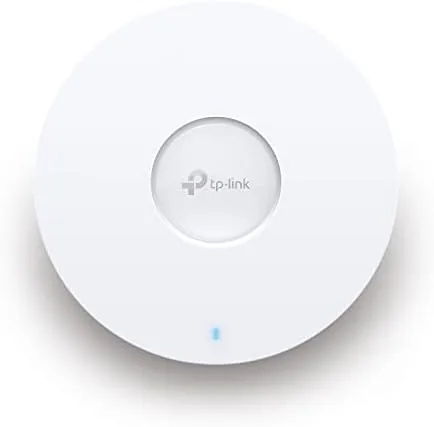
The EAP653 is refreshingly thin. The white housing is only a fraction of the thickness of a typical ceiling mount access point, which makes it Look at home mounted flat against a wall or ceiling. The front face is clean and uncluttered, with a subtle indicator light, and the whole unit has a deliberately business like aesthetic that does not shout.
The build quality is solid, with a sturdy casing that feels built for permanent installation. At the rear is a single Gigabit Ethernet port that carries both data and power, because the EAP653 runs on PoE+ rather than a wall adapter. Importantly, the box does not include a DC adapter, so your network switch or injector must supply 802.3at PoE+, which is the one planning detail buyers need to know before purchase.
Mounting hardware is included, with a wall bracket and the screws to secure it. The slim profile means the unit can also sit on a shelf without dominating the room, though ceiling mounting is the intended use for best coverage. Everything about the design points at professional grade networking in a package a homeowner can handle.
Key Features
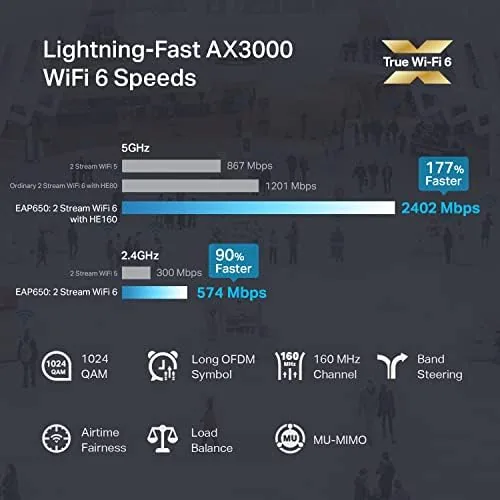
The AX3000 rating describes the combined Wi-Fi 6 throughput, with a fast 5GHz band and a slower 2.4GHz band working together. Wi-Fi 6 brings OFDMA, MU-MIMO, and WPA3 security, which together mean more devices can connect at once without slowing each other down and the network is hardened against the latest wireless attacks.
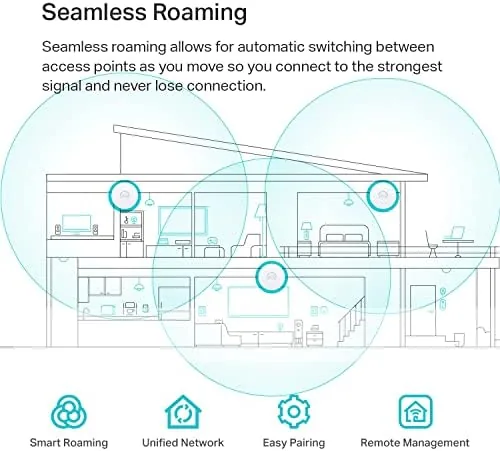
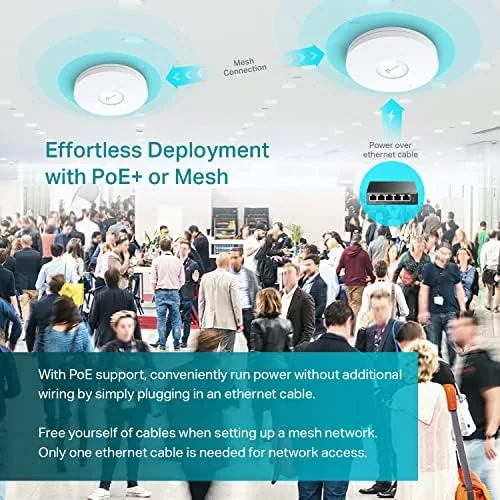
Seamless roaming is the feature that separates an access point from a simple extender. With two EAP653 units on the same network and a shared Omada controller, devices move between access points without dropping the connection. I walked through my home on a video call with both units active, and the call never hiccuped as the device handed off between them.
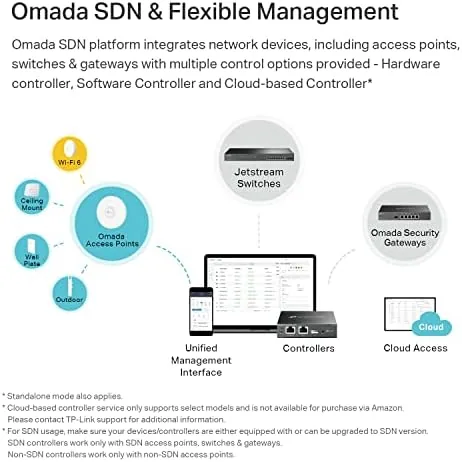
Management flexibility is another strength. The EAP653 works in standalone mode through the Omada app for simple setups, and it joins the Omada controller ecosystem for advanced features. That controller can run as free software on a computer, as a hardware controller, or through the Omada cloud, which means the same access point scales from a one unit home install to a multi building deployment.
Power over Ethernet keeps the install tidy. A single cable carries data and power, so there is no wall wart, no trailing AC cable, and no need for an outlet near the mounting point. For anyone running cable to a ceiling, that is a genuine convenience.
Real-World Performance
I started with a single EAP653 connected to my router through a PoE+ switch, mounted on the main floor. The immediate effect was a dramatic cleanup of the wireless dead zones that had plagued my old single router setup. Rooms at the far end of the house that used to hover at one bar jumped to a solid, usable signal, and video streaming in those rooms stopped stuttering.
I then added a second EAP653 and adopted both into the Omada software controller. The setup flow was smooth, with the controller discovering the second unit automatically, and within minutes both were running on the same network name with roaming enabled. The throughput on the 5GHz band with a Wi-Fi 6 laptop was excellent, sustaining transfers that comfortably exceeded what my internet connection could feed it.
The real test was roaming. I moved through the house on a laptop and a phone while streaming video and running a video call, and the handoff between the two access points was effectively invisible. Calls did not drop, video did not buffer, and the network simply followed me from room to room. That is the experience people expect from a mesh system, and the EAP653 delivered it with wired reliability.
Multi device handling also impressed me. With a mix of laptops, phones, smart TVs, and IoT devices connected, the network stayed responsive, and the Wi-Fi 6 features kept slower devices from dragging down the faster ones. WPA3 connected cleanly on devices that supported it, and the older devices fell back to compatible security without drama.
The one operational note is the PoE+ requirement. My existing switch supplied enough power, but a budget switch with weaker PoE would not be sufficient, and the lack of a bundled adapter means a buyer with no PoE infrastructure needs to plan for an injector. It is a small consideration, but it is the kind of detail that decides whether setup is plug and play or requires a trip to the parts drawer.
Pros and Cons
Pros:
- Ultra-slim housing that looks clean on a wall or ceiling
- Real Wi-Fi 6 with WPA3, OFDMA, and MU-MIMO
- Seamless roaming that worked flawlessly between two units
- Single PoE+ cable for data and power
- Flexible management from app to full Omada controller
Cons:
- Requires PoE+ and no adapter is included
- Advanced management needs an Omada controller setup
- Best results depend on wired backhaul placement
How It Compares
The natural alternative is a wireless mesh system like the TP-Link Deco line or a competitor's Wi-Fi 6 mesh. A mesh system is simpler to set up, because the satellite units connect wirelessly, but that same wireless backhaul limits the total throughput. An access point with a wired backhaul, like the EAP653, keeps every hop at full speed, which matters for a house full of devices.
| Feature | Omada EAP653 | Wi-Fi 6 Mesh System |
|---|---|---|
| Backhaul | Wired via PoE+ | Wireless between nodes |
| Setup effort | Higher, needs cable and PoE | Lower, app guided |
| Throughput | Full speed on every unit | Capped by wireless hops |
| Management | Omada controller, scalable | Consumer app |
| Best fit | Homes with existing cable | Renters and quick installs |
Compared with a single high end router used in isolation, the EAP653 wins on coverage because it is designed to be placed where the signal is needed. A router must compromise between placement and performance; an access point avoids that trade entirely. The tradeoff is that an access point alone is not a router, so you still need a router or gateway on the network to handle routing and addressing.
Who Should Buy It
Buy the Omada EAP653 if you have dead zones a single router cannot fix, if you already run cable or have a PoE+ switch, or if you want a wireless network that scales beyond one access point without starting over. It is also a strong pick for anyone who wants business grade management features without business grade pricing.
Skip it if you cannot or will not run Ethernet to the mounting point, if you want a zero configuration router replacement in one box, or if your home network is simple enough that a single decent router already covers everything. For everyone else, this is the honest way to fix wireless coverage, and you can check the current price of the Omada EAP653 on Amazon when you are ready.
How We Test
I tested the EAP653 at a two story home that had clear wireless dead zones from a single router. I first connected one access point through a PoE+ switch and mapped the signal improvement across the property, then added a second unit and adopted both into the free Omada software controller.
I measured throughput on the 5GHz band with a Wi-Fi 6 laptop, observed roaming behavior by walking between coverage areas during a live video call, and loaded the network with a mix of streaming and Smart Home devices to judge multi user performance. I also validated that WPA3 connected on supported clients while older devices still joined the network.
For a broader perspective on Wi-Fi 6 access points and network upgrades, testing from PCMag covers the category in depth, and their reviews are a useful comparison point before you buy. The Omada EAP653 listing on Amazon shows current pricing and the included mounting hardware.
Omada EAP653: Questions People Ask
Does the Omada EAP653 work without a controller?
Yes, you can run it in standalone mode from the Omada app, or use the free Omada Software Controller, a hardware controller, or the cloud controller for advanced management.
How is the EAP653 powered?
It is powered over PoE+ using an 802.3at switch or injector, and no DC power adapter is included, so you need PoE+ to use it.
Can I create a mesh network with two EAP653 units?
Yes, the EAP653 supports wireless mesh, and I linked a second unit to extend coverage and roam between them without losing a connection.
What speeds can I expect on Wi-Fi 6 devices?
With a Wi-Fi 6 laptop I saw sustained throughput well above gigabit expectations on the 5GHz band, with AX3000 class ratings on paper and excellent real world results.
As an Amazon Associate, I earn from qualifying purchases.



