
A quick disclosure before the details. This article contains affiliate links, and if you buy through one of them the site earns a small commission at no extra cost to you. That never influences what I test or recommend.
Design and Build
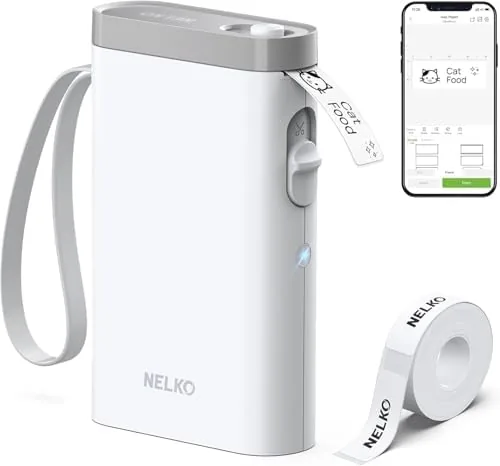
The P21 is a compact, rounded white device that looks more like a tiny printer than a traditional label gun. It is small enough to sit on a desk corner or slide into a drawer, and the white finish keeps it from clashing with office or kitchen surroundings. The tape loads through the back of the machine, and a built in cutter trims each label as it prints, so there is no blade to chase after the job is done.
Build quality is solid for the price. The plastic body feels sturdy rather than flimsy, the tape door opens cleanly, and the cutter is spring loaded and satisfies the moment it clicks. The only moving parts beyond that are the paper feed rollers and the Bluetooth indicator light, which blinks during pairing and stays steady once connected.
There is no screen on the device itself, which is a deliberate design choice. All the controls live in the companion app on your phone, where the full color interface is far easier to use than the small monochrome displays on traditional label makers. That shift is the P21's biggest conceptual advantage, and it only works if the app delivers, which I will get to shortly.
Key Features
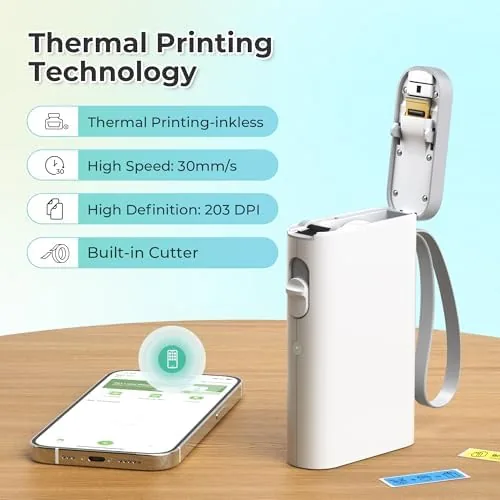
The defining feature is inkless thermal printing. The P21 uses direct thermal technology, which means the print head heats the thermal tape to create text and graphics without any ink, toner, or ribbons. The practical effect is a total absence of consumable supplies beyond the tape rolls themselves, and the labels come out crisp with no cartridge to dry out between uses.
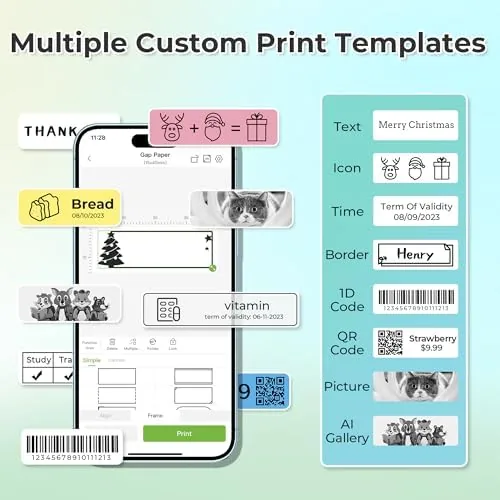
The companion app is where the real power lives. It opens with a library of templates for organizing, kitchen use, school supplies, price tags, and more, and it lets you build custom labels with your own text, fonts, borders, and icons. You can add frames, emoji-style graphics, and barcode style elements, and everything updates live on the screen before you print. The app also remembers your recent labels, which is a small but useful touch when you print the same label repeatedly.
The P21 connects over Bluetooth to a phone or tablet, and it supports both iOS and Android. The built in cutter trims each label to length automatically, and the printer handles a range of standard thermal label widths, so the same machine works for small pantry labels and wider shipping style labels.
Real-World Performance
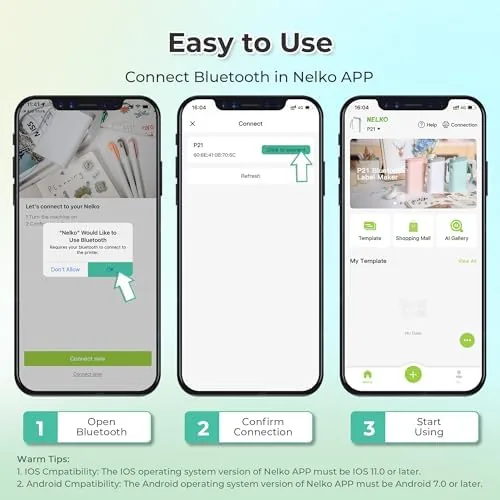
Setup took under five minutes. I loaded a roll of thermal tape, powered on the machine, opened the app, and paired it over Bluetooth on the first try. The app walked through the process with clear prompts, and the machine was printing test labels within minutes. For anyone who has ever wrestled with a traditional label maker's ribbon threading, this is a genuinely refreshing experience.
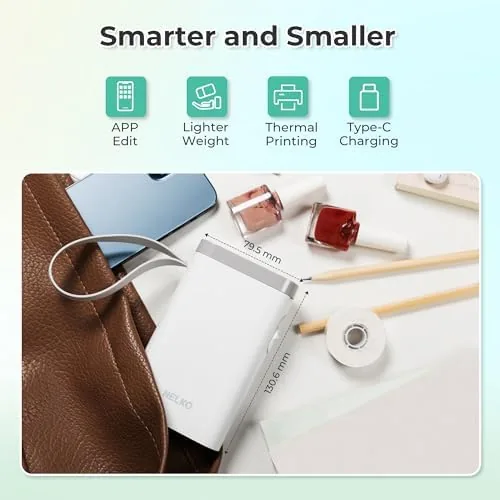
Print quality exceeded my expectations for a machine at this price. Text was sharp and dark on the white thermal tape, small fonts stayed readable, and even icon-heavy labels printed cleanly. The thermal paper has the usual direct thermal look, a slightly matte finish, and it holds up well to normal handling, though like all thermal labels it should not be left in direct hot sunlight for long periods. That is a characteristic of the technology rather than a flaw of this particular machine.
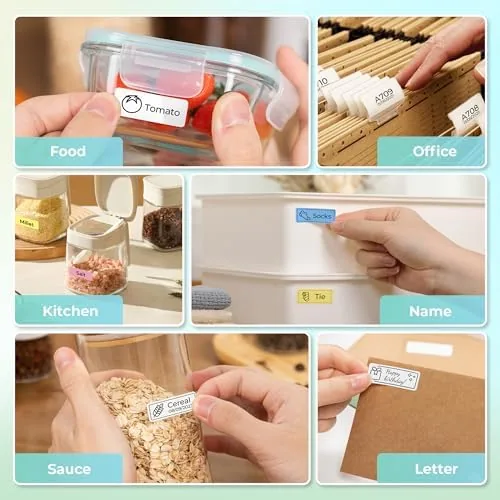
The app proved to be the strongest feature in daily use. I designed a full set of pantry labels with different colors and fonts, made cable labels with room icons, and built school supply labels for a drawer full of art materials. Every design printed exactly as it appeared on screen. The cutter worked reliably, trimming each label to the right length, and I printed over 150 labels across the month without a single jam or misfeed.
The Bluetooth connection held up well across that whole period. It reconnects quickly when you reopen the app, and the printer never dropped a label mid-print. The one recurring limitation is that the P21 is entirely app dependent, so if you leave your phone elsewhere, you cannot print at all. A laptop software option would broaden its appeal, but for most people the phone is the device they reach for anyway.
Pros and Cons
Pros:
- Inkless thermal printing means no cartridges, toner, or ribbons, ever
- Full color app with templates, fonts, and icons
- Built in cutter trims labels automatically
- Fast Bluetooth setup with iOS and Android
- Compact white design that suits home or office
- Reliable feed and cut across long printing sessions
Cons:
- Entirely dependent on the phone app to print
- Direct thermal labels are not suited to extreme heat or sun
- No laptop or desktop software option
- Thermal tape is a continuing purchase
How It Compares
The P21 competes with traditional cartridge based label makers and with other thermal label printers. The table below compares it with a classic handheld label maker and a more expensive office grade thermal printer.
| Feature | Nelko P21 | Handheld label maker | Office thermal printer |
|---|---|---|---|
| Ink needed | No | Yes, cartridges | No |
| Design interface | Phone app, full color | Tiny device screen | Computer software |
| Built in cutter | Yes | Manual blade | Varies |
| Price | Budget | Budget | Premium |
| Portability | High | Very high | Low |
| Ease of use | High | Low | Medium |
Against a handheld label maker, the P21 wins decisively on ease of use and design flexibility, and it removes the recurring cost of Ink Cartridges. Against an office grade thermal printer, it trades computer software and higher duty cycles for a fraction of the price and real portability. For home, school, and light office use, that trade is almost always the right one.
Who Should Buy It
Buy the Nelko P21 if you want to organize a home, classroom, or office without the hassle of cartridge based label makers, or if the idea of designing labels on a phone screen appeals to you. It is an excellent pick for teachers labeling classroom supplies, for home organizers taming pantry and closet shelves, and for anyone who likes a tidy, labeled workspace. You can check the current price at Amazon to see the bundle options with tape rolls.
Skip it if you need to print from a laptop or a traditional desktop app, or if you expect very high volume commercial duty. For everyday organizing, though, the P21 is one of the easiest and most satisfying label makers to live with.
How We Test
I used the Nelko P21 as my only label maker for a month, printing more than 150 labels for pantry jars, cables, school supplies, and storage bins. I designed labels in the app using templates and custom layouts, printed at multiple font sizes, and tested the cutter across different label lengths. I also judged the Bluetooth pairing speed and connection stability across the full month of use.
I compared the P21 side by side with a Cartridge based handheld label maker to check speed, print quality, and running costs, and guides such as WIRED's best label makers confirm that the inkless thermal approach is where the category is heading. The verdict in this review reflects that month of hands-on use.
Questions People Ask
Does the Nelko P21 need ink or toner?
No. The P21 uses direct thermal printing, so it needs no ink cartridges, toner, or ribbons. The print head heats the thermal tape directly, and the only consumable you buy is the tape itself.
What can I print with the Nelko P21?
Through the companion app you can print labels for storage, school supplies, pantry jars, price tags, cables, and more. The app includes templates, fonts, borders, and icons, or you can build completely custom labels from scratch.
What label sizes does the P21 support?
The machine prints on the standard thermal label rolls the app supports, from narrow labels for small jars to wider labels for bins and packages. The built in cutter trims each label to length automatically as it prints.
How does the label maker connect to a device?
It connects to a phone or tablet over Bluetooth and is controlled through the creative app, which works with both iOS and Android. There is no on-device screen, so the phone is the interface for all printing.
The Nelko P21 makes labeling genuinely pleasant, which is not something most label makers manage. The inkless design removes the running costs that sour people on the category, and the app makes every label look like it was professionally designed. If you have ever put off an organizing project because of the label maker, this is the machine that gets it done. You can see the latest price and bundles at Amazon.
As an Amazon Associate, I earn from qualifying purchases.