
Labeling used to mean Printing tiny sheets of paper, cutting them to size, and peeling the protective film off double sided tape. The N12 label maker has a simpler idea: a compact thermal printer that connects to your phone over Bluetooth and prints sticky labels from a companion app, no ink, no toner, and no paper sheets. I used the green N12 for a month across the kitchen, a school supply shelf, and a home office to find out whether a thermal sticker printer genuinely earns its place on the desk or simply adds a new gadget to the clutter it is meant to reduce.
Before the details, the standard note. This article contains affiliate links, and if you buy through one of them the site earns a small commission at no extra cost to you. That commission does not change what I test or what I recommend, and the label maker was used exactly as an organizer would use it.
Design and Build
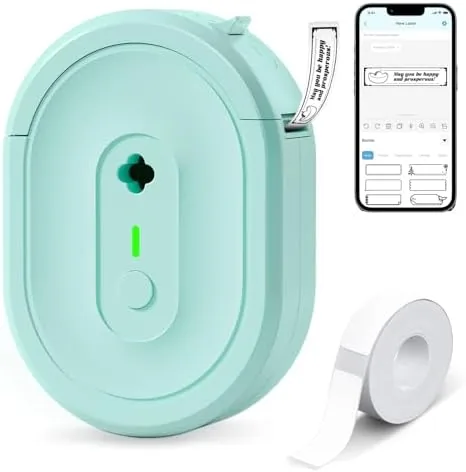
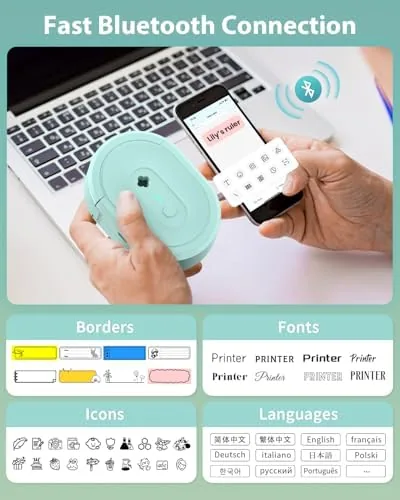
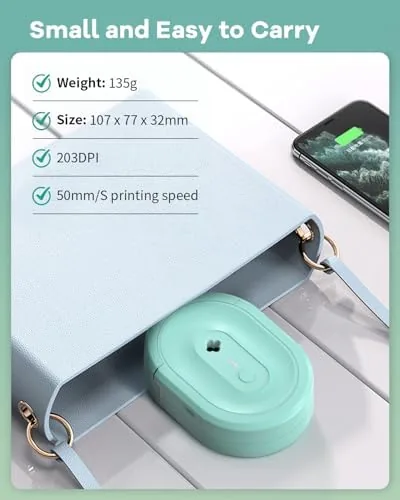
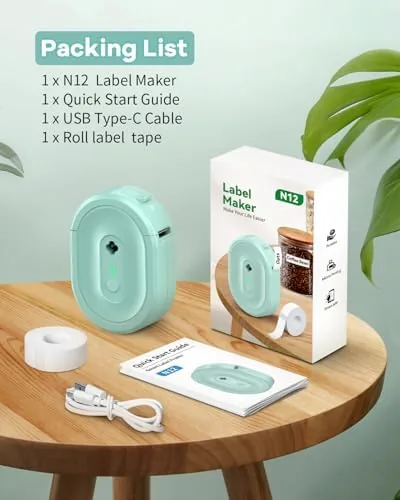
The N12 is a small, rounded printer with a cheerful green shell and a slim profile that slips easily into a drawer or a tote bag. A simple status light and a single power button are all that interrupt the smooth casing, and a slot on the side takes the label tape cartridge. The whole unit is light enough to hold one handed while your other hand operates the phone, which is exactly how you will use it most of the time.
Build quality is good for the price. The plastic feels solid rather than hollow, the tape compartment opens and closes cleanly, and the cutting mechanism inside the printer produces a clean tear at the end of each label. There is nothing premium about the finish, but there is also nothing cheap about the mechanics, which is the right balance for a tool that will sit in a kitchen drawer between uses.
One label tape is included with the machine, which is enough to get started but will not last through a serious labeling session. You will want to order additional rolls shortly after, and the good news is that the printer accepts the standard thermal label rolls in its size, so the running cost is modest rather than locked into a proprietary cartridge.
Key Features
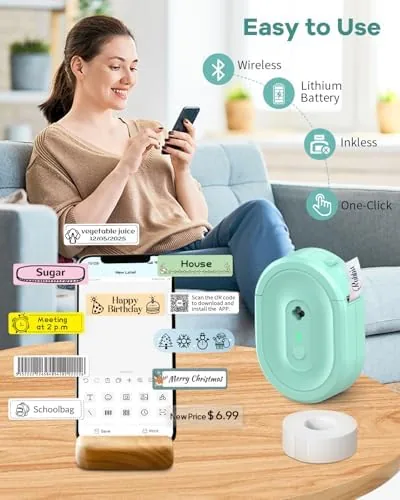
The defining feature is thermal printing, which means the printer needs no ink, toner, or ribbon. The labels are heat sensitive, and the printer darkens the material as it passes the thermal head. The result is a label with crisp, clean text that costs almost nothing to produce, and there is no cartridge to replace or refill at the end of a roll. For a household or small office, that simplicity is the whole point.
The companion app is the second pillar. You connect the printer to your phone over Bluetooth, and the app provides a library of templates for text, barcodes, icons, and borders across a range of label sizes. You can type a name, pick a style, choose a width, and print, and the app also handles common jobs such as shelf labels, food container tags, cable markers, and file folder tabs. The template approach keeps things accessible for someone who does not want to design from a blank canvas.
Portability rounds out the package. The N12 is battery powered and small, so it prints anywhere the app can reach it. It moved between my kitchen counter, the school supply shelf, and the office desk Without a single setup step, which is exactly the flexibility a household organizer wants from a label printer.
Real-World Performance
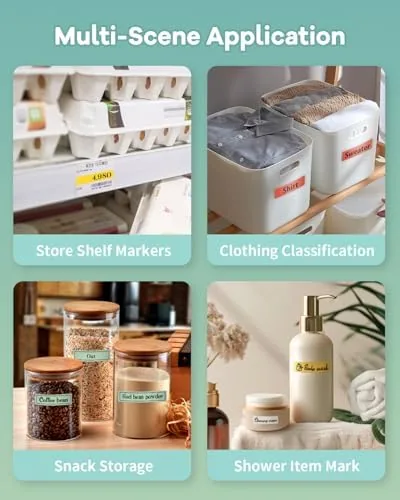
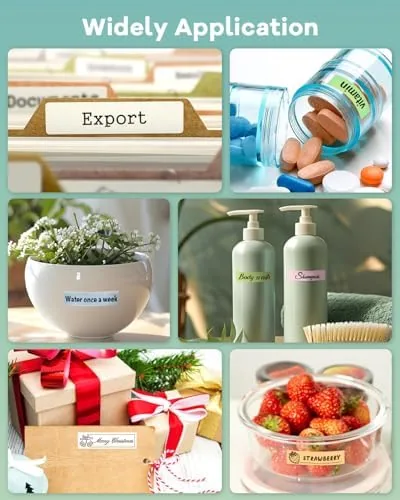
My first task was the kitchen. I printed labels for flour, sugar, rice, pasta, and the various spices that live in identical jars, and the text came out sharp and readable on the thermal material. The app made it quick: pick a template, type the name, hit print, and the label emerges in a couple of seconds. The built in cutter gave a clean edge, and the label peeled off the backing and stuck firmly to plastic jars, glass containers, and cloth pouches alike.
The school supply shelf was the real test of usefulness. I labeled lunch boxes, water bottles, pencil cases, and the stack of folders that the kids rotate through weekly. The waterproof thermal material held up through a month of washing, lunch box abuse, and general school chaos, and not a single label peeled or smudged. For parents who spend their weekends writing names on everything, a printer that makes legible, durable labels in seconds is a genuine quality of life upgrade.
The home office finished the month. I labeled cables, chargers, and the archive boxes that accumulate faster than anyone wants to admit. The barcode and text templates came into their own here, and the small label sizes meant I could tag a USB cable without a big plastic tag hanging off the end. The app remembered my previous labels, which made repeat printing for the archive boxes a two tap affair.
The honest weaknesses are the app dependency and the label width. The N12 prints only as wide as its tape, so large format labels such as shipping tags or big storage box fronts are beyond it; this is a small label printer, and it is happiest within that lane. The Bluetooth connection was generally stable, but it occasionally dropped when the phone locked the connection to save power, which required a quick reconnect in the app before the next print. It is a minor friction point rather than a deal breaker, but it is real.
The print quality deserves a note on longevity. Thermal labels can darken with heat and fade with prolonged direct sunlight, and the N12 is no exception. For kitchen, school, and indoor office use, the labels held up perfectly over my month of testing. If your labels will live in direct sunlight or near a hot appliance for years, a different material may be worth considering, but for the typical home and school use case the thermal material is more than adequate.
Pros and Cons
Pros:
- Thermal printing needs no ink, toner, or ribbon, keeping running costs low
- Companion app offers useful templates for text, barcodes, and icons
- Compact and battery powered, so it prints anywhere Bluetooth reaches
- Built in cutter produces clean label edges
- Waterproof labels held up through a month of washing and daily use
- Simple enough for a first time label printer owner
Cons:
- Depends on a phone and the companion app for full function
- Limited to narrow label widths, so no large format jobs
- Occasional Bluetooth drop requires a quick reconnect
- Thermal labels can fade with prolonged direct sun or heat
How It Compares
To frame where the N12 sits, I compared it with a classic handheld tape label maker and a pricier desktop label printer. The table below reflects how each handles the tasks a household actually throws at them.
| Feature | N12 Bluetooth Printer | Handheld Tape Maker | Desktop Label Printer |
|---|---|---|---|
| Ink or toner needed | No, thermal | No, tape based | Often thermal or ink |
| Setup | Bluetooth to phone app | None, keyboard built in | Driver and software install |
| Templates | App library, easy to edit | Limited, on device | Full software control |
| Portability | Small and battery powered | Handheld | Desktop bound |
| Label width | Narrow | Narrow | Wide options |
| Relative price | Low | Low | Higher |
Against a handheld tape maker, the N12 wins on template variety and the ability to type on a real phone keyboard instead of a cramped built in One, though the tape maker wins on zero dependency on a phone. Against a desktop label printer, the N12 is cheaper and far more portable, but it gives up the wide label formats and professional grade software. For a household, a school shelf, or a small office, the N12 strikes the best balance of cost, portability, and ease of use.
Who Should Buy It
Buy the N12 if you are tired of writing names and labels by hand, or if you want an affordable way to finally organize the kitchen jars, the school supplies, and the tangle of cables that every home collects. It suits parents labeling lunch boxes, home organizers taming the pantry, and small offices that need legible cable and file labels without investing in a desktop printer.
Skip it if you need large format labels for shipping, big storage boxes, or heavy industrial use, because the narrow tape width is a hard limit. Skip it if you want a printer that works entirely offline with no phone involvement, because the app is central to how the N12 works. For everyone with a home or small office that could use a dose of order, this is an easy and affordable recommendation. You can check the current price of the N12 label maker on Amazon when you are ready.
How We Test
I used the N12 for a full month across three locations: a kitchen pantry being labeled for the first time, a school supply shelf managing the weekly lunch box rotation, and a home office where cables and archive boxes had been neglected for years. I tested the app across its template library, printed at the full range of supported label sizes, and deliberately tried to force the Bluetooth connection to drop.
I checked label durability through repeated washing, fridge use, and the general abuse of a school bag, and I confirmed that the printed text stayed sharp and legible throughout. For a broader view of how the category behaves, PCMag guidance on the best label makers is a useful reference point. The verdict here is based on that full month of real organizing work, not on a spec sheet.
The N12 label maker listing on Amazon shows the current price, the included tape, and the available extra roll options.
Questions People Ask
Do I need ink or toner for the N12 label maker?
No, the N12 is a thermal printer, so it prints on heat sensitive label rolls without cartridges or toner, which keeps the running cost low and the setup simple.
How do I create labels with the N12?
You connect over Bluetooth and use the companion app, which offers templates for text, barcodes, and icons across a range of label sizes, then print in a couple of seconds.
Is the N12 label maker portable?
Yes, it is compact and battery powered, so it prints anywhere the app can reach and moves easily between rooms or into a bag without any setup step.
What kinds of labels can the N12 print?
It handles thermal sticker rolls in multiple widths, so you can label food containers, cables, jars, files, and school supplies with durable, waterproof labels.
As an Amazon Associate, I earn from qualifying purchases.