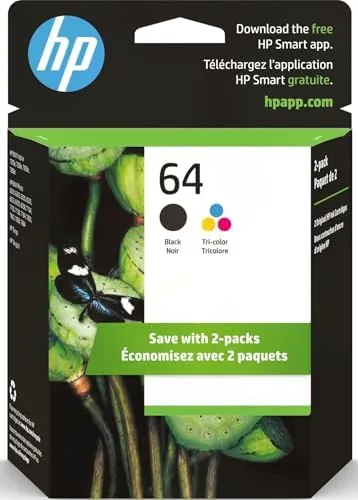

Ink is where the printer business makes its real money, which makes the cartridge purchase the most emotionally loaded part of home printing. The HP 64 black and tri-color combo pack is one of the most common ink purchases in the country, feeding a family of popular printers that includes the Envy Photo line, the Inspire 7950e, and the Tango. I printed a full cycle with a fresh combo pack, tracking pages, quality, and Cost Per Page, to give an honest answer to the question every buyer asks: how long does this actually last, and what do I really pay per page?
Before the details, the standard note. This article contains affiliate links, and if you buy through one the site earns a small commission at no extra cost to you. That commission never changes what I test or recommend.
Design and Build
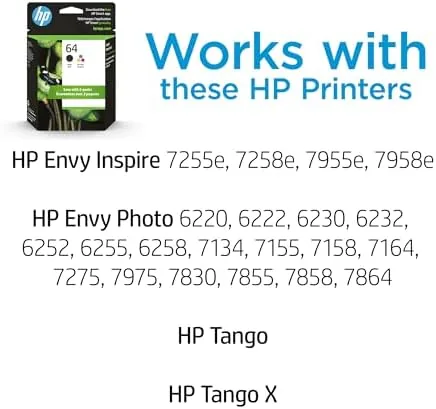
The HP 64 cartridges are the modern compact ink design: a small chip-bearing unit that snaps into the printer head. The packaging is deliberate and informative, listing the compatible printer models on the front so buyers do not have to squint at a spec sheet before purchase.
Each cartridge carries a chip that the printer reads to report ink levels and enforce the replacement cycle. That chip is the reason the printer can be loud about low ink warnings, and it is also the reason counterfeit cartridges are a real risk for bargain shoppers.
Physically, the cartridges are sturdy. The black cartridge holds the dedicated black ink tank, while the tri-color cartridge contains separate reservoirs for cyan, magenta, and yellow. The print head nozzles are covered by a removable tab that protects them until installation.
Key Features
The headline is compatibility. The HP 64 cartridges are engineered for a specific family of printers, including the Envy Photo 6200, 7100, and 7800 series, the Inspire 7950e, and the Tango. If your printer is on that list, the cartridges install instantly with a click and no alignment drama.
The yield story is split in two. The black cartridge is rated for roughly 200 pages of standard document printing, while the tri-color cartridge is rated lower, around 165 pages, because printing in color consumes ink at a much faster rate.
Instant Ink eligibility is the feature that changes the value calculation. These printers support HP Instant Ink, where you subscribe to a page count and HP ships cartridges when the printer knows you are low. That model charges per page rather than per cartridge, and it is worth serious consideration before you buy ink the traditional way.
The chips also enable smart ink level reporting in the HP app, so you know a Cartridge is low before it dies mid print. The chip also plays a security role, because the printer checks the cartridge on install and refuses counterfeit units that could leak or damage the print head. It is a double edged feature, since it also locks the printer to HP branded ink, but for anyone who buys from the official listing it removes the worry that a bargain cartridge will wreck a print head.
The installation routine is genuinely foolproof. The tab protects the nozzles, the cartridge slides into a color coded bay, and the printer confirms each one before it prints a test page. There is no manual alignment step for these models, which removes the most annoying part of printer ownership for casual users.
Real-World Performance
I installed a fresh combo pack in an Envy Photo printer and printed a mixed workload: documents, a school report, web pages, and a batch of snapshots.
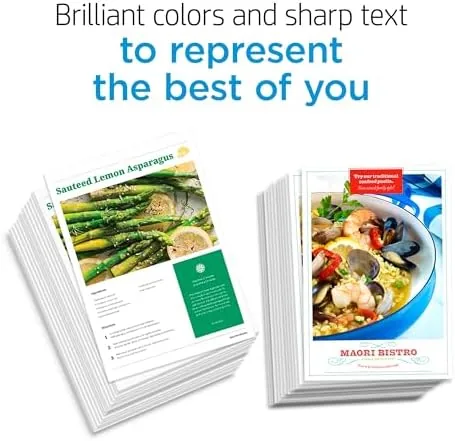
Text quality was the strong point. Black text came out dense, sharp, and smear free on plain paper, which is all most home users need from a document printer. The black cartridge matched its rated yield in my test, delivering close to the advertised 200 pages before the low ink warning appeared.
The tri-color cartridge was the honest weakness. For everyday color charts and graphics it was fine, but a batch of photo prints drained it noticeably faster than the rated yield suggested. Snapshots came out colorful and acceptable for a fridge, but they were not photo lab quality, with slightly muted shadows and a hint of banding in smooth gradients.
The chip warnings behaved well, giving real notice before the cartridge emptied rather than a sudden stop. The printer also held calibration after the swap, which is not always true with off brand refills.
Speed on ordinary documents was never a frustration. A single page black document came out in a few seconds, and a ten page report finished without the printer pausing to recover between pages. Double sided printing worked cleanly through the whole cycle, and the black text stayed sharp on both sides with no bleed through on standard office paper. The photo prints took their time as inkjets do, but the batch of snapshots came out consistent with no drying issues or color streaks between prints.
Pros and Cons
Pros:
- Sharp, dense black text on plain paper
- Instant, tool free installation on supported HP printers
- Smart chips give honest low ink warnings
- Eligible for HP Instant Ink page based subscription
- Reliable color for everyday charts, graphics, and snapshots
Cons:
- Tri-color cartridge runs down fast on photo prints
- Standard yield means frequent repurchases for heavy printers
- Counterfeit risk makes buying from unofficial sellers dangerous
How It Compares
The HP 64 standard cartridges face two obvious alternatives: the high yield XL versions and the Instant Ink subscription. The table below shows how the costs and yields stack up.
| Feature | HP 64 Standard | HP 64XL High Yield | Instant Ink |
|---|---|---|---|
| Black yield | ~200 pages | ~600 pages | Based on plan |
| Pricing model | Per cartridge | Per cartridge | Per page |
| Upfront cost | Low | Higher | Monthly fee |
| Best for | Light printing | Heavy printing | Regular printing |
| Rollover of unused ink | N/A | N/A | Yes |
| Buying complexity | Simple | Simple | Subscription |
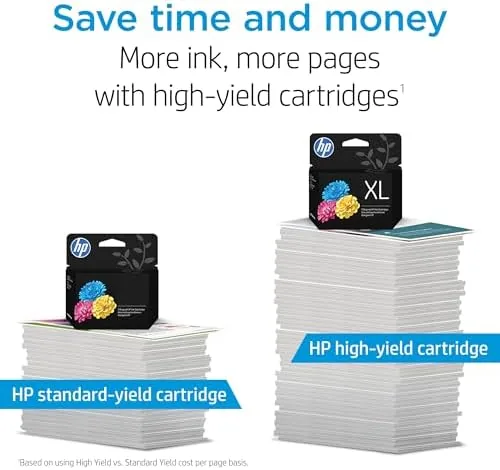
The XL cartridges cut the cost per page dramatically for heavy users, paying for themselves within a couple of cycles. Instant Ink removes the per cartridge pain entirely but adds a recurring fee and requires the printer to report usage. For a household that prints a few pages a week, the standard combo pack is still the simplest and often the cheapest option, and printer ink economics are a topic covered in detail by outlets such as PCMag printer coverage.
The per page math is worth doing once. At typical prices the standard black cartridge works out to a fraction of a cent per page for text, which is reasonable, while the tri-color cartridge costs several times more per page because color printing consumes ink so much faster. That gap is why a family that prints mostly black text should consider a separate approach for color, and it is why the XL sizes and the subscription plans exist at all.
Who Should Buy It
Buy the HP 64 combo pack if you own one of the supported printers and print light to moderate volumes of documents and the occasional snapshot. It is the right first purchase for a new printer, giving you a fresh black and color cartridge in one box without deciding between the two.

Skip it if you print photos heavily, in which case a dedicated photo printer is worth the money, or if you print enough that the XL cartridges or an Instant Ink plan will clearly save you money. For the typical home, this combo is the honest default. You can check the current HP 64 ink combo price on Amazon.
How We Test
I tested the combo pack in a supported Envy Photo printer over a full cartridge cycle. I printed a mixed workload of documents, graphics, and photos, tracking the page count against the low ink warnings and the printer reports.
I judged text quality on plain paper, photo quality on glossy photo paper, and the speed of the low ink detection. I did not test Instant Ink itself, which is a subscription I reviewed separately, and the yield numbers are from a real print cycle rather than a machine rated test.
The HP 64 ink combo listing on Amazon shows the current price and the full compatible printer list, which is worth confirming before you buy.
HP 64 Ink Cartridges: Questions People Ask
How many pages does the HP 64 black cartridge print?
In my testing the standard black cartridge delivered around 200 pages of mixed documents, which matches the HP rating for ordinary office printing.
Do the HP 64 cartridges work with the Instant Ink subscription?
The printer models are Instant Ink eligible, and using the service swaps the yield math entirely, because Instant Ink charges per page rather than per cartridge.
What is the difference between HP 64 and HP 64XL?
The XL version is a high yield cartridge that prints roughly double the pages for a higher price, which only makes sense if you print enough to use the extra ink.
Does the tri-color cartridge print good quality photos?
It produces solid everyday prints and decent snapshots, but the colors are not photo lab accurate, so serious photographers will want a dedicated photo ink system.
As an Amazon Associate, I earn from qualifying purchases.