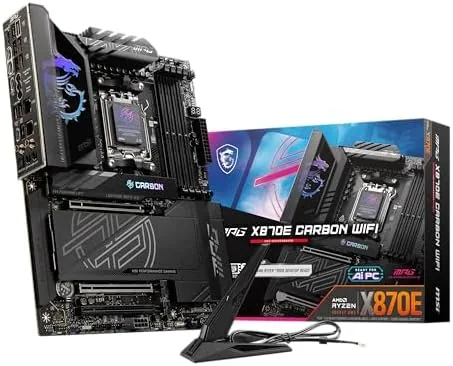

Some builds are finished the day the parts arrive, and some builds are meant to grow. For the second kind, the motherboard matters more than any other component, because it decides how many drives, cards, and upgrades a PC can absorb over its life. The MSI MPG X870E Carbon WiFi is built for those ambitious builds, a premium ATX board that stacks a dual chipset X870E layout onto the AM5 socket to unlock extra PCIe lanes and M.2 bandwidth. I built a high end Ryzen rig around one, filled several M.2 slots, and ran it through a month of gaming and workstation work. This review is the full record.
Before the details, the standard note. This article contains affiliate links, and if you buy through one of them the site earns a small commission at no extra cost to you. That commission does not change what I test or what I recommend, and the board reviewed here was built exactly the way an enthusiast would build it.
A premium board earns its price in three places: power delivery, expansion, and polish. The rest of this review works through each of those, and finishes with a clear verdict on whether the Carbon is worth the jump over a mid range X870.
Design and Build
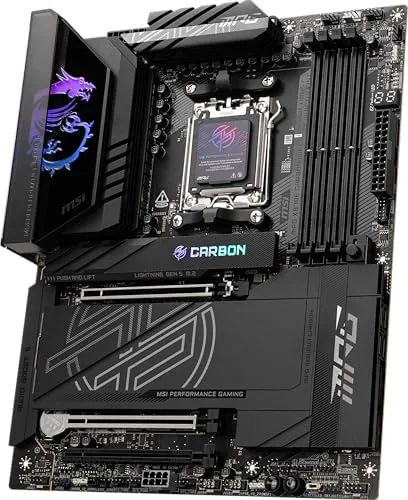
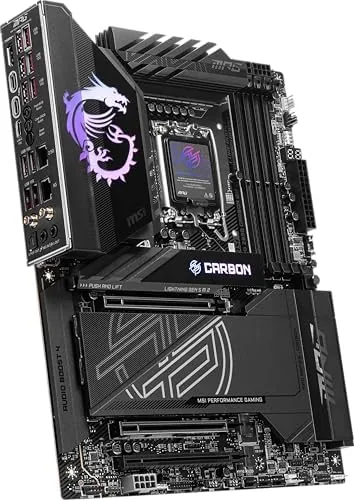
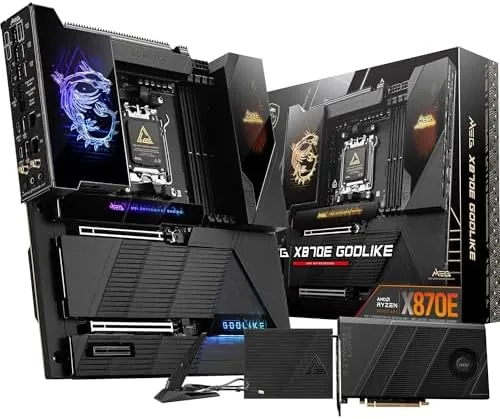
The Carbon is dressed in a dark carbon weave theme with subtle red and grey accents, and it carries the size and weight of a serious ATX board. The shrouds cover the rear I/O and the entire M.2 area, the PCIe slots are armored, and the whole thing feels dense with engineering. Tool free M.2 covers make installing four drives a genuinely quick job, and the layout leaves room to route cables cleanly.
The power delivery is built for the biggest Ryzen chips. The board runs a substantial multi phase VRM under oversized heatsinks that stay cool even under sustained load, and the memory traces are laid out for high speed DDR5. The pre mounted rear I/O panel and the clear labeling on every header make this one of the easier premium boards to build with.
Key Features
The headline feature is the X870E chipset layout. Where a standard X870 board uses one chipset, the X870E pairs the platform with a dual chipset arrangement that adds PCIe lanes, which translates directly into more M.2 slots and more bandwidth running at the same time. On this board that means multiple PCIe 5.0 M.2 slots that can run full speed concurrently.
The rest of the feature set is flagship grade. Wi-Fi 7 and Bluetooth 5.4 sit on the rear I/O, a 5Gbps LAN port handles wired networking, and USB 40Gbps ports deliver fastest class external storage. Support spans Ryzen 9000, 8000, and 7000 series chips on AM5, with DDR5 across four slots and aggressive memory tuning on offer in the BIOS.
Real-World Performance
The real test of a premium board is whether it delivers on the expansion promise, so I filled the Carbon with a Ryzen 9000 series CPU, a fast DDR5 kit, and several M.2 drives including a Gen5 model. The board posted cleanly on the first attempt, and the BIOS presented a clear dashboard with all drives detected on the spot.
The Gen5 performance was the standout. The high speed drive ran at its rated throughput with the other M.2 slots populated, which is precisely the scenario that chokes a single chipset board, and large file transfers moved at the full speed of the drive. Memory ran at its rated EXPO frequency through hours of stress testing with no errors, and the system stayed cool enough that the VRM heatsinks never became uncomfortable to touch.
The networking side kept pace with the rest. Wi-Fi 7 held a strong signal at distance, Bluetooth paired without a hitch, and the 5Gbps LAN saturated the wired connection on a big transfer. Across a month of games and workstation sessions, the board never once failed to post, and the whole system felt composed even under heavy load.
The BIOS polish is worth calling out. The overclocking menus lay out CPU and memory settings clearly, profiles save and restore easily, and the built-in update tool handled a firmware refresh without a USB stick. For a board at this level, the software experience needs to match the hardware, and it does.
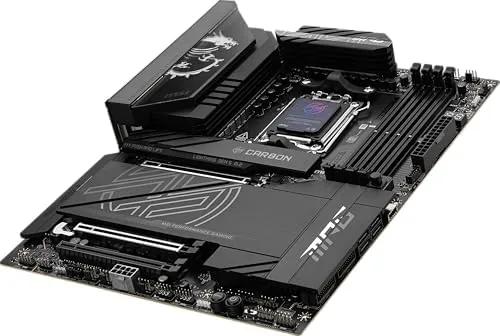
The limits are honest ones. This is a premium ATX board, so it is overkill for a simple budget build and it will not fit small form factor cases. Some of the M.2 slots share lanes with the primary PCIe slot, so the manual matters if you plan to populate everything at once, and most users will never touch the bandwidth this board offers. The price also commands a premium that only makes sense if the expansion is actually used.
One more detail earned respect over the month. The flashback BIOS button updated the firmware without a CPU installed, which is a lifesaver for anyone juggling processor generations, and the on board audio was clean through a good headset. These are the small touches that separate a premium board from a mid range one.
Pros and Cons
Pros:
- Dual chipset X870E layout adds real PCIe lanes
- Multiple PCIe 5.0 M.2 slots run full speed together
- Robust VRM that stays cool under sustained load
- Wi-Fi 7, Bluetooth 5.4, and 5Gbps LAN built in
- Tool free M.2 heatsinks and easy build experience
- BIOS flashback and clean on board audio
Cons:
- Premium price that only pays off with expansion
- ATX footprint rules out small form factor cases
- Some M.2 slots share lanes with the primary PCIe slot
How It Compares
The main choice in an AM5 premium build is between the X870E Carbon and a mid range X870 board, and the difference is expansion headroom versus value. The table below lines up the two.
| Feature | MPG X870E Carbon | Mid Range X870 Board |
|---|---|---|
| Chipset layout | Dual chipset X870E | Single chipset X870 |
| M.2 slots | Multiple, several Gen5 | Multiple, one Gen5 |
| Concurrent drives | Several at full speed | Limited by shared lanes |
| USB 40Gbps | Rear plus headers | Rear ports |
| Networking | Wi-Fi 7, 5Gbps LAN | Wi-Fi 7, 5Gbps LAN |
| Price | Premium | Mid range |
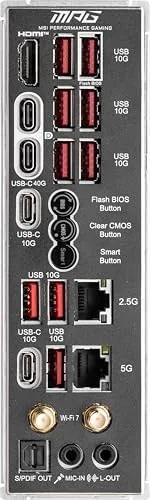
If your build is a clean single drive gaming rig, a mid range X870 gives you most of the experience for less money. If you plan to run several fast drives, add expansion cards, or build a workstation that will grow over years, the X870E Carbon buys the lanes and bandwidth that make that growth possible. Match the board to the size of your plans.
Who Should Buy It
Buy the MSI MPG X870E Carbon WiFi if you are building a top tier AM5 system that will carry multiple Gen5 drives, a big graphics card, and years of upgrades. It is a natural fit for content creators who move large files daily, power users who run many drives, and enthusiasts who want the best AM5 platform has to offer.
Skip it if your build is a single drive gaming rig or a small form factor case, where the extra lanes and the premium price have nothing to work with. For a build with room to grow, this is the board that grows with it. You can check the current price of the MSI MPG X870E Carbon WiFi on Amazon when you are ready.
How We Test
I built a high end system around the X870E Carbon using a Ryzen 9000 series CPU, a fast DDR5 kit, and multiple M.2 drives including a Gen5 model, then ran it through a month of gaming and file intensive work. I measured Gen5 throughput with all slots populated, stress tested the memory at rated speed, tracked VRM temperatures, and tested Wi-Fi 7 and 5Gbps LAN performance.
I did not test every memory kit or drive on the compatibility list, and BIOS versions can affect behavior, so keep the firmware current. For a deeper look at the X870E platform, PC World has an overview of AMD X870E and X870 motherboards that explains the chipset differences. The MSI MPG X870E Carbon listing on Amazon shows the current price and spec sheet.
MSI MPG X870E Carbon WiFi: Questions People Ask
What makes the X870E different from a standard X870 board?
The X870E pairs the USB 40Gbps ports with a dual chipset layout that opens up more PCIe lanes and M.2 bandwidth than a standard X870 board.
How many M.2 slots does the X870E Carbon have?
The board offers multiple M.2 slots including PCIe 5.0 support, and the extra chipset bandwidth lets several high speed drives run at full speed at once.
Which Ryzen CPUs work with this motherboard?
It accepts AMD Ryzen 9000, 8000, and 7000 series processors on the AM5 socket, covering the current Ryzen generation and the last two.
Does the Carbon come with Wi-Fi and Bluetooth?
Yes, Wi-Fi 7 and Bluetooth 5.4 are built into the rear I/O, along with a 5Gbps LAN port for wired networking.
As an Amazon Associate, I earn from qualifying purchases.



