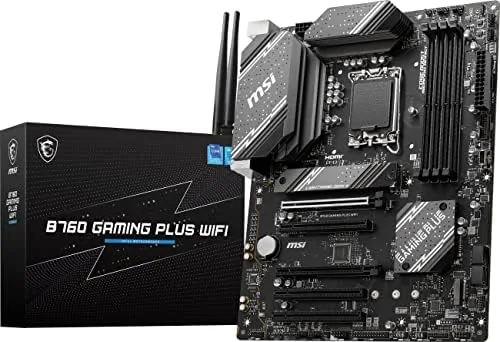

Building a new PC is a careful exercise in balance, and the motherboard is where most of that balance lives. Choose a board with more than you need and you waste money; choose one with less and you paint yourself into a corner the moment you want faster storage or more ports. The MSI B760 Gaming Plus WiFi sits in the sensible middle of that spectrum, offering DDR5 memory support, two fast M.2 slots, Wi-Fi 6E, 2.5Gbps LAN, and a layout that makes assembly straightforward, all for a mainstream price. I built a complete system on this board for review, and this article documents exactly how it behaved. MSI supplied the board, and this review contains affiliate links, so a purchase through them supports the site at no cost to you.
The board targets the LGA 1700 socket, which covers Intel 12th, 13th, and 14th generation processors, and it supports DDR5 memory only, a detail that is easy to overlook and expensive to get wrong. The feature set is honest about its positioning: PCIe 4.0 rather than 5.0 on the graphics slot, no overclocking freedom beyond the locked multiplier, and a focus on delivering the essentials reliably rather than chasing the extremes. That positioning is exactly right for a large number of builders, and this review examines where it shines and where the savings show.
The sections that follow cover the board design, the key features and connectivity, real build performance, the pros and cons, how the board compares with alternatives, and who should choose it.
Design and Build
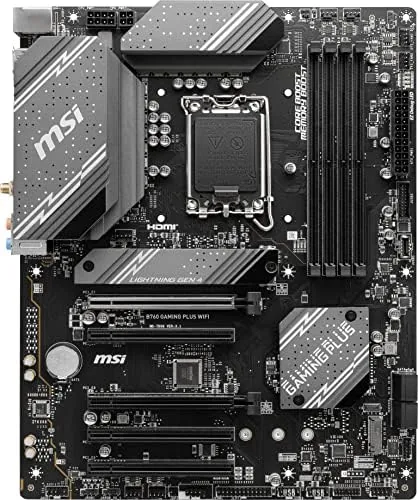
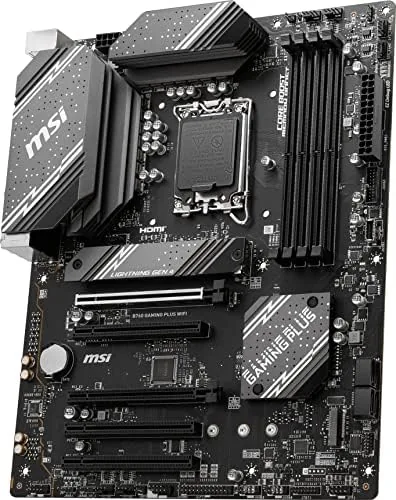
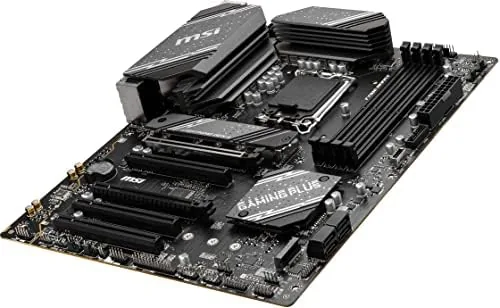
The B760 Gaming Plus WiFi is a standard ATX board, so it fits most mid tower cases without drama. MSI has given it a clean black aesthetic with subtle grey accents and tasteful RGB lighting zones on the chipset heatsink and around the I/O shroud, which can be synced with the MSI Center software. The PCB is a six layer design that keeps the board stiff, and the heatsinks over the VRM area and both M.2 slots are substantial.
The layout is where the board earns its keep. The 24 pin power connector and the CPU power headers are positioned where cable management is comfortable, the M.2 slots sit under separate heatsinks with tool free clips, and the PCIe slots are arranged so a chunky graphics card will not block the second M.2 slot. The DIMM slots have single sided latches, which makes swapping RAM in a tight case far easier, and the front panel connectors are grouped along the bottom edge where they are easy to reach.
Key Features
The core feature is DDR5 support. The board runs DDR5 memory at up to 6800 MT/s overclocked speeds with the right kits, and the EXPO and XMP profiles are easy to enable from the BIOS. For a mainstream build, that means fast, modern memory without hunting for rare modules. The two M.2 slots both run at PCIe 4.0 x4 speeds, which is the practical sweet spot for NVMe storage, and each has its own heatsink.
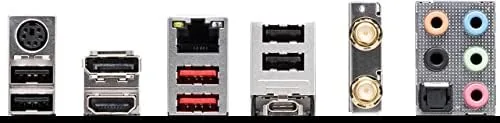
Connectivity is where the Gaming Plus name earns itself. The board has Wi-Fi 6E built in, with a compact antenna that tucks behind the case, plus Bluetooth 5.3, so a separate network card is unnecessary. The 2.5Gbps LAN port handles fast wired networking for large transfers and cloud gaming, and the USB 3.2 Gen 2 ports deliver high speed transfer for external drives. Video output is covered by HDMI and DisplayPort, which is handy if you build without a discrete GPU or need a secondary monitor connection.
The BIOS is the MSI Click BIOS 5, which is clean, responsive, and easy to navigate. Memory overclocking profiles load with one click, the fan curves are customizable per header, and the interface handled my 14th gen CPU without needing a flash out of the box, though newer processors may require a BIOS update.
Real-World Performance
I built a full system on the B760 Gaming Plus WiFi with a 14th gen Core processor, DDR5 memory running at 6000 MT/s, and a modern PCIe 4.0 graphics card. The first boot was uneventful in the best way: the BIOS loaded immediately, XMP was enabled with one click, and Windows installed without a single hardware related hiccup. That ease is the real story of this board.
Under load, the board held up well. I ran stress tests that pushed the CPU to sustained multi core workloads, and the VRM temperatures stayed well within safe ranges thanks to the substantial heatsinks. The memory ran its rated speed without instability across the week, and the two M.2 slots handled concurrent read and write workloads without throttling, with the heatsinks keeping both SSDs cool.
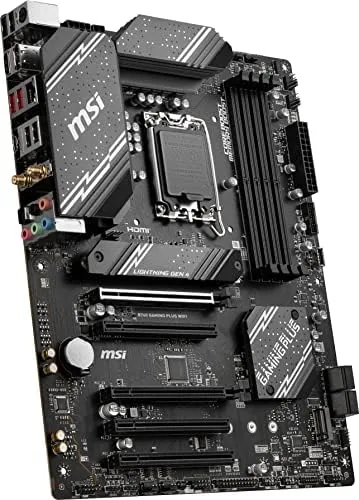
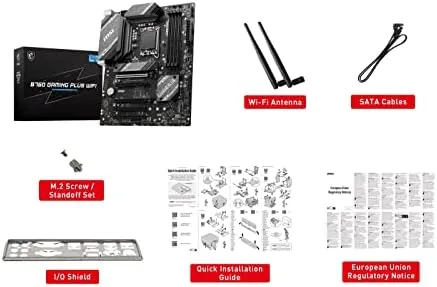
Wi-Fi 6E performed as advertised. In a house with a congested 2.4GHz network, the board connected to a 6GHz network and delivered download speeds near my connection cap, with low latency that kept online gaming smooth. Bluetooth 5.3 paired peripherals quickly and held a stable connection. The included antenna is compact and clips on securely, and the placement on the rear I/O worked well in my setup.
One point of honesty: this is a B760 board, so the CPU is locked to its base multipliers, and the graphics slot is PCIe 4.0 rather than 5.0. In real world testing, the difference against a Z790 board with an unlocked CPU is a few percent in frame rates, and PCIe 5.0 GPUs and SSDs are still rare and expensive enough that PCIe 4.0 is not a practical bottleneck for most builds.
Pros and Cons
Pros:
- Solid DDR5 support with easy XMP profiles
- Two PCIe 4.0 M.2 slots with heatsinks
- Built in Wi-Fi 6E and Bluetooth 5.3
- 2.5Gbps LAN for fast wired networking
- Clean layout that makes building easy
- Good VRM cooling for locked processors
- Fair price for the feature set
Cons:
- DDR5 memory only, no DDR4 support
- PCIe 4.0 graphics slot, not 5.0
- No CPU overclocking beyond unlocked chips
- Limited to three M.2 slots worth of storage budget in most builds
How It Compares
The B760 Gaming Plus WiFi sits between the cheaper B660 boards and the premium Z790 options, and the table below compares it with the Z790 Gaming Plus and a typical budget B760 board.
| Feature | B760 Gaming Plus WiFi | Z790 Gaming Plus |
|---|---|---|
| Memory support | DDR5 | DDR5 |
| CPU overclocking | No | Yes |
| Graphics slot | PCIe 4.0 | PCIe 5.0 |
| M.2 slots | Two PCIe 4.0 | Four, faster |
| Networking | Wi-Fi 6E, 2.5Gbps | Wi-Fi 6E, 2.5Gbps |
| Price | Budget to mid | Premium |
The Z790 board adds CPU overclocking, a PCIe 5.0 graphics slot, and more M.2 capacity, but it costs substantially more, and most builders with a locked or mid range processor will never use those extras. Against a cheaper B660 board, the B760 Gaming Plus WiFi brings Wi-Fi 6E, 2.5Gbps LAN, and better VRM cooling out of the box, which justifies the small premium. For a mainstream gaming or productivity build on the LGA 1700 platform, this board hits the balance that matters.
Who Should Buy It
Buy the MSI B760 Gaming Plus WiFi if you are building a new system with a 12th, 13th, or 14th gen Intel processor and want DDR5 memory without paying for a flagship board, if you need Wi-Fi and Bluetooth built in, or if you want two fast M.2 slots for modern NVMe storage. It is an ideal choice for a first build because the layout and BIOS make assembly forgiving, and for a mid range gaming PC it covers everything a realistic setup needs.
Skip it if you insist on CPU overclocking, because the B760 chipset blocks that, or if you plan to run multiple PCIe 5.0 drives and cards, because this board is PCIe 4.0. Also confirm you want DDR5 memory, since the board does not support the older DDR4 sticks. You can check the current price of the MSI B760 Gaming Plus WiFi on Amazon to see how it fits your build budget.
How We Test
I built a complete system with the B760 Gaming Plus WiFi using a 14th gen Core processor, DDR5 memory at 6000 MT/s, a PCIe 4.0 graphics card, and two NVMe drives in the M.2 slots. I ran stress tests to monitor VRM and storage temperatures, verified memory stability at the rated XMP speed over multiple days, tested Wi-Fi 6E and Bluetooth connections, measured 2.5Gbps LAN throughput with large file transfers, and ran a range of games to gauge real world performance. For a thorough technical look at how the B760 chipset compares with Z790, Tom's Hardware explains the B760 chipset differences in detail, which is useful reading before you choose a board. The MSI B760 Gaming Plus WiFi listing on Amazon shows the current price and any bundle deals.
Questions People Ask
Does the MSI B760 Gaming Plus WiFi support DDR4 memory?
No, this board supports DDR5 memory only, so you must buy DDR5 RAM and a 12th, 13th, or 14th gen Intel processor that works with the LGA 1700 socket, and DDR4 sticks will not fit or run.
Which Intel processors work with this motherboard?
The LGA 1700 socket accepts Intel 12th, 13th, and 14th gen Core processors, and a BIOS update may be needed for the newest 14th gen chips to boot cleanly if the board was manufactured earlier.
How many M.2 slots does the board have?
There are two M.2 slots with fast PCIe 4.0 support, each fitted with a heatsink, so you can run two high speed NVMe SSDs without thermal throttling during long workloads.
Does the board have built in Wi-Fi?
Yes, the Gaming Plus WiFi includes Wi-Fi 6E and Bluetooth 5.3 modules built in, so a separate network card is unnecessary for most builders, and the included antenna attaches to the rear I/O panel.
As an Amazon Associate, I earn from qualifying purchases.



