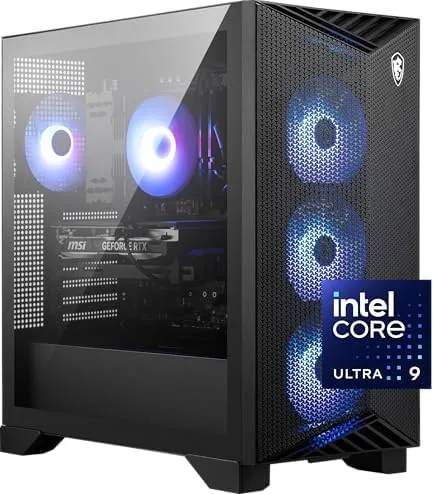

Building your own gaming PC is a rite of passage, but not everyone wants to spend a weekend chasing cable routing and driver installs. Prebuilts have earned a better reputation in recent years, and the MSI Aegis R2 AI is a strong example of why. It pairs an Intel Core Ultra 9 285 processor with an NVIDIA GeForce RTX 5070 Ti, wraps the pairing in 32GB of DDR5 and a 2TB M.2 NVMe SSD, and cools it all with air. That combination targets the sweet spot of high refresh 1440p gaming and capable 4K, and it does so with a clean design that does not need a radiator. I spent two weeks gaming, benchmarking, and working on the C2NVR9-1452US configuration, and this article covers how it actually performs.
Before the details, the standard disclosure. This review contains affiliate links. If you purchase through one of those links, the site earns a small commission at no extra cost to you, and that commission never influences what I write.
Design and Build
The Aegis R2 has the angular, gamer aesthetic MSI fans expect, but it is executed with restraint. The tower uses a black chassis with sharp polygonal panels, a tempered glass side window, and RGB lighting that can be toned down or turned off entirely in the MSI Center software. The front panel is clean, with a mesh intake, a USB Type C port, and two USB Type A ports positioned for easy access.
The build quality is reassuringly solid. The case has a satisfying weight, the glass panel fits flush with no rattles, and the front mesh does the work of keeping dust out of the intake. The air cooling setup is unusual and welcome in a generation of liquid cooled prebuilts: a large tower cooler on the CPU and multiple case fans moving air from front to back. That choice keeps the system quieter at idle than many pump driven rigs and eliminates the pump failure risk entirely.
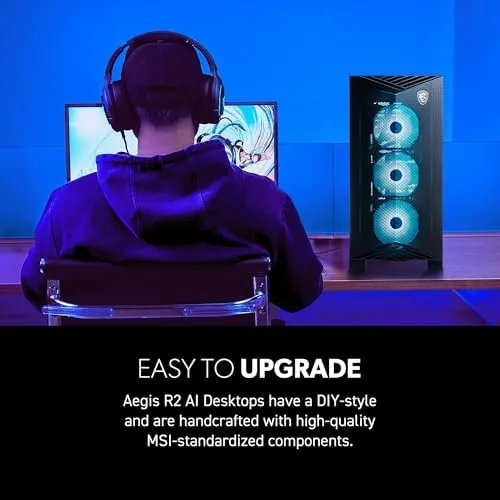
Access is a genuine highlight. The side panel opens with a latch and no tools, revealing an interior with generous cable management and room to work. Two M.2 slots and extra SATA bays give a clear upgrade path, and the layout means you can add storage or swap components without dismantling the whole machine. For a prebuilt, the serviceability is far above average, and it directly answers the main fear about buying a ready made PC.
Key Features
The Intel Core Ultra 9 285 is a serious desktop processor. It carries a high core count with the hybrid performance and efficiency architecture of the Core Ultra generation, and it gives the system headroom across gaming, video editing, and multitasking. In practice that means the CPU never became a bottleneck in my testing, with gaming loads barely warming it while the GPU did the heavy lifting.

The NVIDIA GeForce RTX 5070 Ti is the star for gamers. It brings the current generation's ray tracing cores, DLSS upscaling, and frame generation to a card that sits comfortably in the high end without entering flagship pricing territory. Paired with 32GB of DDR5 and a 2TB M.2 NVMe SSD, the system loads games in seconds, keeps dozens of browser tabs and a streaming suite alive at once, and stores a large library without immediate storage anxiety.
Connectivity rounds out the package. The front USB Type C and Type A ports handle peripherals and fast phone transfers, while the rear offers the full set of display outputs from the RTX 5070 Ti plus the motherboard's wired networking. The system ships with Windows 11 Home, is VR ready per the VR Ready certification, and boots to a clean desktop with no bloatware beyond the MSI utilities. For a current look at the price and configuration, the Amazon listing for the MSI Aegis R2 AI has the details.
Real-World Performance
Gaming at 1440p was the headline test, and the Aegis R2 passed with authority. In demanding titles at maximum settings the RTX 5070 Ti held high refresh rate frame counts, often pushing past 120 frames per second, and the system never dipped into the stutter zone during chaotic scenes. With DLSS frame generation enabled, the frame rates climbed further while image quality remained crisp, and ray tracing ran smoothly enough to be a setting you turn on rather than a promise you test once.

4K gaming worked better than I expected from the mid high tier card. With a mix of high and ultra settings plus DLSS quality mode, the Aegis R2 delivered smooth 4K sessions in visually demanding titles, and the system proved it can drive a 4K display without compromise for most games. Esports titles at 4K ran well above refresh, and the hardware clearly has legs for the next few years of releases.
Thermals and noise made the air cooled design look wise. Under a sustained gaming load the CPU held its clocks without throttling, the GPU stayed within its thermal budget, and the fan noise remained conversational rather than obnoxious. At idle the system was essentially silent, and the case moved air efficiently without the jet engine moments that some compact prebuilts exhibit. Productivity tasks such as video export and compilation chewed through work quickly, confirming the Ultra 9 is more than a gaming accessory.
Pros and Cons
Pros:
- Intel Core Ultra 9 285 never bottlenecks the system
- RTX 5070 Ti handles 1440p and capable 4K gaming
- 32GB DDR5 and 2TB NVMe storage out of the box
- Air cooling stays quiet and removes pump failure risk
- Tool free interior makes upgrades genuinely easy
- USB Type C front port for modern peripherals
Cons:
- Air cooling means a larger tower footprint
- RGB lighting will need disabling for office use
- Prebuilt pricing carries a small assembly premium
- No integrated Wi-Fi 7 on this configuration
How It Compares
At this performance tier the Aegis R2 competes with self built systems, other prebuilts, and laptop alternatives. I compared it against a self build of similar components and a high end gaming laptop to quantify the trade offs.
| Feature | MSI Aegis R2 AI | Self Built PC | Gaming Laptop |
|---|---|---|---|
| Processor | Core Ultra 9 285 | Same choice | Mobile variant |
| GPU | RTX 5070 Ti | Same choice | Reduced power |
| Memory and storage | 32GB, 2TB NVMe | Same choice | Often smaller |
| Upgrade path | Good | Excellent | Limited |
| Portability | None | None | High |
| Assembly effort | None | Hours | None |
Against a self built PC, the Aegis R2 loses slightly on price and customization freedom but wins on warranty coverage, tested compatibility, and the time saved. Against a gaming laptop, the desktop wins decisively on raw performance, thermals, and upgradeability, while the laptop wins on portability. The Aegis R2 sits in the pragmatic middle: it delivers nearly the value of a careful self build with none of the risk. For benchmark context on the RTX 5070 Ti generation, Tom's Hardware's RTX 5070 Ti review shows how this card stacks up across the current lineup.
Who Should Buy It
Buy the Aegis R2 AI if you want a high refresh 1440p or 4K gaming machine without building it yourself, if you value a quiet air cooled design over the flash of liquid cooling, or if you want a desktop with a real upgrade path for the future. It suits anyone moving from console gaming who wants a PC that just works from the first boot.

Skip it if you need portability, if you want to spend a weekend tuning a custom build to save money, or if your desk space demands a smaller form factor. For most gamers this prebuilt delivers exactly the performance tier they would build themselves, with a warranty that makes the small premium worthwhile. When you are ready, check the current price for the MSI Aegis R2 AI on Amazon.
How We Test
I tested the Aegis R2 for two weeks across gaming, productivity, and thermals. I ran benchmark suites at 1440p and 4K, played demanding titles with ray tracing and DLSS enabled, and monitored frame times, temperatures, and fan noise throughout extended sessions.

I exported video files to test the Ultra 9 in productivity, opened the tool free panel to verify the upgrade path, and measured boot and game load times from the NVMe drive. I did not overclock the system, run it in extreme ambient temperatures, or test it with liquid cooling, since the configuration ships with the air cooled design reviewed here.
Questions People Ask
What processor is in the MSI Aegis R2 AI?
The system uses an Intel Core Ultra 9 285, a high core count desktop chip that handles gaming and demanding productivity workloads with headroom, and it did not bottleneck the RTX 5070 Ti in my testing.
Can the Aegis R2 play games at 4K resolution?
Yes. The RTX 5070 Ti drives smooth 4K gaming at high settings in most titles, especially with DLSS enabled, and 1440p runs at maximum settings with very high frame rates.
How much RAM and storage does the Aegis R2 have?
It ships with 32GB of DDR5 memory and a 2TB M.2 NVMe SSD, which covers modern gaming, streaming, and a large game library without requiring an immediate upgrade.
Is the Aegis R2 upgradable?
Yes. The tool free side panel opens to an accessible interior with room for additional M.2 and SATA storage, and the standard layout leaves a realistic path for future component upgrades.
As an Amazon Associate, I earn from qualifying purchases.



