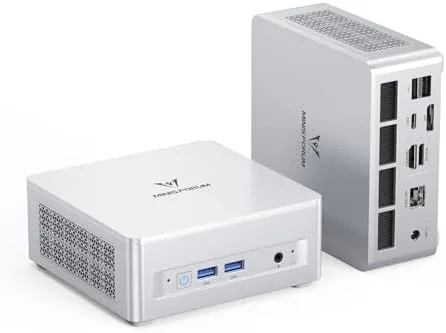

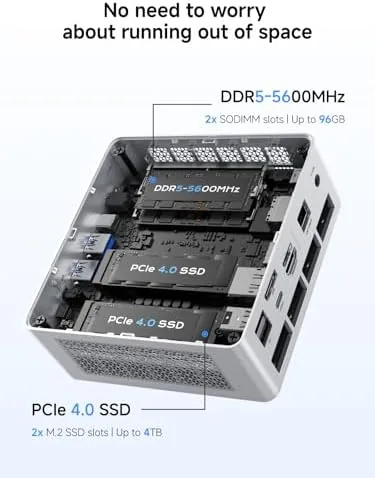
Desktop computers have been shrinking for decades, but the last few years have turned that gradual slide into a genuine takeover. Mini PCs now deliver processor performance that would have filled a tower case a generation ago, and the MINISFORUM UM880 Plus is a confident example of where the category has landed. Inside a chassis roughly the size of a thick paperback sits an AMD Ryzen 7 8845HS with eight cores and sixteen threads, 32GB of DDR5 memory, a 1TB PCIe 4.0 SSD, triple display outputs through HDMI, DisplayPort, and USB4, a 2.5G LAN port, five USB ports, and an OCuLink port that opens the door to external graphics. I ran it as my daily machine for two weeks to test whether this much computing really fits in that little box.
One note up front. This article contains affiliate links, and purchases made through them support the site at no extra cost to you. That support never changes how I test a product or what I write about it.
Design and Build
The UM880 Plus is immediately notable for its footprint. The aluminum chassis is compact, quiet, and surprisingly dense, with a weight that speaks to solid construction rather than hollow plastic. The top surface is a clean, machined plane with subtle branding, and the sides carry ventilation grilles that keep airflow moving without looking like an afterthought. There is a small power button on the front, along with a headphone jack and a pair of USB ports that are easy to reach for thumb drives and peripherals.
The build quality feels premium throughout. The chassis does not flex, the seams are tight, and the whole unit sits flat on a desk with rubber feet that hold it steady. It can also be mounted behind a monitor with the included VESA bracket, which is the arrangement most users will want for a clean workspace. The cooling solution keeps the Ryzen 7 in check, and under load the fan produces a soft, steady hum that fades into the background of a typical room rather than the aggressive whine of smaller coolers.
Key Features
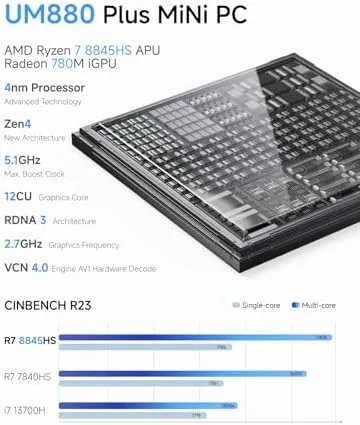
The engine here is the AMD Ryzen 7 8845HS, a mobile class chip with eight cores and sixteen threads that boosts up to 5.1GHz. It is paired with the Radeon 780M integrated graphics, which is the strongest integrated GPU currently shipping in this class of chip. That combination means the UM880 Plus handles heavy multitasking, code compilation, video editing timelines, and even light gaming without reaching for a dedicated card.
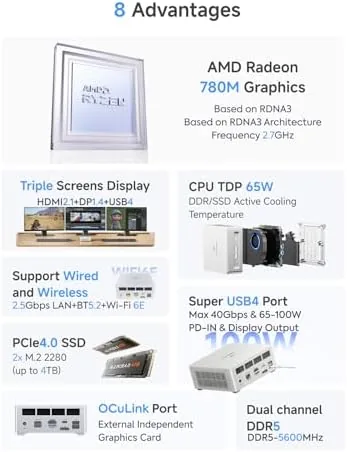
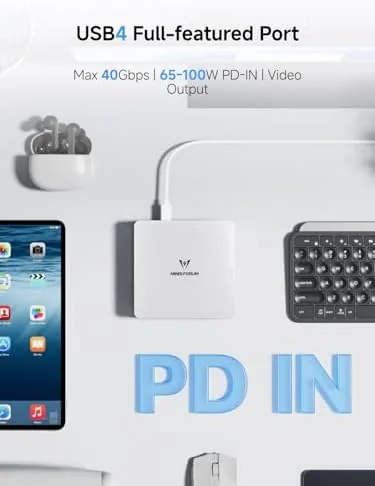
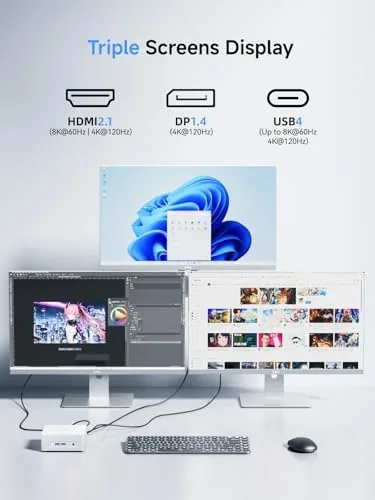
Connectivity is the story that sets this unit apart. The triple display outputs let you run three 4K monitors simultaneously, which turns the little box into a real productivity station for trading, editing, or software work. The USB4 port carries both data and display signal at high speed, and it can drive an additional screen or a fast external SSD. The 2.5G LAN port is ahead of the gigabit standard, which matters for anyone moving large files over a network or running a home server.
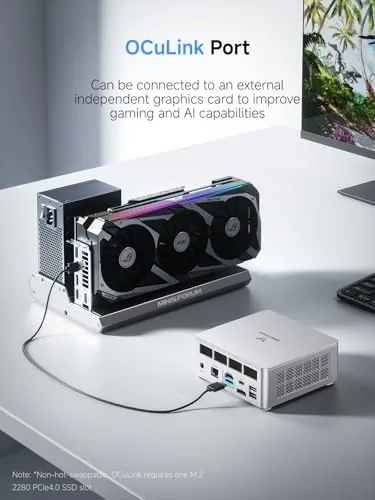
The OCuLink port is the expansion secret. OCuLink connects an external GPU enclosure over a PCIe interface, giving the mini PC access to Desktop Class graphics when you need them. It is a straightforward upgrade path that the vast majority of mini PCs lack, and it transforms the UM880 Plus from a productivity box into a machine that can keep up with heavier rendering and higher frame rate gaming when docked. For a look at the current pricing and configurations, the MINISFORUM UM880 Plus listing on Amazon is the best reference.
Real-World Performance
I made the UM880 Plus my primary machine for two weeks, which meant real work rather than synthetic benchmarks. Browsing with dozens of tabs, document editing, video calls, and spreadsheet work all ran with the immediate responsiveness you expect from a modern desktop. The Ryzen 7 never felt strained, and the 32GB of DDR5 meant I never once thought about memory pressure, even with large files and many applications open at once.
Productivity power showed its face in heavier tasks. I edited a series of 1080p video clips in a nonlinear editor, applied color corrections, and exported a finished timeline. The Radeon 780M accelerated the preview and the export ran smoothly, and the machine stayed cool and quiet throughout the render. Photo editing in a raw editor was equally comfortable, with large files opening and adjusting without stutter.
The gaming test was the surprise. I loaded a few lighter titles and a mid range shooter, and the Radeon 780M handled 1080p gaming at respectable settings and smooth frame rates. This is not a replacement for a dedicated gaming PC, but it is genuinely capable for esports and older or less demanding titles, and it does all of that inside a box that fits in a backpack. For users who want more, the OCuLink port is waiting.
The triple display setup earned its keep during a long work session. I ran a main 4K monitor flanked by two more screens, with a spreadsheet, reference documents, and a video call all visible at once. The desktop never hiccupped, and the 2.5G LAN handled large file transfers across my home network far faster than the gigabit ports on my older hardware.
Pros and Cons
Pros:
- Ryzen 7 8845HS delivers genuine eight core desktop performance
- 32GB DDR5 and 1TB PCIe 4.0 SSD handle heavy workloads
- Triple 4K display support through HDMI, DisplayPort, and USB4
- OCuLink port enables external GPU expansion
- Radeon 780M handles light 1080p gaming
- Quiet cooling and A Compact, well built aluminum chassis
Cons:
- Requires a separate external GPU enclosure for heavy gaming
- Integrated graphics cannot match a dedicated card
- SSD bay is a single slot for expansion-minded users
- Premium pricing relative to entry level mini PCs
How It Compares
To place the UM880 Plus in context, I compared it against a budget Celeron based mini PC and a traditional mid tower desktop with a dedicated mid range graphics card. These three represent the practical choices for someone sizing a new computer.
| Feature | MINISFORUM UM880 Plus | Budget Mini PC | Mid Tower Desktop |
|---|---|---|---|
| Processor | Ryzen 7, 8 cores | Celeron, 2 cores | Desktop Ryzen or Core |
| Memory and storage | 32GB DDR5, 1TB | 8GB, 256GB | Configurable |
| Graphics | Radeon 780M | Basic integrated | Dedicated GPU |
| Triple 4K displays | Yes | No | Varies |
| OCuLink eGPU | Yes | No | Not needed |
| Footprint | Palm sized | Palm sized | Full tower |
Against a budget mini PC, the UM880 Plus is in a different league. The Ryzen 7 crushes the entry level Celeron in every meaningful workload, and the triple display support and OCuLink port simply do not exist on the cheaper unit. Against a mid tower desktop, the UM880 Plus concedes raw graphics power but wins on footprint, power draw, and simplicity. A tower with a dedicated card remains the right call for serious 4K gaming or sustained rendering, but for everyone who does not need that, the mini PC delivers most of the experience at a fraction of the space.
Who Should Buy It
The UM880 Plus is for the person who wants a real desktop computer without the desktop. It suits professionals running multiple monitors, students who want a powerful machine that moves between dorm and home, software developers compiling large projects, and creators who edit photos and light video without a dedicated graphics card.
Skip it if you need heavy 4K gaming at high settings without compromise, if you plan a serious multi GPU render farm, or if a simple budget machine covers your browsing and documents. For everyone else, this is one of the most complete mini PCs you can buy at the price, and it keeps room to grow. You can check the current price for the MINISFORUM UM880 Plus on Amazon before you commit.
How We Test
I used the UM880 Plus as my daily computer for two weeks. I ran web and office work, compiled projects, edited photos and video, and tested light 1080p gaming. I connected a three monitor setup over the weekend and ran file transfers across a 2.5G network to verify the LAN performance.
I did not test the unit with an external GPU enclosure, since that requires separate hardware, and I based gaming observations on integrated graphics alone. For a broader view of the mini PC category, outlets such as Tom's Hardware coverage of the best mini PCs offer useful context. The MINISFORUM UM880 Plus Amazon page lists the full specification sheet and current offers.
Questions People Ask
Can the UM880 Plus drive three monitors at once?
Yes. It offers HDMI, DisplayPort, and USB4 triple outputs, so you can run three 4K displays simultaneously for a full desktop setup.
What is the OCuLink port used for?
The OCuLink port connects an external GPU enclosure over PCIe, giving you desktop class graphics for gaming or rendering when you need it.
How much RAM and storage does it ship with?
This configuration includes 32GB of DDR5 memory and a 1TB PCIe 4.0 NVMe SSD, with room to expand both inside the chassis.
Can it play games with the Radeon 780M?
Yes. The Radeon 780M integrated graphics run esports and lighter titles smoothly at 1080p, and the OCuLink port supports an external GPU for heavier games.
As an Amazon Associate, I earn from qualifying purchases.