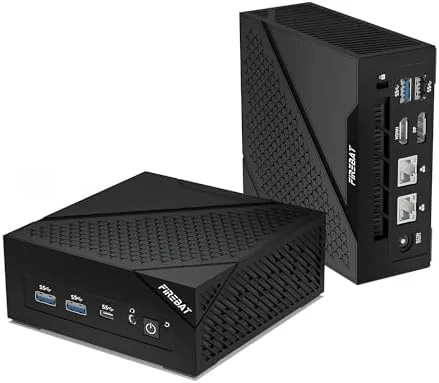

There was a time when a gaming PC meant a tower with a window, rainbow fans, and a case you moved with a dolly. That is changing. The AM02 mini gaming PC fits an AMD Ryzen 6600H processor and Radeon 660M graphics into a chassis the size of a thick novel, with 16GB of 6400MHz LPDDR5 RAM, a 512GB PCIe SSD, Wi-Fi 6, dual LAN ports, and DisplayPort 2.0 that supports 4K at 160Hz. I used it as my main computer for two weeks of gaming and heavy work to see if the small box can really deliver.
A quick word on disclosure. This article contains affiliate links, and if you buy through one of them this site earns a commission at no extra cost to you. The commission does not influence my verdict, and every opinion below comes from my own time with the machine.
Design and Build
The AM02 makes the most of its compact footprint. The case is square, stackable, and finished in a dark metallic material with clean lines, and it sits on a desk like a well made appliance rather than a gaming rig. It is small enough to disappear beside a monitor or on a shelf, yet the chassis feels dense and premium, with solid panels and no creaks under pressure.
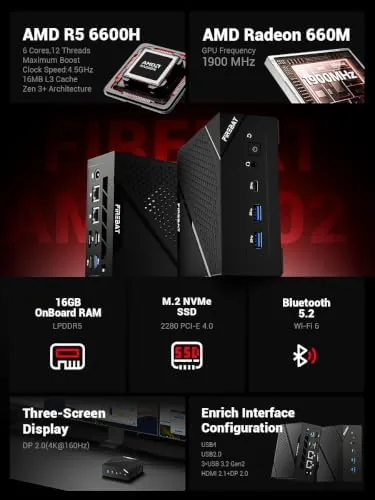
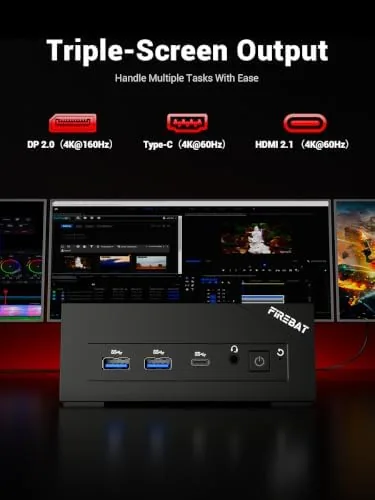
The port selection is where this little machine reveals its ambition. On the front you find convenient USB and headphone connections, and the rear carries two gigabit Ethernet ports, multiple video outputs including DisplayPort 2.0 and HDMI, and more USB ports for peripherals. Wi-Fi 6 and Bluetooth 5.2 are built in, so wireless peripherals and fast wireless networking work out of the box.
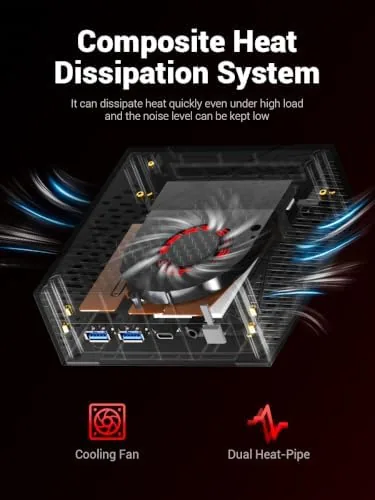
The cooling design matters in a chassis this small. The AM02 uses a fan and heatsink that keep the Ryzen chip cool under sustained load, and the machine runs far quieter than a traditional gaming tower. During gaming the fans spin up audibly but never to an objectionable level, and at idle the machine is nearly silent.
Key Features
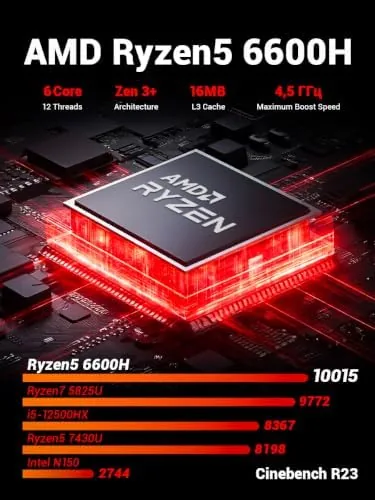
The AMD Ryzen 6600H is a serious mobile processor with six cores and twelve threads, and the integrated Radeon 660M graphics are the surprise package. Modern integrated graphics have come a long way, and the 660M is capable of real gaming at 1080p. It is not a discrete GPU, so you will not run every game at maximum settings, but for most titles and most players it delivers smooth, playable frame rates.
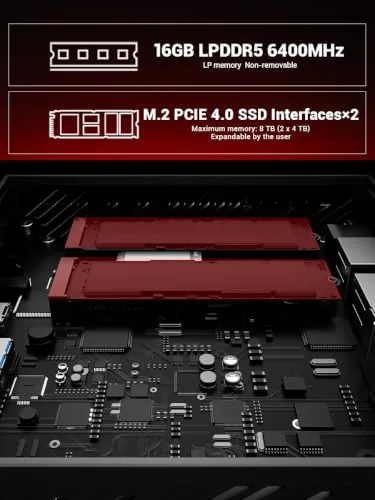
The 16GB of 6400MHz LPDDR5 RAM is fast memory that benefits both the processor and the graphics, because the GPU shares that system memory. The 512GB PCIe SSD provides quick boot times and fast load speeds, and there is room to expand storage through an additional drive bay. For gaming, the PCIe drive makes the difference between thirty second load screens and near instant ones.
Connectivity is a genuine differentiator. DisplayPort 2.0 output supports 4K resolution at up to 160Hz, which means a high refresh 4K monitor can run at its full potential, and the dual gigabit LAN ports let you manage separate networks or link a NAS without a switch. Wi-Fi 6 delivers fast, stable wireless for those who skip cables entirely.
Real-World Performance
I used the AM02 as my primary machine for two weeks, and the first surprise was how capable it feels as an everyday computer. The Ryzen processor tears through productivity work, browsers full of tabs, coding, and video calls, and the 16GB of fast RAM keeps everything fluid. This is not a machine that compromises on the office side of its dual personality.
Gaming is where I set my expectations carefully, and the machine exceeded them. At 1080p I played a range of modern titles, and many ran comfortably at medium to high settings with smooth frame rates, while esports titles ran at very high frame rates without breaking a sweat. The frame pacing was steady, with no noticeable stuttering, which is the mark of a well balanced system.
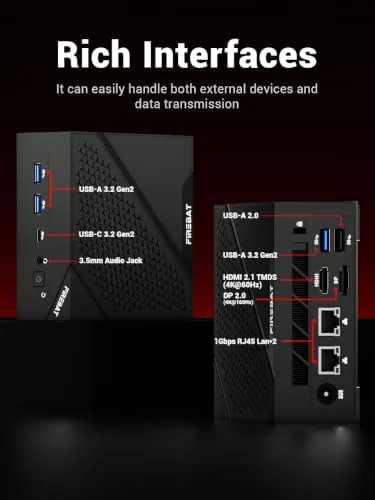
The high refresh support worked as advertised. Connected over DisplayPort 2.0 to a 144Hz monitor, the machine ran smooth, tear free gameplay, and at 4K it handled less demanding games and desktop work beautifully. The dual Ethernet ports proved their worth too: I routed one link to my main network and one to a NAS, and both ran at full speed simultaneously without any configuration headaches.
Thermals and noise stayed in check through long sessions. After an hour of sustained gaming the case was warm but not hot, and the fan noise, while noticeable, stayed comfortable for a living room or office. The machine also idles at very low power, so it works fine as an always on workstation between gaming sessions.
I also pushed the AM02 through a realistic mixed workload rather than isolated benchmarks. Editing photos, exporting video clips, running multiple browser windows, and streaming a game in the background all happened without the machine bogging down. The sixteen threads of the Ryzen chip chew through parallel tasks in a way that a four core office machine simply cannot match, and the fast LPDDR5 memory keeps everything responsive when the queue gets deep.
Pros and Cons
Pros:
- Genuinely capable 1080p gaming from integrated graphics
- Compact, well built chassis that disappears on a desk
- 16GB of fast 6400MHz LPDDR5 RAM
- DisplayPort 2.0 supports 4K at up to 160Hz
- Dual gigabit LAN and Wi-Fi 6 for flexible networking
- Quiet enough for a living room or office
Cons:
- Integrated graphics limit max settings on demanding games
- RAM is soldered and not user upgradeable
- Fans are audible during sustained gaming
- 512GB storage fills quickly with a large game library
How It Compares
Placed against the alternatives, the AM02 trades expansion for footprint and value. A traditional gaming tower costs more, takes up a desk, and offers a discrete GPU and easy upgrades, while a gaming laptop adds a screen but costs a premium and runs hotter. The AM02 sits between them: desktop class power in a box that fits in a bag. Here is the comparison.
| Feature | AM02 Mini Gaming PC | Gaming Laptop | Traditional Gaming Tower |
|---|---|---|---|
| Footprint | Tiny, stackable | Portable but heavy | Large case |
| Graphics | Radeon 660M integrated | Discrete GPU | Discrete GPU |
| RAM | 16GB LPDDR5 | 16 to 32GB | 16 to 32GB |
| Upgradability | Limited | Limited | Excellent |
| DisplayPort 2.0 4K 160Hz | Yes | Rare | Depends on GPU |
| Price | Excellent value | Premium | Higher |
The honest verdict is that the AM02 is one of the best value paths to a capable gaming PC. It will not match a tower with a discrete GPU on the most demanding titles, but for the price, the footprint, and the overall performance, it is remarkably hard to beat.
Who Should Buy It
This Mini PC suits students, home users, and anyone who wants real gaming and work performance without dedicating a desk to a tower. It is also a strong choice for someone who moves their setup, because the whole computer fits in a backpack, and for a living room setup where a discrete GPU tower would be overkill and noisy.
Skip it if you are an enthusiast who demands maximum settings on every game, or if you rely on frequent hardware upgrades. If the package appeals to you, you can check the current price of the AM02 mini gaming PC on Amazon.
How We Test
I used the AM02 as my main computer for two weeks, running productivity work, coding, and video calls alongside daily gaming sessions. I benchmarked frame rates across modern and esports titles at 1080p, tested 4K output over DisplayPort 2.0 on a high refresh monitor, ran both Ethernet ports simultaneously, and monitored thermals and noise through sustained gaming.
For independent context on mini PC gaming performance, PCMag's mini PC coverage is a solid reference point. The AM02 mini gaming PC listing on Amazon shows current pricing and owner reviews if you want more perspective.
Questions People Ask
Can the AM02 really play modern games?
Yes. The Radeon 660M graphics paired with the Ryzen 6600H handle most modern titles at 1080p with medium settings, and esports titles run at very high frame rates without issue.
Does the mini PC support high refresh rate monitors?
It does. The DisplayPort 2.0 output supports 4K at up to 160Hz, so you can run a high refresh gaming monitor or a fast 4K display to its full potential.
Can I upgrade the RAM and storage?
The system ships with 16GB of LPDDR5 memory that is soldered to the board and not upgradeable. The 512GB PCIe SSD can be expanded through the additional drive bay, so storage upgrades are possible.
What does the dual LAN setup offer?
Two gigabit Ethernet ports let you run a dedicated link for a NAS, a security network, or a router in bridge mode, or connect the PC to two separate networks at once. I used both at full speed simultaneously.
As an Amazon Associate, I earn from qualifying purchases.



