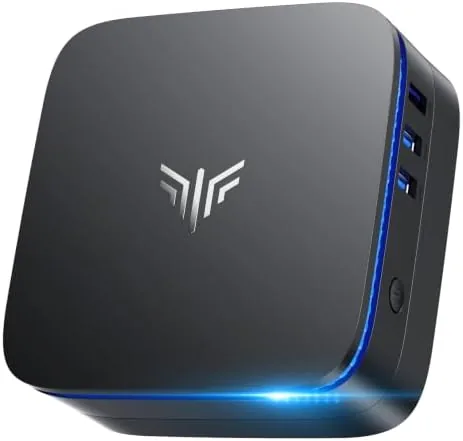

The desk in my home office has room for exactly one small box. A tower sits on the floor, a laptop gets shoved aside, and the cable behind the monitor is always in the way. That is the problem a mini PC exists to solve, and the KAMRUI AK1PLUS approaches it in the most direct way possible: a palm sized case, a low power Intel processor, and two 4K outputs from a device that costs a fraction of a mid range laptop. I ran the AK1PLUS as my primary office machine for several weeks, with two monitors attached, a dozen browser tabs open, and video calls scheduled throughout the day. This review is the record of that time.
Before the details, the standard disclosure. This article contains affiliate links, and a purchase through one of them earns this site a small commission at no extra cost to you. That commission does not influence what I test or what I recommend, and the review reflects the AK1PLUS as it performed in my own office over an extended period.
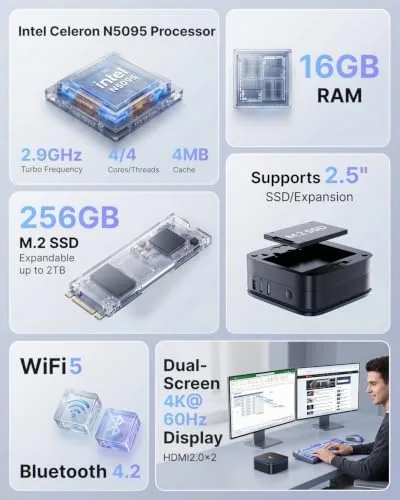
A mini PC is a bet on a simple idea: that most daily computing does not need a big tower or a powerful graphics card. The AK1PLUS makes that bet with the Intel Celeron N5095, a four core Jasper Lake processor, paired with 16GB of RAM and a 256GB solid state drive. The rest of this review covers the build, the ports, the real world performance across office tasks, and the places where a Budget processor shows its limits.
Design and Build
The AK1PLUS is small in a way that still surprises people. It measures roughly five inches square and about two inches tall, which puts it somewhere between a paperback book and a small stack of index cards. The case is dark plastic with a subtle textured top, quiet on the desk and easy to tuck behind a monitor or beside a router. Nothing about the exterior is flashy, and that is the point. This is a working box meant to disappear into an office corner and stay out of the way.
The build quality is better than the price suggests. The case panels fit cleanly, the rubber feet keep it planted, and the top vent pulls air through the chassis with a small fan that stays remarkably quiet under normal use. I never heard the AK1PLUS over a normal room hum, even during video calls and sustained browser work. The power supply is a compact external brick, which keeps the box itself thin, and the overall footprint means the computer can live on the desk, behind a monitor, or mounted to the back of a display with the included plate.
Key Features
The headline feature is the dual 4K display output. Two HDMI ports sit on the rear panel, and both support 4K resolution at 60Hz, which means the AK1PLUS can drive two monitors side by side as a complete desktop workspace. For a home office that runs spreadsheets on one screen and a browser on the other, that single feature changes how the machine feels to use. It is a genuinely useful capability in a device that costs well under three hundred dollars.
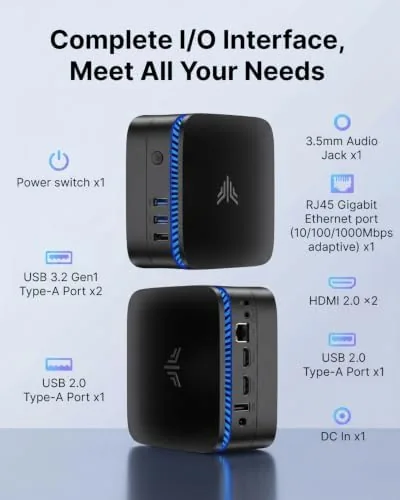
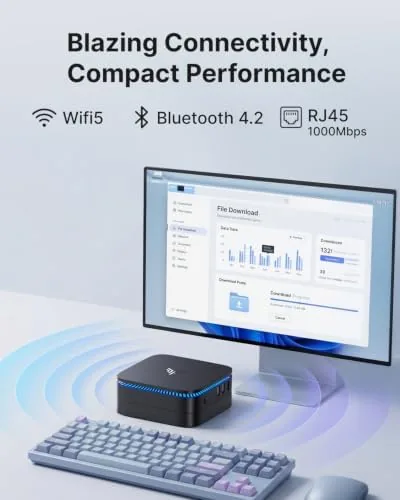
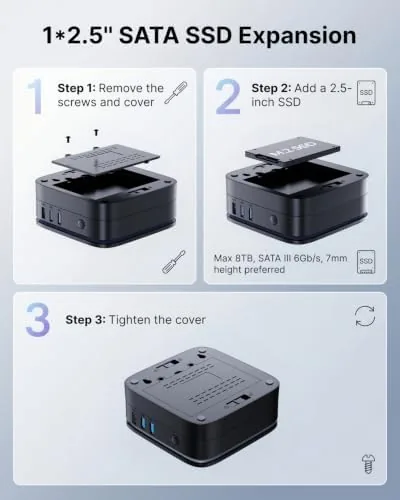
The storage picture is the other standout. The 256GB M.2 SSD handles the operating system and daily files, and the case opens to reveal a bay for a 2.5 inch SATA drive, so the total capacity can grow to over a terabyte with a cheap upgrade. The connectivity list is complete for an office box: gigabit ethernet, dual band WiFi, Bluetooth for a mouse or headphones, and a healthy set of USB ports including Type C on the front. The machine ships with a licensed Windows installation and boots straight to the desktop, so setup is unbox, plug in, and log in.
Real-World Performance
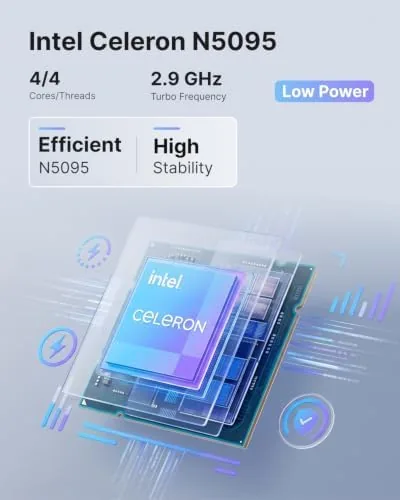
The Celeron N5095 is not a speed demon, but the AK1PLUS does not need one to do its job. For the core office workload, email clients, a browser with a dozen tabs, document editing, spreadsheets, and PDF viewers, the machine stayed responsive throughout my testing. Pages opened without the stutter you expect from budget hardware, documents saved instantly, and the 16GB of RAM meant I rarely thought about memory pressure at all. Multitasking is where the extra RAM pays for itself, because a lighter 8GB machine would have felt cramped with the same workload.
Video calls were the pleasant surprise. The AK1PLUS handled Zoom and browser based meetings without dropping frames on my side, and the small fan never spun up audibly enough to bother a call. With two 4K monitors attached, the desktop stays sharp and the cursor moves crisply, which is the experience most people actually want from an office computer: responsive enough that the hardware disappears from your awareness.
The limits are honest and predictable. The Celeron is a low power chip, so heavy work is where the machine backs down. A large spreadsheet with thousands of rows recalculates with a visible pause, photo editing in a serious editor is workable only for light crops, and anything involving video rendering will find the ceiling quickly. Gaming is out of scope beyond very light titles, and I did not test it beyond a couple of casual games because that is not what this machine is for. None of those limits are defects for a budget office box, but they define where it belongs.
Reliability over the test period was strong. The AK1PLUS stayed cool enough that the top of the case never felt more than warm, it woke reliably from sleep, and it survived a long weekend of being left on without complaint. For a device in this price class, that steadiness matters more than raw speed.
Pros and Cons
Pros:
- Dual 4K output at 60Hz from a very small box
- 16GB of RAM handles heavy multitasking comfortably
- Quiet operation even under sustained office work
- Easy 2.5 inch drive bay for cheap storage expansion
- Complete port selection including Type C and gigabit ethernet
- Licensed Windows installed and ready to boot
Cons:
- Celeron N5095 limits heavy multitasking and creative work
- 256GB base storage fills up quickly before expansion
- Plastic case lacks the polish of pricier mini PCs
How It Compares
The natural rival to the AK1PLUS is the newer generation of budget mini PCs built on Intel's N100 processor, which appears in successor models and in machines from Beelink and others. The table below lines up the two approaches.
| Feature | KAMRUI AK1PLUS (N5095) | Newer N100 Mini PC |
|---|---|---|
| Processor | Celeron N5095, 4 cores | N100, 4 efficiency cores |
| RAM | 16GB DDR4 | Usually 16GB or less |
| Display output | Dual HDMI 4K at 60Hz | Dual HDMI plus DP options |
| Storage | 256GB SSD plus 2.5 inch bay | 256GB or 512GB with extra M.2 slot |
| Typical price | Very low | Slightly higher |
The N100 generation is a bit snappier in single threaded work and slightly more efficient, while the AK1PLUS counters with more RAM in this configuration and a lower price. For the same office workload, both machines feel equivalent in daily use, because the difference shows only in heavier tasks. If you can find the N100 version near this price, it is the better long term buy, but the AK1PLUS remains a strong value for a pure email, browser, and document machine.
Who Should Buy It
The AK1PLUS is for the person who wants a full Windows desktop without the tower. Home office workers who live in email, browsers, and documents will find the dual 4K output genuinely useful, and the compact footprint frees up desk space that a tower would consume. It is also a natural fit for a spare room office, a student desk, or a simple second machine that sits beside a monitor and just works.
Skip it if your work involves video editing, large creative files, or heavy multitasking that needs a real desktop processor, and skip it if gaming matters to you at all. For the office workload it targets, the AK1PLUS does the job quietly and cheaply. You can check the current price of the KAMRUI AK1PLUS on Amazon to see today's deal.
How We Test
I used the AK1PLUS as my main office machine for several weeks, connected to two 4K monitors with my normal operating system and workload installed. I tracked startup time, browser multitasking, document handling, video calls, and noise, and I left the machine running through evenings and weekends to gauge stability and thermals.
I did not run synthetic benchmarks or aggressive stress tests, because the relevant question for this class of machine is everyday usability, not peak performance. For a broader look at how budget mini PCs fit into an office, PCMag maintains a running guide to the best mini PCs that is worth reading before you buy. The KAMRUI AK1PLUS listing on Amazon shows the current price and full specifications.
KAMRUI AK1PLUS Mini PC: Questions People Ask
Can the KAMRUI AK1PLUS run two 4K monitors at once?
Yes, the dual HDMI ports each support 4K output at 60Hz, so you can drive two monitors side by side for a full desktop workspace.
How do I expand storage on the AK1PLUS?
Open the bottom panel and connect a 2.5 inch SATA SSD to the included cable and mounting bay, which takes about five minutes with a screwdriver.
Is the Celeron N5095 fast enough for office work?
For email, browsers, document editing, and video calls it is comfortably fast, and the 16GB of RAM keeps many tabs and apps open at once.
Does the mini PC come with Windows installed?
The AK1PLUS ships with a licensed Windows system ready to boot, so you can set it up and start working within minutes of unboxing.
As an Amazon Associate, I earn from qualifying purchases.