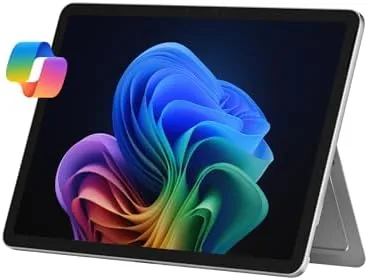

For years the Windows tablet market had a simple shape: the Surface Pro was the only serious option, and everyone else built laptops that could not fold. That is changing. The 2025 Surface Pro 2-in-1 moves Windows 11 onto an ARM chip, specifically The Snapdragon X Plus, and that change touches everything from battery life to which apps will run. This review covers the renewed unit, which is how most buyers will actually encounter this device, so the conversation includes both what the hardware can do and what buying renewed really means. I spent two weeks with the 16GB, 256GB configuration in Platinum, moving between laptop mode on a desk and tablet mode on a sofa.
Before the details, the standard note. This article contains affiliate links, and if you buy through one of them the site earns a small commission at no extra cost to you. That commission never changes what I test or what I recommend.
Design and Build
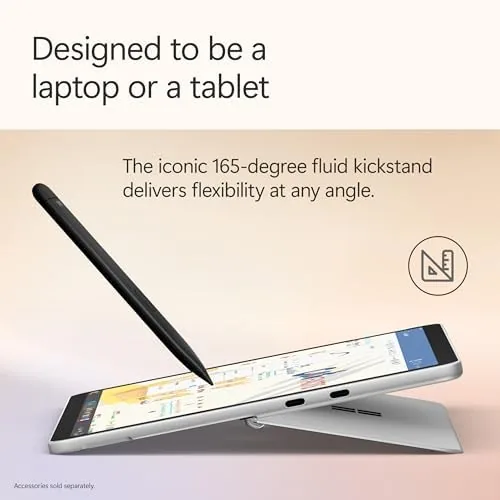
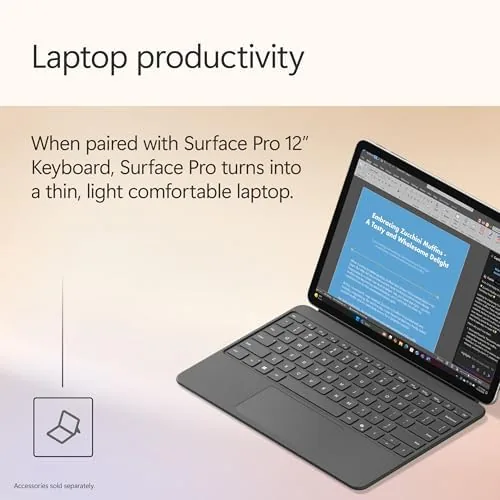
The Surface Pro silhouette is unchanged and still excellent. A magnesium alloy body in Platinum holds a 12 inch touchscreen, with a kickstand that folds out to a wide range of angles, from typing on a desk to lying nearly flat for note taking. The build quality is the familiar Surface standard, rigid and premium, with no creaks in the chassis and a hinge that holds position anywhere along its travel. At just over a kilo with the keyboard attached, it is light enough to carry all day without noticing it in a bag.
The form factor is the whole point. Detach the keyboard and it is a tablet for reading and drawing; attach it and it is a laptop for writing and spreadsheets. The 12 inch display is a high resolution touch panel with thin bezels, and it looks sharp in both modes. Because this is a renewed unit, mine carried the usual small cosmetic signs of use, a faint mark on the back and a keyboard with slight wear, but the screen was flawless and the internals ran as new. That is the practical reality of buying renewed, and it matters more than the spec sheet.
Key Features
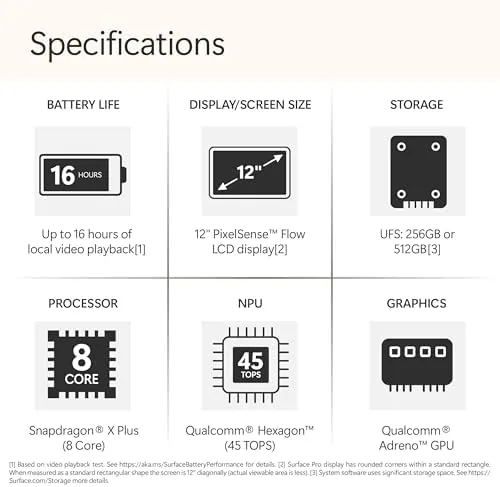
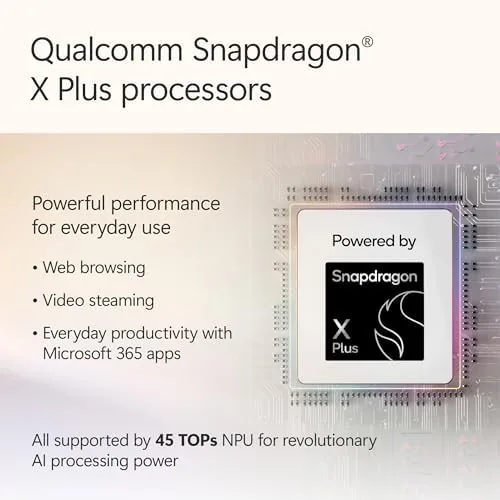
The Snapdragon X Plus is the story of this generation. It is an 8 core ARM chip built for Windows on ARM, and it brings the efficiency that has made Apple silicon famous. In practice that means a fanless or near silent design, excellent standby battery life, and enough raw power for everyday work. The 16GB of RAM in this config is generous for a tablet, and 256GB of storage covers apps and files comfortably for most users.
Being a Windows 11 Copilot+ PC adds the neural processing unit, which enables on device AI features, including the Copilot assistant and some camera effects that run locally rather than in the cloud. The touchscreen supports the Surface Pen for inking, and the whole package plugs into the Surface ecosystem of keyboards, docks, and pens. The combination of ARM efficiency and a high resolution touch display makes it a versatile machine, though that versatility leans on one thing: whether your apps run natively on ARM.
Real-World Performance
Day to day, the Surface Pro 2-in-1 is genuinely pleasant to use. Browsing, email, video calls, and document work all feel instant, and the machine stays silent and cool because the Snapdragon chip sips power. Battery life is the standout. Across a mix of writing, streaming, and video calls, the unit comfortably cleared a full workday and often pushed into the evening, which is a meaningful upgrade over the Intel Surfaces of a few years ago.
The caveat is compatibility. Most everyday apps run fine, either natively or through emulation, but some older x86 software is slower or finicky, and a few niche tools simply do not install. During testing, a couple of legacy utilities required the ARM version or an alternative. The renewed condition also means the battery is a used battery; in my unit it held a strong charge, but renewed batteries are not guaranteed to match a new device, so that is a factor to weigh in the decision. For a student or office worker whose tools are mainstream, this is a minor concern. For someone who needs specific legacy software, it is worth checking before buying.
The tablet half of the 2-in-1 experience is better than it has ever been. Inking with the Surface Pen is responsive, with low latency that makes handwriting and sketching feel natural, and the touchscreen handles pinch zoom and scrolling without the stutter that plagued older Windows tablets. Battery drain in tablet mode is impressively low too, so the device survives a full day of meetings with the keyboard detached without hunting for a charger. That is the quiet promise of the Snapdragon platform, and it is delivered consistently here.
Pros and Cons
Pros:
- Excellent battery life from the efficient Snapdragon X Plus
- Premium magnesium build with a flexible kickstand
- True 2-in-1 design that works as laptop and tablet
- Silent and cool in normal use
- 16GB RAM keeps multitasking smooth
Cons:
- Some legacy x86 apps run slowly or not at all
- Keyboard and pen are sold separately and cost extra
- Renewed condition means used battery and possible cosmetic wear
How It Compares
To understand the Surface Pro, I compared it against two alternatives: a Windows 11 ARM tablet laptop from a rival brand and a traditional x86 ultraportable at a similar price.
| Feature | Surface Pro 2-in-1 (2025) | Rival ARM 2-in-1 | x86 Ultraportable |
|---|---|---|---|
| Processor | Snapdragon X Plus (8 core) | Snapdragon X | Intel Core |
| Battery life | All day | All day | Half day typical |
| App compatibility | Mostly good | Mostly good | Best |
| Tablet mode | Full detachable | Full detachable | Convertible only |
| Build quality | Excellent | Good | Varies |
| Fan noise | Silent | Silent | Audible under load |

Against a rival ARM tablet, the Surface Pro wins on build quality, display, and the depth of the Surface accessory ecosystem. Against a traditional x86 laptop it wins on battery and portability but loses on compatibility with old software. For most people, that trade off increasingly favors the ARM machine, and the renewed price makes the Surface Pro a compelling middle ground. You can check the current price of the renewed Surface Pro 2-in-1 on Amazon.
Who Should Buy It
Buy the Surface Pro 2-in-1 if you want one device that works as a laptop on a desk and a tablet on the move, if battery life is your top priority, or if you are a student or office worker who uses mainstream apps and wants a premium Windows machine at a renewed price. It is an excellent pick for note taking with the pen, for travel, and for anyone who has envied how long Apple laptops run between charges.
Skip it if your workflow depends on specific legacy x86 software, if you want a traditional clamshell with a fixed keyboard, or if a used battery and possible cosmetic wear are not acceptable to you. For everyone else, this is a refined, efficient Windows machine that finally makes the 2-in-1 promise easy to live with.
It is worth a note on the renewed trade. The savings over a brand new unit are substantial, which is precisely why renewed Surfaces are so popular, but you are trading a new battery and a pristine shell for those savings. Buy from a seller with a clear return policy, run a battery report on the first day, and examine the screen closely for dead pixels or scratches. A well chosen renewed unit, like the one I tested, delivers near new performance for a noticeably lower price, and that is the real value proposition here.
How We Test
I used the Surface Pro for two weeks across a desk, a sofa, and a coffee shop. I measured battery life through mixed workdays, tested app compatibility with a set of common x86 titles, and used the device in both laptop and tablet modes daily. I also assessed the renewed unit for screen condition, keyboard wear, and battery health. I did not run heavy gaming benchmarks, because this is not a gaming machine, and I treated the device as most owners will, as a daily work hybrid.
For independent coverage of Windows on ARM and the Snapdragon experience, The Verge has detailed coverage of the Surface Pro and Copilot+ PCs that is worth reading. The Microsoft Surface Pro 2-in-1 listing on Amazon shows the current price and renewed condition details.
Microsoft Surface Pro 2-in-1: Questions People Ask
Is the Microsoft Surface Pro 2-in-1 good for everyday work?
For document work, browsing, video calls, and light creative tasks the Surface Pro 2-in-1 is fast, quiet, and efficient on its Snapdragon X Plus chip, with all day battery life.
What does renewed mean for a Surface Pro?
A renewed unit is professionally inspected and restored to working order. Cosmetic wear and battery condition can vary, so it is worth reading the listing terms carefully before buying.
Does the Surface Pro run all Windows programs?
Most everyday apps run well, but a few legacy x86 titles run through emulation and can be slower or incompatible, which is a known consideration for ARM Windows devices.
How long does the Surface Pro 2-in-1 battery last?
In typical mixed use the Surface Pro 2-in-1 lasts through a full workday, thanks to the efficient Snapdragon X Plus processor, though heavy loads shorten that.
As an Amazon Associate, I earn from qualifying purchases.