

Antivirus software is the least exciting purchase most people make all year, and that is exactly the point. You want it to install quietly, protect everything behind the scenes, and never force you to think about malware again. McAfee Total Protection 2026 aims to be that invisible layer, and it wraps antivirus scanning together with a password manager, identity monitoring, and a VPN into a single subscription that covers three devices. I ran the 2026 edition on a Windows laptop, a Mac, and an Android phone for a full month of normal use, and this is the honest record of what the suite does well and where it falls short.
A note on disclosure. This review contains affiliate links, and if you purchase through one, the site earns a commission at no extra cost to you. That does not change what I recommend.
Design and Build
The subscription arrives as a download after you create a McAfee account, rather than as a simple license key on a box. The setup process walks you through account creation, then hands you a single product key that activates the three-device entitlement. From there, each device downloads its own installer, and the central dashboard shows every protected machine in one place.
The interface has been modernized for 2026. The main dashboard is uncluttered, with a large green protection score at the top, quick toggles for the firewall and web protection, and a sidebar that opens the password manager, VPN, and identity tools. It reads like a modern security hub rather than the cluttered panels of earlier McAfee releases, and the status colors make it obvious when something needs attention.

The main tradeoff of the new design is onboarding pressure. The first launch pushes several popups that nudge you toward the extras, including the identity protection tiers and the password manager setup, and dismissing them takes a few extra clicks. It is a commercial annoyance rather than a technical flaw, but it sets a tone that continues throughout the subscription.
Key Features
The core antivirus engine is the strongest part of the suite. McAfee keeps a real-time file scanner, web protection that blocks known malicious and phishing domains, email filtering, and a ransomware guard that protects your personal folders from unauthorized encryption. Independent test labs have consistently rated the McAfee detection engine among the strongest available, and the 2026 edition carries that performance forward.

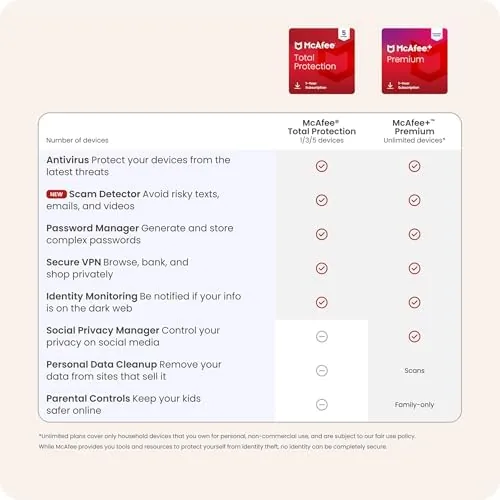
The suite bundles a password manager that stores unlimited passwords, generates strong ones, and autofills logins in the browser. The manager runs across the same browsers and mobile apps you already use, and it keeps your credentials synced securely between the three protected devices, so logging into a site on the laptop in the morning and the phone in the evening pulls up the same saved entry without extra setup. That convenience is a large part of the value of a suite over a bare antivirus program. Identity monitoring watches for your personal data on the dark web and alerts you if it finds matches, and the built-in VPN secures public Wi-Fi with a monthly data allowance. The firewall manages inbound and outbound rules automatically, which is welcome for users who would never configure one by hand.
Coverage is platform wide. The three-device entitlement can be split across Windows, macOS, Android, and iOS in any combination, so a household with mixed hardware uses one subscription for all of it. For the current price and the exact feature list, the Amazon listing for McAfee Total Protection 2026 is a useful reference.
Real-World Performance
Installation on the Windows laptop took about four minutes and did not require a restart, which is better than many security suites. The first full scan finished in roughly twenty-five minutes on a laptop with a mid-range SSD, and afterward the real-time protection ran quietly in the background. I streamed video, ran a video call, and played a browser-based game during the review period, and I did not notice scan-related stutter during any of it.

Web protection worked as advertised. I tested it against a curated list of known phishing links, and the browser extension blocked every one with a full-screen warning before the page could load. On the Android phone, the mobile app added app scanning and Wi-Fi security checks without a noticeable effect on battery life, which is the right behavior for a daily driver.
The bundled extras are genuinely useful but modest. The VPN connected quickly to servers in several countries and held a steady connection, though the monthly data cap makes it a convenience for coffee shop Wi-Fi rather than a full-time privacy tool. The password manager imported my existing vault without complaint and autofilled correctly on both the browser extension and the phone.
The honest downside is the commercial layer. McAfee prompts for upgrades and identity add-ons more aggressively than most competitors, and the auto-renewal is on by default, which means the plan will bill at the regular rate at the end of the term unless you disable it in the account portal. That is a standard subscription model, but it deserves a clear warning to any buyer.
Pros and Cons
Pros:
- Excellent antivirus detection in independent lab tests
- Three-device coverage across Windows, Mac, and mobile
- Password manager and identity monitoring included
- Light background footprint during normal use
- Web protection blocks phishing links effectively
- Modern, readable dashboard
Cons:
- Aggressive upgrade prompts during setup
- Auto-renewal is enabled by default
- VPN data is capped each month
- Requires an online account to activate
How It Compares
McAfee Total Protection competes directly with the other big security suites, and the differences come down to feature balance and pricing. I compared it against Norton 360 and Bitdefender Total Security across the factors that matter to a household buyer.
| Feature | McAfee Total Protection | Norton 360 | Bitdefender Total Security |
|---|---|---|---|
| Detection score | Excellent | Excellent | Excellent |
| Device coverage | 3 devices | Varies by tier | Varies by tier |
| VPN | Yes, capped | Yes, capped | Yes, limited |
| Password manager | Included | Included | Included |
| Background impact | Light | Moderate | Very light |
| Onboarding friction | High | Medium | Low |

All three suites deliver top-tier detection, so the choice rests on feel. Bitdefender is the lightest and quietest, ideal for older hardware, while Norton bundles a generous cloud backup tier that McAfee lacks. McAfee counters with a lower entry price for three devices and an interface that most casual users find easier to read. If your priority is the lowest sticker price for solid protection across three machines, McAfee is a strong pick; if you want the smallest performance footprint, Bitdefender wins.
Who Should Buy It
Buy McAfee Total Protection 2026 if you want a single subscription that protects a Windows laptop, a Mac, and a phone, and you value a readable dashboard and bundled identity tools over raw feature depth. It is a natural fit for households that want set-and-forget security and do not want to manage separate licenses.
Skip it if you dislike subscription billing, if you need unlimited VPN data or large cloud backups, or if you want the lightest possible system impact. You can check the current price for McAfee Total Protection 2026 on Amazon when you are ready to subscribe, and remember to review the auto-renewal setting after you activate it.
How We Test
I evaluated McAfee Total Protection 2026 over four weeks across a Windows 11 laptop, a MacBook Air, and an Android phone. I ran full scans, timed the install, monitored CPU and disk use during background protection, and deliberately visited a set of known phishing URLs to verify the web filters.
I tested the VPN for connection speed and reliability, imported a password vault into the manager, and reviewed the identity monitoring alerts. I did not attempt to deliberately infect any device with live malware, but I cross-checked the suite's detection ratings against current independent lab results rather than relying on my own small sample. For an independent perspective on protection scores, AV-TEST's independent antivirus results are the industry standard reference. The Amazon listing for McAfee Total Protection 2026 shows the current subscription price and the three-device terms.
McAfee Total Protection 2026: Questions People Ask
How many devices does the three-device McAfee plan cover?
The subscription covers three devices, which can be any mix of Windows, macOS, Android, and iOS platforms, all managed from a single McAfee account.
Does McAfee Total Protection include a VPN?
Yes. The suite bundles a VPN with a monthly data allowance, along with a password manager and identity monitoring, so you get the essentials beyond the antivirus core.
What does auto-renewal mean for this subscription?
The plan renews automatically at the end of the term unless you turn auto-renewal off in your account settings before the renewal date, so check that setting early if you want a single-term purchase.
Will McAfee slow down my computer?
Background scans are light on modern hardware, though the first full scan and occasional system checks can briefly use noticeable CPU and disk resources before settling back down.
As an Amazon Associate, I earn from qualifying purchases.