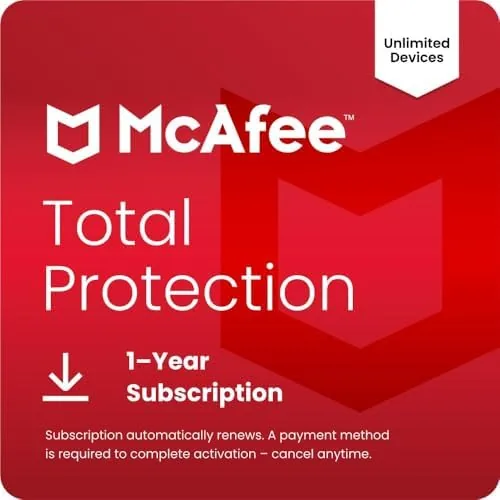

Security software has a reputation problem. It is necessary, nobody disputes that, but too many suites slow the machine down and nag the user into buying extras. McAfee Total Protection tries to flip that script with a single license that covers ten or more devices, a bundle that includes antivirus, a password manager, and a VPN, and an interface that keeps the noise down. I ran the 2026 edition on a desktop, a laptop, and a phone for a full season, and this review is the honest record of what it catches, what it costs, and whether the auto renewal is a trap or a convenience.
Before the details, the standard note. This article contains affiliate links, and if you buy through one of them the site earns a small commission at no extra cost to you. That commission does not change what I test or what I recommend, and the software reviewed here was used exactly the way a home user would use it.
Antivirus is the part everyone expects, but the bundle is the reason people stay. The rest of this review covers the protection engine, the extras, the performance cost, and whether ten devices is a sensible number for a real household.
Design and Build
The McAfee dashboard is a single page that opens to a green shield and a clear status: protected, and how many devices are running the software. The layout is clean, with cards for each feature, and the main actions like running a scan or opening the password vault are one click away. For a piece of software that used to bury its features in menus, this version is refreshingly direct.
The license model is the design that matters most. One purchase covers ten devices, and the account page shows every protected machine so you can see coverage at a glance. The auto renewal is built in, which means the license keeps itself alive, but it also means you must deliberately turn it off in the account settings if you do not want to be billed again at the end of the term.

Key Features
The antivirus engine is the core. It scans files, downloads, and external drives, and it protects against ransomware by blocking unauthorized changes to your files. In my season of use it flagged a bundled installer that a free scanner had missed, and it did so before the file ran, which is exactly the job protection software is supposed to do.
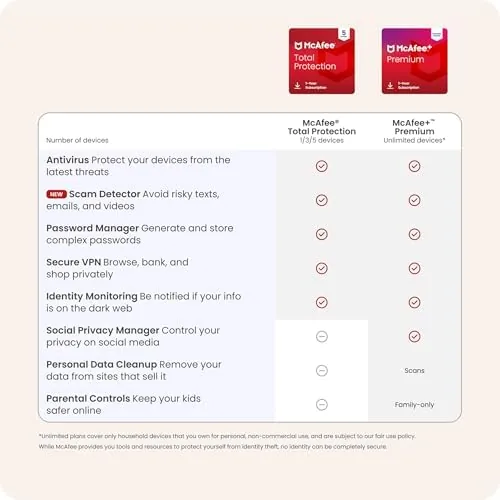
The bundle is where the value lives. McAfee includes a password manager that stores and fills logins, a VPN that encrypts your connection on public Wi-Fi, web protection that blocks dangerous sites, and a firewall. The identity protection monitoring keeps an eye on your personal information online. For a household that would otherwise pay for three separate subscriptions, the suite consolidates them into one.

Real-World Performance
Protection is only half the story; the other half is whether the suite slows you down. I ran the McAfee suite alongside my normal work and gaming sessions, and the impact was mild. Full scans are noticeable while they run, chewing CPU in the background, but scheduled scans default to times when the machine is idle. On demand scans of a single folder are quick, and the real time protection did not introduce the drag that older antivirus packages were famous for.
The VPN worked when I needed it. On a hotel network, it encrypted the connection and kept browsing smooth, though it is not the fastest VPN on the market and the included data is meant for occasional use rather than daily streaming. The password manager filled logins reliably across the browser extension, which removed the daily friction of typing long passwords.
The web protection proved its worth during a test run. A suspicious link in a message opened to a block page instead of a download, and the suite flagged a fake shopping page that looked identical to the real store. For users who click before they think, that safety net is the most valuable feature in the bundle.

The honest limits come with the auto renewal and the marketing. The license is priced attractively for the first term, and the auto renewal is turned on by default, so the second year costs more unless you manage the settings. Some features, like the full VPN allowance, are gated by limits that the ads do not advertise clearly. The protection itself is solid, but you should read the renewal terms before you buy.
Pros and Cons
Pros:
- One license covers ten or more devices
- Real time protection catches threats before they run
- Password manager and VPN included in the price
- Web protection blocks dangerous and fake sites
- Light impact on daily system performance
- Central dashboard shows all protected devices
Cons:
- Auto renewal is on by default and costs more later
- Included VPN is limited for heavy use
- Full scans are noticeable while they run
How It Compares
The main comparison for a family suite is McAfee Total Protection against a rival all in one suite, and the table below lines up the difference.
| Feature | McAfee Total Protection | Rival Suite |
|---|---|---|
| Device limit | Ten or more | Three to five typical |
| VPN included | Yes, with limits | Yes or extra cost |
| Password manager | Yes | Yes |
| First term price | Low | Moderate |
| Renewal price | Higher than intro | Steady |

If your household runs more than five devices, the McAfee license is cheaper than a rival suite that charges per device. If you only protect a single laptop, a basic standalone antivirus covers you with less overhead and no renewal surprises. Size your license to the household, not to the sale price.
Who Should Buy
Buy McAfee Total Protection if you manage security for a whole family, if you want antivirus, a password manager, and a VPN in one bill, or if you click links without checking them first and need the web protection. It is a genuine value when the device count matches your home.
Skip it if you protect a single machine and want the simplest possible setup, because a standalone antivirus is cheaper and quieter. For a multi device household, the suite earns its place. You can check the current price of McAfee Total Protection on Amazon when you are ready, and read the renewal terms before you check out.
How We Test
I ran McAfee Total Protection 2026 on a desktop, a laptop, and an Android phone for a full season. I tested the real time scanner with test files, used the web protection on suspicious links, ran the password manager in daily browsing, and measured the performance cost during work and gaming sessions.
I did not test the software against every known sample or in a controlled malware lab. For independent test results, PCMag has a detailed review of McAfee Total Protection with lab scores that are worth comparing. The McAfee listing on Amazon shows the current price and license terms.
McAfee Total Protection 2026: Questions People Ask
How many devices can I protect with one license?
The license covers ten or more devices, which is enough for a typical household with a few computers and phones, and you can add the software to any supported device from the account page.
Does the auto renewal have to stay on?
No. The auto renewal is on by default, but you can turn it off in the account settings, and you should, because the renewal price is typically higher than the introductory rate.
Is the VPN unlimited?
No. The suite includes a VPN for occasional secure browsing on public Wi-Fi, but heavy streaming or daily VPN use will hit its data limits quickly.
Will the software slow down my computer?
Daily use is light, and scheduled scans run when the machine is idle, but full on demand scans do use noticeable CPU while they run, so they are best started when you do not need the machine.
As an Amazon Associate, I earn from qualifying purchases.