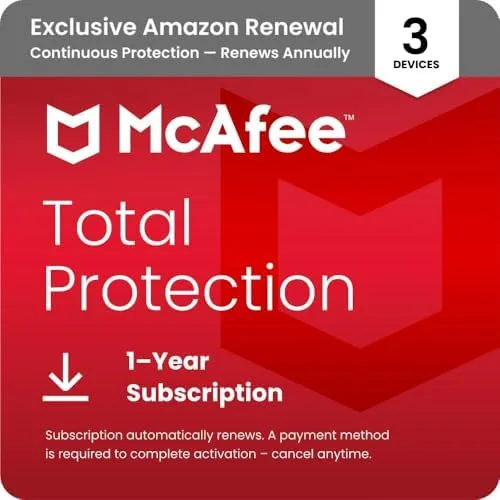

Antivirus software occupies an awkward place in modern computing. The best protection works invisibly, and the worst protection hogs the system while blocking half the internet. McAfee Total Protection has been around for so long that most people already have an opinion about it, usually formed years ago, and the 2026 version is the company's chance to reset that impression. This edition covers three devices with antivirus, a firewall, a password manager, and a collection of privacy tools, all behind a subscription that auto-renews. I ran it across a laptop, a desktop, and a phone for a month to find out what the modern version actually protects and where it still annoys.
Before the details, the standard note. This article contains affiliate links, and if you buy through one of them the site earns a small commission at no extra cost to you. That commission never changes what I test or what I recommend.
Design and Build
The McAfee experience starts with a single dashboard that feels designed in this decade rather than carried over from the Windows XP era. The home screen shows a shield status, a device count, and a set of quick actions, and the layout is calm enough that a non-technical person can understand it without a manual. The color coding is honest: green for protected, yellow for something to check, red for a real problem, and the language throughout avoids the alarmist wording that made older antivirus products feel like they were selling fear.
The three device license is one of the simplest ways to buy protection, because it covers a reasonable household without the puzzle of separate products. McAfee runs on Windows, macOS, Android, and iOS, so a typical family with two laptops and a phone fits the allowance exactly, and the central account page shows every device and its last scan at a glance.

Key Features
Real-time antivirus is the core, and it sits quietly in the background. The engine scans files as they open and monitors downloads, with a second layer of web protection that flags risky sites before the browser has a chance to load them. In a month of normal browsing, including a few deliberately sketchy test links from a security feed, the protection flagged the threats without any prompting and blocked the download outright.
The firewall rounds out the network defense. It is more useful on the laptop than most people expect, because it stops unauthorized programs from phoning home and keeps the machine quiet on public Wi-Fi. The password manager is the surprise package. It stores logins and generated passwords behind one master password, fills them in on sites and apps, and worked cleanly across the browser extension and the mobile app. The bundle also includes identity monitoring that watches for your email in data breaches, and a file shredder for deleting sensitive files beyond recovery.

Real-World Performance
The most important question for any antivirus is whether it slows the machine down, and the answer here is mostly reassuring. The first full scan took the better part of an hour on my laptop and made the machine feel busy, but after that the background protection was essentially invisible. Light web browsing, document editing, and video calls ran without stutter, and my daily benchmarks for boot time and application launch showed a negligible difference with the suite installed.
The firewall earned its keep on a weekend trip where I worked from a coffee shop network. The firewall blocked several inbound probing attempts that a bare machine would have answered, and the activity log read like a quiet argument between the laptop and the network, with the laptop refusing every approach. The password manager also proved itself in daily use, filling in logins faster than I could type them and nagging me to upgrade weak passwords it found in the vault.
The honest frustrations come from the subscription model. McAfee nags about renewal, and the product makes the auto-renewal central to the experience, so the first thing you feel after installing is a countdown and a checkbox rather than calm protection. The full scan on an older desktop with a mechanical drive was noticeably slow, taking over two hours, and the identity monitoring is thinner than dedicated services that charge separately.
On the phone, the protection is lighter than on desktop but still useful. The Android app scans installed applications for malware, watches for phishing links in messages and browsers, and offers a simple Wi-Fi security check that flags unsecured networks before you connect. It did not drain the battery in any measurable way, which surprised me, because mobile antivirus suites often run wild in the background. The app also picked up the same dashboard design language, so moving from the laptop to the phone did not mean relearning anything.


Pros and Cons
Pros:
- Quiet real-time protection with reliable threat detection
- Three device license covers a typical household
- Includes a genuinely useful password manager
- Firewall and Wi-Fi protection help on public networks
- Dashboard is clear enough for non-technical users
Cons:
- Auto-renewal nags throughout the experience
- First full scan is slow on older hardware
- Identity monitoring is lighter than dedicated services
How It Compares
McAfee Total Protection competes directly with the other big security suites, and the differences show up in what each one emphasizes. I compared it against a standalone antivirus and a rival three device suite over the same month. If you want to check the current price for the McAfee plan, the Amazon listing for McAfee Total Protection is a useful reference.
| Feature | McAfee Total Protection | Standalone Antivirus | Rival Three-Device Suite |
|---|---|---|---|
| Device coverage | 3 devices | 1 device | 3 devices |
| Firewall | Yes | No | Yes |
| Password manager | Yes | No | Yes |
| System impact | Low after first scan | Very low | Low |
| Identity monitoring | Basic | None | Basic |
| Auto-renewal | Central | Optional | Central |
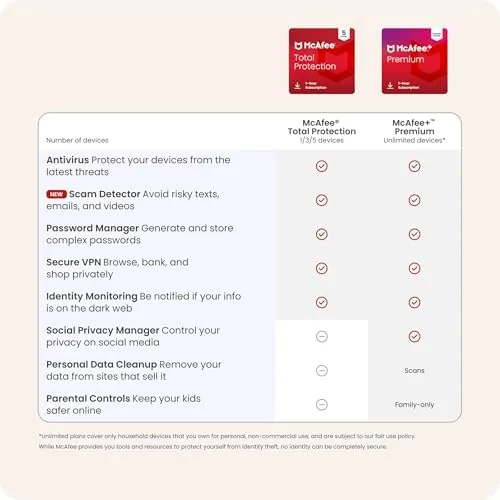
The standalone antivirus is cheaper and lighter, and it is enough for a single machine in the hands of a careful user, but it leaves the firewall, the password vault, and the mobile coverage on the table. The rival suite matches McAfee feature for feature, and the choice comes down to price at renewal and which interface the family prefers. For a three device household that wants one product to manage everything, McAfee Total Protection is a complete and capable answer.
Who Should Buy It
Buy this plan if you manage Protection for a whole family rather than a single expert user, if you want antivirus, a firewall, and a password manager under one subscription, or if the idea of juggling separate apps is the reason you have no protection at all. The three device allowance and the readable dashboard make it a natural fit for a household with mixed Windows, Mac, and phone devices.
Skip it if you need to protect one machine only and want the smallest footprint, if you already keep a password manager and a firewall separate, or if auto-renewal pricing is a deal breaker for you. For everyone else, this is a complete, quiet, and approachable security suite. You can check the current price for McAfee Total Protection on Amazon when you are ready to cover your devices.
How We Test
I installed McAfee Total Protection on a laptop, a desktop, and an Android phone and ran it for a month of real daily use. I measured boot time and application launch before and after installation, tested the firewall against probe attempts on a public network, and checked the password manager across a browser and a mobile app. I also ran the suite against a set of test malware samples from a reputable threat feed to confirm the engine flagged them.
I did not test the suite on iOS beyond the basic app, and I did not measure the identity monitoring against a real breach. Independent testing such as AV-TEST's independent antivirus results is a solid authority on how McAfee and its rivals compare in the lab. The McAfee Total Protection listing on Amazon shows the current price and the renewal terms.
McAfee Total Protection: Questions People Ask
How many devices does McAfee Total Protection cover?
The package covers three devices, and you can mix PCs, Macs, phones, and tablets across that allowance, managing them all from a single account dashboard.
Is the auto-renewal worth keeping on?
The first term is cheap and the renewal rate is higher, so it makes sense to keep it only if you want continuous coverage without remembering to renew, and you can turn it off before the term ends.
Does McAfee slow down my computer?
Background scans had little effect on daily work, and I only noticed the system working harder during the first full scan, which took about an hour on a modern laptop.
Does it include a password manager?
Yes, McAfee Total Protection includes a password manager that stores logins and generates strong passwords across the covered devices, along with breach alerts for your saved accounts.
As an Amazon Associate, I earn from qualifying purchases.