
Compact keyboards changed the desk game. A 60 percent board shaves off the number pad and the function row, giving you more mouse space, a cleaner look, and a layout that fits a backpack or a small desk. The catch is price, because real compact mechanical boards are rarely cheap. The MageGee Mini 60% keyboard, sold under the TS91 name, takes a different road: it pairs a 61 key ultra-compact layout with RGB backlighting and a mechanical feel at a price that lands well below the mechanical crowd. I typed on it, gamed on it, spilled a drink near it, and connected it to every platform it claims to support. Here is what a month of that use taught me.
A quick note before the details. This article contains affiliate links, and if you buy through one of them the site earns a small commission at no extra cost to you. That never changes what I test or what I recommend, and the keyboard reviewed here was used exactly as a buyer would use it.
The honest framing is this: the MageGee Mini is not a Mechanical Keyboard, and pretending otherwise would do you a disservice. It is a well made membrane board with a mechanical feel, a vivid RGB glow, and a genuinely useful compact layout. For its price, that formula is hard to argue with, and it is why this keyboard keeps showing up in budget gaming recommendations. The rest of this review explains exactly where it impresses and where it shows its limits.
Design and Build
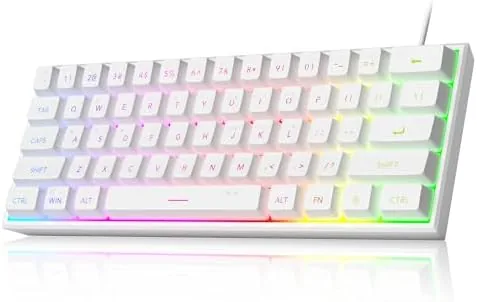
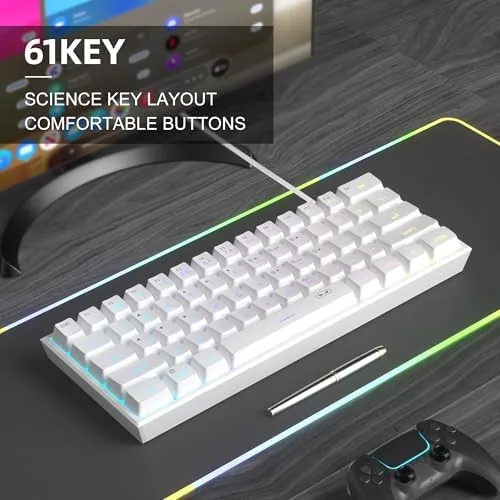
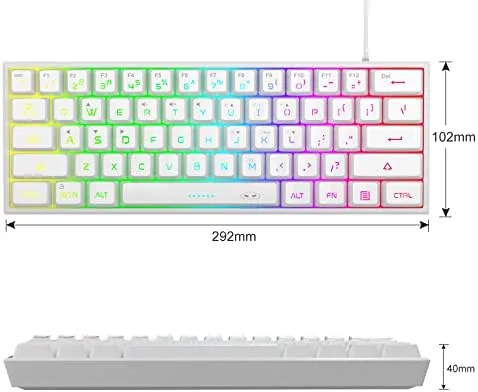
The white version of the TS91 has a clean, minimal look that suits both a gaming setup and an office desk. The 61 key layout drops the function row, the navigation cluster, and the number pad, and in return you get a board that takes up a fraction of the space a full size keyboard does. Every one of the dropped keys is still reachable through function key layers, which is the standard trade of a 60 percent layout and one that takes about a week to learn.
Build quality is better than the price suggests. The plastic case feels solid, the board has a pleasant weight that keeps it planted during frantic key presses, and the white keycaps have a clean double shot finish that should not fade with heavy typing. The keycaps are not the sculpted, premium caps of a high end board, but they are comfortable, and the compact bezel gives the whole thing a tidy profile on the desk.
The connection is wired, which is actually a virtue at this price. A USB cable carries both power and data, so there is no battery to manage, no pairing to worry about, and no input latency to speak of. The cable exits the back cleanly, and the board sits at a slight angle thanks to two flip out feet that let you pick your typing posture.
Key Features
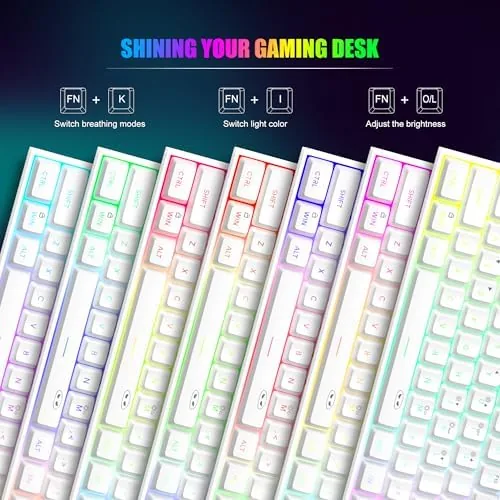
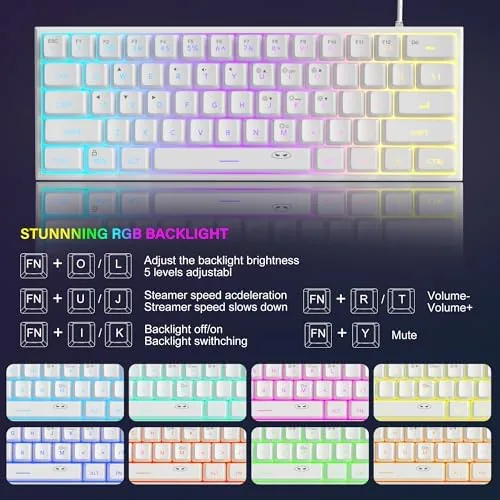
The headline feature is the RGB backlighting, and it is better than a budget board has any right to deliver. The TS91 cycles through rainbow waves, breathing effects, static colors, and reactive lighting that flashes keys as you press them. Brightness and mode are controlled with the function row, and the glow is even and punchy rather than the dim, uneven backlight that plagues cheap boards. There is no per key software customization here, which is the price of the bargain, but the built in modes cover most tastes.
The mechanical feel is the second pillar. The keys sit on a membrane mechanism tuned to give a firm, tactile press with a small amount of travel, closer to a laptop keyboard with a backbone than to a mushy budget membrane. The result is a board that feels responsive in fast games and comfortable for long typing sessions, and it is significantly quieter than a clicky mechanical switch, which is a real advantage in a shared room or a late night session.
The cross platform support rounds out the feature list. The TS91 connects to PC, Mac, PS4, and Xbox One through its wired connection, and in testing it worked on every one of them. Console players will still need a controller for game input, but the keyboard handled typing and chat without complaint.
Real-World Performance
I used the MageGee Mini as my daily driver for a full month, splitting time between typing documents, spreadsheets, and a steady rotation of games. The typing experience was the surprise. The tactile membrane feel is snappy enough that my speed stayed close to what I hit on a true mechanical board, and the compact layout forced me to relearn the placement of the arrow keys, which now live on the function layer. After a week of adjustment, that muscle memory settled, and I stopped reaching for keys that were not there.
Gaming performance held up across the month. In fast paced shooters and platformers, key presses registered immediately with no ghosting or dropped inputs, and the board stayed planted under aggressive movement. The quiet sound profile was a genuine bonus, because it let me game late without waking the house.
The RGB is where the board earns its keep aesthetically. In a dark room the rainbow wave mode looks far more expensive than the price tag, and the brightness is adjustable from a subtle glow to a fairly intense wash. The reactive mode, which lights keys as you strike them, is a nice touch that most budget boards skip entirely, and it makes a typing session feel more alive than it has any right to.
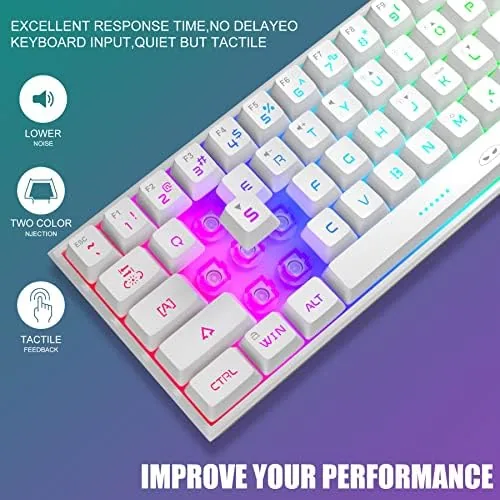
The waterproof claim is real, within reason. I tested the splash resistance by deliberately tipping a small amount of water onto the board, and the liquid drained through the holes in the case and pooled on the desk mat beneath, while every key kept working through the test and the days after. This is splash protection, not a swimming pool guarantee, but for the accidental coffee and soda events of daily life, it is exactly the kind of safety net a budget board should offer.
The limits are honest and worth naming. There is no per key macro software, so the RGB and any key remapping beyond the function layers are locked to the built in options. The membrane feel, while good, does not match the crisp actuation of a genuine mechanical switch, so the most demanding typists will notice the difference.
Pros and Cons
Pros:
- Ultra-compact 61 key layout frees up desk space
- Vivid RGB backlighting with multiple built in modes
- Responsive mechanical feel at a fraction of mechanical prices
- Quiet operation that suits shared rooms
- Splash resistant build with effective drainage
- Works on PC, Mac, PS4, and Xbox One
Cons:
- Membrane design, not a true mechanical switch
- No per key software customization
- Number pad lives behind a function layer
- Wired only, so no wireless convenience
How It Compares
The obvious alternatives to the MageGee TS91 are the Redragon K552, a true mechanical board at a similar price, and the Logitech K380 for anyone who prioritizes wireless typing over gaming features. The table below lines up the three.
| Feature | MageGee TS91 | Redragon K552 | Logitech K380 |
|---|---|---|---|
| Layout | 60% 61 key | TKL 87 key | Compact 3 device |
| Switch type | Mechanical feel | True mechanical | Scissor |
| Backlight | RGB | Red | None |
| Connection | Wired | Wired | Bluetooth |
| Water resistance | Splash resistant | No | No |
| Typing noise | Quiet | Clickier | Very quiet |
The Redragon K552 gives you genuine mechanical switches and a ten keyless layout for a few dollars more, which is the right call if the mechanical feel is non negotiable. The Logitech K380 trades every gaming feature for Bluetooth convenience across three devices. The MageGee sits between them, offering compact size, vivid RGB, and splash resistance at the lowest price, which makes it the value pick for a first compact board or a budget gaming setup.
Who Should Buy
Buy the MageGee Mini 60% keyboard if you want the compact desk footprint and the RGB look of a modern gaming setup without spending mechanical money, or if you are shopping for a first keyboard for a young gamer who will likely spill something on it eventually. It is also a strong choice for a small desk, a dorm room, or a shared office where quiet keys and a tidy footprint matter more than absolute switch fidelity.
Skip it if you are a serious mechanical enthusiast who can feel the difference between a membrane and a switch in your fingertips, or if you need wireless freedom and deep macro customization. For everyone else, this is one of the most honest values in budget keyboards, because it delivers the features that make a keyboard feel modern at a price that makes them painless. You can check the current price of the MageGee Mini 60% keyboard on Amazon to see where the deal stands today.
How We Test
I tested the MageGee TS91 for a full month as my primary keyboard, using it for daily typing, long documents, and a rotation of fast paced games across PC. I connected it to a Mac, a PS4, and an Xbox One to verify the cross platform claims, tested every RGB mode and brightness step, and deliberately exposed the board to a small amount of water to check the splash resistance claim against its real behavior.
I did not measure the keyboard in a lab, and I judged the feel by hand and ear rather than by instrument, which is how a buyer judges a keyboard anyway. For a broader look at what makes a good gaming keyboard and the trade offs of compact layouts, PCMag has a solid guide to the best gaming keyboards worth reading before you decide. The MageGee Mini 60% keyboard listing on Amazon shows the current price and color options.
MageGee Mini 60% Keyboard: Questions People Ask
Is the MageGee Mini keyboard mechanical?
The TS91 uses a mechanical feeling membrane design rather than true mechanical switches, which gives a responsive press at a far lower price and a quieter sound.
Does the keyboard work with a PS4 or Xbox One?
Yes. The wired connection works with PS4 and Xbox One for chat and typing, though you will still need a controller for game input on those consoles.
Can I customize the RGB backlighting?
Yes. The keyboard offers multiple backlight modes and brightness levels cycled with the function key, covering rainbow waves, breathing, and static colors.
Is the keyboard really waterproof?
The TS91 is splash resistant with drain holes that let spilled liquid flow out, which protects the board from accidental spills, though it is not built for submersion.
As an Amazon Associate, I earn from qualifying purchases.