
Most people stop thinking about their keyboard the moment it works, but anyone who writes for a living knows the tool matters. The Logitech MX Keys S is the quiet, low profile full size keyboard that has become the default recommendation for office desks, and the renewed market makes that recommendation easier to act on. I typed on a renewed unit for a full work week to test the feel, the backlighting, the multi device switching, and whether buying a refurbished keyboard makes sense.
Before the details, the standard note. This article contains affiliate links, and if you buy through one of them the site earns a small commission at no extra cost to you. That commission does not change what I test or what I recommend, and the keyboard reviewed here was used exactly the way an office worker would use it.
The rest of this review covers the typing feel, the backlighting and battery, the multi device workflow, and whether the renewed price is the right reason to buy.
Design and Build
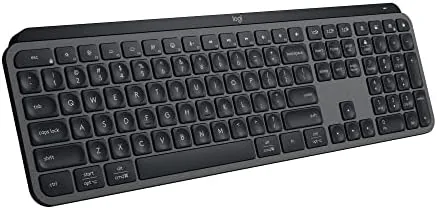
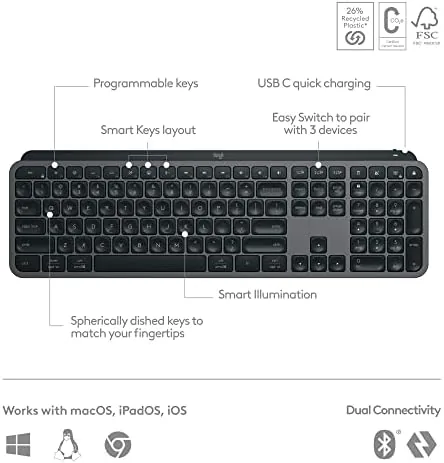
The MX Keys S has a distinctive silhouette that sets it apart from the plastic office keyboards it replaces. The Graphite finish gives the body a premium, matte look, and the full size layout includes a number pad, function row, and the signature concave keycaps that curl slightly at the edges to guide your fingers. The board sits at a comfortable angle on its built in feet, and the low profile design means your wrists stay in a more neutral position than with a tall mechanical keyboard.
The renewed unit I tested arrived in clean condition with no visible wear on the keycaps, and the backlighting worked across all the keys. The frame feels rigid with no flex when you press the center of the board, and the rubberized base keeps it planted on the desk even during fast typing sessions. For a keyboard that spends eight hours a day under your hands, the build quality is reassuring, because nothing rattles and no key feels loose.
Key Features
The typing feel is the reason this keyboard built its reputation. The low profile scissor switches deliver a shallow, crisp press that is quiet enough for a shared office, and the concave keycaps make touch typing more accurate because your fingers land consistently in the center of each key. Logitech calls the feel spherically dished, and in practice it translates to a confident, almost silent rhythm that does not disturb anyone nearby.
The smart backlighting and connectivity complete the package. The keys light up as your hands approach and dim when you step away, saving battery without making you hunt for keys in a dark room. The keyboard pairs with up to three devices over Bluetooth or the Logi Bolt receiver, and a single button press flips between a laptop, a desktop, and a tablet. Charging runs through USB C, and the same cable that charges the keyboard also works for a full wired connection if you ever want it.
Real-World Performance
A full week of writing put the keyboard through the paces, and the feel held up impressively. Long sessions left my hands less tired than they usually do after a day on a standard office board, which is the quiet benefit of a low profile layout that does not force your wrists up. The quiet switches meant I could type during video calls without the clicking leaking into the microphone, a detail that becomes important the moment someone points it out.
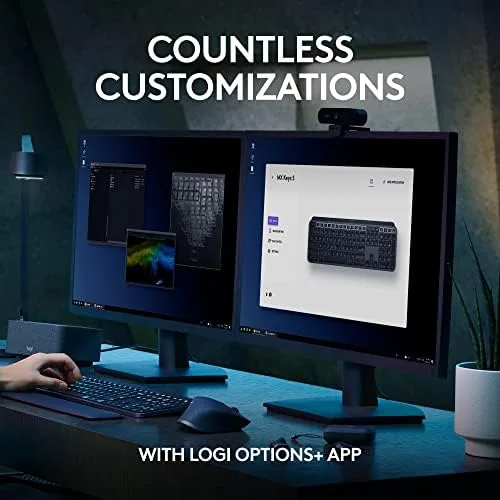
Switching between devices was the feature that earned its keep. I moved between a desktop for editing, a laptop for email, and a tablet for notes, and each press of the Easy Switch keys moved the keyboard instantly with no reconnection delay. Logitech Options Plus handled the pairing setup, and the same profiles carried the backlighting and function key shortcuts across all three devices, which is the kind of seamless workflow the marketing promises and, this time, delivers.
Battery life matched the claims. With the backlight at its automatic setting, the keyboard went a full working week and still showed plenty of charge, and a quick top up over USB C took it back to full in about two hours. The proximity sensor that wakes the backlight worked reliably, lighting up as my hands approached and turning off shortly after I walked away.
One honest note about the renewed unit: the keyboard has no mechanical switches and no replaceable battery, so its life is tied to the internal cell. My unit held charge exactly as expected, but a renewed keyboard carries a small amount of unknown history. That is the trade for the lower price, and in this case it was a fair one. Logitech Options Plus adds a layer of control that lifts the board above a plain typing tool. I reassigned the function keys, set the Fn row to default to media controls, and asked the backlight to dim after a short idle, all without touching a manual. The software also shows battery status at a glance, so there is no guessing when a charge is due, and it remembers a different layout for each connected device, which keeps the keyboard useful whether it is driving a desktop, a laptop, or a tablet.
Pros and Cons
Pros:
- Quiet, low profile typing that suits a shared office
- Concave keycaps make touch typing more accurate
- Switches between three devices with one button press
- Adaptive backlighting that saves battery
- Long battery life and fast USB C charging
- Solid build with a premium Graphite finish
Cons:
- No mechanical switch option for those who want the click
- Renewed battery history is an unknown
- Full size layout needs desk space
- Backlight eats battery quickly if left on high
How It Compares
The main alternative to a quiet low profile board is a mechanical keyboard, and the table below lines up the differences.
| Feature | MX Keys S | Mechanical Keyboard |
|---|---|---|
| Key feel | Scissor, low profile | Tactile or clicky switches |
| Noise | Very quiet | Loud, varies by switch |
| Wrist posture | Neutral, low profile | Taller, needs a wrist rest |
| Device switching | Three devices, one button | Usually single device |
| Customization | Logitech Options Plus | Software or hardware macros |
| Price | Lower, renewed option | Varies widely |
If quiet is your priority and you share an office, the MX Keys S wins without contest. If you miss the tactile click and want full switch customization, a mechanical board may satisfy you more. The MX Keys S is for people who want to stop thinking about their keyboard and simply type comfortably all day.
Who Should Buy It
Buy the MX Keys S if you write for a living, work in a shared space where noise matters, or juggle multiple computers and want one keyboard for all of them. It is also an excellent upgrade for anyone who has spent years on a laptop keyboard and wants a better feel without a learning curve.
Skip it if you are a mechanical switch enthusiast, if you want per key macro programming, or if you need a battery you can replace yourself. For everyone else, this is a keyboard you will forget you are using, in the best possible way. You can check the current price of the renewed MX Keys S on Amazon when you are ready.
How We Test
I used the renewed MX Keys S as my daily keyboard for a full work week, typing long documents, switching between three paired devices, and logging battery drain with the backlight at automatic settings. I also tested the keyboard in a quiet room to judge how much typing noise actually travels.
I did not open the unit to inspect the internal battery, so renewed condition will vary unit to unit. For a detailed look at the MX Keys S when it was new, PCMag reviewed the Logitech MX Keys S and covers the features and feel in depth. The renewed MX Keys S listing on Amazon shows the current price and condition details.
Logitech MX Keys S Renewed: Questions People Ask
Is the MX Keys S quiet to type on?
Yes, the low profile scissor switches are noticeably quieter than mechanical boards, which makes it easy to type in a shared office or a late night session.
How many devices can the MX Keys S connect to?
It pairs with up to three devices over Bluetooth or the Logi Bolt receiver, and you can switch between them with a single button press.
How long does the MX Keys S battery last?
A full charge lasts up to ten days with the backlight on and up to five months with the backlight turned off, depending on usage.
What does renewed mean for this keyboard?
The renewed unit is a returned or open box keyboard that is inspected and cleaned before resale, with a fresh keycap and body in most cases.
As an Amazon Associate, I earn from qualifying purchases.