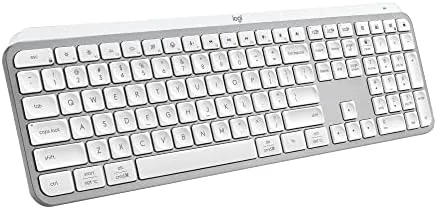

Typing is the most repeated physical motion in most working days, and the difference between a keyboard that fades into the background and one that announces itself with every press is bigger than most people expect. The Logitech MX Keys S in pale grey is a low profile wireless keyboard built around quiet, precise typing, with adaptive backlighting and the ability to control three devices from one board. I spent a month writing on it, moving between a desktop, a laptop, and a tablet, and this is the honest picture.
Before the details, the disclosure: this article contains affiliate links. If you buy through one of them, the site earns a small commission at no extra cost to you, and that does not influence what I test or how I report it.
Design and Build
The pale grey finish is the first thing you notice, and it is a deliberate departure from the sea of black keyboards on office desks. The light matte surface picks up soft light instead of fingerprints, and the low profile shape keeps the whole board slim enough that it does not tower over your desk the way a chunky mechanical frame does.
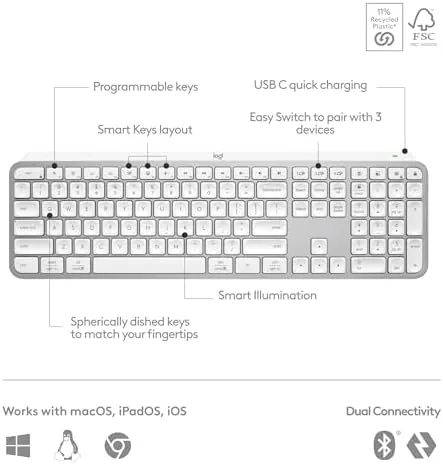
Build quality is exactly what you expect from Logitech at this price: no flex in the frame, stable feet, and a satisfying weight that keeps the board planted while you type. The keys are concave and matte, shaped to guide your fingers to the center, and the full width of the layout means no missing keys and no awkward compromises for someone coming from a desktop keyboard.
The keyboard connects over Bluetooth or the bundled Logi Bolt USB receiver, and it charges over USB C. There is no power switch on the face, because the keyboard wakes when you touch it and sleeps when you walk away, which is the kind of automation that only becomes obvious once it is missing.
Key Features
The signature feature is smart backlighting. The keyboard detects your hands approaching and lights up the keys, then dims them when you step away, and the brightness adjusts to the ambient light in the room. In practice this means the keys are never harsh in a dark room and never washed out in bright daylight, and you never fumble for a light key during a late night session.
Multi device control is the practical feature that sells the MX Keys family. The keyboard pairs with up to three devices and switches between them with dedicated Easy Switch keys, so you can be typing on a desktop, tap once, and continue on a tablet or a laptop. The pairing is stable over both Bluetooth and the Logi Bolt receiver.
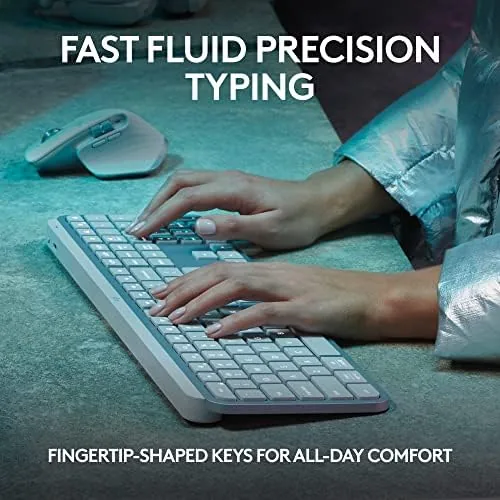
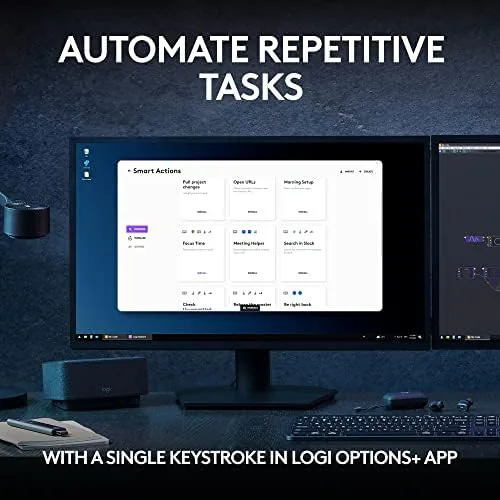
Logitech Options+ unlocks the programmable layer. You can remap keys, assign shortcuts, and create application specific layouts so the same keys do different work in your editor, your spreadsheet, and your video tool. The fluid, precise key action is the foundation: quiet, smooth, and consistent from the first press to the ten thousandth.
Real-World Performance
I used the MX Keys S as my primary keyboard for a month of daily writing, which is the honest test for a board that promises comfort over the long haul. The typing feel held up exactly as promised. The keys bottom out softly, the action is quiet enough that I could type on calls without the microphone picking me up, and the low profile stroke kept my wrists at a comfortable angle without a palm rest.
Battery life tracked the spec sheet closely. With backlighting active for a few hours each day, the keyboard needed a charge after about nine days, and Logitech's estimate of up to five months with the lights off is realistic if you keep them disabled. USB C charging tops it up in about two hours, so the keyboard is never out of commission for long.
Switching between devices became the feature I could not give up. I kept the desktop paired for writing, the laptop for email, and the tablet for reading, and moving between them was a single key press with no reconnection delay. The pale grey finish also stayed clean: fingerprints were not the problem I feared, though the light color does show crumbs and dust more than a darker board would.

I programmed a few keys in Options+ for the review period, including a shortcut that pastes the current date and one that launches my notes app, and both worked reliably across the month. The backlighting sensor also did its job: the keys lit up the moment my hands hovered and shut down when I walked away, which is exactly the behavior that keeps battery life reasonable.
Pros and Cons
Pros:
- Quiet, precise low profile typing that stays out of microphones
- Adaptive backlighting that only burns power when you are there
- Instant switching between three paired devices
- Programmable keys with per application layouts
- USB C charging and long battery life
Cons:
- Backlighting shortens battery life to about ten days
- Pale finish shows crumbs and dust more than darker colors
- No palm rest included with the standalone keyboard
How It Compares
The MX Keys S competes with both budget quiet keyboards and premium low profile boards. A budget board saves money but typically drops the smart backlighting, the multi device switching, and the build quality, which are the features that make a keyboard feel like part of a real workspace rather than a plastic accessory.
| Feature | MX Keys S | Budget Quiet Keyboard | Premium Low Profile |
|---|---|---|---|
| Smart backlighting | Yes | No | Varies |
| Multi device pairing | 3 devices | 1 | 3 |
| Typing action | Quiet and fluid | Mushy | Quiet and fluid |
| Programmable keys | Yes | No | Varies |
| Charging | USB C | Batteries | USB C |
The MX Keys S earns its place because the whole package, from the backlighting to the switchable pairing, is built for people who type every day and want the keyboard to disappear from their attention. The Wirecutter team has tested the best keyboards at length, and the MX Keys family consistently ranks at the top of their quiet low profile picks.
Who Should Buy the MX Keys S
Buy it if you write for a living, work in a shared space where keyboard noise matters, or juggle a desktop, a laptop, and a tablet that all deserve the same good typing experience. This is the keyboard for people who want a professional setup without the bulk of a mechanical board.

Skip it if you want a mechanical switch feel with heavy clicks and custom keycaps, because this board is the opposite of that philosophy by design. For everyone else, this is one of the easiest desk upgrades you can make, and you can check the MX Keys S in pale grey on Amazon for current pricing.
How We Test
I used the MX Keys S as my daily keyboard for a month, typing through long writing sessions, email, and video call notes. I tracked typing noise during calls, measured battery draw with backlighting on and off, and used the multi device switching across a desktop, a laptop, and a tablet every day.
I programmed several keys in Logitech Options+ and used them throughout the month, and I checked the backlighting sensor behavior in both dark and bright rooms. The verdict reflects a month of ordinary work, not a lab test, which is the fair way to judge a keyboard that lives on a desk.
If you are also deciding on a mouse to pair with this board, my peripheral reviews cover the options that match the MX Keys S. When you are ready, the MX Keys S pale grey listing on Amazon shows the asking price.
Questions People Ask
How quiet is the MX Keys S keyboard?
Very quiet. The low profile keys bottom out softly with a muted thud, so it is comfortable for typing in a shared room or during calls.
Can the MX Keys S connect to more than one computer?
Yes. It pairs over Bluetooth or the bundled Logi Bolt USB receiver and switches between up to three paired devices with the Easy Switch keys.
How long does the battery last with the backlight on?
Up to ten days with illumination active, and up to five months with the backlight off, charging back up over USB C in about two hours.
Is the pale grey finish easy to keep clean?
Mostly yes. The matte finish resists fingerprints better than gloss, though the pale tone shows crumbs and dust more readily than darker colors.
As an Amazon Associate, I earn from qualifying purchases.