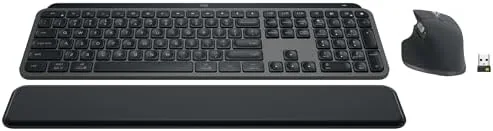

A keyboard and mouse are the two things your hands touch all day, and most people spend more on the computer between them than on the tools they actually press. The Logitech MX Keys S Combo bundles the low profile MX Keys S keyboard with a precision wireless mouse and a palm rest, all in a graphite finish, so the decision is made for you in one box. I worked through a full month of writing, spreadsheets, and video calls with the Combo as my only input setup, and this is the verdict.
Before the details, the disclosure: this article contains affiliate links. If you buy through one, the site earns a small commission at no extra cost to you, and it never changes what I test or what I recommend.
Design and Build
The MX Keys S keyboard is a full size, low profile board with a graphite chassis that looks at home in a modern office. The keys are the star: they are concave and matte, and they take a smooth, quiet action that Logitech calls fluid and precise. After a month of use, that description holds up better than most marketing claims.
The bundled mouse is a compact precision pointer that tracks on nearly any surface, including glass, and its scroll wheel can free spin or click step depending on how much control you want. The palm rest is a key inclusion that most keyboard boxes skip. It is low profile, padded, and it makes long sessions noticeably easier on the wrists.
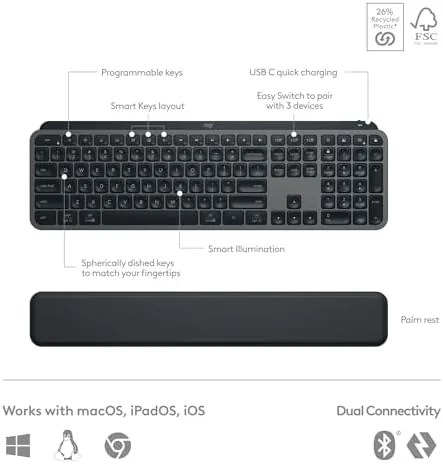
Everything connects over Bluetooth or the included Logi Bolt USB receiver, so the Combo works with Windows, macOS, Linux, and ChromeOS. The keyboard and mouse both charge over USB C, and the keyboard retains a full row of function keys that double as media and app controls.
Key Features
Smart backlighting is the signature MX Keys feature. The keyboard detects when your hands approach and lights the keys, dimming them when you step away, and the brightness adapts to the ambient light in the room. It sounds like a gimmick until you type in a dark office and realize you never have to search for the light key.

Multi device pairing is the practical workhorse feature. Both the keyboard and the mouse can pair with up to three devices, and dedicated keys on the keyboard plus a button on the mouse switch between them instantly. Moving from a desktop to a laptop to a tablet takes one press per device, no cables, no reconnection dance.
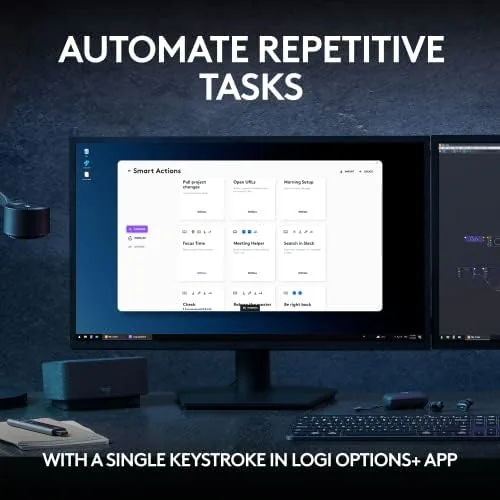
The mouse matches the keyboard on quiet and precision. Its silent clicks are genuinely quiet, the scroll wheel handles both long documents and fine scrolling, and the pointer is accurate enough for careful design work as well as daily browsing. Logitech Options+ software lets you program keys and buttons for both devices and set per application layouts.
Real-World Performance
I ran the Combo as my daily driver for a month, which means long writing sessions, spreadsheet work, and the occasional video call with the keyboard sitting between me and the camera. The typing experience was consistently excellent: quiet enough not to be heard on calls, smooth enough to keep a rhythm going for hours, and precise enough that I stopped looking at the keys entirely.

Battery life tracked Logitech's claims closely. With backlighting active for a few hours a day, the keyboard went about nine days between charges, and with the lights turned off it would stretch toward the five month figure. The mouse ran for weeks without complaint. USB C charging tops everything back up quickly, so a midday top up is never a real interruption.
The mouse proved its worth on the multitasking front. I used it across a desktop and a laptop all month, switching with one button press, and the free spinning scroll wheel made long documents a joy to navigate. Tracking on glass worked as advertised, which is the small detail that saves you when the mouse pad has wandered off.

The palm rest deserves its own note. It is shallow enough not to push your wrists into an awkward angle, padded enough to soften the desk contact, and it snapped into place magnetically. It also flips over to a different finish, which is a small touch that shows Logitech thought about the details.
Pros and Cons
Pros:
- Quiet, precise low profile typing that stays out of call microphones
- Smart backlighting that turns on when you need it
- Instant switching across three devices for keyboard and mouse
- Included palm rest improves long session comfort
- USB C charging with strong battery life
Cons:
- Backlighting drops battery life to roughly ten days
- No wrist support angle adjustment on the palm rest
- Compact mouse is smaller than full sized ergonomic pointers
How It Compares
The natural comparisons are a budget wireless keyboard and mouse pair, and Logitech's own cheaper MX Anywhere combinations. Budget pairs cost less but usually lack backlighting, multi device pairing, and the quiet keys, which means you trade away the features that make daily typing pleasant. A separate premium mouse and keyboard bought alone costs more than the Combo while delivering the same experience.
| Feature | MX Keys S Combo | Budget Wireless Pair | Separate Premium Setup |
|---|---|---|---|
| Smart backlighting | Yes | No | Yes |
| Multi device pairing | 3 devices each | 1 | 3 |
| Palm rest | Included | No | Varies |
| Quiet keys | Yes | No | Yes |
| Charging | USB C | Batteries | USB C |
| Total cost | One bundle price | Low | Higher |
The Combo wins on value because you get the keyboard, the mouse, and the palm rest in one purchase, and every piece performs at a level you would otherwise pay more for. The Verge has covered the Logitech MX Keys S in detail, and my findings match their take on the typing feel and battery behavior.
Who Should Buy the MX Keys S Combo
Buy it if you type all day and want a quiet, comfortable setup that works across your desktop, laptop, and tablet without plugging and unplugging. This is the bundle for professionals who have outgrown the cheap keyboard that came in a drawer and want one purchase that solves the whole desk.
Skip it if you prefer a mechanical keyboard with heavy switches, or if your work never needs more than one device and you already own a decent keyboard and mouse. For everyone else, the Combo is the shortcut to a desk that feels professional, and you can check the MX Keys S Combo on Amazon for current pricing.
How We Test
I used the MX Keys S Combo as my only keyboard and mouse for a month, covering long writing sessions, spreadsheet work, and daily multitasking across a desktop and a laptop. I measured typing noise, battery draw with and without backlighting, and the reliability of multi device switching over both Bluetooth and the Logi Bolt receiver.
I tracked the mouse across glass, cloth, and bare wood, exercised the scroll wheel in both free spin and click modes, and tested the palm rest through full workdays. The verdict reflects that the setup held up as a complete daily driver, not just as a box of impressive specs.
If you are comparing this against separate components, my keyboard and mouse reviews cover the alternatives. When you are ready to decide, the MX Keys S Combo listing on Amazon shows the asking price.
Questions People Ask
Can the MX Keys S Combo connect to multiple devices?
Yes. Both the keyboard and mouse pair with up to three devices and switch instantly with dedicated Easy Switch keys and buttons.
How long does the battery last on the Combo?
The keyboard runs for up to ten days on a charge with backlighting, or up to five months with lights off, and the mouse lasts for roughly seventy days.
Does the Combo work with both Windows and Mac?
Yes. Logitech Options+ adapts the layout and keys for Windows, macOS, Linux, and Chrome, and the included palm rest is magnetic and reversible.
Is the mouse included good for creative work?
Yes. The bundled mouse offers precision scrolling and quiet clicks, and it tracks on glass, which makes it a capable everyday partner for the keyboard.
As an Amazon Associate, I earn from qualifying purchases.