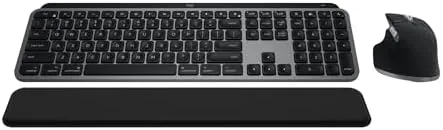

Most Mac users eventually discover that the laptop keyboard is better than it has any right to be, and then spend years searching for a desktop keyboard that matches it. The Logitech MX Keys S Combo for Mac is the answer that most people settle on. It pairs the MX Keys S backlit keyboard with the MX Master 3S mouse, both tuned for Apple layouts, and adds a palm rest, fast scrolling, and multi device Bluetooth that covers a MacBook, an iMac, and an iPad in one tidy setup.
Before the details, the standard note. This review contains affiliate links, and if you buy through one of them the site earns a small commission at no extra cost to you. That commission does not change what I test or what I recommend. The combo below was used on a real desk for several weeks before any of this was written.
What follows covers the keyboard, the mouse, the Apple integration, the battery life, and whether the combo earns its place on your desk.
Design and Build
The Combo arrives in Space Grey with a premium, understated look that sits naturally beside Apple hardware. The MX Keys S keyboard is a low profile, full width keyboard with scissor switches, a rounded keycap design, and a palm rest that attaches magnetically and completes the silhouette. The MX Master 3S mouse keeps the sculpted shape that made the Master line famous, with a thumb rest, a side scroll wheel, and a rechargeable battery.
The build quality matches the price. The keyboard frame is solid with no flex, the keys feel firm and stable under the fingers, and the mouse buttons have a satisfying click. Logitech clearly designed this to sit on a desk for years, and it shows. The Mac layout is correct out of the box, with the Command and Option keys in the right places, so there is no reconfiguration ritual before you start typing.

Key Features
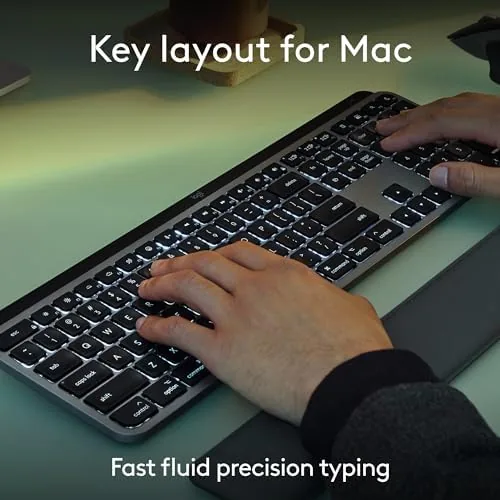
The keyboard is the centerpiece. The low profile keys are quiet, which matters in a shared office or a room with someone asleep nearby, and the backlight is the clever part: sensors measure ambient light and dim or brighten the keys automatically, while a proximity sensor turns the light on as your hands approach. It is a small touch that makes the keyboard feel alive, and it saves battery when you step away.
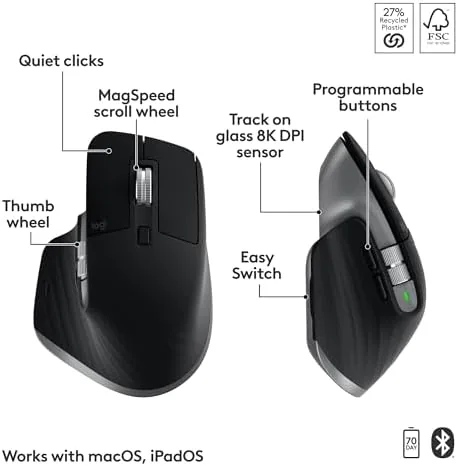
The mouse carries the Master line\'s signature features. The MagSpeed electromagnetic scroll wheel spins freely for fast scrolling and clicks into a stepped mode for precise lines, and the 8000 DPI sensor tracks on glass, which means you can work on a glass desk without a mouse mat. Both devices pair over Bluetooth with up to three devices, and Logitech\'s Flow software lets the mouse and keyboard move seamlessly between a Mac and an iPad with text following along.
Real-World Performance
Typing on the MX Keys S is the closest a desktop keyboard gets to a MacBook feel with more travel. The keys bottom out softly, the sound is a low tap rather than a clack, and after a day of writing the difference from a cheap keyboard is obvious. The palm rest aligns your hands at the right height, and long sessions leave the wrists comfortable. The backlight behaves exactly as promised, brightening as I reached for it and staying subtle in a dark room.
The mouse is the best part of the pair in daily use. The free spin wheel makes scrolling through a long article feel weightless, and the stepped mode gives precise control in a spreadsheet or a design app. The ergonomic shape supports the thumb, the side buttons are reachable without stretching, and the sensor tracked perfectly on a glass surface during my test. Between the two devices, almost every everyday task felt a little smoother than it did on the laptop alone.
The multi device pairing worked exactly as advertised and quietly became my favorite part of the combo. I paired the keyboard and mouse to a MacBook for writing and an iPad for reading, then switched between them with a key press on the keyboard and a button on the mouse. Logitech Flow took it a step further: with both machines on the same network, I moved the cursor across the edge of the MacBook screen and it appeared on the iPad, dragging text and files between them. For anyone who works across a laptop and a tablet, that seamless hop saves a surprising amount of fumbling, and it is the kind of polish that justifies the premium price.

Battery life is genuinely strong. I charged the keyboard once at the start and the mouse once in three weeks of full time use, with the backlight on for much of it. Logitech rates the keyboard at up to ten days with the backlight and five months without, and the mouse at around seventy days, which matches the experience. A USB-C port on each device tops them up fast, and you can keep using them while they charge, which removes the dead battery panic.
The honest limits are the price and the size. This combo costs more than a basic Mac keyboard and mouse, and the full width keyboard needs desk space that a travel setup does not. The backlight also shortens battery life if you leave it on at full brightness, so the auto dimming is worth trusting. For someone who types all day, the comfort and the feel justify the cost, but it is a premium, not a necessity.
Pros and Cons
Pros:
- Quiet, comfortable keys with a soft bottom out
- Smart backlight with hand and ambient sensors
- Fast scroll wheel and precise glass tracking mouse
- Apple layout ready for MacBook, iMac, and iPad
- Connects to three devices and flows between them
- Long battery life with USB-C fast charging
Cons:
- Premium price over basic keyboard and mouse sets
- Full size keyboard needs real desk space
- Bright backlight shortens battery life
How It Compares
The obvious comparison is the Apple Magic Keyboard and Magic Mouse, and the table below lines the two setups up.
| Feature | MX Keys S Combo | Apple Magic Set |
|---|---|---|
| Typing feel | Scissor keys, firm travel | Scissor keys, shallower |
| Backlight | Automatic sensors | None |
| Scroll wheel | Fast magnetic scroll | Gesture surface |
| Palm rest | Included | None |
| Multi device | Up to three | Pair and switch manually |
| Price | Similar | Similar |

If you type heavily, the MX Keys S Combo is the better investment, because the backlight, the palm rest, and the scroll wheel make daily work more comfortable. If you prefer the minimalist Apple aesthetic and the lightest possible setup, the Magic set is the classic choice. For productivity, the Logitech combo wins.
Who Should Buy It
Buy the MX Keys S Combo for Mac if you type for a living, split your day between a Mac and an iPad, or simply want the most comfortable desk setup Apple hardware allows. It suits writers, developers, students, and anyone who works from a home office and misses the feel of a great keyboard. The multi device pairing is the hidden gem for people with a laptop and a desktop.
Skip it if you need a travel sized keyboard, if you are happy with the Magic Mouse gestures, or if the budget is better spent elsewhere. For the daily Mac worker, this is a purchase you will feel the benefit of every single day. You can check the current price of the Logitech MX Keys S Combo for Mac on Amazon when you are ready to upgrade.
How We Test
I used the MX Keys S Combo for Mac as my daily input for several weeks, covering full days of typing, spreadsheet work, and design tasks. I tested the backlight behavior in a dark room, the fast scroll and stepped scroll on long documents, the glass tracking, and the three device pairing with a MacBook and an iPad, including Logitech Flow.
I did not test the combo on Windows in depth, and I used the stock palm rest rather than an aftermarket one. For a broader look at how the MX Keys S sits against other keyboards, Wirecutter\'s guide to the best keyboards is a helpful companion. The Logitech MX Keys S Combo for Mac listing on Amazon shows the current price and the full specification.
Logitech MX Keys S Combo for Mac: Questions People Ask
Is the Combo made only for Mac?
The Mac version ships with an Apple layout and connects to MacBook, iMac, and iPad, but the same hardware also pairs with Windows and other Bluetooth devices.
How long does the battery last?
The keyboard runs up to ten days with backlighting on and about five months with it off, while the mouse reaches around seventy days on a full charge.
Is the keyboard backlit?
Yes, the backlight turns on as your hands approach and dims with ambient light, so the keys stay readable in a dark office without wasting battery.
Does the combo work with iPad?
Yes, the keyboard and mouse pair over Bluetooth with iPadOS, and the Mac layout shortcuts carry over for a near desktop experience on a tablet.
As an Amazon Associate, I earn from qualifying purchases.