
Every writer knows the difference between a keyboard that gets out of the way and one that gets in it. The Apple Magic Keyboard belongs firmly in the first group. It pairs instantly, types with a soft and confident feel, and runs for roughly a month on a single charge. I spent weeks typing on it across a Mac and an iPad, and this review is the honest record of whether Apple own design still earns its premium price.
The usual disclosure applies. This review contains affiliate links, and a purchase through one of them supports this site at no extra cost to you. That does not shape my typing test, and the keyboard reviewed was used exactly as a buyer would use it.
The rest of this review covers the design and build, the typing feel, the battery and connectivity, and how the Magic Keyboard compares with mechanical and travel keyboards.
Design and Build
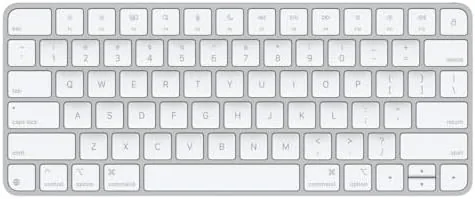
The Magic Keyboard is a study in minimalism. It is a single slim slab of aluminum and plastic with a row of function keys along the top, a few inches deep, and nothing else. There is no wrist rest, no RGB lighting, and no software hub, which is precisely the point: it disappears into a desk setup the way a keyboard should, leaving only the essentials in view.
Build quality is exactly what you expect from Apple. The aluminum base is rigid and heavy enough to stay planted while you type, the key caps are stable with no wobble, and the low profile looks neat from any angle. The keyboard tilts at a gentle angle with its built in feet, and the whole unit feels like a single machined object rather than a collection of parts. After weeks of daily use, it still looks as clean as the day it arrived.

Key Features
The typing feel comes from a scissor mechanism under each key, the same switch design Apple has refined for years. The result is a short, quiet, and consistent keypress with just enough feedback to know you have registered without bottoming out loudly. It is not the deep thock of a mechanical board, and it is not the vague mush of a cheap membrane keyboard: it sits comfortably in between, and for Long sessions that balance is the whole game.
Connectivity is effortless in the Apple ecosystem. The keyboard pairs over Bluetooth with a Mac, an iPad, or an Apple TV, and switching between devices is as simple as pairing again or using the function key shortcuts where supported. The function row gives quick access to brightness, volume, media controls, and a few system actions, which beats reaching for a mouse or the screen.
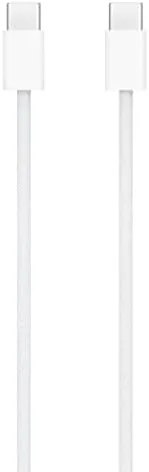
Battery life is the quiet headline. Apple rates the Magic Keyboard for roughly a month of use between charges, and the built in battery recharges through the included USB-C to Lightning cable while you keep typing over Bluetooth. In practice, I stopped thinking about the battery entirely, which is the highest praise a wireless keyboard can earn.

Real-World Performance
The real test of any keyboard is whether you stop noticing it, and the Magic Keyboard passed. I wrote long documents on a Mac, answered email, and drafted this review on it, and the typing experience stayed consistent from the first line to the last. The keys are quiet enough for an office or a bedroom at night, and the feedback is predictable enough that your rhythm never breaks.
The pairing experience deserves a mention for how smooth it is. Press the power switch, wait a moment, and the keyboard appears in Bluetooth settings on a Mac or iPad. From there, the connection is stable: no dropouts mid sentence, no lag, no reconnecting dance at the start of each day. That reliability is easy to understate and impossible to overstate for anyone who has fought a flaky wireless keyboard.
Using it with an iPad turned the tablet into a small writing station. On a lap desk or a table, the Magic Keyboard paired with an iPad makes a surprisingly capable setup for drafting, notes, and even light document work, and the compact footprint fits in a bag far more easily than a mechanical board. It is not a full desk replacement, but it covers the mobile writing gap well.

The function row earned more use than I expected. Adjusting volume and brightness without reaching for a mouse or the screen became second nature within a day, and the media keys handled playback during listening sessions without any interruption to the typing flow. On an iPad, the same keys mapped sensibly to the tablet controls, which made the keyboard feel like a native part of the setup rather than an external accessory that only sort of works.
The limits are honest ones. The key travel is shallow, and typists who live on deep mechanical switches will feel the difference immediately; some will love the low effort, others will miss the tactile bump. There is no backlighting, which is a real omission for anyone who types in dim light, and the lack of a wrist rest means some people will want a pad for marathon sessions. And the price is firmly premium, which means the value depends entirely on how much you type.
Pros and Cons
Pros:
- Quiet, consistent scissor key typing
- Roughly a month of battery life between charges
- Effortless Bluetooth pairing with Mac and iPad
- Rigid aluminum build that stays planted
- Compact footprint for desk and travel
- Handy function key row for common actions
Cons:
- Shallow key travel is not for mechanical fans
- No backlighting for dark rooms
- No wrist rest for long sessions
How It Compares
Most people choosing a desktop keyboard weigh the Magic Keyboard against a mechanical board or a budget wireless option. The table below lines up the three.
| Feature | Apple Magic Keyboard | Mechanical Keyboard | Budget Wireless Board |
|---|---|---|---|
| Key switch | Scissor mechanism | Mechanical switches | Rubber dome |
| Noise | Very quiet | Click to thock | Moderate |
| Battery life | About a month | Weeks to months | Weeks |
| Mac integration | Native | Varies | Varies |
| Backlight | No | Often yes | Sometimes |
| Best for | Apple desks, writers | Tactile typists | Budget setups |
If you live in the Apple ecosystem and type for hours, the Magic Keyboard is the most polished match you can buy. If you crave deep tactile switches or backlighting, a mechanical board gives you more, often for less money. For quiet, reliable, and beautifully built typing on a Mac, the Magic Keyboard remains the reference standard.
Who Should Buy
Buy the Apple Magic Keyboard if you write or type for a living on a Mac, if you want a second quiet keyboard for a desk or a bedroom, or if you pair keyboards with an iPad and value the effortless Bluetooth connection. It is also a natural fit for anyone who already owns a MacBook and wants the same typing feel on a desktop.
Consider the context of the purchase. This is the keyboard Apple pairs with the Mac mini and the iMac, and it completes those setups in a way a third party board cannot match for integration. For someone building a clean Apple desk, the cost sits inside a larger system that already carries a premium, and the keyboard earns its place in that system more convincingly than almost any peripheral Apple makes.
Skip it if you cannot live without mechanical switch feel, if backlighting is essential, or if you only type a few lines a day and cannot justify the premium. For daily writers, the cost dissolves into the comfort. You can check the current price of the Apple Magic Keyboard on Amazon when you are ready.
How We Test
I used the Magic Keyboard as my daily typing surface for several weeks, writing long documents on a Mac and pairing it with an iPad for mobile work. I assessed typing comfort across full sessions, tracked battery use over the period, and tested the Bluetooth connection stability across multiple devices.
I did not measure key force with instruments, and I judged the typing feel by hand and ear over extended use. For a deeper look at keyboard options and how Apple keyboards compare, CNET has covered the Magic Keyboard design and its role in the Apple lineup. The Apple Magic Keyboard listing on Amazon shows current pricing and availability.
Apple Magic Keyboard: Questions People Ask
How long does the Apple Magic Keyboard battery last?
A full charge lasts roughly a month or more of regular typing, and a short charge quickly restores hours of use when the battery does run low.
Does the Magic Keyboard work with an iPad?
Yes, it pairs over Bluetooth with any iPad running a recent version of iPadOS, so it works as a portable typing surface outside the Smart Keyboard line.
How do I charge the Magic Keyboard?
It charges through its built in USB-C to Lightning cable, and you keep typing over Bluetooth while the keyboard tops up from a computer or adapter.
Is the Magic Keyboard compatible with Windows?
It works with Windows over Bluetooth for basic typing, though the Command key maps to the Windows key and some shortcuts need remapping.
As an Amazon Associate, I earn from qualifying purchases.