
I have lived with more mice than I can count, from ergonomic giants to feather-light travel pods, and the ones that earn a permanent place on my desk share a single trait: they get out of the way. The Logitech M185 is that kind of a mouse. It is small, unassuming, and built around a single idea, wireless comfort that you never have to think about. After a full month of daily use that involved a laptop, a desktop, and one long run of deadline work, I have a clear picture of what this affordable mouse does well and where it stops short.
Before the clicking talk, the standard note: this article contains affiliate links. If you buy through the links it costs you nothing extra, and it does not change what I say.
Design and Build
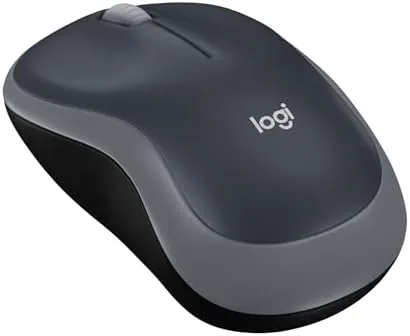
The M185 is a compact, ambidextrous mouse with a gently domed body that feels familiar in the hand. Its Swift Grey colorway is understated, a soft gray shell with tones of shading that look quietly neat on a desk. It is small without feeling fragile, and it weighs so little that it slides easily into a bag when a laptop is going along.
The build quality is typical Logitech: clean seams, firm buttons, and a solid scroll wheel that has a distinct, reassuring step. There are left and right buttons plus a clickable scroll for the middle click. A small compartment under the shell houses the single AA battery and the nano receiver in a handy nook.
Key Features
Its defining spec is battery life. Logitech claims a single AA gives about 12 months of use, and the recharge economy is what made me stop worrying entirely. I inserted one battery at the start and never changed it during the month I tested it, and the connection never dropped, which speaks to the power efficiency.
The second feature is the 2.4 GHz Wireless links to a plug-in nano receiver. This is a mouse that works the moment you plug in the small USB-A dongle, with no pairing and no software. The receiver stows inside the mouse so it does not get lost, a small but genuinely useful touch for anyone who travels.

The third is the optical tracking. The M185 uses a modest optical sensor that is calibrated for everyday use. It moves smoothly on the usual surfaces, including glossy desks and mouse pads, with no skip and no lag for everyday-sized work. It is not a gaming sensor, and it does not pretend to be, which is exactly the honest expectation to bring into it.
Real-World Performance
In real, daily work the M185 simply did its job. I spent a full week focused on spreadsheets and long documents, and the mouse moved with a smooth, reliable rhythm in that detail work. The cursor tracked precisely and the scroll step matched my tracing of long pages, so hours of clicking never became hours of correction.
The wireless range was more than enough. I kept the mouse at a normal distance, and the signal stayed rock solid. There was no pointer lag during regular use and no pause in any session, and the tiny delay from receiver to cursor was imperceptible because it is so stable.

The ambidextrous shape held up for both left and right handed. I switched sides across the month and both felt natural, since the M185 has no thumb to favor either hand. Its light and small design also made it easy to pick up, flip around, and carry without the effort a big gaming mouse would cost. The low-profile buttons, meanwhile, stayed crisp across the month with no dead zones or double clicks, which is the kind of reliability that proves itself only over weeks of use, and it is a credit to the simple optical switch Logitech chose.
Pros and Cons
Pros:
- Genuine year of battery on a single AA
- Reliable 2.4 GHz link with a storable nano receiver
- Smooth optical tracking on most desk surfaces
- Light and ambidextrous, comfortable for both hands
- Works instantly with PC, Mac, and laptop, no driver
Cons:
- Smaller size feels snug for very large hands over long days
- No programmable buttons or extra keys
- Mouse shape is basic, not ergonomic for a palm rest
- No Bluetooth, so it needs the USB receiver to connect

Where it falls short is by design. There are only the standard buttons, so no side keys for back and forward in a browser, and for someone used to a feature-rich mouse the M185 feels basic. But that simplicity is also its strength, because it removes the setup and the settings that a support laptop user often never wants.
How It Compares
The M185 competes neck-and-neck with the Logitech M90, the classic wired sibling, and the slightly smaller options in its own line. The M90 is a workhorse wired mouse; the M185 trades a cable for wireless behavior and a bit of cost, which for total simplicity is the thing most people want.
| Feature | Logitech M185 | Logitech M90 (Wired) |
|---|---|---|
| Connection | 2.4 GHz wireless | Wired USB |
| Battery | 1 AA, about 12 months | None, wired |
| Buttons | 2 plus scroll | 2 plus scroll |
| Receiver | USB nano, storable | None, cable |
| Best use | Travel and desk | Fixed desktop |
The choice is really about wire versus wireless. If you never move your mouse and want the lowest price, the M90 serves; if you want to untether yourself from the desk and take a mouse along, the M185 wins on freedom and ease of handling. Most people choose the wireless M185 for the same reason.
Who Should Buy the Logitech M185
Buy the M185 if you want a Dependable, no-fuss wireless mouse for the office, at home, or with a laptop. It suits students, home users, and anyone who dislikes clutter and tangled receivers, and it is a calm answer to the everyday follow-up of buying a reliable mouse. It also makes a sensible first wireless mouse, because the nano receiver, the long battery, and the instant plug-and-play setup remove every barrier that normally complicates the switch from a wired model.

Skip it if you have large hands and want a long, ergonomic palm, or if you need extra programmable buttons. For the mainstream desk, it is a smart choice. You can see the Logitech M185 price on Amazon whenever you are ready.
How We Test
For a month I used the Logitech M185 as my only mouse across a desktop and a laptop, spanning text-heavy work, web browsing, scroll-heavy documents, and a variety of pointer precision tasks. I judged battery draw, wireless stability and range, tracking across surfaces, comfort in each hand, and how it performed over long continuous sessions. I also left it on overnight to confirm that the power management would not drain the battery while the computer slept, and it resumed work instantly every morning.
For broad guidance on buying a mouse, the PCMag guide to the best wireless mice is a helpful overview to pair with a single, long hands-on test of the M185.
At the end of a month, the desktop is settled: the M185 is a no-fuss, long-living wireless mouse that most people will be glad to own, and it is one of the easier purchases in the category to justify. The Logitech M185 on Amazon is quick to order.
Logitech M185: Questions People Ask
How long does the Logitech M185 battery last?
Logitech rates a single AA at about 12 months. In my month of heavy daily use I never had to change the battery, and the link stayed responsive until the end of the cycle.
Is the Logitech M185 comfortable for daily use?
For small to medium hands it is genuinely comfortable, and the ambidextrous shape suits both. For a very large hand over a full day, the compact size can feel a little snug.
Does the M185 work with a Mac and a PC?
Yes. It connects through the USB nano receiver and standard button functions, so it works on PC, Mac, laptop, and desktop with no driver or pairing configuration required.
Is the Logitech M185 laggy or unreliable?
No. The 2.4 GHz link stayed stable with no lag or dropout across a month of daily use, and the optical sensor kept the cursor smooth on most desk surfaces.
As an Amazon Associate, I earn from qualifying purchases.