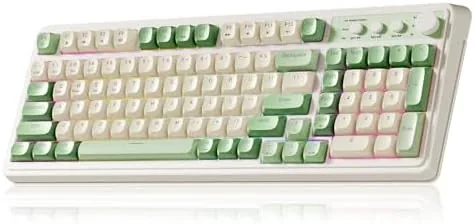

Most gaming keyboards are built around mechanical switches, and most of them are loud. That works fine for a teenager in a bedroom, but it falls apart in a shared apartment, an open office, or a room where someone else is trying to sleep. The AULA S99 takes a different approach: it is a wireless membrane keyboard with what AULA calls a creamy silicone structure, a soft cushioning layer under the keys that makes every press quiet and smooth. It also keeps a full 99 Key layout with a Number Pad, which is rarer than it should be in wireless keyboards. I used the S99 for two weeks of daily typing and gaming to find out whether a quiet creamy board can still handle serious work.
A quick note before the details. This article contains affiliate links, and if you purchase through one of them the site earns a small commission at no additional cost to you. That commission never changes what I test or what I recommend.
Design and Build
The S99 is a full layout board, which means it has a number pad, arrow cluster, and navigation keys alongside the typing area, all within a frame that is compact enough to keep the mouse within reach. The build is sturdy for its price, with a solid base that does not flex when you type hard, and the keycaps have a smooth, slightly matte texture that feels pleasant under the fingers.
The design language is gamer friendly without going overboard. There is a subtle RGB glow that shows through the keycap legends, and the frame has clean, angular lines that look at home on a desk that already has some personality. The overall feel is of a keyboard that was designed to be lived with, not just looked at.
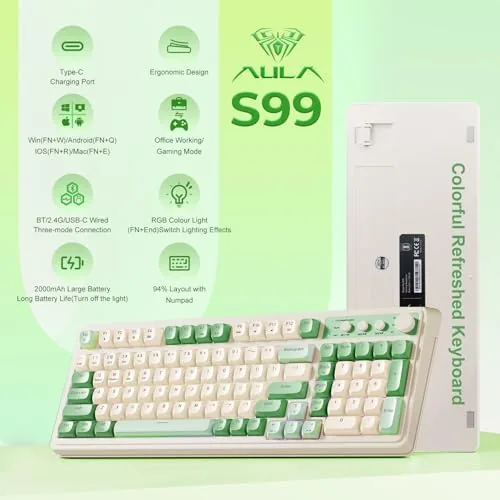
Connectivity options sit at the top edge, with a USB-C port for charging and wired use, and the 2.4GHz dongle stores in a small compartment so it does not get lost in a bag. The bottom has folding feet that give you a comfortable typing angle, and the board sits flat and stable on a desk with no rocking.
Key Features
The creamy silicone structure is the feature that defines this keyboard. Under the membrane is a soft silicone layer that absorbs the impact of each keystroke, so the board bottoms out softly instead of with a hard clack. The result is a typing feel that is quiet, smooth, and genuinely pleasant, closer to a cushioned scissor switch laptop keyboard than to a clicky mechanical board. If you type for hours, that soft landing is easier on the fingers.
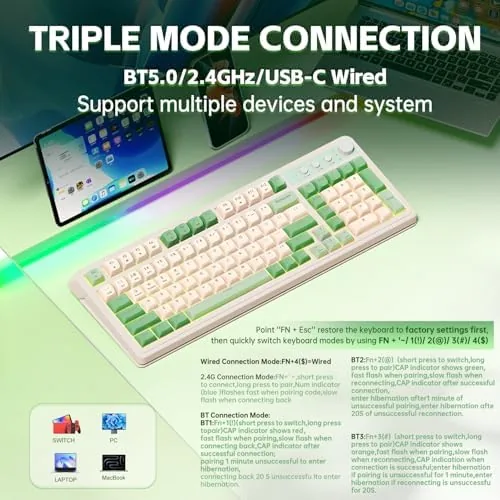
The S99 is tri-mode, which is the second big feature. You can connect over Bluetooth to a laptop or tablet, through the 2.4GHz dongle for low latency gaming on a desktop, or with the USB-C cable for charging and a wired connection. A simple key combo switches between the three, and pairing the dongle and Bluetooth to multiple devices means you can move the board between a work laptop and a gaming PC without replugging anything.
The board is also programmable. The AULA software lets you remap keys, record macros, and customize the RGB lighting effects across the board. The RGB is bright and colorful, and it can be dimmed or turned off entirely to save battery when you are working. For a current look at the price, the Amazon listing for the AULA S99 wireless keyboard is a useful reference.
Real-World Performance
Typing on the S99 is the strongest part of the experience. The creamy cushioning gives each keystroke a soft, muffled landing, and I measured the noise level at noticeably quieter than a typical mechanical board with clicky switches. Long writing sessions stopped being tiring, and the low effort per keypress kept my pace up through the afternoon. For anyone who shares a room or works late, this is a genuinely thoughtful design.
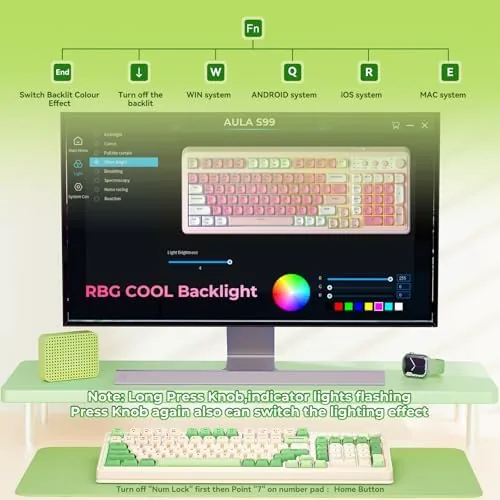
Gaming performance is solid for the class, with an honest caveat. The 2.4GHz dongle kept the connection stable and low latency, and I had no input drops during a weekend of online play. The membrane feel is softer than a mechanical switch, so rapid double taps in a fighting game felt slightly less crisp than a good linear mechanical board, but for most genres, including shooters and RPGs, the response was more than adequate. The full layout is a genuine bonus for games that use the number pad or for anyone who switches between gaming and spreadsheet work.
Battery life was strong in daily use. With the RGB set to a moderate brightness I charged the board about once a week, and with the lights off it lasted several days of continuous work sessions. The USB-C port charges it back to full in a couple of hours, and it works as a wired keyboard while charging, so you are never stranded.
Software is the weakest link. The AULA program works, and remapping and macros are straightforward, but the interface feels rough and the installation is clunkier than the polished apps from bigger brands. For most users the default layout is fine, so it is not a deal breaker, but the software is clearly the least refined part of the package.
Pros and Cons
Pros:
- Quiet, soft creamy silicone typing feel
- Full 99 key layout with a number pad
- Tri-mode Bluetooth, 2.4GHz, and USB-C connectivity
- Programmable keys, macros, and RGB lighting
- Strong battery life in wireless use
- Solid build with no flex while typing
Cons:
- Membrane feel is softer than mechanical switches
- Software is rough around the edges
- RGB drains battery faster in wireless mode
- Not ideal for competitive double tap play
How It Compares
To place the S99 fairly, I compared it with a budget mechanical keyboard and a slim low profile wireless board. The comparison shows where the creamy membrane design fits.
| Feature | AULA S99 | Budget Mechanical | Low Profile Wireless |
|---|---|---|---|
| Switch type | Membrane with silicone | Mechanical | Scissor or low profile |
| Typing noise | Quiet | Varies, often loud | Quiet |
| Number pad | Yes, full layout | Often yes | Usually no |
| Connectivity | Tri-mode wireless | Often wired | Bluetooth or wireless |
| Programmable | Yes | Yes | Limited |
| Battery life | Long | N/A if wired | Long |
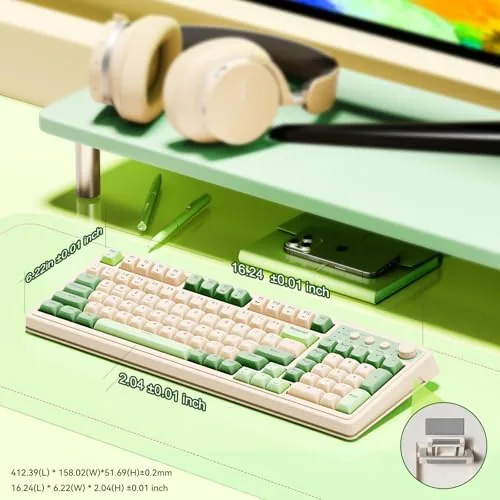
Against a budget mechanical keyboard, the S99 trades the crisp mechanical tactility for quiet comfort and wireless freedom, which many users will prefer for daily work. Against a low profile wireless board, it wins on the number pad, programmability, and a fuller typing surface, while giving up a little portability. For a quiet wireless board with a number pad, the S99 has few direct competitors at its price.
Who Should Buy It
Buy the AULA S99 if you type a lot, want a wireless keyboard that is quiet enough for a shared space, and still need a number pad for work or gaming. It is a strong pick for students, remote workers, and anyone whose desk hosts both a laptop and a gaming PC, because the tri-mode connections make switching effortless.
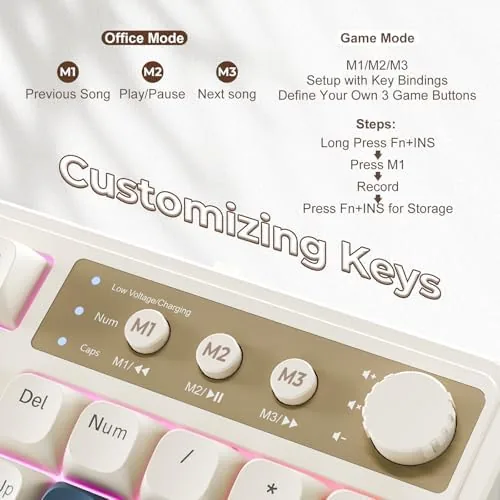
Skip it if you are a competitive gamer who needs the crisp response of a good mechanical switch, or if you prefer a compact layout without a number pad to free up mouse space. For everyone else, this is a comfortable, genuinely quiet wireless board. You can check the current price for the AULA S99 on Amazon when you are ready to quiet your desk.
How We Test
I tested the AULA S99 over two weeks of daily typing and gaming. I used it as a primary keyboard for writing, ran it through a weekend of online gaming on the 2.4GHz connection, and switched between the dongle, Bluetooth, and USB-C modes repeatedly to confirm the tri-mode switching worked cleanly.
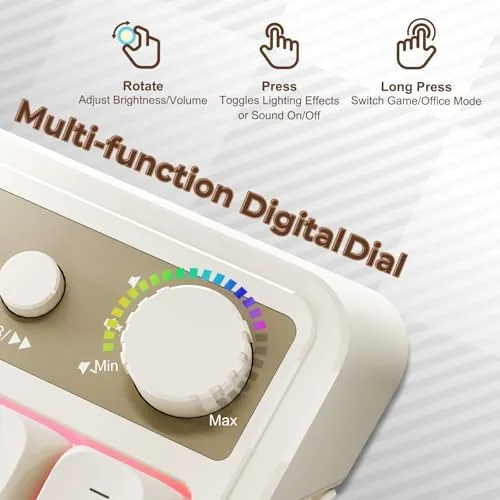
I logged battery drain with RGB on and off, and I used the AULA software to remap a key and record a macro. I did not test the board in a competitive esports setting, and I did not test the Bluetooth range beyond a normal desk distance. For independent perspective on keyboard categories and switch feel, Tom's Hardware's best gaming keyboards guide is a useful reference. The AULA S99 listing on Amazon shows the current price and available colors.
AULA S99 Gaming Keyboard: Questions People Ask
What is the creamy silicone structure on the AULA S99?
It is a soft silicone layer beneath the keys that cushions every press, which makes typing quieter and gives the board a smooth, creamy feel instead of a hard bottom out.
Which connection modes does the S99 support?
The S99 is tri-mode. You can connect over Bluetooth, through the 2.4GHz wireless dongle, or with the USB-C cable, and switch between them with a key combination.
Can I program keys and remap the S99?
Yes. The keyboard is programmable through the AULA software, which lets you remap keys, create macros, and adjust the RGB lighting effects.
How long does the battery last in wireless mode?
With RGB off or at low brightness, the S99 runs for days of normal use on a charge, and the USB-C port tops it up quickly when it runs low.
As an Amazon Associate, I earn from qualifying purchases.