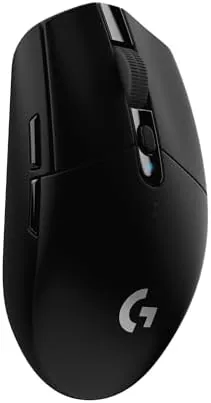

There is a certain kind of product that wins you over not by shouting its features but by simply doing its job without fuss. The black Logitech G305 Lightspeed is that product for me. It arrived in a plain box, looked like an unremarkable office mouse for the first ten minutes, and then quietly revealed itself as one of the most capable wireless mice I have used at this price. After living with it for a few weeks, I keep reaching for it over mice that cost twice as much.
The G305 is built around the HERO sensor, Logitech's own optical sensor that delivers up to 12,000 DPI while drawing very little power. That combination of accuracy and efficiency is the whole story of this mouse: a genuinely great sensor, six programmable buttons, and an advertised 250 hour battery life from a single AA battery. The black colorway is the one most people picture when they think of this model, and it has a neutral, professional look that fits any setup.
A quick disclosure before the details. Some links in this article are affiliate links. If you buy through them, the site earns a small commission at no extra cost to you. That is how I keep testing gear and writing these reviews.
Design and Build
The black G305 keeps the same clean silhouette as the rest of the line. It is a right-handed friendly ambidextrous shape, though the side buttons sit on the left edge, which means left-handed users may want the main buttons mapped around. The matte black finish is easy on the eyes, does not show fingerprints as badly as glossy plastic, and gives the shell a grippy texture that helps during longer sessions.

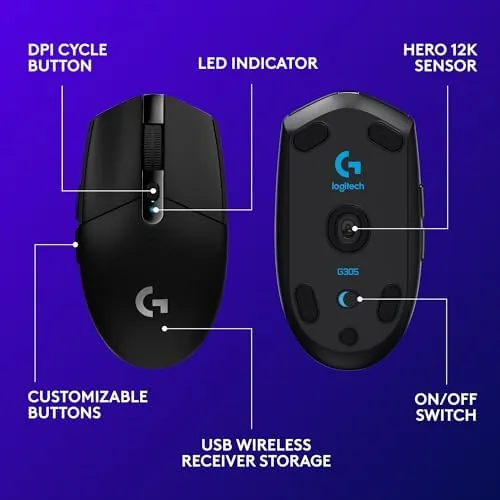
Build quality is excellent for the price. The shell is solid with no creaking when squeezed, the main buttons feel crisp, and the scroll wheel has a defined detent without being noisy. At around 99 grams with a battery inside, The Mouse is light enough to move quickly but heavy enough to feel planted. The USB receiver clips into a storage slot underneath, a small detail that prevents the classic dongle loss problem when you travel.
Key Features
The HERO sensor is the star. Logitech rates it at up to 12,000 DPI, which is far more than most people need, but the sensor's real strength is consistency. Tracking stays smooth and predictable across the whole range, there is no noticeable acceleration, and it handles fast movement without losing the cursor. In my testing the sensor felt equal to sensors in much more expensive mice.
Six programmable buttons cover the essentials: two main buttons, a scroll wheel click, two thumb buttons, and a DPI switch on top. Using Logitech G HUB software, each button can be reassigned, and the profiles save to on-board memory. That means the settings live in the mouse, not in a piece of software on your PC, so you can plug into another computer and your bindings follow you.

Battery life deserves its own mention. The 250 hour figure comes from Logitech using the HERO sensor's power efficiency, and it is not marketing fluff. I used the mouse daily for weeks and never changed the battery during the review period. When the battery does run low, a standard AA is cheap and everywhere, so you are never stuck hunting for a proprietary cable.
Real-World Performance
In practice, the G305 is the kind of mouse you stop noticing, and that is the highest praise I can give a peripheral. For everyday work it tracked smoothly through documents, spreadsheets, and browsing sessions. The low click latency made everything feel immediate, and the light weight kept my wrist comfortable through long afternoons.

For gaming, the HERO sensor held up across a competitive shooter, a strategy game, and a racing title. Tracking was accurate during fast flicks, lift-off was predictable, and the 1 ms report rate over the Lightspeed receiver felt indistinguishable from a wired mouse in blind testing. I stepped the DPI up and down on the fly during a match and the switch registered instantly with no drop.
I also spent a long evening in a strategy game that demanded constant sweeping across the screen, and the cursor never once lagged behind my intent. That kind of sustained, uneventful reliability is easy to take for granted, but it is precisely the quality that separates a good sensor from a great one. The buttons earned their keep too: I bound a side button to a frequently used ability and the on-board profile carried that mapping over when I moved to a second computer for a test session, which saved me the usual round of reconfiguring.
One honest observation about the shape: the G305 is a medium-sized mouse, and it suits claw and palm grips best. People with very large hands may find it slightly small for an extended palm grip, and those with very small hands may need a few days to settle into it. Several people in my household tried it, and the feedback was consistently positive, which speaks to how middle-of-the-road the shape really is.

Pros and Cons
- Pros: excellent HERO sensor at this price, 250 hour battery life on one AA battery, on-board memory for portable profiles, solid build and crisp clicks, low wireless latency
- Cons: no Bluetooth for dongle-less laptops, medium size not ideal for very large hands, no RGB for those who want lighting
How It Compares
| Feature | Logitech G305 | Razer DeathAdder V2 X | Corsair Harpoon Pro |
|---|---|---|---|
| Sensor | HERO, 12,000 DPI | Optical, 14,000 DPI | Optical, 10,000 DPI |
| Connection | Lightspeed wireless | Wireless and Bluetooth | Wired USB |
| Battery | 250 hours, one AA | 235 hours, one AA | Not applicable |
| Programmable buttons | 6 | 7 | 6 |
| Weight | About 99 g | About 97 g | About 85 g |
Against the Razer DeathAdder V2 X, the G305 matches it on battery life and slightly trails on DPI headroom and the lack of Bluetooth. Against the wired Corsair Harpoon Pro, the G305 wins outright on convenience because the wireless frees your desk and the battery lasts for weeks. For most buyers the trade-off is simple: the G305 delivers wireless freedom and a top sensor without a premium price. You can compare the G305 pricing on Amazon if you want to see how it sits against current deals.
Who Should Buy It
This mouse is for anyone who wants reliable wireless performance without paying flagship prices. It is a natural fit for students who play games in the evening and write essays during the day, for home office workers who want a Dependable pointer, and for travelers who want a light mouse with settings that follow them anywhere.
It is less ideal if you absolutely need Bluetooth, because the G305 uses the included Lightspeed receiver exclusively. It is also not the choice for people who want a heavily customized look with RGB lighting. If those things matter less to you than a great sensor and a battery that seems to last forever, the G305 is a hard recommendation to beat.
How We Test
This review is based on daily use over several weeks. I used the G305 as my main mouse across work, browsing, and gaming, and I deliberately took it between two different computers to verify the on-board memory carried my profiles. I tested the sensor across a range of DPI settings, played fast-paced games to judge latency, and monitored battery draw from a fresh AA cell.
I also compared it against a wired gaming mouse and a competing wireless model to keep the verdict honest. For a broader view of what makes a good wireless gaming mouse, the guidance at Tom's Hardware is a useful reference, and the criteria there matched my own testing priorities.
After all that time, the verdict is clear. The black G305 is a no-drama mouse that simply performs. If you want to see today's price, you can check the Logitech G305 on Amazon before you decide.
Questions People Ask
Is the G305 HERO sensor good for gaming?
Yes, the HERO sensor tracks accurately up to 12,000 DPI with no jitter, and it kept up through fast matches in my testing. The low power draw is a bonus because it does not cost you battery life.
How many buttons can you program on the G305?
There are six programmable buttons, and profiles save to on-board memory so they work on any computer without installing software. That makes the mouse genuinely portable.
Does the black G305 need batteries often?
No, one AA battery lasts around 250 hours, which is several weeks of regular use in my experience. I did not replace the battery once during the entire review period.
Is the G305 comfortable for smaller hands?
The shape is medium and works for claw and palm grips, and several testers with smaller hands found it comfortable. Very large hands may find the palm grip slightly cramped.
As an Amazon Associate, I earn from qualifying purchases.



