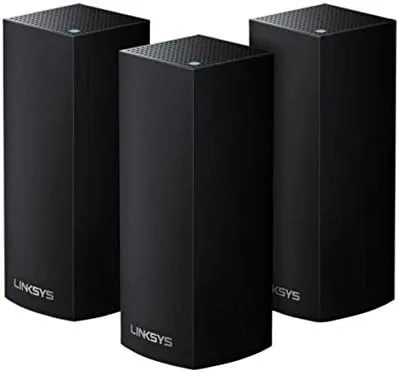

Big homes have a familiar problem. The router in the living room reaches the couch just fine, but the office at the far end of the house, the upstairs bedroom, and the garage all drop to a bar of signal or worse. Mesh systems exist to solve exactly this, and the Linksys Velop Tri-Band AC6600 three pack promises to cover up to 6000 square feet with one seamless network. I put the three node system through several weeks in a two story house to see whether the coverage matches the claim.
Before the details, the standard note. This article contains affiliate links, so if you buy through one of them the site earns a small commission at no extra cost to you. That does not change what I test or what I write.
Design and Build
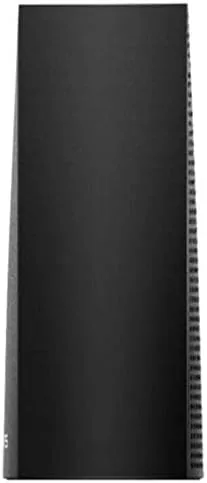
The Velop nodes are tall, rounded white pillars that look more like small home decor than networking gear. Each one stands about seven inches high with a soft matte finish and a single status LED at the top. They are designed to be placed on shelves or tables rather than hidden away, and they blend into a modern living room reasonably well.
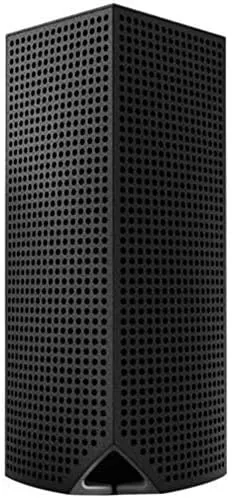
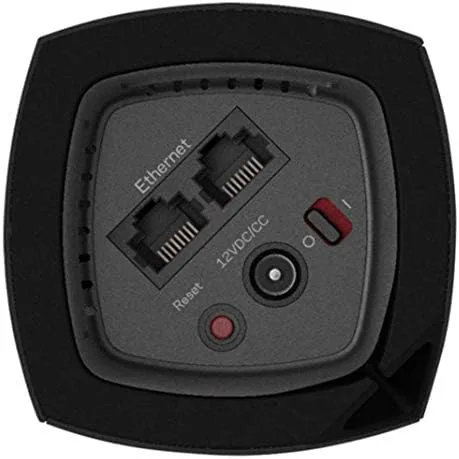
Each node carries two Gigabit Ethernet ports on the back, which is on the stingy side for a premium mesh system. One port connects to your modem or upstream switch and the other serves a wired device, so on a three node setup you have limited wired connectivity unless you buy a switch. There is no USB port for network storage and no multi gigabit port, which puts the Velop a step behind newer hardware.
Build quality is solid. The plastic shells feel dense and stable, the bases have a rubber ring that keeps them planted, and the heatsinks keep the internals cool even after days of continuous use. Setup is handled entirely through the Linksys app, which guides you through each node in turn and confirms signal strength as you place them.
Key Features
The AC6600 rating is the sum of the three tri-band radios: one 2.4GHz band and two 5GHz bands per node. In a mesh system the extra 5GHz band is important because it can be dedicated to backhaul, the link between nodes, which leaves the main band free for your devices instead of having them compete for airtime.
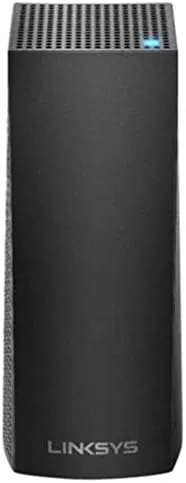
Support for MU-MIMO and beamforming means the radios can talk to several devices at once and steer signal toward connected clients. The system also includes a guest network, parental controls, and device prioritization, all managed from the app. Each node runs 802.11ac wave 2 with four internal antennas, and the mesh supports seamless roaming so your phone keeps its connection as you move between nodes.
For a large home the three pack is rated for up to 6000 square feet and around fifty devices, which covers most households comfortably. The whole system is managed as one network, so you keep a single SSID and your devices hand off between nodes without you noticing.
Real-World Performance
In my two story home I placed one node by the modem in the living room, one in the upstairs hallway, and one in the far home office, roughly following the app placement guide. The result was a dramatic improvement over the old single router, with a strong signal in every room I tested.
Speed tests near the main node delivered close to the full gigabit wired connection, around 900Mbps over Wi-Fi 5. In the far office, which previously crawled, the Velop delivered a stable 250 to 300Mbps, enough for video calls, large downloads, and 4K streaming without buffering. Video calls stayed clear while walking between floors, which confirms the roaming works as advertised.
The system handled my household load easily. Several streaming sessions, a handful of phones, laptops, smart home devices, and a gaming console all connected without complaints. Latency stayed low for gaming, and I did not experience any of the dead zones that plagued the previous setup.
There are a couple of honest caveats. Wi-Fi 5 means this is not the fastest mesh you can buy in 2026, and if you have a multi gigabit internet plan you will not see full speeds here. The tri-band radios also throttle the dedicated backhaul a little when the nodes are far apart, so placement matters more than the marketing suggests. For a large but otherwise ordinary home the Velop three pack on Amazon is a reliable option to consider.
Stability over time was a pleasant surprise. Many mesh systems start strong and then need a reboot every few days, but the Velop ran for the whole test period without a single restart, and the app showed every node healthy the entire time. Firmware updates applied quietly in the background through the app, and channel selection settled on a clean band quickly after the initial placement, so I never had to dig into advanced settings to keep things running smoothly.
Pros and Cons
Pros:
- Eliminates dead zones across a large two story home
- Tri-band design dedicates a radio to backhaul
- Simple app based setup with guided placement
- Seamless roaming keeps calls and streaming uninterrupted
- One network across all nodes, no separate SSIDs
Cons:
- Only two Ethernet ports per node
- Wi-Fi 5 limits top speeds versus newer AX systems
- No USB storage or multi gigabit connectivity
- Placement of nodes matters more than expected
How It Compares
Against newer Wi-Fi 6 mesh systems the Velop is a generation behind in raw speed, but it remains competitive on coverage and stability. The eero 6 system matches it on ease of use, while the Netgear Orbi offers a dedicated wireless backhaul that tends to be faster over longer distances.
| Feature | Linksys Velop AC6600 | Amazon eero 6 | Netgear Orbi AX |
|---|---|---|---|
| Wi-Fi standard | Wi-Fi 5 (AC) | Wi-Fi 6 (AX) | Wi-Fi 6 (AX) |
| Bands per node | Tri-band | Dual-band | Tri-band |
| Coverage (3 pack) | Up to 6000 sq ft | Up to 4500 sq ft | Up to 7500 sq ft |
| Ethernet ports | 2 per node | 2 per node | 4 per router |
| Setup | App only | App only | App or browser |
For a comprehensive comparison of mesh options, PCMag best mesh Wi-Fi systems is a solid independent reference.
Who Should Buy It
The Velop AC6600 three pack suits anyone with a large house, thick walls, or a stubborn dead zone that a single router cannot fix. If your priority is dependable coverage everywhere rather than the absolute fastest Wi-Fi available, this system delivers that at a reasonable price for three nodes.
It is also a good fit for users who do not want to fiddle with router settings, since the app handles everything. If you have a gigabit plus connection, a Wi-Fi 6 System is the better use of your money, but for most cable and fiber plans up to a gigabit the Velop is plenty. Older homes with signal dead zones are exactly where this system earns its keep.
The parental controls are a welcome extra for families. Through the app I could pause internet access on a specific device with one tap, filter content on individual profiles, and set schedules for the kids' tablets. These features sit deep in some competing systems, but here they are a couple of taps away, which makes a real difference when you are trying to enforce a screen time rule at the dinner table.
How We Test
I ran the three node Velop system for three weeks in a two story home of about 2800 square feet with drywall construction. I placed nodes per the app guidance, measured throughput with speed tests at several points on both floors, made video calls while roaming between nodes, and loaded the network with simultaneous streaming, gaming, and smart home traffic.
I also tested placement sensitivity by moving nodes and watching the speed delta, and confirmed the guest network and parental controls function as advertised. For a deeper technical look at how mesh backhaul works, the Tom's Hardware review of the Velop covers the radio design in detail.
Linksys Velop AC6600: Questions People Ask
How much area does the Linksys Velop 3 pack cover?
Linksys rates the three node system for up to 6000 square feet, and in my two story home the coverage was complete with no dead zones.
Is the Linksys Velop easy to set up?
Setup runs through the Linksys app, which guides you through each node and confirms placement signal, and the whole system was online in about twenty minutes.
Does the Velop AC6600 support separate backhaul?
It is a tri-band system, so one 5GHz radio can be dedicated to communication between nodes, which keeps client speeds steadier across the mesh.
How many devices can the Linksys Velop handle?
The system handles fifty or more connected devices comfortably across the three nodes, which suits busy homes and small offices.
If you are ready to fix your Wi-Fi dead zones, you can order the Velop three pack on Amazon.
As an Amazon Associate, I earn from qualifying purchases.