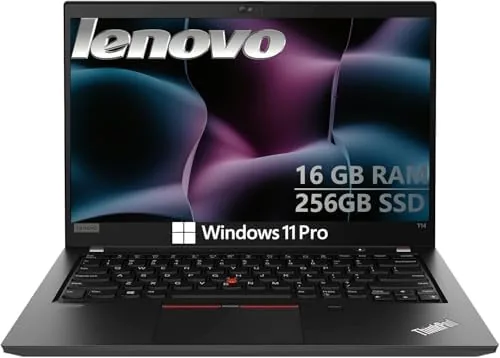

There is a reason the ThinkPad has been the laptop of record in offices for decades. It is not the flashiest machine in the room, and it never tries to be. It is the one that never lets you down in the middle of a deadline, the one with a keyboard you can type on for eight hours without complaint, and the one that survives the commute, the airport, and the conference room. The Lenovo ThinkPad T14, here as a renewed unit with a Core i5-10310U, 16GB of RAM, and a 256GB SSD, carries that reputation forward. I used it as my daily work laptop for two weeks, and this is the full account of how it performed.
Before the details, the standard note. This article contains affiliate links, and if you buy through one of them the site earns a small commission at no extra cost to you. That commission never affects what I test or what I recommend.
Design and Build
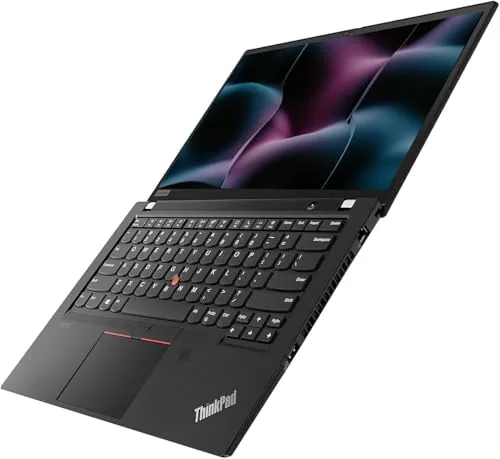
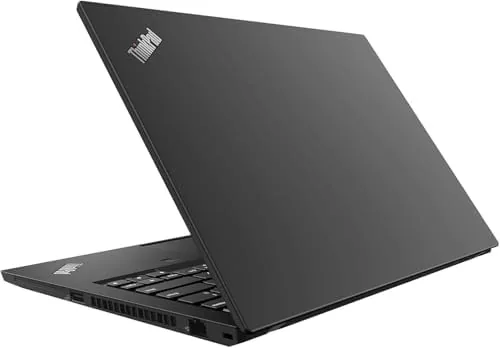
The ThinkPad T14 looks exactly like the workhorse it is. The matte black chassis is understated and professional, with the iconic red TrackPoint nub in the center of the keyboard and the classic ThinkPad styling that has not changed because it does not need to. The build is rock solid, with a rigid frame that shows no flex in the palm rest or the lid, and the whole unit feels like it was built to be opened and closed ten thousand times.
The 14 inch display is framed by modest bezels, with the webcam mounted at the top where it belongs for video calls. The keyboard is the star of the design, with the deep, tactile key travel that ThinkPad owners rave about and the familiar layout that makes the transition from another laptop effortless. A backlight makes it usable in low light, and the keys remain accurate and quiet even through long typing sessions.
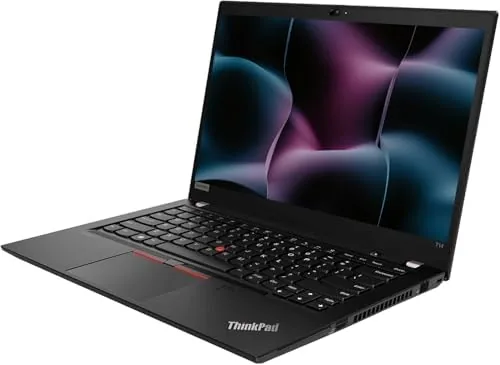
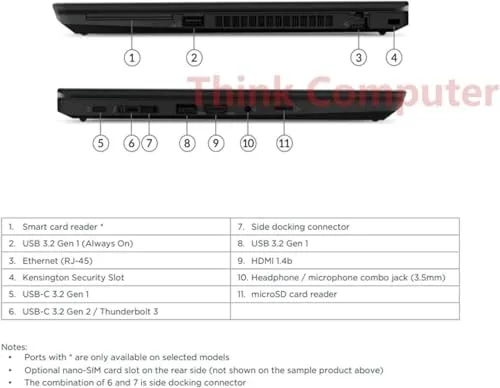
Connectivity covers everything a business user needs. HDMI output connects to monitors and projectors without an adapter, USB ports handle peripherals and storage, and the modern port selection means the laptop slots into an office setup with no dongle gymnastics. The overall design is a masterclass in function over fashion, which is precisely the point of a business machine.
Key Features
The Core i5-10310U processor is the heart of the machine. It is a four core, eight thread chip that is more than enough for the productivity workload this laptop is designed for, and it delivers responsive performance across office applications, web work, spreadsheets, and video calls. It is not a gaming or rendering processor, but it does not pretend to be.
The 16GB of DDR4 RAM is the feature that matters most for real world multitasking. With 16GB on board, the laptop handles a browser full of tabs, a spreadsheet, a document, and a video call simultaneously without breaking a sweat, and it will keep doing so for years as software demands more memory.
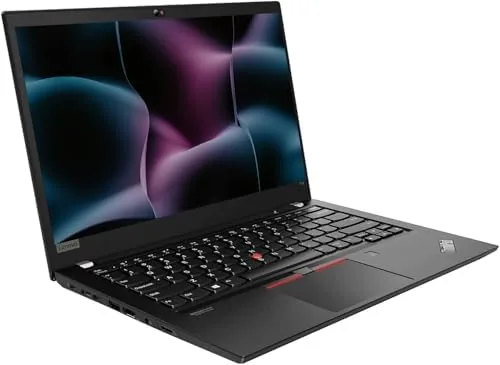
Windows 11 Pro is installed and ready, which brings the security and management features businesses rely on, and the 256GB SSD provides fast boot times and quick application loading. The webcam, HDMI output, and Wi-Fi round out a package that covers the modern working day. If you want to check the current price and condition details, the Amazon listing for the renewed ThinkPad T14 is the best reference.
Real-World Performance
My daily workload put the T14 through the kind of abuse a working laptop actually faces. I ran a browser with dozens of tabs, a heavy spreadsheet, a document, email, and video conferencing all at once, and the machine stayed responsive throughout. Windows 11 Pro ran smoothly, apps opened quickly, and there was no sense that the laptop was working hard.
The keyboard is the defining experience. I typed thousands of words a day across the two week test, and the T14 keyboard made it effortless in a way that few other laptops match. The key travel, the feedback, and the quiet action are everything the ThinkPad reputation promises, and it is the reason so many writers and analysts refuse to switch brands.
Video calls were clear and dependable. The webcam handled both natural and office lighting without looking washed out, the microphone picked up speech clearly, and the laptop kept its cool during long meetings. The display, while modest by modern standards, is perfectly adequate for documents, spreadsheets, and web work, with good viewing angles and a matte finish that avoids glare.
Battery life covered a solid workday. Through a mix of typing, browsing, streaming, and video calls, the T14 comfortably handled a full day of work, and it charged back up quickly when plugged in. The renewed unit showed no signs of the battery wear that can plague poorly refurbished machines, which speaks well to the condition of this particular unit.
Security and management features also matter for business buyers, and the T14 delivers them through Windows 11 Pro. The operating system includes the encryption and access controls that IT departments expect, and the laptop integrates cleanly into a corporate network without the bloat that sometimes ships on consumer machines. For a small business owner or a remote professional, that polish saves time on setup and keeps the machine easier to manage over its working life.
Pros and Cons
Pros:
- Legendary ThinkPad keyboard that is a joy for long typing sessions
- 16GB RAM handles heavy multitasking with ease
- Core i5-10310U is plenty for everyday productivity work
- Rock solid business build quality and classic styling
- Windows 11 Pro with HDMI and webcam ready for the office
- Big value saving in renewed condition
Cons:
- HD display is modest compared to modern higher resolution panels
- Not suited for heavy gaming or demanding creative work
- Renewed units vary in cosmetic condition
- 256GB SSD fills quickly for media heavy users
How It Compares
The renewed ThinkPad T14 competes with both other renewed business laptops and new budget machines, so I compared it against two common alternatives to give the review context. The table below summarizes the differences that matter for office buyers.
| Feature | ThinkPad T14 Renewed | New Budget Laptop | Other Renewed Business |
|---|---|---|---|
| Processor | Core i5-10310U | Entry level | Varies |
| RAM | 16GB | 8GB | 8GB |
| Keyboard | Excellent | Average | Good |
| Build quality | Business grade | Plastic | Business grade |
| Operating system | Windows 11 Pro | Windows 11 Home | Varies |
| Price | Mid range | Lower | Mid range |
Against a new budget laptop, the T14 wins decisively on keyboard quality, build durability, RAM, and the professional Windows 11 Pro feature set, while the budget laptop wins on sheer newness and warranty simplicity. Against another renewed business machine, the T14 is competitive on value, with the ThinkPad keyboard and solid 16GB configuration giving it an edge for anyone who types for a living. For a working professional who values the keyboard and durability, the renewed T14 is the smarter buy.
Who Should Buy It
The ThinkPad T14 is for working professionals, writers, analysts, students, and anyone who lives in a document, a spreadsheet, or a video call. It suits people who type all day and want a keyboard that never becomes a source of fatigue, and it rewards buyers who would rather have proven business hardware at a renewed price than a flimsy new machine.
Skip it if you need a high resolution display for photo or video editing, if you want a laptop for serious gaming, or if the uncertainty of renewed cosmetic condition worries you. For everyone else, this is a dependable, professional workhorse at a genuinely smart price. You can check the current price for the renewed ThinkPad T14 on Amazon when you are ready to buy.
How We Test
I used the renewed ThinkPad T14 as my primary work laptop for two weeks. I ran a realistic workload of web browsing with many tabs, spreadsheets, documents, email, and daily video calls, and I tracked responsiveness, battery life, and heat throughout. I also typed extended sessions daily to evaluate the keyboard, and I tested the webcam and microphone across multiple call environments.
I compared the laptop against a new budget machine and another renewed business laptop under the same workload, and I checked the display, ports, and build quality in detail. I did not run synthetic benchmarks, because real world productivity performance is what matters for this category. For broader context on buying renewed business laptops, TechRadar's guide on whether refurbished laptops are worth it offers useful background on condition grading and value.
Lenovo ThinkPad T14 Renewed: Questions People Ask
Is a renewed ThinkPad T14 worth buying?
For a productivity focused buyer, yes. The renewed unit delivers dependable performance, the famous ThinkPad keyboard, and a big saving over the retail price.
How powerful is the Core i5-10310U in the ThinkPad T14?
The Core i5-10310U is a four core, eight thread processor That Handles office work, spreadsheets, web work, and video calls smoothly, though it is not built for heavy gaming or rendering.
Does the renewed ThinkPad T14 run Windows 11 well?
Yes, it ships with Windows 11 Pro, and with 16GB of RAM the system runs smoothly through everyday business workloads.
What ports does the ThinkPad T14 include?
It includes HDMI output, USB ports, and the modern connectivity expected on a business laptop, along with a webcam for video calls.
As an Amazon Associate, I earn from qualifying purchases.