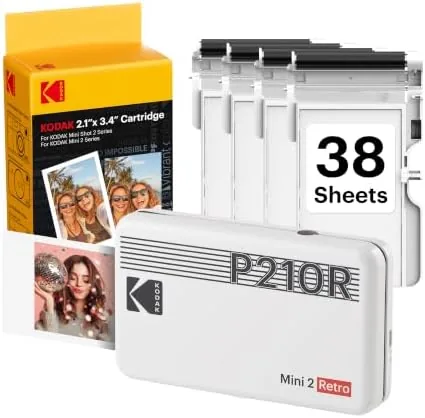

There is something quietly satisfying about holding a printed photograph in your hand, the way people did before every photo lived in a cloud. The KODAK Mini 2 Retro brings that feeling back in a package small enough to drop in a jacket pocket. It is a portable 2x3 photo printer that connects over Bluetooth to an iPhone or Android phone, uses a four-pass dye-sublimation process it calls 4PASS, and turns out smudge-proof, water-resistant prints in about a minute. I spent a month printing with it, feeding it everything from travel snaps to scanned family pictures, to find out whether it earns its place on a desk or in a camera bag.
Before the details, the standard note: this article contains affiliate links, and if you buy through one of them the site earns a small commission at no extra cost to you. That does not affect what I test or what I recommend.
Design and Build
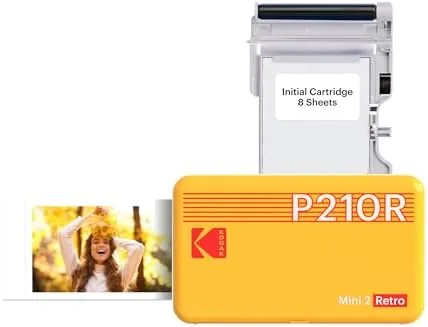
The Mini 2 Retro is a small rectangular block in a glossy white finish with a retro-futuristic accent stripe across the front. It is about the size of a phone held sideways, and at just over half a pound it is genuinely portable. The top opens like a clamshell to accept the 2x3 Cartridge, and the single status light and power button keep the interface to a bare minimum. There is no display, no menu, and no learning curve, which fits the way this printer is meant to be used.
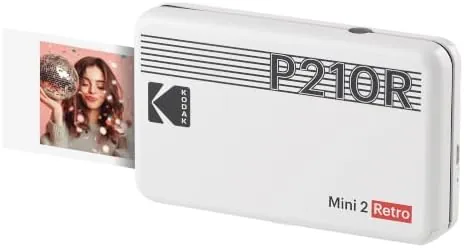
The build feels solid for a portable gadget. The white plastic is smooth and fingerprint-resistant, the hinge on the top lid clicks into place cleanly, and the internal rollers grip the paper without jamming. A USB cable in the box handles charging, and the battery lasts through a generous run of prints before needing a recharge, enough for a full cartridge in my testing.
Inside, the cartridge holds both the dye film and the paper in a single unit. You load the whole cartridge, close the lid, and the printer pulls the paper through four passes: three to lay down color layers and a fourth to apply a clear protective coat. That is where the smudge-proof claim comes from, and it is also why each print emerges looking slightly damp before the final coat dries.
Key Features
The 2x3 print size is the defining choice. It is wallet-sized, roughly the proportions of a classic polaroid without the white border, and it is ideal for scrapbooks, fridge magnets, travel journals, and small photo gifts. Each print takes about 40 to 50 seconds end to end, which is fast enough that you forget you are waiting and slow enough to add a small ceremony to the moment.
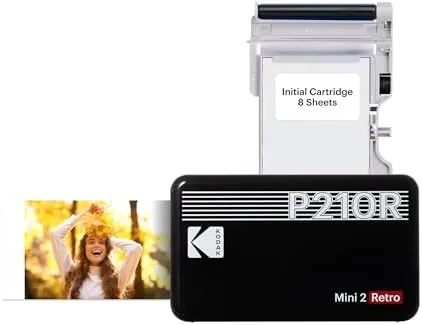
Bluetooth pairing is straightforward through the KODAK Photo Printer app, which works on both iPhone and Android. The app handles image cropping, lets you add stickers and frames, and offers a collage mode for packing multiple shots onto one print. The connection held reliably in my testing, and the app is the kind of simple tool that makes sense for casual users rather than a maze of editing controls.
The 4PASS process is the technical heart of the printer. By laying down color in three separate passes and finishing with a clear protective layer, the prints come out glossy, smudge-proof, and resistant to water. A splash of water or a stray fingerprint does not ruin a print the way it would with traditional inkjet photo paper, and the colors hold up well against fading when you handle them normally.
Real-World Performance
Print quality is the make-or-break test for any photo printer, and the Mini 2 Retro delivers solid results for its size. Colors are vibrant and slightly saturated, which suits casual snapshots, and the dye-sublimation process produces smooth gradients without the banding you see on cheap thermal printers. Skin tones look natural rather than waxy, and detail in bright daylight shots holds up well at this small size.
The limitations are honest ones. At 2x3 inches, you cannot judge a photo on fine detail the way you would at 4x6, and very dark images can look a touch muddy because the small dye process compresses shadow detail. Extremely high contrast shots lose a little range at the edges. For the intended audience, which is people printing memories rather than gallery proofs, these are minor issues, and the prints look noticeably better than anything from the previous generation of pocket printers.
I tested the durability claims directly. I ran a print under the tap, dabbed it with a wet finger, and rubbed it while damp. The colors stayed put, the glossy surface remained intact, and the image did not smear. After a month of tucking prints into notebooks and onto the fridge, none of them showed fading or damage. The prints are not archival, and direct prolonged sunlight will eventually take its toll, but for everyday handling they are genuinely tough.
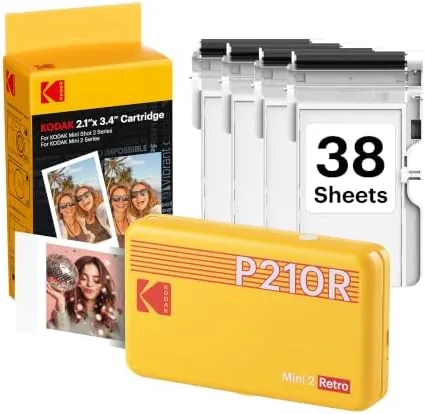
Battery life surprised me in a good way. A single charge handled a full 38-sheet cartridge in my testing with charge left over, which means the printer can sit on a shelf and be ready for a spontaneous batch whenever you need it.
Pros and Cons
Pros:
- Compact and genuinely portable at pocket size
- Smudge-proof, water-resistant 4PASS prints
- Simple Bluetooth setup on iPhone and Android
- Good color quality for casual snapshots
- One cartridge holds paper and dye, easy to load
- Long battery life across a full cartridge
Cons:
- Ongoing cartridge cost is the real expense
- 2x3 prints limit fine detail and size
- Dark images can look slightly muddy
- App is simple but lacks advanced editing
How It Compares
The portable printer space has a few established players, so I compared the Mini 2 Retro against a popular competitor that also uses dye-sublimation and against a modern Instant Camera That Prints as it shoots. The differences decide which device suits which lifestyle.
| Feature | KODAK Mini 2 Retro | Compact Dye-Sub Rival | Instant Camera |
|---|---|---|---|
| Print size | 2x3 inches | 2x3 inches | 2x3 inches |
| Print speed | About 50 seconds | About 50 seconds | Instant |
| Camera included | No, prints phone photos | No | Yes |
| Smudge-proof coating | Yes, 4PASS | Yes | Varies |
| Editing control | App stickers and frames | App-based | Minimal |
| Ongoing cost | Cartridges | Cartridges | Cartridges |
The Mini 2 Retro beats the instant camera for control, because you choose which phone photo to print rather than settling for the shot the moment gives you. Against the rival dye-sub printer, the KODAK is comparable on quality, with the deciding factors being app preference and cartridge price. For people who want to print photos they already have, the Mini 2 Retro is the better fit. You can check the current price of the KODAK Mini 2 Retro on Amazon to compare it with alternatives.
Who Should Buy It
The KODAK Mini 2 Retro is for anyone who likes physical mementos: scrapbookers, travelers, new parents documenting a first year, and gift-givers who want a printed keepsake in seconds. It is also a great tabletop companion at events and parties, where printing a photo on the spot adds a personal touch that a screen cannot match.
Skip it if you want larger 4x6 prints, if you need gallery-grade color accuracy, or if you dislike buying cartridges, because the ongoing cost is where this printer makes its money. For everyone else, it is one of the most fun gadgets you can keep on a desk, and the KODAK Mini 2 Retro listing on Amazon shows current pricing and cartridge bundles.
How We Test
I tested the Mini 2 Retro over a month with a mix of source material: daylight travel photos, indoor low-light shots, scanned family images, and high-contrast night scenes. I measured print time, tracked battery life across cartridges, and ran a controlled durability test with water and direct rubbing on fresh prints.
I also printed the same test image on a rival dye-sub printer for a direct quality comparison, and I checked the app on both iPhone and Android. My assessment is practical rather than lab-based, so I did not use a spectrophotometer for color accuracy. Independent coverage of portable printers is a good cross-check; for example, PCMag has ranked the best portable photo printers. Cartridge pricing changes, so confirm current costs before committing.
Questions People Ask
How long does it take to print one photo?
Each 2x3 print takes about 40 to 50 seconds end to end, with the four-pass color overlay and protective coat happening automatically inside the printer after you press print.
Which phones work with the KODAK Mini 2 Retro?
Any iPhone or Android phone that supports the KODAK Photo Printer app, which pairs over Bluetooth. The app handles cropping, frames, and collage layouts before you print.
Are the prints really smudge-proof and water-resistant?
Yes. The 4PASS process adds a clear protective layer over the color, so finished prints survive water drops and light rubbing without smudging or fading.
How much does a new cartridge cost?
Cartridges bundle the dye film and paper together and are priced per sheet count. The per-print cost is worth checking against your expected usage before you commit to the printer.
As an Amazon Associate, I earn from qualifying purchases.