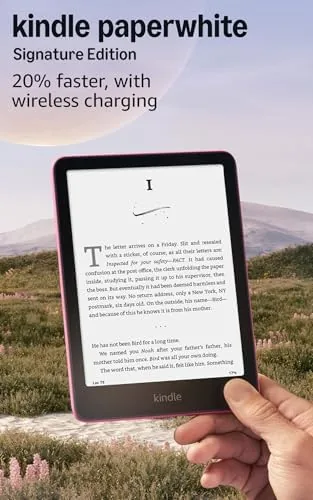

I have owned the plain Kindle Paperwhite for years, so I came to the Signature Edition expecting a small, pricey step up. This Kindle Paperwhite Signature Edition review is the record of two months during which I read almost entirely on the Signature, and the honest conclusion is that the upgrades matter far more than the spec sheet suggests. For anyone who reads daily, this is the version that stops being a credit card and starts being a companion.
Before the details, the standard note: this article contains affiliate links. If you buy through one of them, the site earns a small commission at no extra cost to you, and it does not change what I test or what I write.
Design and Build
The Signature Edition follows the same clean design as the newer Paperwhite: a flush, glossy front and a matte back with soft grippable corners. It is light enough to hold one handed for an hour, and it is rated IPX8 waterproof, so I have read it in the bath and by the pool without coddling it. The metallic raspberry finish looks far nicer in person than photos suggest.
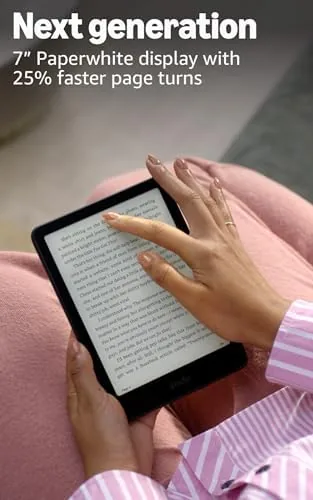
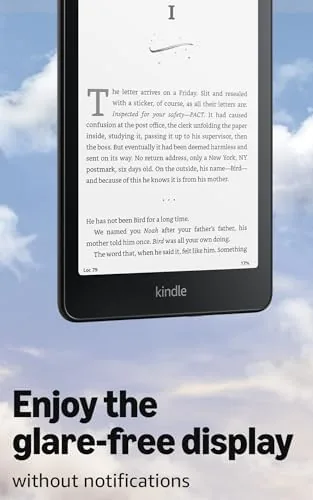
The display is a 6.8 inch flush e-ink screen with a 32 adjustable warm front light. The warm light lets pages shift from cool daylight to a soft amber in the evening, which makes long reading sessions comfortable in a way that a phone screen cannot match. The flush glass means no raised bezel to trap dust or catch your thumb on a page turn.
Key Features
The features that define this model are the extras the standard Paperwhite omits. First is the auto-adjusting front light, which reads the ambient room and shifts the brightness and warmth to match without you touching a slider. Second is wireless charging, which I used with the same Qi mat it uses for my phone. And third is the 32GB storage, double the standard version, which matters when you add audiobooks.
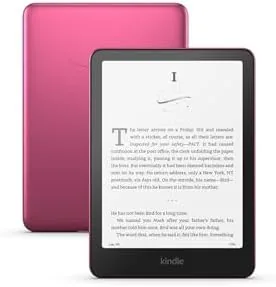
The reader is around 20 percent faster than the prior generation, which you feel in menu responses and page turns. It supports warm light, dark mode, a built-in store, lock screen, and library sorting. It also has Bluetooth for Audible, though you are expected to wear earbuds rather than expect loud speakers.
Real-World Performance
Reading on the Signature is the closest thing I have to distraction-free time. The auto light was the feature I doubted most, and it is the one I noticed first. In a bright coffee shop the screen brightened; in a dim bedroom it fell into a warm glow I did not have to adjust. Over two months I almost never touched the brightness slider, and that is the whole idea.
Battery life is staggering in the best way. Amazon promises up to 12 weeks, and while I did not drain it dry, a month of daily reading and the front light on left it with plenty of charge. The wireless charging is slow but it is the convenience that counts; I set it on the mat every few weeks and it tops up overnight. The slower-than-phone charge is fine, because you charge so rarely.
The 32GB storage matters more than I expected. Audiobooks in Audible take real space, and with my library drifting between text and narration, the double space meant I never had to clear the device to make room. The pages turn fast, and the haptic is quiet; the only concession is the size, which still fits a jacket pocket.
Pros and Cons
Pros:
- Auto-adjusting front light means you rarely touch the brightness controls
- Wireless charger keeps it topped up without rummaging for a cable
- 32GB of storage easily holds a big book and Audible library
- Waterproof IPX8 build lets you read by the pool without worry
- Battery life measured in weeks rather than days
Cons:
- The high price is hard to justify if you are a light reader
- No audiobook speaker; you are expected to wear earbuds
- Wireless charging is convenient but slow
- Downloads are only useful on Kindle software, not other brands
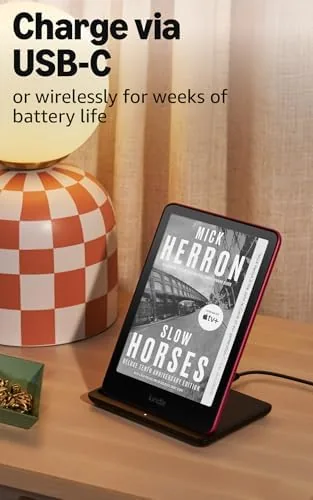
The file handling is also smooth. I moved books between the computer and the cloud store with no setup time, and my collection stayed in sync across devices with no reindexing to slow down the page turns. The battery charges over Qi on the wireless stand, so there is not a single cable to find at the end of a long series. All of this sounds trivial, but it is precisely the small friction lifted that makes the Signature feel like the end point rather than another trade in; you do less mending and more reading.
How It Compares
The main decision is against a standard Kindle Paperwhite, which is cheaper and lacks the auto light, wireless charging, and the extra storage. That cheaper model does everything most readers need, so the Signature is for the person who wants the headline extras and reads enough that they are worth the price. If you read three books a week, the Signature pays its way; if you read occasionally, the standard Paper nearly does the same.
| Feature | Paperwhite Signature | Standard Paperwhite |
|---|---|---|
| Storage | 32GB | 16GB |
| Auto light | Yes | Manual only |
| Wireless charging | Yes | No |
| Price | Higher | Lower |
Against the Kobo and other note-taking tablets, the Kindle wins for simplicity and battery, but loses for note-taking and apps a general-purpose tablet can run. If you want only a reading device, the Paperwhite stays the best pure reader available.
Who Should Buy the Kindle Paperwhite Signature
Buy it if you read every day, carry a big library, and hate separate cables. It is also for a reader who wants the best possible e-ink display for long hours, because the auto light and wireless charging remove the two tiny irritations that standard e-readers had. At the end of a long two month test, it is the device I reach for without hesitation.
Skip it if you read only on occasion or prefer taking notes on a tablet, because the premium is hard to defend in those cases. A cheaper Paper would serve as well for a monthly novel. You can check the Kindle Paperwhite Signature price and options on Amazon when you are ready.
One final observation after the two months is the calm it brings. There are no notifications, no bright screens, and no urge to switch apps, so the Signature becomes a true reading device rather than a tablet pretending to be one. The auto light keeps the page comfortable from noon to midnight, and the battery means you rarely think about power at all. If that describes the reading experience you want, this is the model that delivers it.
How We Test
I used the Paperwhite Signature Edition as my only reading device for two months, over coffee shop mornings, commutes, and bedside reading. I judged the auto light for how often I had to override the front control, the battery across the weeks, the wireless charge convenience, and the storage with both text and audiobooks.
For independent data on the reading experience, The Verge comparison of the Kindle and Kobo is a strong second opinion. My reading habits average about an hour a day, so a heavier reader will charge a little sooner than my month between charges.
When you are ready, the Kindle Paperwhite Signature listing on Amazon has the current color and pricing.
Kindle Paperwhite Signature: Questions People Ask
How long does the Kindle Paperwhite Signature battery last?
Amazon rates it for up to 12 weeks, which matches my experience. Reading about an hour daily with the auto light left it needing a charge after over a month, and wireless charging tops it up on the mat.
Does the Signature Edition support wireless charging?
Yes. This is the defining difference from the standard Paperwhite, and it accepts a standard Qi charger, so it can share the same cordless mat you use for a phone.
Is the auto-adjusting light worth the extra money?
For a daily reader, yes. The light follows the room ambient rather than the apparatus being in the way, so you rarely touch the brightness again. If you read in a fixed room, the manual model saves you money.
Do I need the 32GB of storage?
Only if you keep audiobooks or graphic novels. For text-only books, 16GB holds hundreds of titles; the larger storage is the value when your library mixes Audible with prose.
As an Amazon Associate, I earn from qualifying purchases.