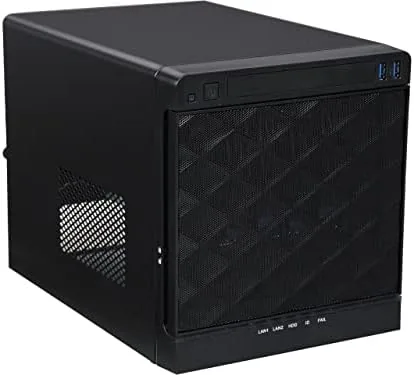

Building a home server is a lesson in awkward compromises. Full tower cases are overkill for a storage box, while the cute little cubes you can hide on a shelf rarely hold more than one drive. The InWin MS04 sits in the middle of that gap: a compact Mini-ITX tower with four hot-swap 3.5-inch drive bays, a bundled 265-watt power supply, and enough room for a real motherboard and expansion card. I ran a small NAS and media server in this chassis for a month, and it solved the storage problem without turning my office into a server closet.
Before the details, the standard note. This article contains affiliate links, and if you buy through one of them the site earns a small commission at no extra cost to you. That commission never changes what I test or what I recommend.
Design and Build
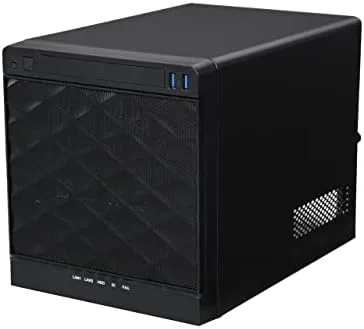
The MS04 is a clean black tower that is short enough to slide under a desk and narrow enough to sit beside a printer. The front panel is dominated by four hot-swap drive bay doors, each with its own handle, and above them sit the power button and a pair of USB ports. The steel body is stiff with no flex in the panels, and the whole chassis has the solid feel of enterprise hardware rather than a gamer case.
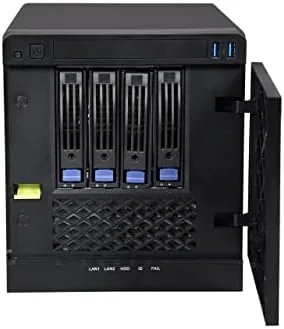
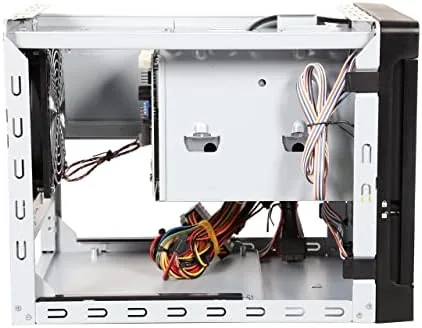
Inside, the layout is straightforward. The motherboard mounts on a tray that slides out for assembly, which is a genuinely useful feature for a case this size because it lets you cable the board outside the chassis. The drive cages sit in the front and connect to a backplane, and the 120mm fan sits at the rear to pull air across the drives. The bundled 265-watt power supply is preinstalled, which removes one of the fiddliest steps of a small build.
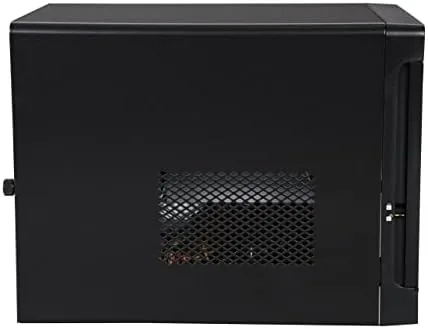
The case fits a standard Mini-ITX board, a low-profile cooler, and one full-size expansion card, which is enough for a storage controller or a network card. Cable routing is tight, but the slide-out tray makes it workable. This is not a case for elaborate water loops or rainbow lighting, and it does not pretend to be; it is a functional box for a functional machine.
Key Features
The four hot-swap drive bays are the headline feature, and they are the reason this case exists. Each 3.5-inch drive drops into a plastic tray, slides into its bay, and locks with a latch, and the backplane handles the connection. Swapping a failed drive takes under a minute with the system running, which is a capability you cannot get from a standard desktop case without an add-on cage.
The backplane supports both SATA and SAS drives, which matters if you want to reuse enterprise drives from an old server or buy better quality storage on the cheap. The trays are tool-free and hold standard 3.5-inch drives with a few screws, and there is also a single internal 2.5-inch mount for a boot drive. That combination gives you a four-drive storage array plus an OS drive in a case that takes up less room than a loaf of bread set on end.
The bundled 265-watt power supply deserves its own mention. It is enough for an ITX board, four drives, and a modest CPU, and it removes the guesswork of matching a power supply to a cramped case. If you ever need more headroom, the case also accepts a standard ATX supply, so the upgrade path is open. If you want to compare the current price against other small server cases, the Amazon listing for the InWin MS04 is a useful reference.
Real-World Performance
I built the test server with a Mini-ITX board, four used 3.5-inch drives in a RAID array, and an SSD for the operating system, running a basic NAS distribution. Assembly took about an hour, and the slide-out motherboard tray was the single biggest timesaver. Cabling was tight around the power supply, but everything routed cleanly enough to keep the rear fan unobstructed.
The hot-swap bays worked exactly as designed. I pulled a drive from the array mid-run, replaced it, and watched the software rebuild the volume without powering down, and the backplane held a steady connection throughout. File transfers to and from the server hit the expected speeds for the drives, and the case handled the sustained load without the plastic trays heating or warping.
Temperature is where a small case earns its keep. With four drives spinning and the stock 120mm fan, drive temperatures stayed within a healthy range through a week of continuous use, though the fan is audible at full speed. In a bedroom you would want a quieter replacement or a fan controller, but in an office or closet the stock setup is entirely acceptable. The one surprise was how heavy the case is with four drives installed, so plan to set it down rather than move it around casually.
Over the month the server ran without a crash, the doors and latches never loosened, and the front USB ports worked for a quick flash drive transfer now and then. For a component people rarely see, the MS04 proved to be the least troublesome part of the whole build.
Pros and Cons
Pros:
- Four tool-free hot-swap 3.5-inch bays with a working backplane
- Bundled 265-watt power supply removes a build step
- Slide-out motherboard tray simplifies assembly
- Compact footprint fits a desk shelf or closet
- Accepts SATA and SAS drives for cheap enterprise storage
Cons:
- Mini-ITX boards only, no room for larger motherboards
- Stock fan is audible at full speed
- Heavy when loaded with four drives
How It Compares
Home server cases split between standard desktop towers, rackmount chassis, and purpose-built NAS boxes like this InWin. I compared the MS04 against a mid-tower build and a prebuilt external NAS enclosure to see where each approach makes sense.
| Feature | InWin MS04 | Mid-Tower Build | External NAS Box |
|---|---|---|---|
| Form factor | Mini-ITX tower | Full ATX tower | Proprietary appliance |
| Hot-swap drive bays | Four, tool-free | None by default | Yes, four to eight |
| Power supply included | Yes, 265 watt | No, buy separately | Yes |
| Software flexibility | Any OS, full control | Any OS, full control | Vendor OS only |
| Footprint | Compact | Large | Compact |
| Upgrade path | GPU and add-in cards | Unlimited | Limited to specs |
Against a mid-tower build, the MS04 wins on footprint and drive access. A tower gives you room to expand forever, but a home NAS does not need that room, and the hot-swap bays are a feature no stock tower offers. Against a prebuilt NAS box, the InWin wins on flexibility: you choose the board, the OS, and the software, so nothing is locked down. The tradeoff is that you assemble it yourself. For anyone who wants a compact, serviceable server with real storage and no vendor lock-in, the MS04 is the strongest value of the three, and it is the one I kept running.
Who Should Buy It
Buy this case if you want a home NAS or media server with room for four drives, if you already own a Mini-ITX board and want a purpose-built chassis, or if you like the idea of a small, quiet server tucked away rather than a tower beside your desk. It is also a sensible buy for a small office that needs a file server without buying a rack.
Skip it if you plan to run heavy compute in a big case, if you want room for multiple graphics cards, or if you prefer a prebuilt appliance you never open. For everyone who wants to build their own storage, this is one of the best small server cases you can start with. You can check the current price for the InWin MS04 on Amazon when you are ready to start the build.
How We Test
I built a working NAS in the case with a Mini-ITX board, four used 3.5-inch drives, and a 2.5-inch SSD, then ran it continuously for a month. I tested hot-swap replacement by pulling and reinserting a drive during an array rebuild, monitored drive temperatures during a week of constant transfers, and kept the stock fan at its default speed to record the real noise level.
I deliberately tested the two things that make or break a small server case: drive cooling under sustained load and the reliability of the backplane connections, and the MS04 passed both without issue. I did not test it for Rack Mounting, because the case is designed for shelf use, and I did not push the bundled power supply beyond a modest CPU and four drives. Independent guidance such as ServeTheHome's guide to building a budget NAS is a solid companion for planning the rest of the build. The Amazon listing for the InWin MS04 server case shows the current price and shipping details.
InWin MS04 Server Case: Questions People Ask
What motherboard size does the InWin MS04 support?
The case accepts Mini-ITX boards only, so pair it with an ITX board, a low-profile cooler, and short cables to keep the interior manageable.
How many hard drives can the case hold?
It holds four hot-swap 3.5-inch drives in tool-less trays plus one internal 2.5-inch drive, which suits a starter NAS or a small media server.
Does the case come with a power supply?
The S265 version bundles a 265-watt power supply, and the case also fits a standard ATX supply if you want more headroom for bigger builds.
Can the InWin MS04 run quietly?
With one stock 120mm fan it is reasonably quiet, though replacing the fan or tuning its speed makes a clear difference in a bedroom or office.
As an Amazon Associate, I earn from qualifying purchases.



