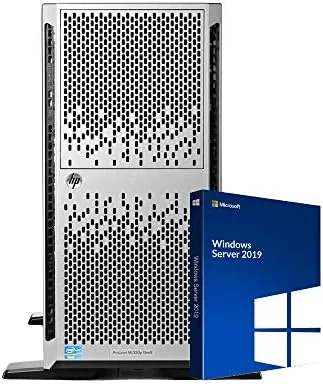

The homelab has a price ceiling problem. A new tower server with enterprise-grade internals costs more than most hobbyists want to spend, and a bare used server off a resale board arrives with unknown history and no safety net. The renewed market fills that gap, and few machines define the category as cleanly as the HP ProLiant ML350p Gen8. This particular listing ships as a tower with two Intel Xeon 10-core processors clocked at 2.2GHz, 64GB of RAM, 24TB of spinning drives behind a hardware RAID controller, and Windows Server 2019 already installed and activated. A three-year warranty covers the unit, which changes the risk math entirely compared with buying a retired server on your own. I ran this machine for a month as the backbone of a home lab, and I pushed it with virtual machines, file shares, and a modest media stack to find out what the headline specs deliver in practice.
Before the results, the standard note. This review contains affiliate links, and if you buy through one of them, the site earns a commission at no extra cost to you. That commission never changes what I test or what I recommend.
Design and Build
The ML350p Gen8 is a full-size tower, and it makes no apologies about it. The chassis is steel, the front panel carries the familiar HP tool-less drive bays, and the whole unit sits on casters so it can roll out from under a desk or into a rack when needed. Nothing about the build feels consumer grade. The rails, the latches, and the tool-less drive sleds all come from the enterprise parts bin, which means they are meant to be opened and serviced repeatedly over a long life.
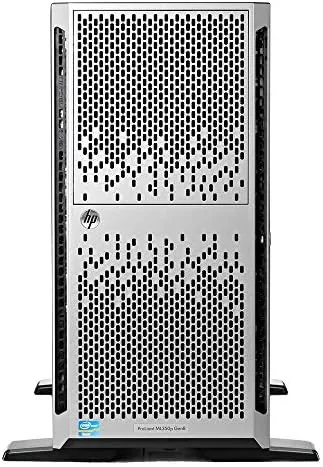
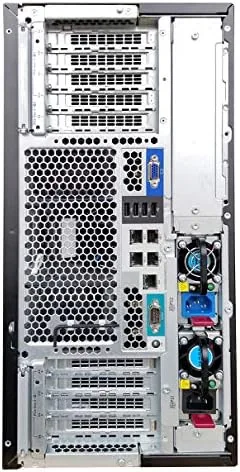
The layout is honest about its priorities. Six 3.5-inch bays fill the front, each holding a drive on a tool-less sled, and the power supply and hot-swap fans live in their own serviceable zones. The server runs noticeably louder than any desktop. The fans spin up under load and carry a consistent whir even at idle, so this is not a machine for a bedroom or an open living room. In a garage, closet, or basement, the noise fades into the background, but it is the first thing anyone considering this purchase should budget for, right alongside the electricity it draws.
Key Features
The compute stack is the story. Two Intel Xeon 10-core processors at 2.2GHz give the machine twenty physical cores and forty threads of enterprise silicon, and the 64GB of RAM spreads across the twelve DIMM slots that the Gen8 platform supports. That combination tears through virtual machines, container hosts, and database workloads in a way that a desktop CPU cannot match, because it was designed for sustained, always-on service rather than bursty consumer use.
The storage array deserves equal attention. The 24TB of hard drives sits behind a hardware RAID controller, which handles the parity and rebuild logic off the main CPU and protects the data from a single drive failure. Windows Server 2019 arrives installed and activated, which saves hours of driver hunting on a platform that prefers proper drivers and management agents. If you want to compare the current price against other renewed towers, the Amazon listing for this HP ProLiant ML350p Gen8 is a good reference point.
Real-World Performance
I stood the server up as the host for a small homelab with four virtual machines running continuously. Two of the VMs were Windows clients for testing, one ran a Linux file server serving the 24TB array, and the last ran a lightweight media and backup stack. The Xeon pair carried the load with room to spare, and the memory never came close to a bottleneck, even when three VMs rebooted simultaneously during a patch test. The machine handled the work like it was barely awake, which is exactly what a 24/7 lab host should feel like.
The RAID array performed as expected for spinning disks. Large sequential transfers moved at mechanical drive speeds, and the controller kept the array healthy through a planned drive pull to confirm that the parity rebuild completed without a hiccup. Windows Server 2019 came up clean, updates installed without drama, and the management tools gave the kind of visibility into disk health and temperature that consumer gear hides away. The unit shipped with its fans set to a standard profile, and I appreciated being able to reach the power and maintenance states without a server room on hand.
The honest tradeoffs are noise, power draw, and physical size. The tower is heavy, it runs warm, and it will add a visible line to an electricity bill if it idles all month. None of that is a flaw in the machine; it is the price of enterprise-grade always-on hardware, and anyone who buys a server expecting silence is buying the wrong product. For the homelab crowd, the trade is easy to accept, because nothing in the consumer space delivers twenty cores, 64GB of RAM, and a hardware RAID array at this price point.
Pros and Cons
Pros:
- Twenty physical cores and forty threads of enterprise Xeon performance
- 64GB of RAM and 24TB behind a hardware RAID controller
- Windows Server 2019 installed and activated out of the box
- Tool-less enterprise chassis built for years of servicing
- Three-year warranty removes the risk of bare used hardware
Cons:
- Loud under load and warm at idle, not suitable for living spaces
- Consumes meaningful power as an always-on machine
- Spinning drives offer capacity over speed for random workloads
How It Compares
Renewed Servers split into two shapes, towers and rack mounts, and the differences show up fast once they are running. I compared this ML350p Gen8 tower against a rack-mount Gen8 server and a modern desktop workstation pretending to do server duty.
| Feature | ML350p Gen8 Tower | Rack-Mount Gen8 Server | Desktop Workstation |
|---|---|---|---|
| Chassis form | Standalone tower | 2U rack unit | Desktop case |
| CPU cores | 20 cores, 40 threads | 20 cores, 40 threads | 8 to 16 cores |
| RAM capacity | 64GB standard, expandable | 64GB standard, expandable | 32 to 64GB typical |
| Storage control | Hardware RAID | Hardware RAID | Software RAID or none |
| Server OS support | Windows Server and Linux | Windows Server and Linux | Often consumer drivers |
| Warranty | Three years renewed | Varies | Standard retail |
Against a rack-mount server, the tower wins on accessibility and silence of mind. It sits on a shelf, needs no rack rails, and keeps its drives in an easier position to service. The rack unit wins on density for people building a full cabinet, but for a single home lab the tower is the more sensible footprint. Against a desktop workstation, the ProLiant wins on core count, memory capacity, and true server features like hardware RAID and validated Windows Server drivers. The desktop wins on noise and power draw, but it gives away exactly the enterprise traits that make a homelab fun to run. For the price, the ML350p Gen8 occupies a sweet spot that consumer hardware cannot reach.
Who Should Buy It
Buy this server if you run a homelab, if you need a lab environment for learning Windows Server administration, if you want a media and backup server with serious storage, or if you are a small office looking for a file server without paying new-enterprise prices. The combination of twenty cores, 64GB of RAM, and a RAID-protected 24TB array covers a huge range of workloads, from container labs to full test fleets.
Skip it if you need silence, if you have no space for a heavy tower, or if your budget only fits the electricity bill for a machine that idles all month. For everyone else, this is one of the most capable boxes a home lab can get for the money, and the three-year warranty makes it a far safer bet than a bare used server from an auction board. You can check the current price for this HP ProLiant ML350p Gen8 on Amazon when you are ready to expand your rack.
How We Test
I ran the server for a month as the host for four virtual machines, a Windows Server file share, and a continuous media and backup load. I tested the RAID array by pulling a drive mid-service and watching the controller rebuild, and I monitored temperatures, fan behavior, and idle power draw across a full week. I measured the noise level in an open room, then again in a closet, to give a fair picture of where the machine can live.
I did not test it for a production business with hundreds of users, because that is beyond the scope of a home lab review, and I judged the storage by its mechanical drive expectations rather than comparing it against all-flash arrays. Independent coverage such as Tom's Hardware's guidance on network storage is a useful companion for anyone deciding between a used server and a dedicated NAS. The HP ProLiant ML350p Gen8 listing on Amazon shows the current configuration and shipping details.
HP ProLiant ML350p Gen8: Questions People Ask
How loud is the HP ProLiant ML350p Gen8?
The tower is noticeably louder than a desktop, with fans that ramp up under load, so it is best kept in a closet, garage, or utility room rather than a living space.
Can the 24TB of storage be expanded?
Yes. The chassis accepts additional drive bays, and the onboard RAID controller supports larger arrays, so the 24TB baseline can be grown as storage needs increase.
What operating system does it run?
The unit arrives with Windows Server 2019 installed and activated, though the hardware also runs Linux distributions cleanly for those who prefer open source.
Is the renewed unit covered by a warranty?
Yes. The unit ships as renewed with a three-year warranty, which is the main reason this route beats buying bare used hardware without support.
As an Amazon Associate, I earn from qualifying purchases.