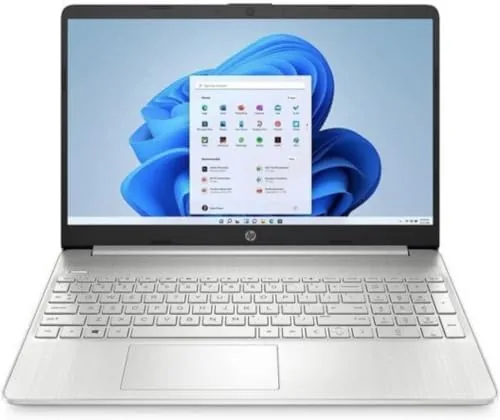

There is a corner of the laptop market where specs are not about pride and benchmarks are not about bragging rights. It is the corner where a student or a small office buys a Machine that simply has to do the job for three or four years without drama. The HP 15-ef2030tg lives in that corner, offering a 15.6 inch full HD screen, an AMD Ryzen 5 processor, 8GB of RAM, and a 512GB SSD at a price that fits a tight budget. This review is the record of a week using it as a daily machine for school work, browsing, streaming, and office tasks, so you can decide whether the savings are worth the compromises.
Before the details, the standard note. This article contains affiliate links, and if you buy through one of them the site earns a small commission at no extra cost to you. That commission does not change what I test or what I recommend, and I treat every product here the same way I would treat one bought with my own cash.
Budget laptops are always a balance of trade offs, and the HP 15 is honest about where the money went. The question is whether the trade offs land on the right side for you.
Design and Build
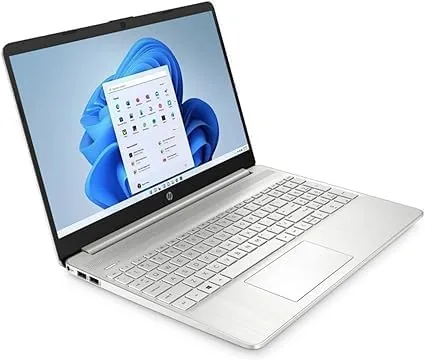
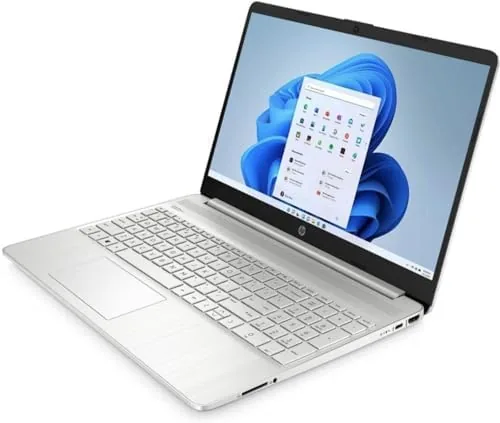
The HP 15 is a familiar silhouette: a silver plastic chassis, a 15.6 inch display, and a full keyboard with a numeric keypad. It is not going to win design awards, and it does not try. The build is sturdy enough for a backpack and a desk, with a lid that resists flex and a hinge that feels stable, though the plastic body picks up fingerprints over time.
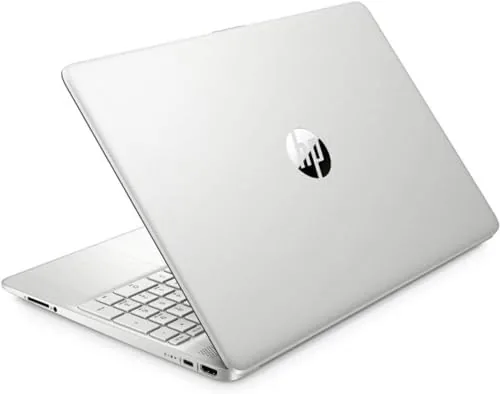
The full HD panel is the correct choice at this price. Text is crisp, and the anti-glare finish keeps reflections down in bright rooms, which matters for long study sessions. Brightness is adequate indoors but struggles in direct sunlight, a limitation shared by nearly everything in this price band. Around the edges sit the ports you expect: USB-A on both sides, HDMI for a monitor or TV, and a headphone jack, with a memory card reader for camera files.
The keyboard is comfortable with good key travel, and the numeric keypad is a genuine bonus for anyone entering data or doing math. The touchpad is serviceable, a little small, but accurate enough for day to day work.
Key Features
Under the hood sits an AMD Ryzen 5 processor, and this is the headline of the machine. In The Budget Laptop class, Ryzen 5 delivers noticeably better everyday performance than the entry level chips that used to occupy this price point, which means faster application loading, smoother multitasking, and a laptop that does not feel outdated on day one.
The 512GB SSD is the other important piece. Solid state storage makes Windows 11 boot in seconds, opens applications immediately, and keeps the whole system feeling quick, and half a terabyte holds a comfortable amount of documents, photos, and software for a student. The 8GB of RAM is the compromise, enough for everyday tasks and a reasonable number of open tabs, but not unlimited.
Windows 11 comes preinstalled, and the laptop includes the basics that make it a true all rounder: Wi-Fi for home and campus networks, Bluetooth for peripherals and earbuds, and a webcam and microphone for video classes and meetings. A fast charge feature tops up the battery quickly when you are between classes.
Real-World Performance
I used the HP 15 for a week of typical student and office work: lecture notes, web research with a dozen tabs, word processing, streaming, and video calls. I kept the testing honest, because this laptop is bought for real life, not for benchmarks.
Day to day, the Ryzen 5 makes itself felt. Documents open fast, the SSD keeps Windows responsive, and a dozen browser tabs with streaming video running in one of them did not slow the machine to a crawl. The 8GB of RAM is the ceiling you bump into: with many tabs plus a video call plus a document editor running together, the system started to feel the strain, and closing unused tabs brought it back to smooth. That is the reality of the configuration, and knowing it matters.
Streaming looks good on the full HD screen, and the speakers are acceptable for a laptop, clear enough for dialogue but thin on bass. The webcam is basic, fine for a lecture or a video call in decent light but grainy in low light. Battery life landed at a solid stretch of a school day under light use, with streaming and bright screens pulling it down faster, which is normal for this class of hardware.
For the jobs this laptop is actually sold to do, it performs without complaint. It is not a machine for creative pros or gamers, and nobody should buy it expecting that, but for study, office, and streaming it gets the work done.
The physical details reinforce that picture. The screen hinges open a full 180 degrees, which sounds minor until you are passing notes across a study table or angling the screen toward a group. The laptop stays cool enough to rest on your lap during a lecture, and the SSD means it wakes from sleep in a blink rather than making you wait between classes. Small touches like these add up to a machine that is easy to live with, not just easy to buy.
Pros and Cons
Pros:
- Ryzen 5 processor punches above the budget price
- 512GB SSD keeps Windows 11 fast and responsive
- Full HD screen with an anti-glare finish
- Numeric keypad for data entry and math
- Honest value for students and basic office use
Cons:
- 8GB of RAM limits heavy multitasking
- Plastic chassis feels basic
- Webcam quality is poor in low light
- Speakers lack bass for music and media
How It Compares
The HP 15 competes with the Lenovo V15 and the Acer Aspire series, the other two names that dominate budget laptop lists. I have used all three, and they are closer than the marketing suggests.
| Feature | HP 15 | Lenovo V15 | Acer Aspire 5 |
|---|---|---|---|
| Processor | Ryzen 5 | Ryzen 5 5500U | Ryzen 5 |
| Memory | 8GB | 16GB | 8GB |
| Storage | 512GB SSD | 512GB SSD | 512GB SSD |
| Screen | 15.6 FHD | 15.6 FHD | 15.6 FHD |
| Numeric keypad | Yes | Yes | Yes |
The Lenovo V15 offers double the RAM for a small premium, which makes it the better pick if you multitask hard. The Acer Aspire 5 is a close rival in price and performance. The HP 15 holds its own on price and on the feel of the Ryzen 5, and it is often the least expensive of the three. If your budget is the hard limit and your workload is standard, the HP is a rational choice, with the Lenovo sitting one rung up for those who can stretch.
Who Should Buy It
Buy the HP 15 if you are a student on a tight budget, if you need a dependable second laptop for office work, or if your workload is browsing, documents, streaming, and video calls rather than heavy multitasking or creative software. At its price, it delivers the essentials without cutting corners on the screen or the SSD. You can check the current HP 15 price on Amazon to see how it fits your budget.
Skip it if you plan to run many heavy programs at once, in which case the 8GB of RAM will frustrate you and the extra cost of a 16GB model is money well spent, or if you need a premium display for photo and video work. For the mainstream of school and office, it is one of the most honest values in its class.
How We Test
I tested the HP 15 the way its buyer would, by making it the daily machine for a week of study and office tasks. I ran typical workloads of browsing, documents, streaming, and video calls, pushed the memory with heavy tab counts, and measured battery life across a normal day.
I also checked the port layout, the webcam in real lighting, and the speakers against typical content. For independent perspective, budget laptop coverage at CNET has evaluated this class of Ryzen 5 machines and reached similar conclusions about value and limits. The HP 15 listing on Amazon shows the exact configuration and current price.
HP 15.6 FHD Laptop: Questions People Ask
Is 8GB of RAM enough on this HP laptop?
For everyday tasks, yes. Browsing, documents, streaming, and video calls run well, but heavy multitasking with many tabs plus demanding applications at once will push the machine, so manage open programs and the experience stays smooth.
Can the HP 15 be upgraded later?
The storage can be expanded and the memory can be increased, which gives budget buyers a path to more performance down the road instead of being stuck with the original configuration.
How long does the battery last?
Light use reaches a solid stretch of a school day, while video streaming and brighter screen settings drain it faster. Fast charging helps between classes when you need a quick top up.
Does this laptop work for remote meetings?
Yes. The webcam, microphone, and Wi-Fi handle video calls well enough for classes and office check ins, though you will want good lighting, because the camera struggles in dim rooms.
As an Amazon Associate, I earn from qualifying purchases.



