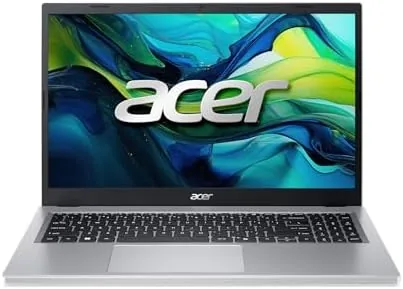

A good budget laptop is not the cheapest machine a store will sell; it is the one that quietly does everything you ask of it without complaint. This Acer Aspire Go 15 review is the record of a month using the AI ready laptop as my main work machine, and the honest conclusion is that for school and everyday office work it is a genuinely capable bargain, held back only by one serious storage choice.
Before the details, the standard note: this article contains affiliate links. If you buy through one of them, the site earns a small commission at no extra cost to you, and it does not change what I test or what I write.
Design and Build
The Aspire Go 15 is a plain, honest 15.6 inch clamshell with an aluminum-like finish on the lid and a matte plastic on the bottom. It is not a thin and light showpiece, and it is heavier than a premium ultrabook, but it is comfortable to carry in a bag and the build feels solid for the price. The hinge opens smoothly and holds the screen in place with no wobble.
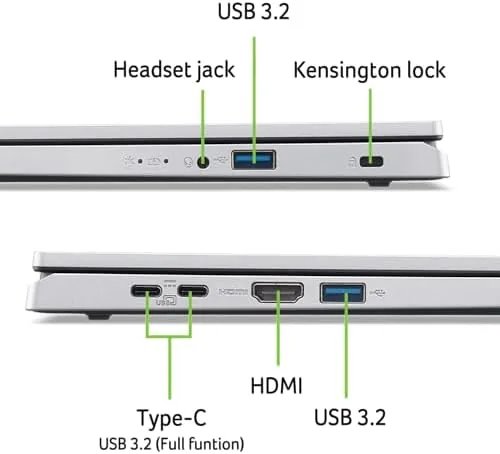
The keyboard is a full layout with a numeric keypad, which I liked for data entry, and the keys have decent travel for a budget machine. The trackpad is wide and clicks cleanly, though it is not the best I have used. The port situation is good for the class: USB-C, a couple of USB-A ports, HDMI for a monitor, and a headphone jack, which covers most setups without an adapter.
The screen is the highlight of the design. The 15.6 inch FHD IPS panel is bright and has good viewing angles, and the matte finish cuts reflections, which made long study sessions and video calls comfortable. It is a far better screen than the older budget laptops had, and it raises the whole machine at this price.
Key Features
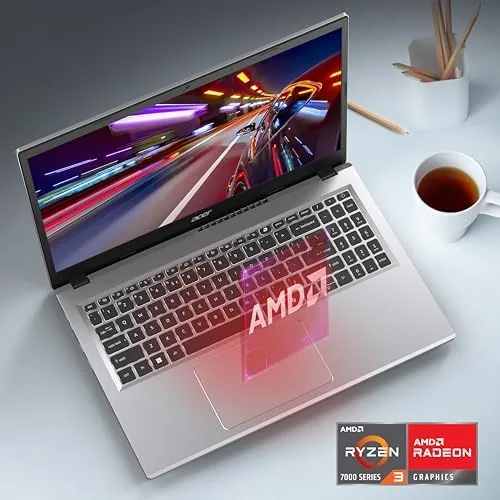
Inside is the AMD Ryzen 3 7320U processor with the integrated Radeon 610M graphics, paired with 8GB of LPDDR5 RAM. This is a chip built for efficiency, so the balance has shifted toward battery life rather than raw power, which is the right trade for this class of laptop.
It ships with Windows 11 Home in S Mode, which means it only installs apps from the Microsoft Store until you switch out, and a 128GB PCIe SSD for storage, plus Wi-Fi 6 for fast wireless. There is also a webcam that supports video calls, and the whole thing comes in at a price that undercuts most rivals.
The two figures you have to decide on are the RAM and the storage. 8GB of RAM is fine for browsers and office apps, and it will struggle only if you try to keep twenty tabs and heavy video editors open at once. The 128GB SSD is the far bigger concern, because Windows takes a large share of it, and it is not an easy thing to upgrade on this chassis.
Real-World Performance
Here is where I put the spec sheet aside. In a month of use the Aspire Go 15 handled the work I gave it with no drama: writing documents, spreadsheet work, running the browser with a dozen tabs, video calls, and streaming. There were occasions where it took a moment to wake from sleep, and the fan goes noisy on heavy loads, but it never got in the way of the work itself.
Battery life was a strength. I worked through most of a day of light loads, around six to seven hours, on a single charge, which is a honest result for a budget 15.6 inch machine. It is not the all-day battery of some premium laptops, but it easily covered a day of classes or a work shift.
The screen really did impress me. For the price, the FHD IPS panel was bright, sharp, and free of the washed-out look old budget laptops had. Photo work, video, and reading text all looked good, and that is usually the first thing to be cut at this price, so Acer deserves credit for keeping it.
The limits are the ones the spec sheet foretells. The 128GB SSD filled much faster than I expected once I added photos and a couple of apps, and I grew to rely on cloud and an external drive. On an old heavy game, the integrated graphics chugged, which is no surprise; this is not a gaming or editing laptop, and anyone buying it as such should look elsewhere.
Pros and Cons
Pros:
- Bright 15.6 inch FHD IPS screen, the star of the machine
- Good port selection including USB-C
- Solid battery for a full day of school or work
- Full keyboard with numeric keypad
- Very good value for the price
Cons:
- Only 128GB of storage, which is tighter than expected
- 8GB of RAM with no easy upgrade
- Ships in Windows 11 S Mode by default
- Not built for gaming or heavy editing
How It Compares
The closest rival in the budget laptop world is the Lenovo IdeaPad, and the Aspire Go often wins on screen brightness and a lower price. If you can stretch the budget, a model with a Ryzen 5 chip and 256GB of storage is worth the extra money, because the storage is the one thing this machine lacks, and it is the single best upgrade to pay for.
| Feature | Acer Aspire Go 15 | Lenovo IdeaPad 3 |
|---|---|---|
| Processor | AMD Ryzen 3 7320U | Ryzen or Intel options |
| RAM | 8GB LPDDR5 | 8GB or 16GB |
| Storage | 128GB PCIe SSD | 256GB SSD options |
| Display | 15.6" FHD IPS | 15.6" FHD |

Who Should Buy
Buy the Acer Aspire Go 15 if you need a reliable laptop for school, remote work, or general office use, if a bright screen and good battery matter more to you than raw power, or if you are on a strict budget and want the most machine for the money. For students and daily office users it is my honest pick in this price band.

Skip it if you need to edit video or photos, play modern games, or keep a large library of files on the machine, because the storage will frustrate you. If that is you, spend a little more on a model with a larger drive. You can check the Acer Aspire Go 15 price and options on Amazon when you are ready.
How We Test
I used the Aspire Go 15 as my daily machine for a month, handling documents, browsing, video calls, and light media, and I judged it on speed, display, battery, and how practical it was for a normal work day.
I compared it with a Lenovo budget laptop and one more expensive Ryzen machine, so the verdict comes from living with the laptop rather than a sales page. I did not do heavy video editing or play taxing games on it, because that is not its purpose, so treat that part with care. Independent testing, such as NotebookCheck's Acer Aspire Go 15 review, is a useful second opinion.
The Acer Aspire Go 15 listing on Amazon has the current price and configuration.

Acer Aspire Go 15: Questions People Ask
Is the Acer Aspire Go 15 good for school and office?
Yes for documents, browsers, video, and office apps. The Ryzen 3 handles everyday work smoothly, though gaming and heavy video editing are beyond it.
What is Windows 11 S Mode on this laptop?
S Mode limits you to apps from the Microsoft Store. You can switch out to full Windows 11 for free, though Acer notes that the change is a one-way street, so it is worth thinking about first.
Is 128GB of storage enough?
It is tight. Windows takes a lot of it, and most users end up relying on cloud or an external drive, and the SSD is not meant to be a simple upgrade.
How long does the Aspire Go 15 battery last?
In my use it lasted around six to seven hours of light work, which covered a school day or a full work shift before needing the charger.
As an Amazon Associate, I earn from qualifying purchases.



