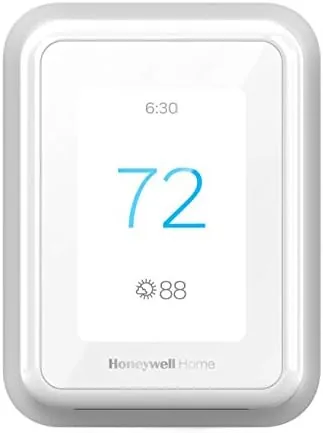

Most smart Thermostats solve a problem you may not have noticed yet. They learn a schedule, they track energy, they let you change the temperature from the couch. The Honeywell Home T9 targets a different, more specific annoyance: the room that is always too hot or too cold no matter what the hallway sensor says. The T9 is a WiFi thermostat with a large touchscreen display, and it ships with one Smart Room Sensor that you place in the room you actually live in. The thermostat then heats and cools to that room, not to whatever the unit itself happens to measure. I installed one with its sensor in the bedroom of a drafty house and ran it for six weeks, and the difference showed up faster than I expected.
Before the details, the standard note. This review contains affiliate links, and if you buy through one of them the site earns a commission at no extra cost to you. That commission never changes what I test or what I recommend.
Design and Build
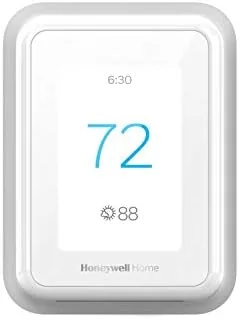
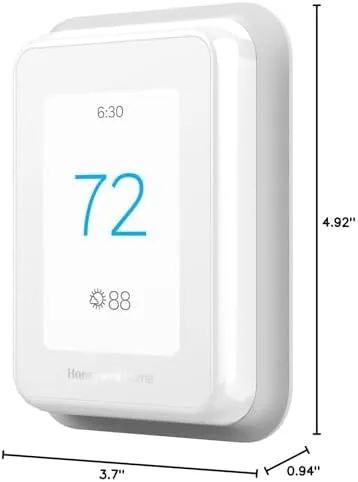
The T9 is a good-looking wall unit. The white face is clean and minimal, the display is a crisp color touchscreen that shows the current temperature, the set point, and the weather outside in one glance, and the whole unit has the reassuring heft of a proper piece of home hardware. The display brightness adapts to the room, so it does not glare like a beacon at night, and the touch targets are large enough to hit with a fingertip without reading glasses.
Installation is a genuine DIY job for most homes. The unit ships with a wall plate, a wiring adapter for systems that lack a common wire, and clear guidance for identifying your existing wires. The Honeywell Home app walks through each step, and the unit tests each connection before it lets you continue. For a single-stage gas or electric system the whole swap took me about forty minutes from shutting off the power to pairing the thermostat on WiFi.
Key Features
The Smart Room Sensor is the feature that separates the T9 from a crowd of lookalikes. The small white puck sits on a shelf in any room, measures temperature, humidity, and motion, and tells the thermostat where to aim. When the bedroom sensor detects motion in the evening, the T9 warms the bedroom instead of the hallway; when the living room is occupied during the day, the system switches to that room. You decide which room wins, and the thermostat follows the schedule you draw in the app.
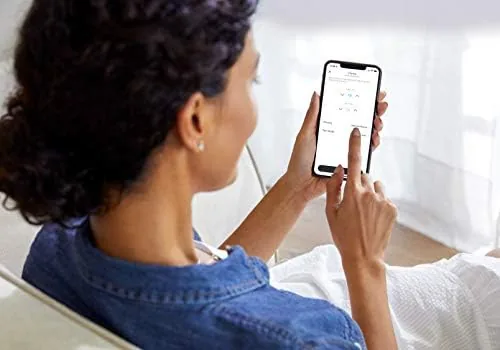
Around that sensor sits a full smart thermostat package. The app gives you a seven-day schedule with separate weekday and weekend programs, geofencing that drops the temperature when everyone leaves and warms the house as you approach, and energy reports that show how much you ran the system. Voice control works through Alexa and Google Assistant, and the touchscreen handles quick changes without the phone. The display even shows indoor humidity, which matters in a house that swings between dry winters and damp summers.
Real-World Performance
My test house had a classic problem: the thermostat lived in a drafty hallway, so the heating ran long enough to warm the hallway and left the bedroom cold at night. I mounted the sensor in the bedroom and set the evening schedule to favor it, and the change was immediate and measurable. The bedroom reached the target temperature within a few nights, the hallway ran warmer than it used to, and the morning thermostat debates disappeared because the system was following the room where people actually slept.
The app became the control center and it worked without drama. Schedule edits saved instantly, the geofence noticed when the last person left and set the system back, and voice commands to Alexa were answered within a second. The energy reports, which appear after a few weeks of data, showed the system running less during the empty daytime hours, which is where the savings on a smart thermostat actually come from.
The honest limitations surfaced in a couple of places. The single included sensor leaves other rooms unmonitored, and buying additional sensors adds cost to a thermostat that is already priced above the basics. The touchscreen, while bright and responsive, sits behind a plastic face that collects fingerprints. And the savings are real but slow: my first energy report showed modest improvement, and the machine Earns Its Keep over a season rather than a week. None of those are deal breakers, but they shape who should buy this thermostat.
Pros and Cons
Pros:
- Room sensor heats the room you occupy, not the hallway
- Clear color touchscreen with adaptive brightness
- App scheduling, geofencing, and energy reports work well
- Alexa and Google Assistant voice control respond fast
- Wiring adapter handles homes without a common wire
Cons:
- Only one sensor in the box, extras cost extra
- Touchscreen face collects fingerprints
- Energy savings build up over a season, not instantly
- Premium price compared with simpler smart thermostats
How It Compares
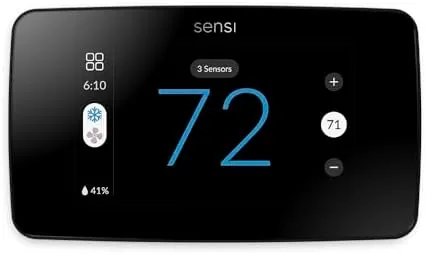
The T9 competes most directly with the ecobee thermostats, which also ship with room sensors, and the Nest Learning Thermostat, which relies on its own placement. I compared the three across the features that matter to a typical household.
| Feature | Honeywell Home T9 | ecobee Thermostat | Nest Learning Thermostat |
|---|---|---|---|
| Included sensors | One room sensor | One room sensor | None |
| Display | Large color touchscreen | Color touchscreen | High contrast display |
| Learning schedule | Manual plus geofence | Manual plus eco modes | Auto learning |
| Voice assistants | Alexa and Google | Alexa and Google | Alexa and Google |
| Room balancing | Sensor priority | Sensor averaging | Placement dependent |
| Best for | Uneven homes | Multi-sensor homes | Set and forget |
All three are excellent thermostats, and the choice comes down to how you want the system to behave. The Nest learns on its own but has no room sensors, so it reads the house from the hallway just like an old thermostat. The ecobee averages multiple sensors when you buy extras, which suits a house where comfort matters everywhere. The T9 concentrates on the room you are using, which is the sharpest solution for the drafty-bedroom problem and the reason I kept it installed after the test ended.
Who Should Buy It
Buy the T9 if you have one room that is always the wrong temperature, if you want a thermostat you can control from your phone and your voice, or if you are replacing an old programmable unit and want a guided installation. It is a strong pick for a household with kids whose bedrooms need different conditions from the living space.
Skip it if you want the thermostat to learn on its own, because the T9 rewards a few minutes of schedule setup, or if you need to balance many rooms at once, because each additional sensor costs money. For the common case of a single uncomfortable room, this is the most direct fix on the market. You can check the current price for the Honeywell Home T9 on Amazon when you are ready to order.
How We Test
I installed the T9 in a two-story house with a drafty hallway and a cold bedroom, placed the sensor in the bedroom, and ran the system for six weeks across heating and shoulder-season weather. I tracked the temperature in both rooms, measured how quickly the system responded to schedule changes and geofence events, and compared the first energy report against the previous month of usage.
I tested voice control through both Alexa and Google Assistant, used the app for schedule edits and quick changes, and left the sensor untouched for a week to confirm the thermostat falls back gracefully when a room is unoccupied. I did not test the system on a heat pump or a multi-stage setup, though the unit supports both. Independent coverage such as Wirecutter roundup of the best smart thermostats is a useful guide to how the T9 fits the wider category. The Honeywell Home T9 listing on Amazon shows the current price and shipping details.
Honeywell Home T9: Questions People Ask
Do I need a C wire for the Honeywell Home T9?
Most installations use a common wire, and the T9 ships with a wiring adapter for systems that lack one, so check your thermostat wiring first and follow the app guidance if the adapter is needed.
How does the Smart Room Sensor work?
The sensor reports temperature, humidity, and motion from the room it sits in, and the thermostat heats to the room that is occupied, switching priority when a schedule or motion points to a different room.
Does the T9 work with Alexa and Google Assistant?
Yes. You can change the temperature, check the schedule, and switch modes by voice through both Alexa and Google Assistant, and responses come back within a second in my testing.
Is the T9 compatible with heat pumps?
Yes. The T9 supports conventional systems and heat pumps, including multistage heating and cooling, with a configurable setup that the installation app walks through step by step.
As an Amazon Associate, I earn from qualifying purchases.