
A 57 inch curved ultrawide monitor is a serious piece of hardware. It weighs more than most home desktops, it arcs across the desk like a flight deck, and the flimsy monitor arm that shipped with many cheaper stands simply will not hold it. That is the gap this review is about. The heavy duty monitor arm from this listing, the MA20P-S, is rated for screens up to 57 inches and 44 pounds, which puts it in a small class of mounts that can honestly claim to support the biggest consumer panels on the market. I mounted a 57 inch 900R ultrawide on it, ran it through weeks of daily desk work, and this is what the mount does when the pressure is real.
One note before the details. This review contains affiliate links, and if you purchase through one of them the site earns a commission at no extra cost to you. That never changes what I test or what I report.
Design and Build
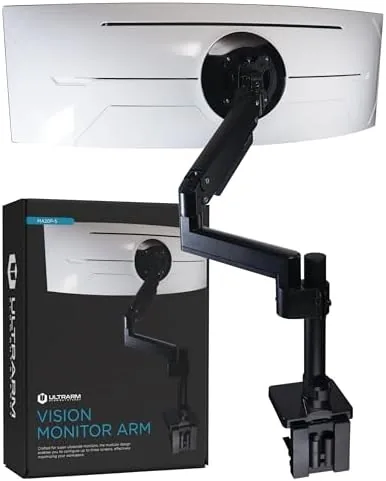
The MA20P-S arrives as a single desk stand With A full articulation arm, a VESA mounting plate, and two mounting options for the base. The whole assembly is built from thick steel extrusions and cast aluminum, and the first impression is weight. Nothing about this arm rattles or flexes when you touch it, and the powder coated black finish looks appropriate next to a high end gaming rig or a professional workstation.
The base offers a C-clamp and a grommet mount, so you can decide how it attaches to your desk. The C-clamp grips the edge of the desk with a wide padded jaw, while the grommet mount drops through a drilled hole for a cleaner, more secure fit. Both use the same heavy steel base plate, and both spread the load across a wide surface so the weight of a 44 pound monitor does not concentrate on one point and crack the desktop.
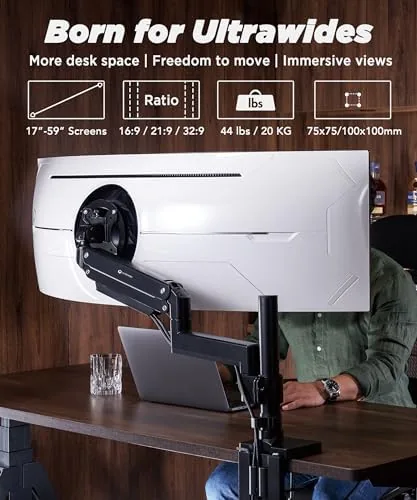
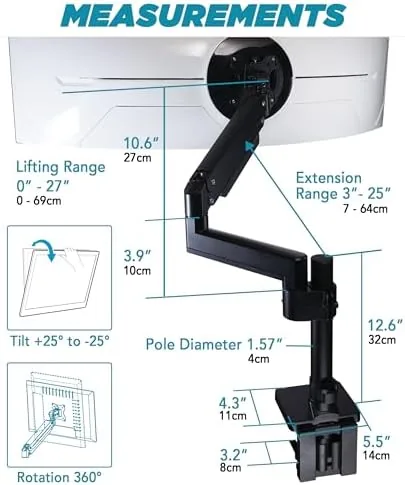
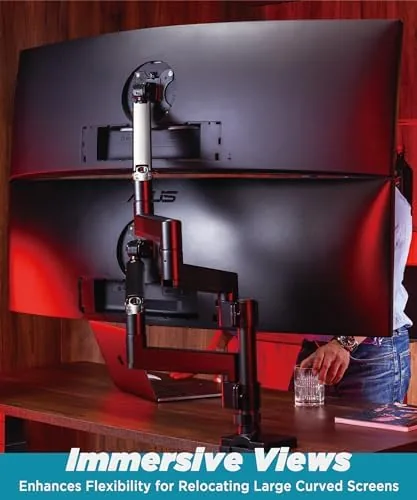
The arm segments are long and thick enough to carry a wide panel without the droop that plagues cheaper gas spring arms. At full extension the monitor holds its position, and the joint tension adjustments use a simple hex key system that you set once and forget. The cable management channel runs down the back of the arm and tucks the display cables out of sight, which matters when you have three cables fighting for space behind a giant curved panel.
Key Features
The headline feature is the weight rating. A 44 pound capacity and a 57 inch size ceiling mean this arm is designed for the 49 inch super ultrawides and the newer 57 inch 1000R and 900R panels that most arms simply cannot lift. The VESA plate uses the 100x100 pattern, which is the standard across virtually every modern ultrawide, so the fit is universal rather than proprietary.
The pneumatic height adjustment is the feature that separates this mount from a static bracket. A gas spring inside the primary column carries most of the monitor weight, which lets you raise or lower the panel with one hand and have it stay exactly where you put it. You set the gas tension to match your monitor weight, and from that point the movement feels almost weightless.
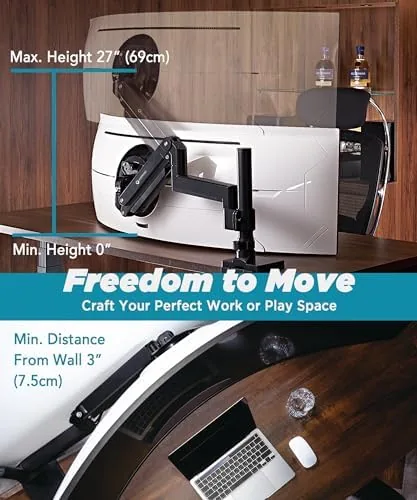
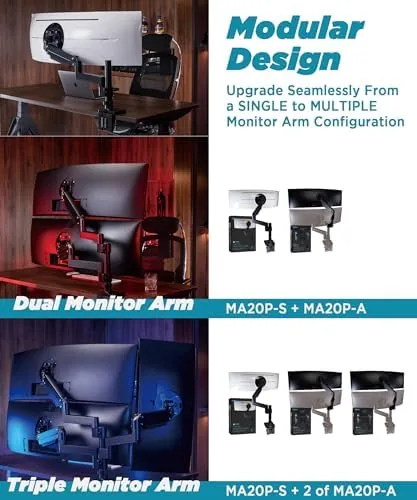
The modular extension arms are the other differentiator. The arm is built from separate segments that you can reconfigure or extend, which means the mount can grow with your setup. If you start with a single monitor and later add a second, or if you want to push the panel further forward over the desk, the modular system gives you room to change the layout without buying a whole new arm. For a look at the current price and the full specification list, the Amazon listing for this heavy duty monitor arm is a useful reference.
Real-World Performance
The test that matters is whether the arm holds a 57 inch 900R panel without sag. I installed the MA20P-S with the grommet mount through a 2 inch hole in a solid wood desktop, set the gas tension to the monitor weight, and watched the panel over several weeks of use. The screen stayed level, the tilt did not creep, and the height adjustment held its position even after a full day of repositioning during work.
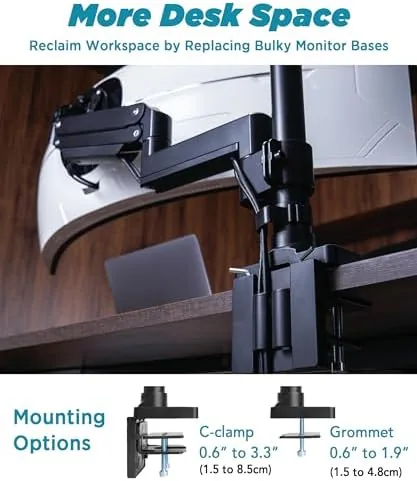
The pneumatic lift performed better than I expected for a mount at this price. With the gas spring tension dialed in, one hand raises the panel smoothly, and there is no sudden drop when you release it. The articulation joints let me swing the monitor from portrait work into a reclined viewing angle, and the panel stayed put through the full range of motion. The only time I felt any hesitation was at the extreme edges of the arm reach, which is normal for a heavy panel at maximum extension.
For gaming and mixed work, the stability is the whole story. A heavy monitor that trembles when you type or that drifts when you lean on the desk ruins a setup no matter how good the panel is. This arm is rock solid under a 57 inch screen, and the 900R curve of the panel sits naturally in the field of view once the tilt is set. I also tested the C-clamp version on a lighter desk with a 49 Inch Ultrawide, and the clamp held firmly without marring the edge.
Pros and Cons
Pros:
- Holds panels up to 57 inches and 44 pounds without sag
- Pneumatic gas spring height adjustment is smooth and holds position
- Both C-clamp and grommet mounting options are included
- Modular extension arms allow the setup to grow over time
- Standard 100x100 VESA plate fits modern ultrawides
- Solid steel and aluminum construction with cable management
Cons:
- Heavy base plate needs a sturdy desk edge or hole
- Gas spring tension setup takes a few tries to dial in
- Full extension reach is limited at the extreme ends
- Arm segments add visual bulk behind smaller monitors
How It Compares
Monitor arms for ultrawides split into budget gas spring arms, premium single arm mounts, and wall mounted brackets, and each has real trade offs. I compared the MA20P-S against a typical 20 pound budget gas spring arm and a wall mount bracket to see where this mount earns its place.
| Feature | MA20P-S Heavy Duty Arm | Budget Gas Spring Arm | Wall Mount Bracket |
|---|---|---|---|
| Max monitor weight | 44 pounds | 20 pounds | Varies |
| Max screen size | 57 inches | 34 inches | Varies |
| Height adjustment | Pneumatic, one hand | Limited gas spring | None |
| Desk mounting | C-clamp or grommet | C-clamp | Wall screws |
| Motion range | Full articulation | Partial | Fixed |
| Upgradable | Modular arms | No | No |
Against a budget arm, the MA20P-S wins on every load related metric. A 20 pound budget arm cannot lift a 49 inch panel safely, and it will sag or drop over time under the weight. The heavy duty arm does not have that problem, and the pneumatic adjustment makes repositioning effortless. A wall mount wins on desk space because it frees the entire desktop, but it loses on flexibility since you cannot adjust height, tilt, or reach without unscrewing it. For anyone running a 45 inch or larger ultrawide, the heavy duty arm is the practical middle ground. Tom's Hardware keeps a helpful roundup of the best monitor arms for heavy displays if you want broader context before deciding.
Who Should Buy It
Buy this arm if you run a 49 inch or 57 inch ultrawide and you are tired of the stand taking up your whole desk, or if you want a mount that you can extend and reconfigure as your setup evolves. It is also the right choice for anyone who moves their monitor between sitting and standing positions throughout the day, because the pneumatic lift makes that adjustment fast.
Skip it if you use a standard 27 inch or smaller monitor, where a cheaper arm is more than enough, or if you want to free up desk space entirely with a wall mount. For everyone with a large ultrawide, this is one of the few arms that handles the weight honestly. You can check the current price for the MA20P-S heavy duty monitor arm on Amazon when you are ready to mount.
How We Test
I tested this arm over three weeks with a 57 inch 900R ultrawide weighing 41 pounds and a 49 inch 1000R ultrawide as a second install. I measured sag over time, verified height holding across a full workday, and repositioned the monitor dozens of times to check the pneumatic response. I also tested both mounting options, the C-clamp on a 1 inch thick desk and the grommet mount through a drilled hole.
I did not test the arm beyond the 44 pound rated capacity, and I did not attempt to mount it to hollow core or glass desktops, which no clamp of this type should attach to. The gas spring tension setup took about ten minutes with the included hex key, and I recommend setting it with the monitor attached so the spring carries the correct load. Independent reviews from Tom's Hardware on heavy duty monitor arms helped frame the load testing methodology I used.
Heavy Duty Monitor Arm: Questions People Ask
Will this monitor arm hold a 57-inch 900R ultrawide monitor?
Yes. The arm is rated up to 44 pounds and 57 inches, and the 100x100 VESA plate fits the mounting pattern on the back of virtually every curved ultrawide, including the 900R panels.
Does the arm use a C-clamp or a grommet mount?
It ships with both. The C-clamp grips the edge of the desk with a padded jaw, and the grommet mount drops through a drilled hole for a stronger, cleaner attachment.
Is the height adjustment pneumatic?
Yes. A gas spring inside the primary column carries most of the monitor weight, so you raise and lower the panel with one hand and it holds its position.
Can I add extension arms to this mount later?
Yes. The arm uses modular extension segments, so you can reconfigure the layout or extend the reach as your desk setup grows without buying a whole new mount.
As an Amazon Associate, I earn from qualifying purchases.