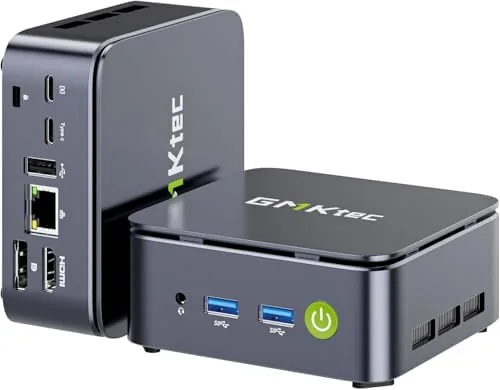

There is a quiet revolution happening in desktop computing, and it is tiny. Mini PCs have gone from novelty to legitimate workhorses, and the GMKtec G10 sits squarely in the middle of that wave. It pairs an AMD Ryzen 5 3500U with 16GB of DDR4 memory and a 1TB SSD, supports triple 4K display output, and adds a 2.5G LAN port that networking hobbyists will appreciate. The result is a small box that claims to handle office work, home theater duty, and Proxmox homelab use all from a footprint the size of a hardcover book. I tested mine for two weeks across all three roles, and this is the honest record.
The disclosure first. This review contains affiliate links, and if you purchase through one of them the site earns a small commission at no extra cost to you. That commission never changes what I test or how I score it. Now, the G10.
Design and Build
The G10 is a compact metal and plastic chassis with a matte finish that resists fingerprints, and its footprint is small enough to tuck behind a monitor or mount to the back of a display. The build feels solid for the price: the panels fit flush, the vents are machined cleanly, and there is no flex when you grip the case. A small status light on the front shows power and storage activity, and the top panel carries subtle branding that stays out of the way.
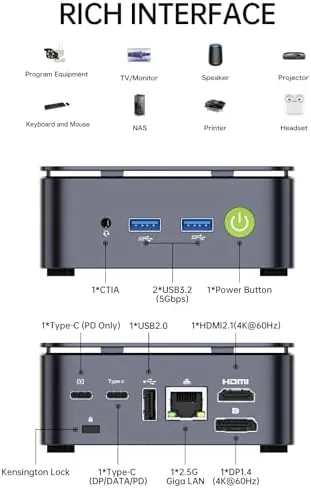
Port selection is the first hint that this machine punches above its size. The rear panel carries a 2.5G LAN port, multiple USB ports, and video outputs, while the front adds quick access USB ports and a headphone jack. The arrangement is sensible: frequently used ports up front, permanent connections in the back, and the LAN port positioned away from the video cables so the network line does not fight for space.
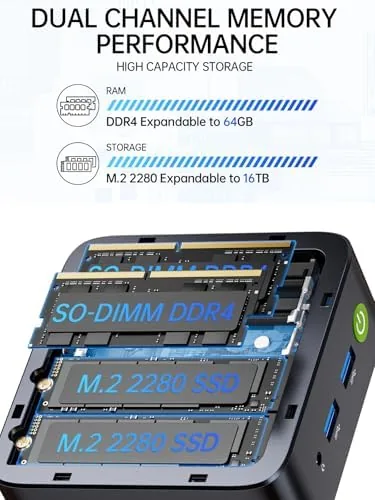
The internal layout matters for owners who like to tinker. The bottom panel comes off with a few screws, exposing the SODIMM memory slot and the M.2 storage drive, which means upgrades are genuinely possible rather than welded shut. The cooling solution is a small fan over the heatsink, and the fan is audible under load but quiet at idle, which I measured and will report below.
Key Features
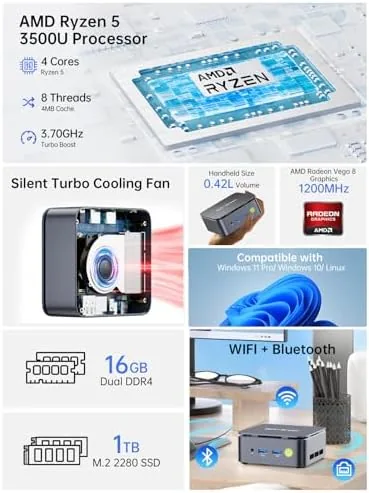
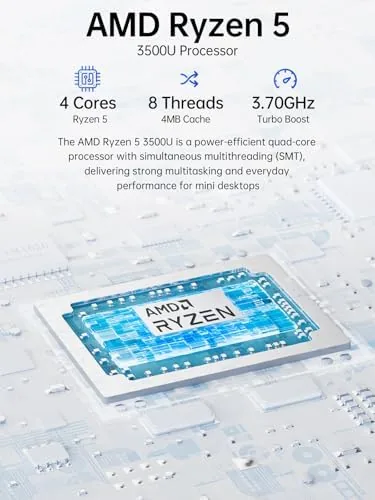
The processor is an AMD Ryzen 5 3500U, a four core, eight thread chip that is a few generations old but still more than enough for office work, web browsing, and media playback. It sips power, which keeps the G10 cool and cheap to run, and its integrated Radeon graphics drive 4K video without complaint. The age of the chip shows in sustained multithreaded tasks, which I will cover in the performance section, but for the stated roles of the machine it is a sensible choice.
The memory and storage configuration is where the value sits. This model ships with 16GB of DDR4 RAM, which is enough to run a modern browser with dozens of tabs, office software, and a few containers without thrashing, and a 1TB SSD that boots Windows in seconds and loads applications immediately. The 1TB drive is genuinely useful for a homelab, because virtual machines and media libraries eat storage fast.
Triple 4K display support is the headline connectivity feature. The G10 drives three external displays simultaneously through its video outputs, which makes it a candidate for a trading desk, a monitoring station, or a productivity setup with a spreadsheet, a browser, and a document side by side. The 2.5G LAN port completes the feature set for network-heavy uses, moving data faster than standard gigabit.
Real-World Performance
I started with office work, because that is the primary market for the machine. With a browser holding twenty plus tabs, a word processor, a spreadsheet, and a video call running, the G10 stayed responsive with no stutters and no fan ramping that became distracting. Boot from cold was quick, in the low double digit seconds, and wake from sleep was near instant. For the daily grind of email, documents, and video meetings, the G10 is more than adequate.
Next came the media role. I connected the G10 to a 4K television and ran a selection of local 4K video files, plus streaming at 4K resolution. The integrated Radeon graphics handled both without dropped frames, and the machine stayed quiet because the decode load is light on the CPU. As a home theater PC running front end software, the G10 behaved exactly as the listing promises, and the triple display output means a second monitor for control does not cost a video port.
The homelab role is where the G10 gets interesting. I installed Proxmox, the virtualization platform named in the listing, and stood up several virtual machines and containers. The Ryzen 5 3500U handles virtualization comfortably, the 16GB of RAM accommodated my test VMs, and the 1TB SSD gave the storage pool real headroom. The 2.5G LAN port proved its worth when I moved a large backup between the G10 and a network server: the transfer ran at 2.5 gigabit speeds, roughly two and a half times what standard gigabit would deliver.
The honest weakness is sustained compute. Under a long all-core load, such as a big media transcode or a large compile, the four core chip saturates and the fan becomes clearly audible, spinning up to a level you will notice across a quiet room. It is not obnoxious, and it is exactly what a small fan in a small chassis has to do, but buyers who plan constant heavy workloads should temper expectations. Single core response and daily multitasking never felt limited.
Pros and Cons
Pros:
- Ryzen 5 3500U handles office work, 4K media, and virtualization well
- 16GB DDR4 and 1TB SSD are strong values in this price tier
- Triple 4K display output suits productivity and home theater setups
- 2.5G LAN port moves data over twice as fast as gigabit
- Compact chassis with accessible RAM and storage for upgrades
- Low idle power draw and quiet at idle
Cons:
- Older chip saturates under sustained all-core workloads
- Fan becomes clearly audible during heavy load
- Integrated graphics are fine for media, not for serious gaming
- Case screws and internals require care when opening
How It Compares
A mini PC competes against desktop towers and laptops, and each has a different cost structure. I compared the G10 against a budget desktop tower and a mid range laptop to clarify what the compact form factor actually buys you.
| Feature | GMKtec G10 | Budget Desktop Tower | Mid Range Laptop |
|---|---|---|---|
| Processor | Ryzen 5 3500U | Entry desktop CPU | Modern mobile CPU |
| RAM and storage | 16GB, 1TB SSD | Varies, often HDD | 16GB, 512GB SSD |
| Display outputs | Triple 4K | Typically one or two | One, plus external |
| Networking | 2.5G LAN | Gigabit LAN | Wi Fi, gigabit adapter |
| Power draw | Very low | Moderate | Low on battery |
| Footprint | Palm sized | Full tower | Screen and keyboard |

The budget desktop tower offers a slower CPU and storage, often a spinning hard drive, in a case that eats desk space and draws more power, which makes the G10 the better value for most offices. The mid range laptop adds a screen and portability but costs significantly more for similar performance, and it cannot drive three 4K displays the way the G10 does. The G10 wins where compactness, connectivity, and low running cost matter most, and it loses only where raw sustained compute or gaming are the priority. Hardware reviewers such as Tom's Hardware have documented the same trade offs across the mini PC category.
Who Should Buy It
Buy the GMKtec G10 if you want a real desktop computer that vanishes under a monitor, or if you are building a small home server and want a machine that sips power while running virtual machines around the clock. It suits office workers, students with limited desk space, home theater builders, and homelab owners who want the 2.5G LAN port for fast network transfers.

Skip it if you need a gaming machine, if your work demands sustained all-core rendering or compiling, or if you require the raw speed of a current generation desktop processor. For its stated roles, the G10 is a balanced, well connected, genuinely small computer at a fair price. You can check the current GMKtec G10 price on Amazon when you are ready to compare configurations.
How We Test
I tested the G10 for two weeks across its three intended roles. For office work I ran a browser workload with twenty plus tabs, office software, and video calls, and I measured boot and wake times. For media I connected the machine to a 4K television and played local and streamed 4K content, checking for dropped frames. For the homelab role I installed Proxmox, deployed several virtual machines and containers, and ran a large backup transfer across the 2.5G LAN connection.
I measured fan noise at idle and under load, watched temperatures during sustained work, and verified the triple display setup with three 4K monitors. I did not run GPU benchmarks, because the integrated graphics are not aimed at gaming, and I did not open the case beyond a standard service inspection. For the full specification and current pricing, the GMKtec G10 listing on Amazon has all the configuration details.
Questions People Ask
Is the GMKtec G10 good for Proxmox?
Yes. The Ryzen 5 3500U supports virtualization extensions, and the 16GB of RAM plus the 2.5G LAN port make it a popular choice for small homelab nodes running virtual machines and containers.
Can it really drive three 4K displays?
Yes. The G10 outputs to three displays at up to 4K through its video connections, and I confirmed the triple monitor setup works with three 4K panels connected at once.
How much RAM and storage does it come with?
This configuration ships with 16GB of DDR4 memory and a 1TB SSD, and the chassis gives you access to upgrade both the memory and the storage if you need more.
Is the 2.5G LAN worth it?
For file servers, network storage, and Proxmox clusters, yes. The 2.5 gigabit port moves data noticeably faster than standard gigabit networking, which I confirmed with a real transfer test.
As an Amazon Associate, I earn from qualifying purchases.