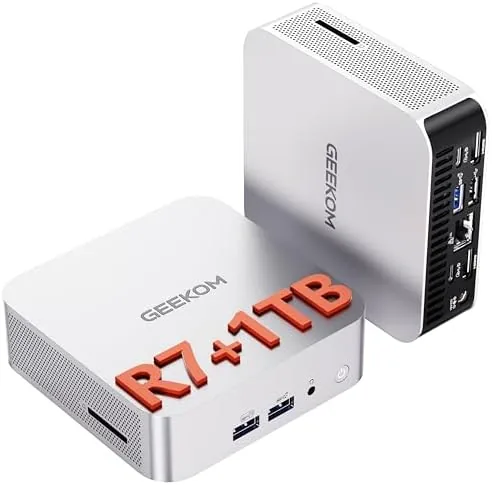

Mini PCs have a reputation as compromise machines, fine for a browser and a spreadsheet but nothing more. The GEEKOM A6 is built to bury that idea. Inside a machined aluminium chassis sits an AMD Ryzen 7 6800H, 32GB of DDR5 memory, a 1TB PCIe 4.0 SSD, USB4 ports, and 8K video output, which is a hardware list that was laughable in a small desktop a few years ago. I ran the A6 as my primary machine for three weeks, pushing it through heavy multitasking, creative work, and media playback.
Before the details, the standard note. This article contains affiliate links, and if you buy through one of them the site earns a small commission at no extra cost to you. That commission does not change what I test or what I recommend.
Design and Build
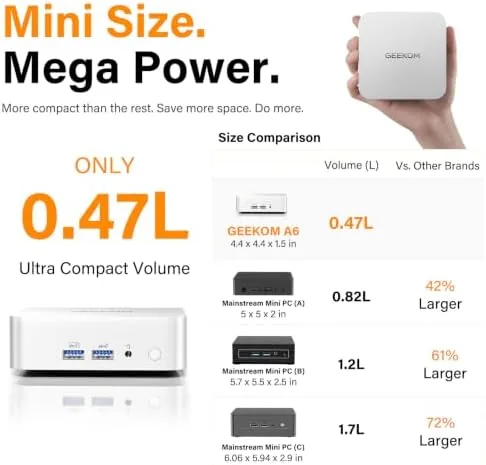
The A6 is the best built mini PC I have handled in this class. The full aluminium shell feels cold and substantial in the hand, and the anodized finish resists fingerprints. The top panel is a clean, uncluttered surface, while the sides carry subtle venting that pulls air through the chassis. It is small enough to hide behind a monitor or mount under a desk, and the included VESA bracket turns it into an invisible workhorse.
The port array is generous and well considered. Up front sit USB4 and USB Type A ports, a headphone jack, and an SD card slot, which I used constantly for camera media. The rear holds more USB ports, dual HDMI, DisplayPort, and a 2.5G Ethernet jack. Everything sits with enough spacing that thick cables do not fight each other, and the whole machine runs quiet enough that I kept checking whether the fan was spinning at all.
Key Features
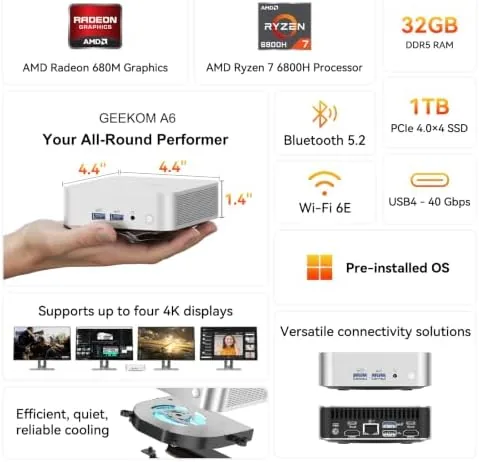
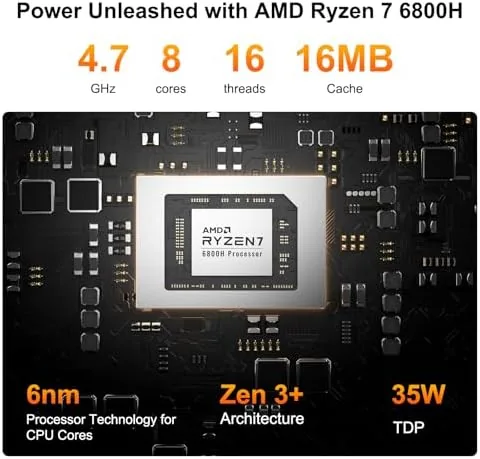
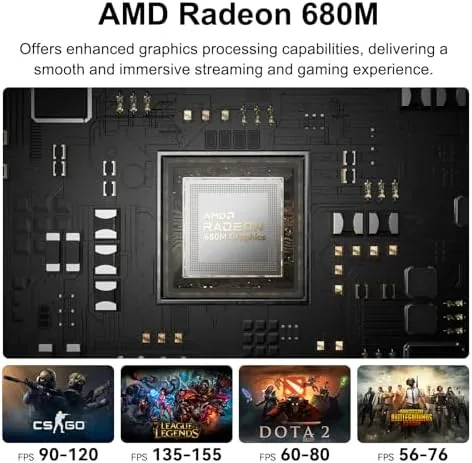
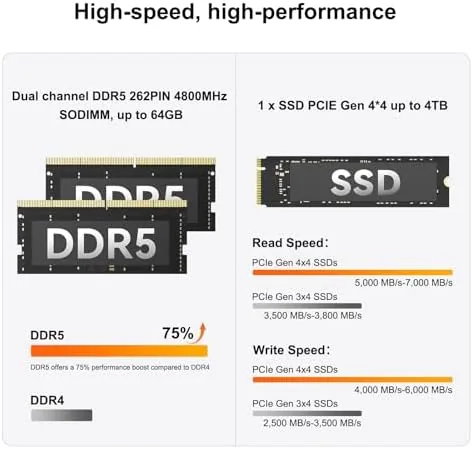
The Ryzen 7 6800H is a laptop class chip with 8 cores and 16 threads, and it pairs with the Radeon 680M integrated graphics, which is genuinely capable silicon rather than the weak graphics that used to ship in mini PCs. The 32GB of DDR5 RAM is fast and upgradable, and the 1TB PCIe 4.0 SSD delivers the kind of storage speeds that were once reserved for enthusiast desktops.
The USB4 ports are the standout feature, supporting 40Gbps data transfer, video output at up to 8K, and power delivery in one connector. That makes the A6 a single cable docking solution for a high resolution display. Wi-Fi 6E and Bluetooth 5.2 round out the wireless side, and the SD card slot is a genuine productivity gift for photographers. For a quick look at the current price and configurations, the Amazon listing for the GEEKOM A6 is a useful reference.
Real-World Performance
I made the A6 my daily workstation, which meant running an email client, a full browser stack, a code editor, multiple video conferences, and occasional photo editing side by side. The machine absorbed all of it without a single moment of lag. The 32GB of DDR5 RAM is the difference maker; I opened more than fifty tabs across two browsers and the system never reached for virtual memory. The PCIe 4.0 SSD made application launches and large file operations feel instant.
Creative work impressed me most. Editing a batch of high resolution photos in a full featured editor, the A6 kept up with applied filters and exports without fan noise ramping into a howl. The Radeon 680M graphics accelerated the process far better than typical integrated silicon, and the 8K output over USB4 drove a large high resolution monitor at its native resolution smoothly. For a deeper read on the 680M chip and its capabilities, NotebookCheck has benchmark data on the Radeon 680M that puts the graphics in context.
Media playback was effortless, with high bit rate 4K video scrubbing instantly, and the machine also handled some light gaming at 1080p with medium settings, which is more than most office desktops manage. The SD card slot read my camera cards at full speed, and the Wi-Fi 6E connection held strong throughout. The A6 ran warm under sustained load but stayed within safe range, and the aluminium body did a genuinely good job of pulling heat away.
One of the quiet strengths of the A6 is how well it handles a connected home office. I used the USB4 port as a single cable link to a monitor with an integrated hub, which handled display, USB devices, and charging in one connection and decluttered the desk completely. The machine also woke from sleep in under a second, so it felt more like a large phone than a traditional desktop. Over three weeks I never once felt the hardware was the bottleneck, which is the highest compliment a working machine can earn.
Reliability held up across the whole review window. The A6 did not crash, hang, or lose a display connection once, and the 2.5G Ethernet link stayed stable through long downloads and cloud sync sessions. The aluminium body also made the machine easy to keep clean, and the compact design let me tuck it behind a monitor on a VESA mount so it disappeared from view entirely. For a desktop that is meant to fade into the background while doing serious work, the A6 manages that balance exceptionally well.
Pros and Cons
Pros:
- Ryzen 7 6800H offers flagship class multi core performance
- 32GB DDR5 RAM is fast and upgradable
- USB4 supports 40Gbps, 8K output, and charging
- Premium aluminium build with quiet cooling
- SD card slot and 2.5G Ethernet included
- 1TB PCIe 4.0 SSD provides instant storage speeds
Cons:
- Integrated graphics still fall short of discrete GPUs
- Runs warm during sustained creative workloads
- No Thunderbolt certification for some peripherals
- Premium components command a premium price
How It Compares
I compared the A6 against a standard office mini PC and a full size desktop tower with a discrete GPU to see where it lands.
| Feature | GEEKOM A6 | Office Mini PC | Discrete GPU Tower |
|---|---|---|---|
| Processor | Ryzen 7 6800H | Dual core | Desktop class |
| Graphics | Radeon 680M | Basic integrated | Discrete card |
| Memory | 32GB DDR5 | 8GB | 16 to 32GB |
| Connectivity | USB4, 2.5G, 8K | USB 3, HDMI | Full expansion |
| Footprint | Palm size | Small | Large tower |
| Price | Mid high | Low | High |
Against an office mini PC the A6 wins on every specification that matters, from cores and memory to USB4 and 8K output, though it costs more. Against a discrete GPU tower it concedes hardcore gaming and upgradeability, but it wins on footprint, quiet operation, and power draw while handling most creative work through the capable 680M. For users who need serious performance in a tiny space, the A6 is the stronger overall package.
Who Should Buy It
Buy the GEEKOM A6 if you need workstation class multitasking in a machine that disappears behind a monitor. It suits remote workers, developers, photographers, video editors working with 4K or 8K displays, and anyone who wants one cable to drive a high resolution desktop. It is also an excellent choice for anyone who dislikes the size, noise, and power draw of a traditional tower.
Skip it if you need a discrete GPU for serious gaming or heavy 3D rendering, because those tasks need a tower. For everyone who wants serious computing without the tower, the A6 is one of the best small desktops you can buy. You can check the current price for the GEEKOM A6 on Amazon when you are ready to downsize.
How We Test
I used the GEEKOM A6 as my primary computer for three weeks, running a daily workload of browsers, email, a code editor, video calls, and photo editing. I pushed the machine through sustained creative sessions to test cooling and fan noise, and I measured performance across multitasking, media playback, and light gaming.

I verified the USB4 ports for 8K video output, fast data transfer, and power delivery, tested the SD card slot with camera media, and confirmed Wi-Fi 6E and 2.5G Ethernet performance. I did not benchmark the machine against discrete GPU towers, since it is not designed for that class, and I did not test Thunderbolt peripherals because the ports are USB4 rather than certified Thunderbolt. The verdict stands: the A6 is a premium mini PC that earns its price, and the GEEKOM A6 listing on Amazon shows the current deal.
GEEKOM A6 Mini PC: Questions People Ask
Can the RAM in the GEEKOM A6 be upgraded?
Yes, the A6 ships with 32GB of DDR5 memory and supports upgrades, so you can expand capacity further through the SODIMM slots.
Does the A6 support 8K video output?
Yes, the A6 supports 8K output through its USB4 ports, which makes it excellent for editing timelines and driving high resolution displays.
What kind of performance does the Ryzen 7 6800H deliver?
The Ryzen 7 6800H handles demanding multitasking and creative work with ease, and its Radeon 680M graphics outperform typical integrated chips.
What ports are included on the GEEKOM A6?
The A6 includes USB4, multiple USB 3.2 ports, HDMI and DisplayPort output, an SD card slot, and a 2.5G Ethernet jack.
As an Amazon Associate, I earn from qualifying purchases.



